Indledning
Tak for købetasing the TENMIYA A13 Portable Bluetooth Speaker. This manual provides detailed instructions for the proper use, setup, and maintenance of your speaker. Please read this manual thoroughly before operating the device to ensure optimal performance and longevity.
Sikkerhedsoplysninger
- Udsæt ikke højttaleren for ekstreme temperaturer, fugtighed eller direkte sollys.
- Undgå at tabe eller udsætte højttaleren for kraftige stød.
- Du må ikke selv adskille, reparere eller ændre højttaleren. Kontakt kvalificeret servicepersonale.
- Hold højttaleren væk fra vand og andre væsker.
- Brug kun det specificerede opladningskabel og strømadapter.
- Rengør højttaleren med en blød, tør klud. Brug ikke slibende rengøringsmidler eller opløsningsmidler.
Pakkens indhold
Tjek venligst pakken for følgende varer:
- 1 x A13 Bluetooth højttaler
- 1 x Fjernbetjening (kræver 2 x AAA-batterier, medfølger ikke)
- 1 x AUX-kabel
- 1 x USB-kabel
- 1 x Brugermanual
Produkt overview
The TENMIYA A13 is a portable Bluetooth speaker designed for versatile audio playback. It features a powerful subwoofer, two tweeters, and a rear heavy bass guide tube for rich sound. Key features include Bluetooth 5.0 connectivity, FM radio, TF/SD card support, USB playback, AUX input, a 3.5mm microphone jack, intelligent remote control, digital display, and colorful RGB lights.
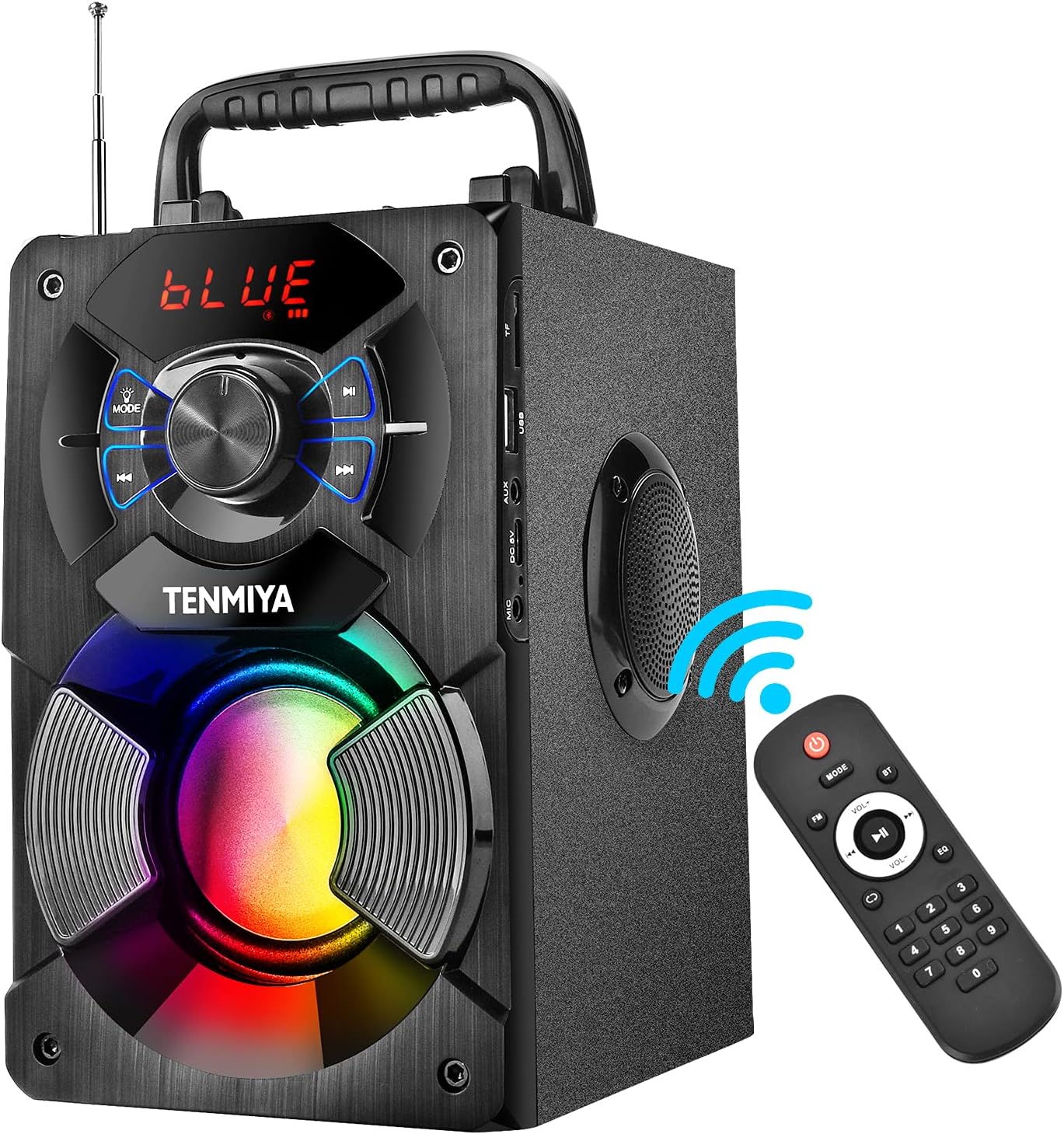
Figure 1: TENMIYA A13 Portable Bluetooth Speaker with included remote control, highlighting wireless connectivity.
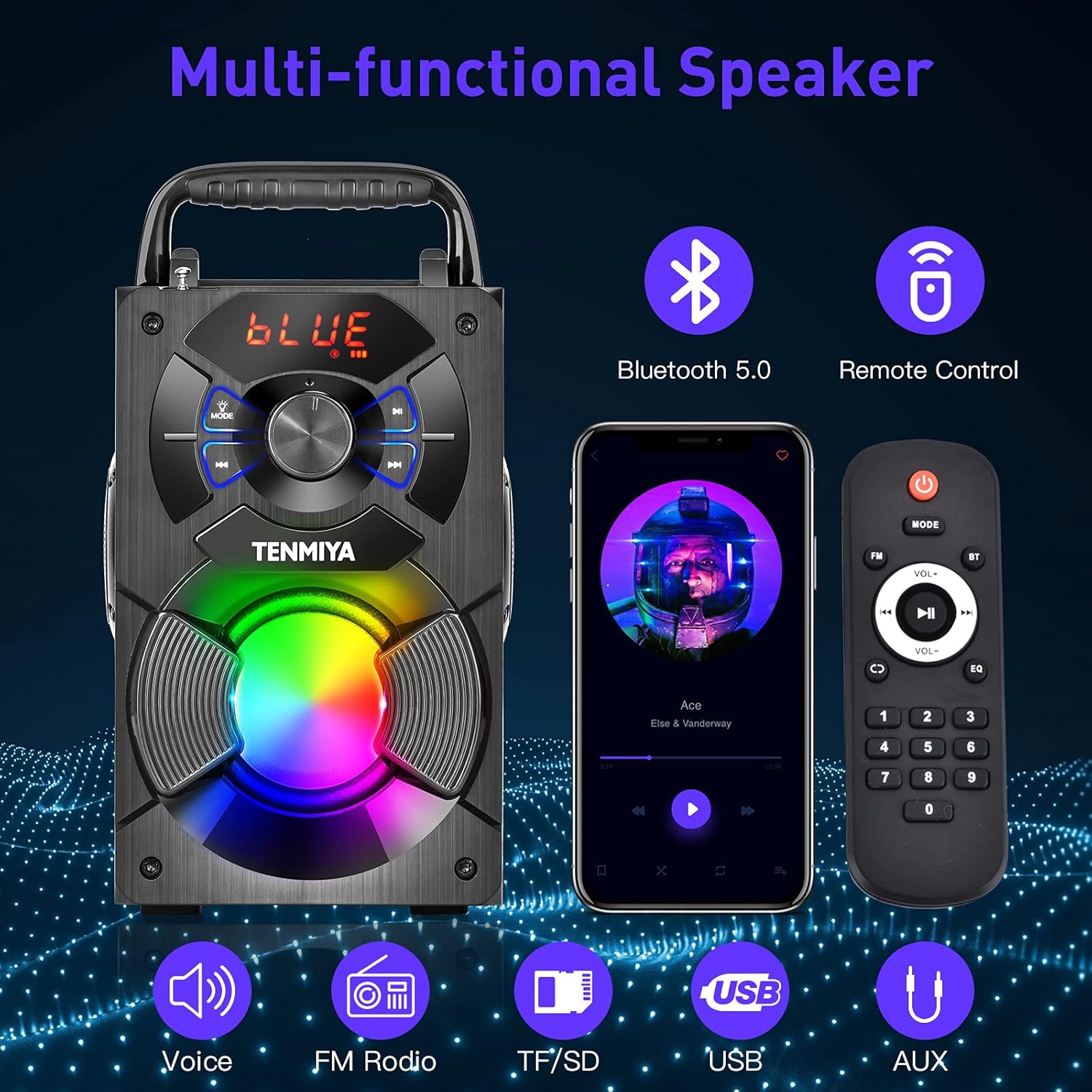
Figur 2: Overview of the speaker's multi-functional capabilities including Bluetooth 5.0, remote control, voice prompts, FM radio, TF/SD card, USB, and AUX input.

Figure 3: Dimensions of the TENMIYA A13 Portable Bluetooth Speaker, showing its compact size and portability with a handle.
Opsætning
Opladning af højttaleren
Before first use, fully charge the speaker. Connect the supplied USB cable to the speaker's DC 5V input port and the other end to a USB power adapter (not included) or a computer's USB port. The charging indicator will illuminate during charging and turn off when fully charged.
Tænd/sluk
To power on the speaker, press and hold the Power button until the digital display illuminates. To power off, press and hold the Power button again until the display turns off.
Betjeningsvejledning
Bluetooth-parring
- Turn on the speaker. It will automatically enter Bluetooth pairing mode, indicated by a flashing "BLUE" on the digital display.
- Aktiver Bluetooth på din smartphone, tablet eller anden Bluetooth-enhed.
- Søg efter "A13" in the list of available devices and select it to connect.
- Once successfully paired, the speaker will emit a confirmation tone, and "BLUE" on the display will stop flashing.
- Du kan nu afspille lyd fra din enhed via højttaleren.
Betjening af FM-radio
- Press the "MODE" button on the speaker or remote control to switch to FM radio mode.
- Forlæng antennen for bedre modtagelse.
- To automatically search and save available stations, long press the "Play/Pause" button. The speaker will scan and store stations.
- Use the "Previous/Next" buttons to navigate between saved stations.
- Alternatively, use the remote control to manually input a station frequency.

Figure 4: The TENMIYA A13 speaker supporting FM radio, shown in an outdoor setting.
TF/SD Card Music Playback
Insert a TF (Micro SD) card into the TF card slot. The speaker will automatically switch to TF card mode and begin playing audio files (MP3, WAV, etc.) from the card.
USB Flash Drive Music Playback
Sæt et USB-flashdrev i USB-porten. Højttaleren skifter automatisk til USB-tilstand og begynder at afspille lyd. files (MP3, WAV, etc.) from the drive.
AUX Line-in Connection
Connect one end of the supplied AUX cable to the speaker's AUX input port and the other end to the audio output jack of your external device (e.g., MP3 player, computer). Press the "MODE" button to switch to AUX mode.
Mikrofonbrug
Connect a 3.5mm microphone (not included) to the speaker's microphone jack. The speaker will amplify the microphone input, allowing for karaoke or public speaking.
Fjernbetjeningsfunktioner
The included remote control allows for convenient operation of the speaker from a distance. Ensure 2*AAA batteries are inserted correctly. Functions include:
- Magt: Tænd/sluk højttaleren.
- KØRSELSVEJLEDNING: Switch between Bluetooth, FM, TF/SD, USB, and AUX modes.
- Volumen +/-: Juster masterlydstyrken.
- Forrige Næste: Skip tracks or navigate FM stations.
- Afspil/pause: Play or pause audio. Long press for FM auto-scan.
- EQ: Cycle through various equalizer presets (Jazz, Rock, Classical, Pop, etc.).
- Nummerplade: For direct input of FM frequencies.

Figure 5: User operating the TENMIYA A13 speaker with the remote control for convenient audio playback.
RGB farverige lys
The speaker features built-in RGB colorful lights that enhance the listening experience. These lights typically activate automatically when the speaker is on. Specific controls for light modes may be available via the remote control or a dedicated button on the speaker (refer to the speaker's control panel for details).
EQ-lydeffekter
The speaker includes various EQ sound effects to customize your audio experience. Press the "EQ" button on the remote control to cycle through presets such as Jazz, Rock, Classical, Pop, and more, adjusting the audio output to suit different music genres.
Opretholdelse
- Rensning: Brug en blød, tør og fnugfri klud til at rengøre højttalerens overflade. Brug ikke flydende rengøringsmidler, aerosoler eller opløsningsmidler.
- Opbevaring: Når højttaleren ikke er i brug i længere perioder, skal den opbevares køligt og tørt, væk fra direkte sollys og ekstreme temperaturer.
- Batteripleje: For at forlænge batteriets levetid bør du undgå at aflade batteriet helt ofte. Oplad højttaleren regelmæssigt, selvom den ikke er i brug.
Fejlfinding
| Problem | Mulig årsag | Løsning |
|---|---|---|
| Højttaleren tænder ikke. | Lavt batteri. | Oplad højttaleren helt. |
| Ingen lyd. | Lydstyrken er for lav; forkert tilstand; enhed er ikke tilsluttet. | Increase volume; switch to correct mode (Bluetooth, AUX, etc.); ensure device is paired/connected. |
| Bluetooth-parring mislykkes. | Højttaler ikke i parringstilstand; enhed for langt væk; interferens | Ensure speaker is in Bluetooth mode and flashing; move device closer; restart both devices. |
| Statisk FM-radio. | Svagt signal; antennen er ikke trukket ud. | Extend the antenna fully; try auto-scanning for stations again; move to a location with better reception. |
| Fjernbetjening virker ikke. | Batteries low or incorrectly inserted; remote out of range. | Replace AAA batteries; ensure correct polarity; point remote directly at the speaker; reduce distance. |
Specifikationer
| Feature | Detalje |
|---|---|
| Produkttype | A13 Bluetooth-højttaler |
| Højttaler udgangseffekt | 5W + 3W x 2 (Total 11W) |
| Højttalerenhed | 3" (Subwoofer) + 2" x 2 (Tweeters) |
| Frekvensrespons | 80Hz-20KHz |
| Indgangsimpedans | 10 kΩ |
| Input bindtage | DC 5V |
| Produktdimensioner | 6.1 x 4.72 x 7.48 tommer (18.52 x 11.51 x 22.5 cm) |
| Spilletid | Approx. 6-8 hours (depends on playing volume) |
| Batterikapacitet | 2500mAh (lithium-ion) |
| Bluetooth version | 5.0 |
| Wireless Range | Op til 100 meter (barrierefrit miljø) |
| Understøttede funktioner | Bluetooth, MP3-musikafspiller, FM-radio, TF-kort, AUX, USB-musikafspiller, fjernbetjening, EQ, karaoke |
| Kompatible enheder | Computer, MP3, MP4, Smart Phone, Tablet, Laptop |
| Materiale Type | Træ |
Garanti og support
TENMIYA products are designed and manufactured to the highest quality standards. For information regarding warranty coverage, please refer to the warranty card included with your purchase or visit the official TENMIYA website. If you encounter any issues or have questions about your A13 speaker, please contact our customer service team. Our dedicated support staff will respond to your inquiries within 12 hours to assist you.
For customer service, please refer to the contact information provided on the product packaging or the official TENMIYA webwebsted.


