1. Introduktion
This manual provides detailed instructions for the setup, operation, maintenance, and troubleshooting of your X9 Wired Ergonomic Keyboard. Designed for comfort and efficiency, this keyboard features a split ergonomic layout and an integrated wrist rest to promote natural hand and arm posture during extended use. Please read this manual thoroughly to ensure proper use and longevity of your device.

Figur 1.1: The X9 Wired Ergonomic Keyboard, showcasing dens splitdesign og integrerede håndledsstøtte.
2. Produktet er slutview
Nøglefunktioner:
- Split Ergonomic Design: Promotes a natural hand and arm position, reducing strain and fatigue.
- Integrated Cushioned Wrist Rest: Provides essential support for comfortable typing.
- Full-Sized 110-Key Layout: Inkluderer et numerisk tastatur for forbedret produktivitet.
- 17 genvejstaster: For quick access to common functions.
- Plug and Play-tilslutning: Simple USB-A wired connection, no drivers required.
- Justerbart støtteben: Allows for customizable typing angles.

Figur 2.1: Detailed breakdown of the X9 Ergonomic Keyboard's features, including its split layout, 110 keys, 17 shortcuts, padded wrist cushion, two spacebars, adjustable kickstands, and sloped design.

Figur 2.2: Illustration of natural arm posture achieved with the X9 Ergonomic Keyboard, highlighting how the split design relieves wrist and arm strain.
3. Opsætningsvejledning
The X9 Wired Ergonomic Keyboard is designed for simple plug-and-play functionality with compatible devices.
Tilslutning af tastaturet:
- Locate an available USB-A port on your computer (desktop, laptop, or Chromebook).
- Insert the USB-A connector of the keyboard cable into the USB-A port on your computer.
- The operating system will automatically detect and install the necessary drivers. No manual driver installation is required.
- Dit tastatur er nu klar til brug.

Figur 3.1: The USB-A cable of the X9 Ergonomic Keyboard, ready for connection to a computer's USB port.
4. Betjeningsvejledning
The X9 Wired Ergonomic Keyboard operates like a standard full-sized keyboard, with added ergonomic benefits and shortcut keys.
Typing Posture:
- Position the keyboard directly in front of you.
- Rest your wrists on the integrated cushioned wrist rest to maintain a neutral wrist position.
- Utilize the split key layout by keeping your hands aligned with their respective halves of the keyboard, allowing your arms to remain in a natural, relaxed posture.
- Adjust the kickstand at the back of the keyboard if you prefer an inclined typing angle.
Using Shortcut Keys:
The keyboard includes 17 dedicated shortcut keys for quick access to various functions. Refer to the keycap legends for specific functions such as media control, volume adjustment, and application shortcuts.
5. Vedligeholdelse
Regular cleaning and proper care will help maintain the performance and appearance of your keyboard.
Rengøring af tastaturet:
- Frakobl tastaturet fra computeren, før du rengør det.
- Brug let en blød, fnugfri klud dampened with water or a mild cleaning solution to wipe the surface of the keyboard and wrist rest.
- Brug trykluft til støv og snavs mellem tasterne.
- Undgå at bruge skrappe kemikalier, slibende rengøringsmidler eller for meget fugt, da disse kan beskadige tastaturet.
Generel pleje:
- Undgå at spilde væsker på tastaturet.
- Udsæt ikke tastaturet for ekstreme temperaturer eller direkte sollys i længere perioder.
- Handle the USB cable gently to prevent damage.
6. Fejlfinding
If you encounter issues with your X9 Wired Ergonomic Keyboard, please refer to the following common solutions:
| Problem | Mulig årsag | Løsning |
|---|---|---|
| Tastaturet reagerer ikke | Loose USB connection, incorrect port, system error. | Ensure the USB cable is securely plugged into a working USB-A port. Try a different USB port or a different computer to isolate the issue. Restart your computer. |
| Visse taster virker ikke | Debris under keycap, software conflict. | Clean the affected keys with compressed air. Check for any software updates or conflicts on your operating system. |
| Ergonomic benefits not felt | Incorrect posture, adjustment needed. | Review the 'Typing Posture' section in this manual. Ensure your wrists are resting on the cushion and your arms are in a natural position. Adjust the keyboard's kickstand to find your optimal angle. |
If the problem persists after trying these solutions, please contact X9 Performance customer support for further assistance.
7. Specifikationer
| Feature | Detalje |
|---|---|
| Modelnummer | X9ERGOKEY |
| Forbindelse | Kabelført USB-A |
| Antal nøgler | 110 |
| Særlige funktioner | Ergonomic Split Design, Integrated Wrist Rest, Adjustable Kickstand, Shortcut Keys |
| Kompatible enheder | Laptop, PC (Windows), Chromebook (Chrome OS) |
| Produktdimensioner | 19 x 9.85 x 1.5 tommer |
| Varens vægt | 2.84 pund |
| Kabellængde | 5 fod (ca.) |
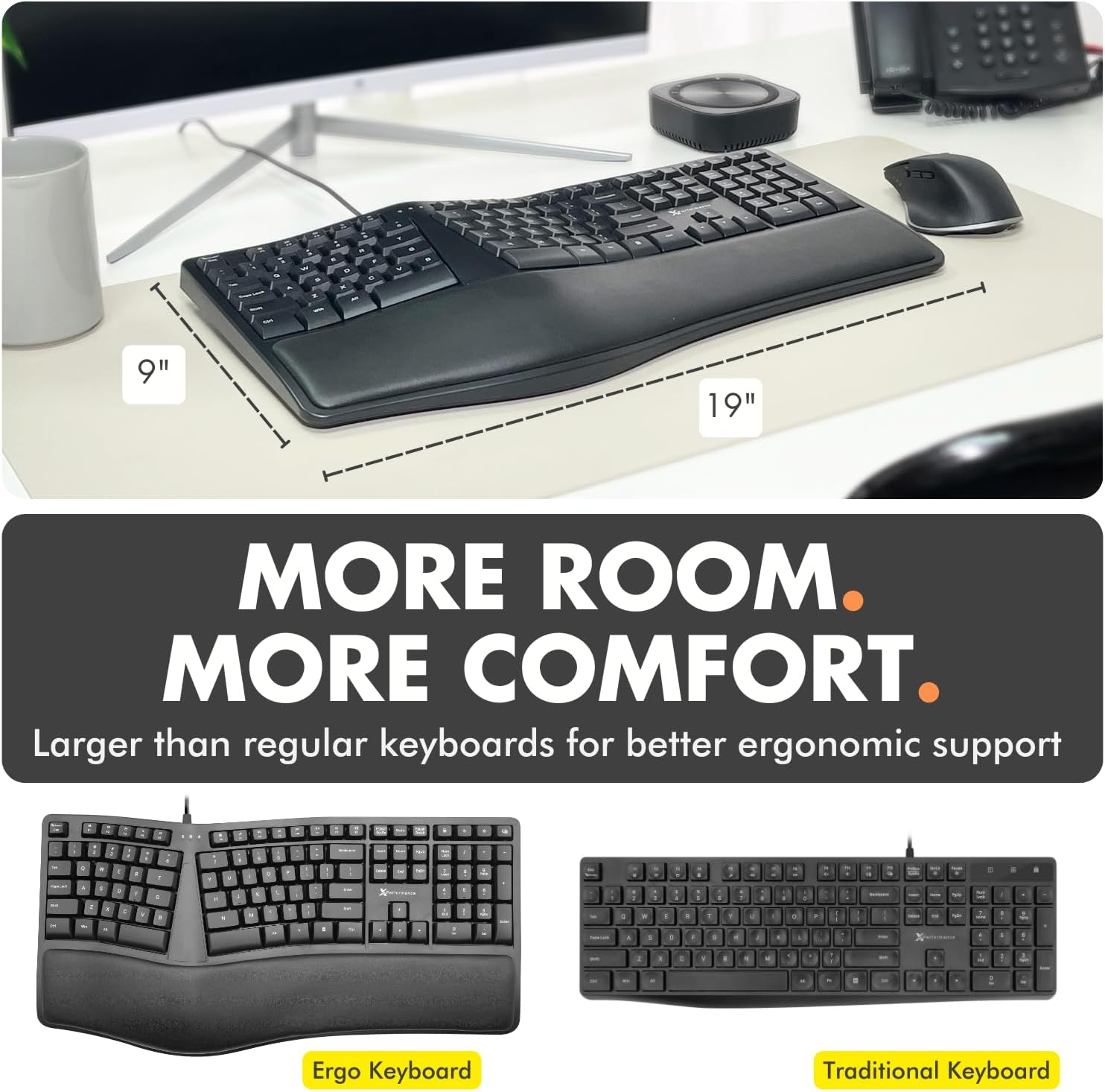
Figur 7.1: Approximate dimensions of the X9 Ergonomic Keyboard (19 inches length, 9 inches width).
8. Garanti og support
X9 Performance values your satisfaction. The X9 Wired Ergonomic Keyboard comes with a 2 års garanti. In case of any issues or for support, please refer to the contact information provided with your product packaging or visit the official X9 Performance website for assistance and easy returns.
For the latest support information and FAQs, please visit the X9 Performance support page.


