1. Introduktion
Tak for købetasing the Muse M-885 DBT Micro System. This comprehensive user manual provides detailed instructions for the setup, operation, and maintenance of your new audio system. The M-885 DBT is a versatile micro system featuring a Bluetooth speaker, LCD screen, DAB+ and FM PLL radio, CD player, alarm clock, sleep function, and various audio controls including treble, bass, and volume. It also includes 2 USB ports, an auxiliary input, AUX-IN cable, 2 RCA jacks, a remote control, antenna, and an AC adapter. Please read this manual thoroughly before using the device to ensure proper and safe operation.
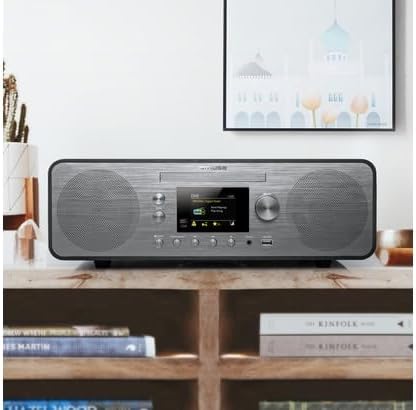
Figure 1.1: The Muse M-885 DBT Micro System placed on a wooden shelf in a home environment.
2. Sikkerhedsoplysninger
For at sikre sikker drift og forhindre skader, bedes du overholde følgende sikkerhedsforanstaltninger:
- Udsæt ikke enheden for regn eller fugt for at forhindre brand eller elektrisk stød.
- Bloker ikke ventilationsåbninger. Installer i overensstemmelse med producentens anvisninger.
- Må ikke installeres i nærheden af varmekilder såsom radiatorer, varmeapparater, komfurer eller andre apparater (inklusive ampløftere), der producerer varme.
- Beskyt netledningen mod at blive trådt på eller klemt, især ved stik, stikkontakter og det sted, hvor de kommer ud af apparatet.
- Brug kun tilbehør/tilbehør specificeret af producenten.
- Træk stikket ud af dette apparat under tordenvejr, eller når det ikke skal bruges i længere perioder.
- Overlad al service til kvalificeret servicepersonale. Service er påkrævet, når apparatet er blevet beskadiget på nogen måde, såsom strømforsyningsledning eller stik er beskadiget, væske er blevet spildt, eller genstande er faldet ind i apparatet, apparatet har været udsat for regn eller fugt, ikke fungerer normalt , eller er blevet droppet.
3. Pakkens indhold
Bekræft, at alle nedenstående varer er til stede i pakken:
- Muse M-885 DBT mikrosystemenhed
- Fjernbetjening
- AC strømadapter
- FM/DAB+ Antenna Cable (75-Ohm)
- AUX-IN Cable (3.5 mm)
- Brugervejledning (dette dokument)

Figure 3.1: Main unit with CD tray open and included accessories: remote control, power adapter, and antenna cable.
4. Produktet er slutview
The Muse M-885 DBT Micro System is designed for a rich audio experience with multiple connectivity options.

Figure 4.1: Front panel of the Muse M-885 DBT, highlighting the central display, control knobs, buttons, and stereo speakers.
Nøglefunktioner:
- DAB+/FM PLL Radio: Enjoy high-quality digital and analog radio broadcasts with 20 FM and 20 DAB preset stations.
- CD-afspiller: Play your entire CD collection effortlessly.
- Bluetooth-forbindelse: Stream audio wirelessly from your mobile devices (smartphones, tablets, laptops).
- USB-afspilning: Two USB ports for playing MP3 files fra USB-drev.
- Hjælpeindgang: Connect external audio devices via the 3.5mm AUX-IN jack.
- LCD-skærm: Clear 2.8-inch LCD/TFT display for easy navigation and information.
- Alarm Clock & Sleep Function: Integrated alarm and sleep timer for convenience.
- Lydkontrol: Adjustable Bass & Treble, Loudness Control, and Preset EQ options.
- Udgangseffekt: 80 Watts for powerful stereo sound.
- Real Wood Casing: Features an elegant real wood housing.

Figure 4.2: Visual representation of key features such as Bluetooth streaming, real wood casing, strong bass with passive membrane, and PLL radio with 20 FM + 20 DAB presets.

Figure 4.3: Dimensional drawing of the Muse M-885 DBT, showing length (420mm), height (139mm), and depth (212mm).
5. Opsætning
5.1 Udpakning og placering
- Tag forsigtigt enheden og alt tilbehør ud af emballagen.
- Place the micro system on a stable, flat surface, away from direct sunlight, heat sources, and moisture. Ensure adequate ventilation around the unit.
5.2 Tilslutning af antennen
For optimal DAB+ and FM radio reception, connect the supplied antenna cable to the "ANTENNA" jack on the rear of the unit. Extend the antenna fully and position it for the best signal.
5.3 Strømtilslutning
- Connect the AC power adapter to the "DC IN" jack on the rear of the micro system.
- Sæt den anden ende af strømadapteren i en almindelig stikkontakt (AC 100-240V, 50/60Hz).
- The unit will enter standby mode.
5.4 Installation af batteri i fjernbetjening
Fjernbetjeningen kræver 2 x AA-batterier (medfølger ikke).
- Åbn dækslet til batterirummet på bagsiden af fjernbetjeningen.
- Isæt de 2 AA-batterier, og sørg for at polerne vender korrekt (+ og -).
- Luk batterirummets dæksel.
6. Betjeningsvejledning
6.1 Tænd/sluk
Tryk på MAGT knappen på frontpanelet eller fjernbetjeningen for at tænde eller slukke enheden (standbytilstand).
6.2 Kildevalg
Tryk på KILDE button repeatedly on the front panel or remote control to cycle through available modes: DAB+, FM, CD, USB, Bluetooth, AUX.
6.3 Lydstyrkekontrol
Drej på BIND knappen på frontpanelet eller brug VOL + / VOL- knapper på fjernbetjeningen for at justere lydstyrken.
6.4 DAB+ radiobetjening
- Vælg DAB+-tilstand ved hjælp af KILDE knap.
- The unit will automatically scan for available DAB+ stations upon first use.
- Brug PRESET/SCAN knapperne eller VÆLGE knob to navigate through the station list.
- Trykke VÆLGE for at bekræfte dit valg af station.
- Sådan gemmer du en forudindstilling: Tryk og hold nede FORUDINDSTILLING knappen, brug VÆLGE knob to choose a preset number, then press VÆLGE igen for at gemme.
6.5 FM-radiofunktion
- Vælg FM-tilstand ved hjælp af KILDE knap.
- Tryk og hold på PRESET/SCAN knappen for automatisk at scanne og gemme tilgængelige FM-stationer.
- Brug PRESET/SCAN knapperne eller VÆLGE knob to navigate through saved presets or manually tune.
- Sådan gemmer du en forudindstilling: Tryk og hold nede FORUDINDSTILLING knappen, brug VÆLGE knob to choose a preset number, then press VÆLGE igen for at gemme.
6.6 CD-afspilning
- Vælg CD-tilstand ved hjælp af KILDE knap.
- Gently insert a CD into the CD slot with the label side facing up. The CD will load automatically.
- Brug AFSPIL/PAUSE, STOP, SPRING FREM/TILBAGE knapper til at styre afspilning.
6.7 USB-afspilning
- Insert a USB flash drive into one of the USB ports on the front panel.
- Vælg USB-tilstand ved hjælp af KILDE knap.
- The unit will automatically detect and begin playing compatible MP3 files.
- Brug afspilningsknapperne (AFSPIL/PAUSE, STOP, SPRING FREM/TILBAGE) til at administrere din musik.
6.8 Bluetooth Pairing and Playback
- Vælg Bluetooth-tilstand ved hjælp af KILDE button. The display will show "PAIRING" or "BLUETOOTH".
- Aktiver Bluetooth på din mobile enhed (smartphone, tablet osv.), og søg efter tilgængelige enheder.
- Select "M-885 DBT" from the list of devices. Once paired, the unit will confirm the connection.
- Start playing music on your connected device. Audio will stream wirelessly to the micro system.
6.9 AUX-IN-tilslutning
- Connect one end of the supplied 3.5mm AUX-IN cable to the AUX IN jack on the front panel of the micro system.
- Connect the other end of the cable to the headphone jack or audio output of your external audio device.
- Vælg AUX-tilstand ved hjælp af KILDE knap.
- Afspil lyd fra din eksterne enhed.
6.10 Alarm Clock and Sleep Function
Refer to the detailed instructions in the full manual for setting the alarm time, alarm source (radio/CD/USB), and activating the sleep timer. These functions are typically accessed via the ALARM og SOVE buttons on the remote control or through the system menu.
6.11 Audio Settings (EQ, Bass, Treble, Loudness)
Access the audio settings through the MENU button on the front panel or remote control. You can adjust:
- Forudindstillet EQ: Select from various equalizer presets (e.g., Flat, Rock, Pop, Jazz, Classic).
- Bas/diskant: Manually adjust bass and treble levels to your preference.
- Lydstyrkekontrol: Enhance bass and treble at low volume levels.
7. Vedligeholdelse
7.1 Rengøring af enheden
- Tag altid stikket ud af stikkontakten før rengøring.
- Brug en blød, tør klud til at tørre de udvendige overflader af.
- Brug ikke slibende rengøringsmidler, voks eller opløsningsmidler, da de kan beskadige finishen.
7.2 CD-linsepleje
To ensure optimal CD playback, avoid touching the CD lens. If the lens becomes dirty, use a specialized CD lens cleaner disc.
7.3 Opbevaring
Hvis enheden ikke skal bruges i længere tid, skal du tage stikket ud af stikkontakten og opbevare den et køligt og tørt sted.
8. Fejlfinding
Før du kontakter kundesupport, bedes du se følgende tabel for almindelige problemer og løsninger på disse.
| Problem | Mulig årsag | Løsning |
|---|---|---|
| Ingen strøm | Netledningen er ikke korrekt tilsluttet. | Sørg for, at netledningen er korrekt tilsluttet enheden og stikkontakten. |
| Ingen lyd | Lydstyrken er for lav eller slået fra. Forkert kilde valgt. | Increase volume. Press the SOURCE button to select the correct input. |
| Dårlig radiomodtagelse | Antenna not properly connected or positioned. Interference from other devices. | Adjust the antenna position. Move the unit away from other electronic devices. |
| CD'en afspiller ikke | CD inserted incorrectly or dirty/scratched. | Re-insert CD with label side up. Clean the CD. Try another CD. |
| Bluetooth-parring mislykkes | Bluetooth not enabled on device. Unit not in pairing mode. Device too far. | Ensure Bluetooth is on and unit is in pairing mode. Move device closer (within 10m). |
| Problemer med USB-afspilning | USB-drevet er ikke formateret korrekt eller understøttes ikke file type. | Ensure USB drive is FAT32 formatted and contains MP3 files. Try another USB drive. |
9. Specifikationer
| Feature | Beskrivelse |
|---|---|
| Modelnummer | M-885 DBT |
| Mærke | MUSE |
| Farve | Mørkegrå |
| Forbindelse | Bluetooth, Auxiliary (3.5 mm), USB |
| Kompatible enheder | Bærbar computer, smartphone, tablet |
| Strømkilde | Wired Electric (AC Power Adapter) |
| Udgangseffekt | 80 watt |
| Højttaler type | Stereoanlæg |
| Dimensioner (L x B x H) | 42 x 21.2 x 13.9 cm (16.5 x 8.3 x 5.5 tommer) |
| Varens vægt | 3.5 kilo (7.7 pund) |
| Batterier til fjernbetjening | 2 x AA (Alkaline, not included) |
| Oprindelsesland | Kina |
10. Garanti og support
For garantioplysninger og teknisk support henvises til garantikortet, der følger med dit produkt, eller besøg den officielle MUSE-side. webwebsted. Gem din købskvittering som købsbevis i tilfælde af garantikrav.
Fabrikant: MUSE
Tilgængelighed af reservedele: Oplysningerne er ikke tilgængelige.
Softwareopdateringer garanteret indtil: Oplysningerne er ikke tilgængelige.
Bemærk: Produktspecifikationer og design kan ændres uden forudgående varsel med henblik på forbedringer.


