Indledning
This manual provides detailed instructions for the installation, operation, and maintenance of your Byron DBY-23513FR Wireless Doorbell Kit BY513. Please read this manual carefully before use and retain it for future reference.
Komponenter inkluderet
The Byron DBY-23513FR Wireless Doorbell Kit BY513 includes:
- 1 x Plug-through Doorbell Chime
- 1 x Wireless Push Button
- 1 x CR2032 Button Cell Battery (pre-installed or included)
- Mounting adhesive for push button

This image displays the main components of the Byron DBY-23513FR Wireless Doorbell Kit: the white plug-through chime unit with a speaker grille and integrated power socket, and the sleek white wireless push button with a central green illuminated ring.
1. Opsætning
1.1. Installing the Push Button
- The wireless push button is powered by a CR2032 button cell battery. Ensure the battery is correctly inserted. A small LED indicator on the button confirms activation.
- Choose a suitable location for the push button, typically near your entrance. Clean the surface thoroughly to ensure proper adhesion.
- Remove the protective film from the adhesive pad on the back of the push button.
- Firmly press the push button onto the desired surface for at least 30 seconds to secure it.
1.2. Installing the Doorbell Chime
- The doorbell chime features a plug-through design, allowing you to retain use of the electrical socket.
- Plug the chime into any standard 220V AC electrical outlet within range of the push button.
- Ensure the chime is securely plugged in.

Dette billede viser sideproffenfile of both the doorbell chime and the push button. The chime is plugged into a wall socket, demonstrating its compact design, while the slim push button is shown next to it.
2. Betjening
2.1. Pairing (if necessary)
The doorbell chime and push button are typically pre-paired from the factory. If they do not communicate, refer to the troubleshooting section for general pairing guidance.
2.2. Selecting Melodies and Adjusting Volume
The chime offers 8 selectable melodies and adjustable volume levels up to 85 decibels.
- Locate the control buttons on the side of the chime unit.
- Use the melody selection button to cycle through the available tunes.
- Use the volume control button to increase or decrease the sound level.
2.3. Silent Mode and Visual Indicator
To activate silent mode, press the dedicated silent mode button. In this mode, the chime will not produce sound.
When silent mode is active or when the doorbell is pressed, a light ring on the chime unit will illuminate, providing a visual alert.
The push button also features an LED indicator that lights up when pressed, confirming activation to the visitor.
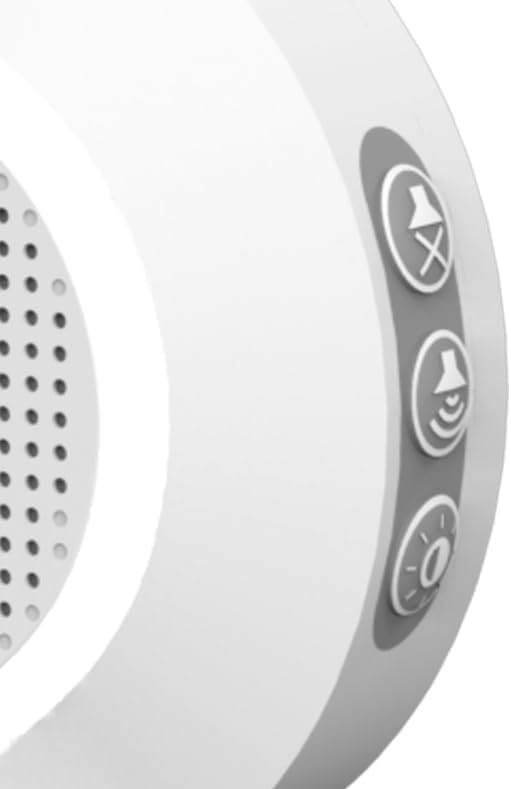
Et nærbillede view of the side of the doorbell chime, highlighting three control buttons: one for silent mode (crossed-out speaker icon), one for volume adjustment (speaker icon with sound waves), and one for melody selection (musical note icon).
2.4. Trådløs rækkevidde
The system operates on a 433 MHz radio frequency and has an unobstructed wireless range of up to 175 meters (approximately 574 feet).
Environmental factors such as walls, metal structures, and other electronic devices can reduce the effective range.

This diagram visually represents the wireless communication between the push button and the chime, indicating an unobstructed range of 175 meters. Wavy lines emanate from the push button towards the chime, symbolizing the radio signal.
2.5. System Expansion
The Byron DBY-23513FR system can be expanded to include up to 6 additional push buttons and 6 additional chimes.
Refer to the specific instructions provided with additional components for pairing procedures.
3. Vedligeholdelse
3.1. Udskiftning af trykknapbatteri
The push button is powered by a CR2032 button cell battery. When the battery is low, the LED indicator on the push button may not light up or may appear dim.
To replace the battery: Carefully open the push button casing. Remove the old CR2032 battery and insert a new one, ensuring correct polarity (+/-). Close the casing sikkert.
3.2. Rensning
Clean the doorbell chime and push button with a soft, dry cloth. Do not use abrasive cleaners or solvents.
Ensure no moisture enters the units.
4. Fejlfinding
4.1. Chime Does Not Sound
- Tjek strøm: Ensure the chime is securely plugged into a live electrical outlet.
- Check Silent Mode: Verify that the chime is not in silent mode. Press the silent mode button to toggle it off.
- Tjek batteri: Replace the CR2032 battery in the push button if the LED indicator does not light up when pressed.
- Rækkevidde: Ensure the push button and chime are within the effective wireless range (up to 175m unobstructed). Obstacles like thick walls or metal objects can reduce range. Try moving the chime closer to the push button temporarily to test.
- Genparring: If the units are not communicating, they may need to be re-paired. To re-pair, typically press and hold the pairing button on the chime until an indicator light flashes, then press the push button. Consult the manufacturer's website or contact support for specific pairing instructions for your model if this general method does not work.
4.2. Poor Sound Quality or Intermittent Operation
- Interferens: Other wireless devices or strong electromagnetic fields nearby can cause interference. Try relocating the chime or push button.
- Rækkevidde: Reduce the distance between the push button and the chime.
- Batteri: A weak battery in the push button can cause intermittent operation. Replace the battery.
5. Specifikationer

A technical diagram illustrating the dimensions of both the doorbell chime and the push button. The chime measures approximately 13 cm in height and 8.5 cm in width, with the plug extending about 1.7 cm. The push button is approximately 8.6 cm in height.
| Feature | Detalje |
|---|---|
| Fabrikant | Byron |
| Modelnummer | DBY-23513FR |
| Produktmål (L x B x H) | 7.05 x 9.08 x 13.45 cm |
| Vægt | 152 gram |
| Farve | Hvid |
| Materiale | Plastic (Housing/Body) |
| Strømtype | AC |
| Voltage | 220 volt |
| Antal genstande | 1 (sæt) |
| Antal stykker | 2 (Chime, Button) |
| Inkluderede komponenter | Byron DBY-23513FR Wireless doorbell set BY513 |
| Batteri inkluderet | Ja |
| Batteri påkrævet | Ja |
| Batterisammensætning | Lithium (CR2032) |
| Trådløs frekvens | 433 MHz |
| Unobstructed Range | 175 meter |
| Melodier | 8 |
| Max volumen | 85 decibel |
| Udvidelsesmuligheder | Up to 6 additional buttons and 6 additional chimes |
6. Garanti og support
Warranty information for the Byron DBY-23513FR Wireless Doorbell Kit BY513 is not available in the provided product data. Please refer to the product packaging or the manufacturer's official webwebsted for specifikke garantioplysninger og vilkår.
For technical support, troubleshooting assistance, or any other inquiries, please contact Byron customer service through their official channels. Contact information can typically be found on the product packaging or the manufacturer's webwebsted.


