1. Produktet er slutview
The EMOS G1240 is a waterproof surface-mounted Passive Infrared (PIR) motion detector designed for both indoor and outdoor applications. It detects moving objects, primarily people, within its detection field by sensing their body heat. Upon detection, it activates a connected device, such as lighting or an alarm, for a user-defined duration.

Billede 1: Forside view of the EMOS G1240 Infrared Motion Detector.
2. Nøglefunktioner
- Registreringsområde: Op til 12 meter.
- Detektionsvinkel: 180 grader.
- Indtrængningsbeskyttelse: IP65 rated, suitable for outdoor use.
- Lysfølsomhed (LUX): Adjustable from 3 lux to 2000 lux (daylight).
- Activation Duration (TIME): Justerbar fra 10 sekunder til 15 minutter.
- Maksimal belastning: 600 W.
- Kompatibilitet: LED compatible.
- Montering: Surface mount (wall or ceiling).
- Adjustable Sensor Lens: The sensor lens can be pivoted for optimal coverage.

Billede 2: Overview of key features including IP65 rating, detection range, and angle.

Image 3: Details on adjustable light sensitivity, activation duration, and power compatibility.
3. Opsætning og installation
This motion detector is designed for surface mounting on walls or ceilings. Professional installation is recommended for electrical wiring. Ensure power is disconnected before installation.
3.1 Montering
- Choose a suitable mounting location, considering the 180-degree detection angle and 12-meter range. Avoid placing near heat sources or direct sunlight, which can cause false triggers.
- Secure the base of the detector to the chosen surface using appropriate screws and anchors.
- Connect the electrical wiring according to local electrical codes and the wiring diagram provided in the full product documentation (not included here).
- Attach the main sensor unit to the mounted base.

Billede 4: Eks.ample of the motion detector installed via surface mount.
3.2 Justering af indstillinger
The EMOS G1240 features two adjustable dials for customizing its operation:
- LUX (lysfølsomhed): This dial controls the ambient light level at which the sensor becomes active. Turn towards the sun icon for activation in brighter conditions (up to 2000 lux) or towards the moon icon for activation only in darker conditions (down to 3 lux).
- TIME (Activation Duration): This dial sets how long the connected device remains active after motion is detected. Adjust from 10 seconds to 15 minutes.
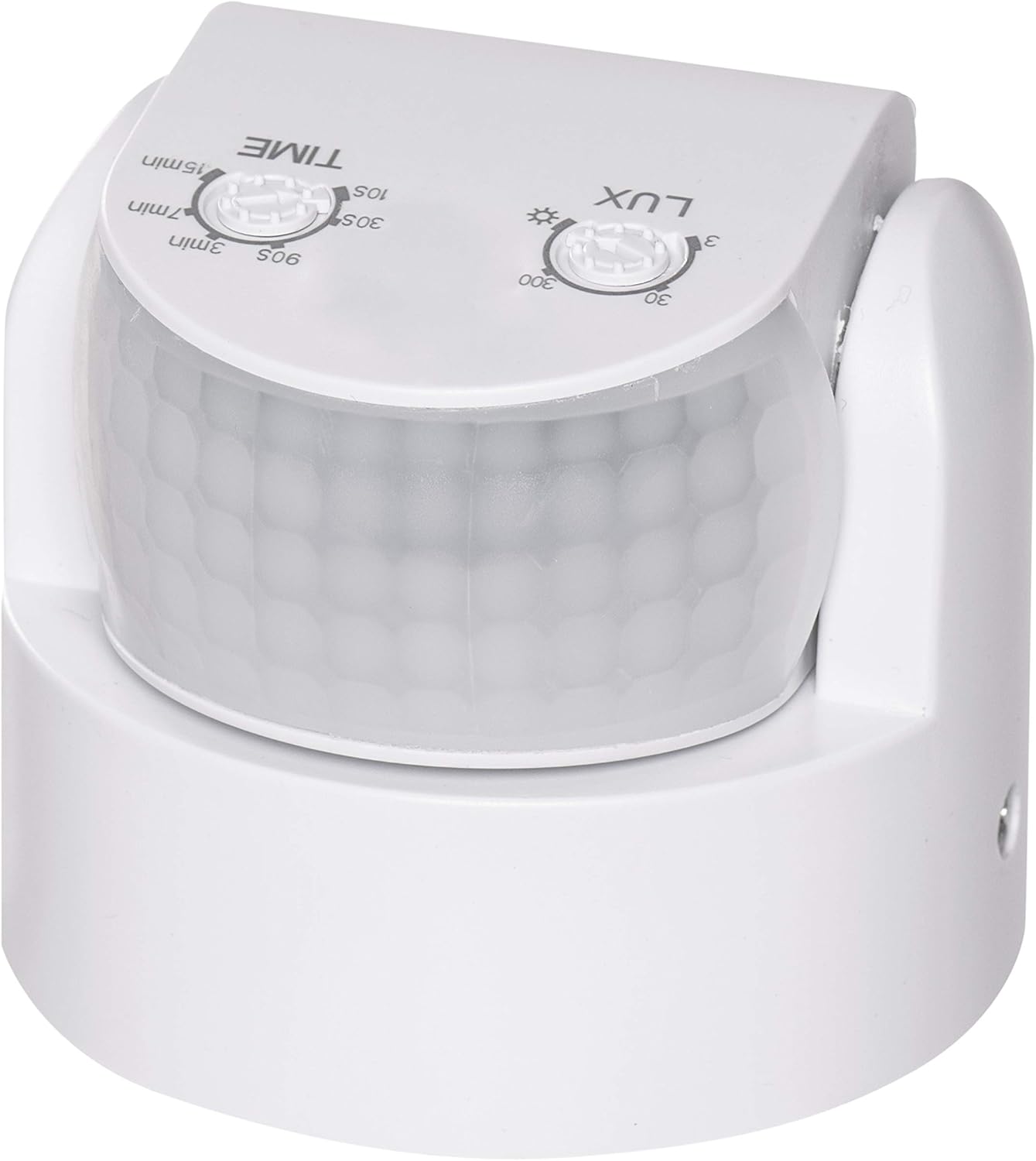
Image 5: Close-up of the LUX and TIME adjustment dials.
The sensor lens can be pivoted to fine-tune the detection area. Adjust it carefully to cover the desired zone and avoid unwanted triggers.
4. Betjeningsvejledning
Once installed and configured, the EMOS G1240 motion detector operates automatically. When motion is detected within its 180-degree field and 12-meter range, and the ambient light level meets the set LUX threshold, the connected device (e.g., light) will activate. The device will remain active for the duration set by the TIME dial. If motion is continuously detected, the timer will reset, keeping the device active until no motion is detected for the set duration.
5. Vedligeholdelse
The EMOS G1240 is designed for durability with its IP65 rating. Regular maintenance is minimal:
- Rensning: Tør sensorlinsen af med jævne mellemrum med en blød klud.amp klud til at fjerne støv, snavs eller affald, der kan blokere detektion. Brug ikke slibende rengøringsmidler.
- Inspektion: Occasionally check the mounting and wiring for any signs of wear or damage, especially for outdoor installations.
6. Fejlfinding
If you encounter issues with your EMOS G1240 motion detector, consider the following:
- Device not activating:
- Check power supply to the detector and connected device.
- Verify LUX setting: If it's set too high (towards sun icon), it may not activate in dim conditions. Adjust towards the moon icon.
- Ensure no obstructions are blocking the sensor's field of view.
- Bekræft at ledningsforbindelserne er sikre.
- Device always on or activating too frequently:
- Adjust LUX setting: If it's set too low (towards moon icon), it might be activating in daylight. Adjust towards the sun icon.
- Adjust TIME setting: Reduce the activation duration if it stays on too long.
- Reposition the sensor lens to avoid detecting unwanted movement (e.g., passing traffic, swaying branches).
- Check for heat sources (e.g., vents, direct sunlight) that might be causing false triggers.
- Short detection range:
- Ensure the sensor lens is clean and unobstructed.
- Verify mounting height and angle are optimal for the desired coverage.
7. Specifikationer
| Feature | Specifikation |
|---|---|
| Fabrikant | EMOS |
| Modelnummer | G1240 |
| Dimensioner (L x B x H) | 75 x 65 x 65 mm |
| Vægt | 150 gram |
| Farve | Hvid |
| Strømkilde | El-kabel |
| Ingress Protection (IP) Rating | IP65 |
| Monteringstype | Wall Mount / Surface Mount |
| Maksimal rækkevidde | 12 meter |
| Detektionsvinkel | 180 grader |
| Lysfølsomhed (LUX) | 3 - 2000 lux |
| Activation Duration (TIME) | 10 sekunder - 15 minutter |
| Maks. Strømforbrug | 600 W |
| Kompatible enheder | Lights, Smart Home Hubs, Security Systems |
| Batterier påkrævet | Ingen |

Billede 6: Produktmål.
8. Garanti og support
Information regarding specific warranty terms and customer support contacts is not provided in this manual. Please refer to the product packaging or the manufacturer's official webwebstedet for detaljerede garantioplysninger og supportmuligheder.


