Brugervejledning til Xiaomi Redmi Airdots høretelefoner
Model: TWSEJ04LS
Indledning
This manual provides comprehensive instructions for the safe and effective use of your Xiaomi Redmi Airdots Earphones. Please read this manual thoroughly before using the product and retain it for future reference.
The Xiaomi Redmi Airdots are true wireless earbuds designed for a seamless audio experience, featuring Bluetooth 5.0 connectivity, a lightweight design, and intelligent noise reduction for clear sound and calls.
Produkt overview
Familiarize yourself with the components of your Redmi Airdots.

Image: Xiaomi Redmi Airdots Earbuds resting inside their open charging case. The earbuds are black, and the case is also black with a smooth, matte finish. This image shows the compact design of the earbuds and their charging solution.
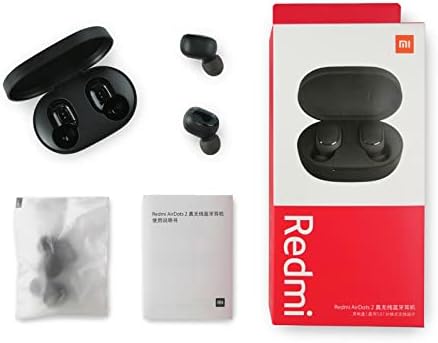
Image: The Xiaomi Redmi Airdots Earbuds are shown outside their charging case. The two black earbuds are positioned next to the open black charging case, illustrating their small size and the design of the charging contacts.
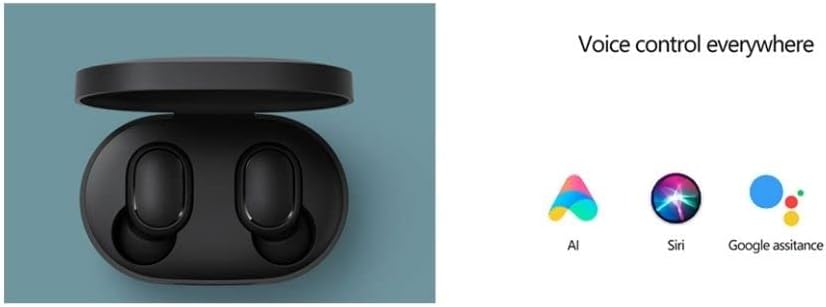
Image: This image displays the complete retail package of the Xiaomi Redmi Airdots. It includes the product box, the charging case with earbuds, a small user manual, and a sealed bag containing additional ear tip sizes. This provides a clear view of what is included in the product purchase.
Hvad er der i æsken:
- Xiaomi Redmi Airdots Earbuds (Left and Right)
- Opladningsetui
- Ear Tips (Small, Medium, Large - one set pre-installed)
- Brugermanual
Opsætning
1. Opladning af øretelefoner og etui:
Før første brug skal du sørge for, at både ørepropperne og opladningsetuiet er fuldt opladet.
- Placer øretelefonerne i opladningsetuiet.
- Connect the charging case to a power source using a compatible USB cable (not included).
- The indicator light on the case will show charging status. Once fully charged, the light will turn off or change color depending on the model.
- Earbuds provide approximately 4 hours of listening time on a single charge. The charging case provides an additional 12 hours of battery life.
2. Parring med din enhed:
The Redmi Airdots use Bluetooth 5.0 for a fast and stable connection.
- Take both earbuds out of the charging case. They will automatically power on and attempt to pair with each other.
- Gå til Bluetooth-indstillingerne på din enhed (smartphone, tablet osv.).
- Aktiver Bluetooth og søg efter tilgængelige enheder.
- Select "Redmi Airdots" (or similar name) from the list of devices.
- Når der er forbindelse, hører du en bekræftelsestone, og ørepropperne er klar til brug.
- Ved efterfølgende brug vil ørepropperne automatisk oprette forbindelse til den sidst parrede enhed, når de tages ud af etuiet.
Betjeningsvejledning
The Redmi Airdots feature a multi-function button on each earbud for easy control.
Grundlæggende kontroller:
- Afspil/pause: Tryk enkeltvis på multifunktionsknappen på begge øretelefoner.
- Besvar/afslut opkald: Single press the multi-function button on either earbud during an incoming call.
- Afvis opkald: Press and hold the multi-function button for approximately 1 second during an incoming call.
- Næste sang: Dobbelttryk på multifunktionsknappen på den højre øreprop.
- Forrige sang: Dobbelttryk på multifunktionsknappen på den venstre øreprop.
- Aktiver stemmeassistent: Double press the multi-function button on either earbud when not on a call. This activates your phone's voice assistant (e.g., Siri, Google Assistant, AI).
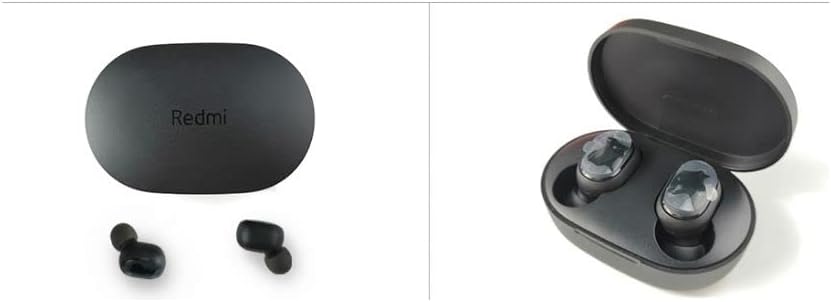
Image: This graphic illustrates the voice control capabilities of the Redmi Airdots, showing icons for AI, Siri, and Google Assistant. It emphasizes the convenience of activating your device's voice assistant directly from the earbuds.
Enkelt ørepropstilstand:
You can use either the left or right earbud independently. Simply take one earbud out of the case, and it will automatically connect to your device if previously paired.
Opretholdelse
Proper care ensures the longevity and performance of your Redmi Airdots.
- Rensning: Brug en blød, tør og fnugfri klud til at rengøre ørepropperne og opladningsetuiet. Brug ikke slibende rengøringsmidler, alkohol eller kemiske opløsningsmidler.
- Vandtæthed: The earbuds are IPX4 waterproof, meaning they are resistant to splashing water and sweat. Do not submerge them in water or expose them to heavy rain. Dry them thoroughly if they get wet.
- Opbevaring: Når ørepropperne ikke er i brug, skal de opbevares i deres opladningsetui for at beskytte dem og holde dem opladede. Opbevares køligt og tørt, væk fra direkte sollys og ekstreme temperaturer.
- Ørespidser: Regularly check and clean the ear tips to prevent wax buildup, which can affect sound quality. Replace ear tips if they become damaged or worn.
Fejlfinding
Hvis du støder på problemer, kan du prøve disse almindelige løsninger:
| Problem | Løsning |
|---|---|
| Ørepropper parrer sig ikke med hinanden. | Place both earbuds back into the charging case. Close the lid, wait a few seconds, then open and take them out again. This often forces them to re-sync. |
| Øretelefoner opretter ikke forbindelse til enheden. | Ensure Bluetooth is enabled on your device. Forget "Redmi Airdots" in your device's Bluetooth settings and try pairing again. Ensure earbuds are charged. |
| Kun én øreprop virker. | Place both earbuds back in the case, then take them out simultaneously. Check battery levels of both earbuds. |
| Lav lydstyrke eller dårlig lydkvalitet. | Adjust volume on your device. Ensure ear tips are clean and properly seated in your ear. Try different sized ear tips for a better seal. |
| Øretelefonerne oplader ikke. | Ensure charging contacts on earbuds and inside case are clean and dry. Check USB cable and power adapter. Ensure case has power. |
Specifikationer
Key technical details of your Xiaomi Redmi Airdots Earphones.
- Modelnavn: Airdots True Wireless Black
- Modelnummer: TWSEJ04LS
- Forbindelse teknologi: Bluetooth
- Bluetooth version: 5.0
- Bluetooth Range: Op til 10 meter (33 fod)
- Audio Driver Størrelse: 7.2 mm dynamisk driver
- Frekvensområde: 20 Hz - 20,000 Hz
- Impedans: 16 Ohm
- Øretelefon batterilevetid: Approximately 4 hours (single charge)
- Opladningskasse Batterilevetid: Approximately 12 hours (additional charges)
- Kontrolmetode: Berøring, stemmestyring
- Støjkontrol: Active Noise Cancellation (DSP intelligent environment noise reduction)
- Vandmodstandsniveau: IPX4 (Sweatproof, Splash resistant)
- Varens vægt: 4.1g per earbud, 58g total (earbuds + case)
- Produktdimensioner: 2.44 x 1.57 x 1.1 cm (opladeretui)
Garanti og support
For warranty information and customer support, please refer to the warranty card included with your product packaging or visit the official Xiaomi website. You may also find additional support resources and FAQs online.
Officiel Xiaomi Webwebsted: www.mi.com
Gem venligst din købsbevis i tilfælde af garantikrav.


