Indledning
Thank you for choosing the Caliber CAM030 Wired Rear View Camera. This manual provides essential information for the proper installation, operation, and maintenance of your new camera. Please read this manual thoroughly before using the product to ensure safe and optimal performance.
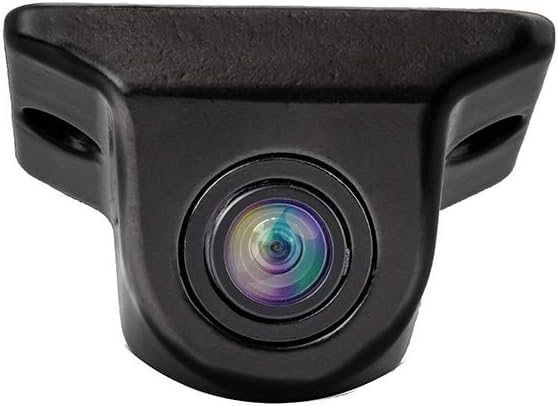
Figure 1: Caliber CAM030 Rear View Kamera
Sikkerhedsoplysninger
Overhold altid følgende sikkerhedsforanstaltninger for at forhindre personskade eller beskadigelse af enheden:
- Sørg for, at køretøjets strøm er slukket, før installationen påbegyndes.
- Kontakt en professionel, hvis du er usikker på installationstrinnene.
- Do not expose the camera to extreme temperatures or direct water immersion.
- Brug kun de medfølgende kabler og tilbehør.
- Opbevares utilgængeligt for børn.
Pakkens indhold
Kontroller venligst, at alle varer er til stede i pakken:
- Caliber CAM030 Rear View Kamera
- RCA videokabel
- Strømkabel
- Mounting Hardware (screws, bracket)
- Brugervejledning (dette dokument)
Opsætning og installation
The Caliber CAM030 is designed for aftermarket installation and connects to a compatible monitor via an RCA connector. Follow these steps for proper installation:
- Vælg et monteringssted: Select a suitable location at the rear of your vehicle, typically near the license plate or bumper, that provides a clear view. The camera is designed for a wide-angle view på 170 grader.
- Monter kameraet: Secure the camera using the provided mounting bracket and screws. Ensure it is firmly attached and angled correctly for optimal visibility.
- Tilslut strøm: Connect the camera's power cable to the vehicle's reverse light circuit. This allows the camera to automatically power on when the vehicle is put into reverse gear. Ensure proper polarity.
- Tilslut videokabel: Route the RCA video cable from the camera to your in-car monitor. Connect the RCA plug from the camera to the corresponding RCA input on your monitor.
- Test installationen: Once all connections are made, turn on your vehicle and shift into reverse gear to test the camera's functionality. Adjust the camera's angle if necessary.

Figure 2: Typical mounting location near the license plate.
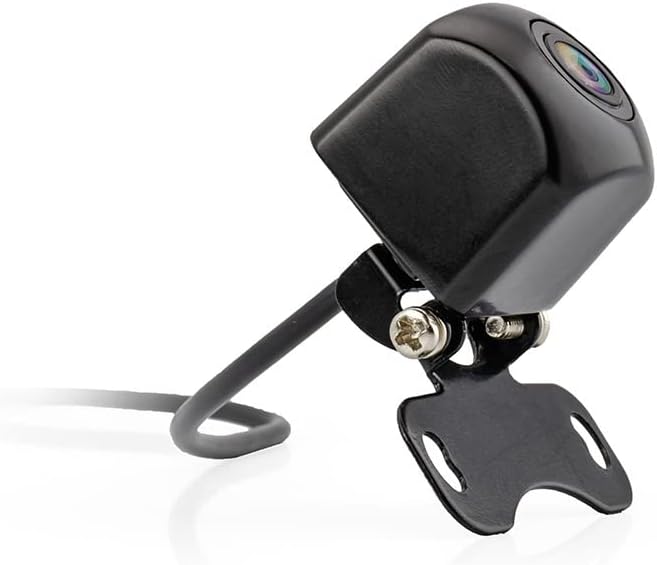
Figure 3: Camera with mounting bracket.

Figure 4: Compact size of the CAM030 camera.
Betjeningsvejledning
The Caliber CAM030 is designed for simple, automatic operation:
- Automatisk aktivering: When properly installed and connected to the reverse light circuit, the camera will automatically activate and display the rear view on your connected monitor as soon as you shift your vehicle into reverse gear.
- Vidvinkel View: The camera features a 170-degree wide-angle lens, providing a broad field of vision to assist with parking and maneuvering.
- Billede kvalitet: The camera captures video in 1080p resolution using CMOS sensor technology for clear images.
Opretholdelse
To ensure the longevity and optimal performance of your camera:
- Rensning: Rengør kameralinsen regelmæssigt med en blød kludamp klud til at fjerne snavs, støv eller vandpletter, der kan blokere viewBrug ikke skrappe kemikalier.
- Kabelinspektion: Regularly check the cables for any signs of wear, fraying, or damage. Ensure all connections remain secure.
- Miljøbeskyttelse: While the camera is designed for outdoor use, avoid exposing it to extreme pressure washing or prolonged submersion in water.
Fejlfinding
| Problem | Mulig årsag | Løsning |
|---|---|---|
| Intet billede på skærmen |
|
|
| Flimrende eller forvrænget billede |
|
|
| Billedet er sløret eller uklart |
|
|
Specifikationer
| Feature | Detalje |
|---|---|
| Mærke | Kaliber |
| Modelnummer | CAM030 |
| Kompatible enheder | Overvåge |
| Connector Type | RCA |
| Installationstype | Eftermarked |
| Videooptagelsesopløsning | 1080p |
| Optisk sensorteknologi | CMOS |
| Linsetype | Vidvinkel |
| Virkelig vinkel på View | 170 grader |
| Felt af View | 170 grader |
| Produktdimensioner | 26L x 26W x 87H millimeters |
| Genopladeligt batteri | Ingen |
| Tilgængelighed af reservedele | Information ikke tilgængelig |
| Softwareopdateringer garanteret indtil | Information ikke tilgængelig |
| Første ledige dato | 5. april 2022 |
Garanti og support
For warranty information and technical support, please refer to the documentation provided at the time of purchase or visit the official Caliber webwebsted. Gem din købsbevis i tilfælde af garantikrav.
Note: Information regarding spare parts availability and software updates is not available at this time.


