1. Introduktion
The JAMJAKE iPad Stylus Pen is designed to enhance your iPad experience, offering a precise, sensitive, and durable tool for writing, drawing, and navigating. This manual provides comprehensive instructions on how to set up, operate, and maintain your stylus pen to ensure optimal performance and longevity.

Figure 1: JAMJAKE iPad Stylus Pen with spare tips.
2. Nøglefunktioner
2.1 Precision and Durability
The JAMJAKE iPad Stylus Pen offers exceptional precision, sensitivity, and wear resistance, significantly improved over conventional models. It provides a true zero-delay and zero-disconnection experience, mimicking the natural feel of writing with an Apple Pencil. Its tip is more durable than standard Apple Pencil tips, making it suitable for various applications and maximizing your iPad's potential.

Figure 2: Illustrates the pen's precision and smooth writing experience.
2.2 Magnetic Adsorption & Palm Rejection
Equipped with a dual-reinforced magnetic adsorption mechanism, the JAMJAKE stylus can be securely attached to your iPad, preventing loss and ensuring convenient storage. This allows for quick and efficient work without worrying about misplacing the pen. Furthermore, the integrated palm rejection feature allows you to rest your hand naturally on the screen while writing or drawing, just as you would on paper, without unintended marks.

Figure 3: Magnetic attachment of the stylus to the iPad.

Figure 4: Palm rejection feature in action, allowing natural hand placement.
2.3 Tilt Recognition
The JAMJAKE iPad Stylus Pen supports tilt recognition, allowing you to dynamically adjust line thickness by changing the angle of the pen tip. This feature is ideal for drawing and sketching, providing a more natural and versatile creative experience. No Bluetooth connection is required for this function.

Figure 5: Tilt recognition allows for varied line thickness based on pen angle.
2.4 Type-C Fast Charging & Long Battery Life
The JAMJAKE stylus features Type-C fast charging. A 1-minute charge provides 1 hour of use, and a 3-minute charge provides 2 hours. A full 15-minute charge allows for up to 10 hours of continuous use. To conserve battery, the pen automatically enters sleep mode after 5 minutes of inactivity and powers off after 30 minutes, preventing accidental battery drain.
3. Kompatibilitet
The JAMJAKE iPad Stylus Pen is specifically designed for iPad models released from 2018 onwards. Please ensure your iPad model is listed below for compatibility. No Bluetooth connection is required for basic functionality.
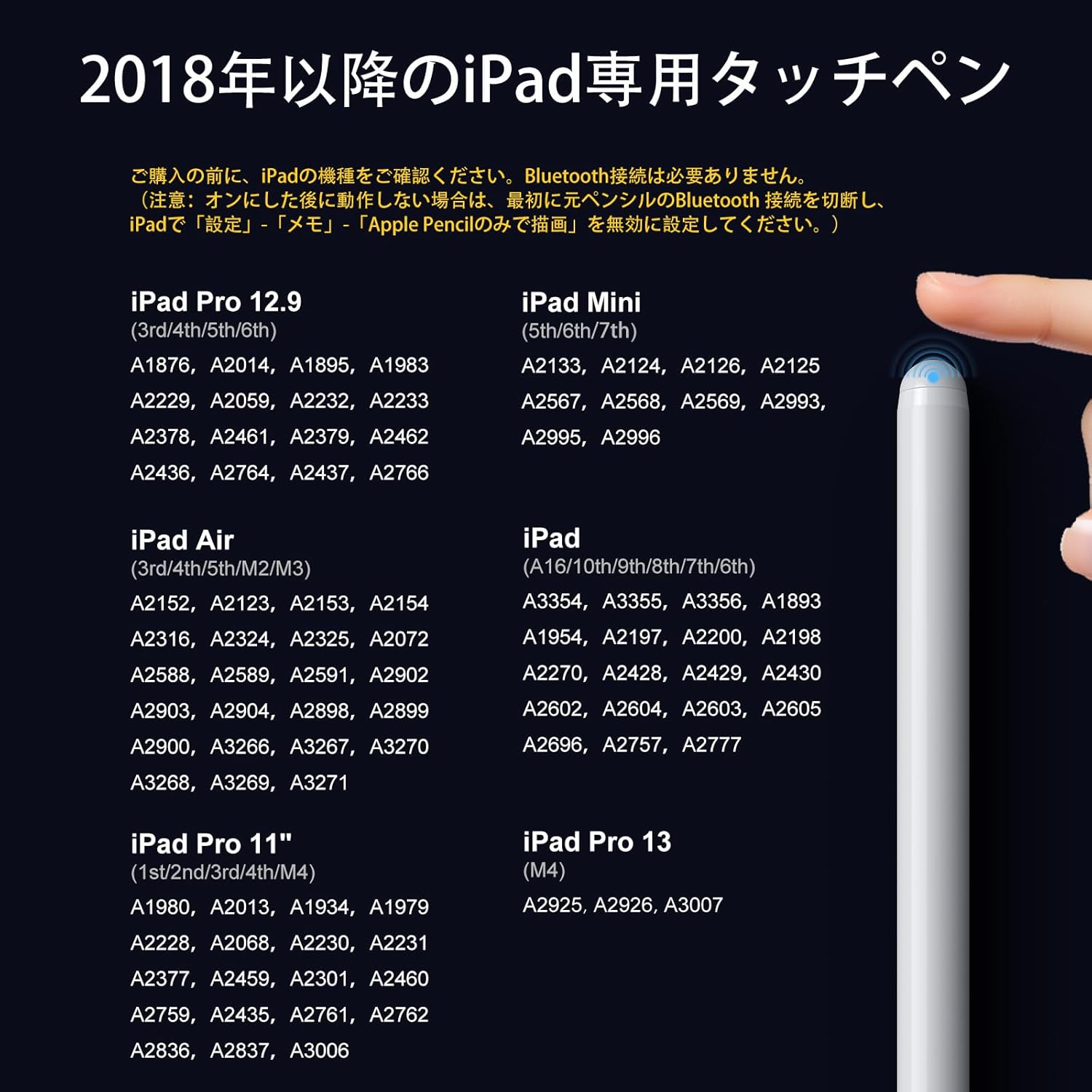
Figure 6: Compatibility chart for iPad models.
Kompatible iPad-modeller:
- iPad (6., 7., 8., 9., 10., 11. generation)
- iPad Air (3rd, 4th, 5th, 6th, 7th Generation)
- iPad Pro 11-tommer (1., 2., 3., 4. generation)
- iPad Pro 12.9 tommer (3., 4., 5., 6. generation)
- iPad Mini (5., 6. generation)
- iPad Pro 13-tommer (M4)
- iPad Air 13-tommer (M2)
Note: If you have previously connected an Apple Pencil to your iPad, please disconnect it and disable "Apple Pencil only drawing" in your iPad settings (Settings > Notes > Apple Pencil) to ensure proper functionality with the JAMJAKE stylus.
4. Opsætning
4.1 Opladning af pennen
Before first use, fully charge your JAMJAKE stylus pen. Connect the included Type-C charging cable to the charging port on the stylus and to a compatible USB power source. The indicator light will show charging status (e.g., red for charging, blue for fully charged). A full charge takes approximately 15 minutes.
4.2 Tænd/sluk
To turn on the stylus, lightly tap the top of the pen. The indicator light will illuminate. To turn off, tap the top of the pen again. The stylus will automatically power off after 30 minutes of inactivity to save battery.
5. Betjeningsvejledning
5.1 Generel brug
Simply touch the pen tip to your iPad screen to begin writing, drawing, or navigating. The stylus is designed for immediate use without complex pairing procedures.
5.2 Using Palm Rejection
With the palm rejection feature, you can comfortably rest your hand on the iPad screen while using the stylus. This prevents accidental touches from your palm or fingers, allowing for a natural and uninterrupted creative flow.
5.3 Utilizing Tilt Recognition
To vary line thickness, simply tilt the stylus. A more vertical angle will produce finer lines, while a more inclined angle will create thicker lines. Experiment with different angles to achieve desired effects in drawing and sketching applications that support this feature (e.g., SketchBook, Procreate, Paper, Noteshelf).
5.4 Genvejsfunktioner
The JAMJAKE stylus supports convenient shortcut functions for enhanced productivity:
- Shape Correction: Draw a shape (e.g., circle, square, heart) and hold the pen for a moment at the end of the stroke. The iPad will automatically correct it into a perfect shape.
- Skærmbillede: Swipe up from the bottom right corner of the iPad screen with the stylus to capture a screenshot.
- Handwriting Text: Use the stylus to write directly into text fields. Your handwriting will be converted to typed text.
- Open Notes: Double-click the screen with the stylus to quickly open the Notes app.

Figure 7: Visual guide to shortcut functions.
6. Vedligeholdelse
To ensure the longevity and optimal performance of your JAMJAKE stylus pen, follow these maintenance guidelines:
- Rensning: Tør pennens krop af med en blød, tør klud. Brug ikke slibende rengøringsmidler eller opløsningsmidler.
- Udskiftning af spids: The stylus comes with spare tips. If the tip becomes worn or damaged, gently twist it counter-clockwise to remove and replace it with a new one by twisting clockwise until secure.
- Opbevaring: When not in use, attach the stylus to your iPad using its magnetic adsorption feature or store it in a protective case to prevent damage.
- Opladning: Use only the provided Type-C cable or a compatible high-quality cable for charging. Avoid overcharging or completely draining the battery for extended periods.
7. Fejlfinding
If you encounter issues with your JAMJAKE stylus pen, please refer to the following common solutions:
| Problem | Mulig årsag | Løsning |
|---|---|---|
| Pennen svarer ikke. | Low battery; Stylus is off; iPad settings conflict. | Charge the stylus; Tap the top to turn it on; Ensure Apple Pencil is disconnected and "Apple Pencil only drawing" is disabled in iPad settings. |
| Inaccurate or broken lines. | Worn tip; Screen protector interference; App compatibility. | Replace the pen tip; Ensure screen protector is thin and properly applied; Try a different drawing/note-taking app. |
| Palm-afvisning virker ikke. | App does not support palm rejection; iPad settings. | Use an app that supports palm rejection; Check iPad settings for any conflicting stylus options. |
| Pennen oplader ikke. | Defekt kabel/adapter; Snavset opladningsport. | Try a different Type-C cable and power adapter; Clean the charging port gently. |
If the problem persists after trying these solutions, please contact JAMJAKE customer support for further assistance.
8. Specifikationer
| Feature | Detalje |
|---|---|
| Modelnummer | K11 |
| Farve | Hvid |
| Produktmål (LxBxH) | 16 x 1 x 1 cm |
| Varens vægt | 15 g |
| Batteri inkluderet | Ja |
| Batteri påkrævet | Ja |
| Average Battery Life (Standby) | 5 år |
| Opladningsport | Type-C |
| Vipgenkendelse | Understøttet |
| Palmafvisning | Understøttet |
| Magnetisk adsorption | Understøttet |
| UPC | 779186303723 |
9. Garanti og support
JAMJAKE stands behind the quality of its products. This stylus pen comes with a 2 års producentgaranti fra købsdatoen. Derudover tilbyder vi en 30 dages gratis ombytning policy for any product defects or issues.
For warranty claims, technical support, or any inquiries, please contact JAMJAKE customer service through the retailer's platform or visit our official website. Please have your purchase details and product model number (K11) ready when contacting support.


