1. Introduktion
The Fitbit Sense is an advanced smartwatch designed to help you understand and improve your overall health and well-being. It integrates various sensors and features to provide insights into your body's responses to stress, heart health, sleep quality, and skin temperature trends. This manual provides detailed instructions for setting up, operating, maintaining, and troubleshooting your Fitbit Sense.
For new users, the Fitbit Sense includes a 6-month free trial of Fitbit Premium, offering personalized guidance and advanced insights. The device requires the Fitbit app and is compatible with iPhone and Android devices. A Google account may be required for full functionality.

Image: The Fitbit Sense Advanced Smartwatch in White/Gold, showcasing dens elegante design og digitale display.
2. Nøglefunktioner
The Fitbit Sense is equipped with a comprehensive suite of features to support your health journey:
- EDA Scan App: Detects electrodermal activity, which can indicate your body's response to stress. This feature helps you track and manage stress levels over time.
- On-Wrist Skin Temperature Sensor: Logs your skin temperature each night, allowing you to observe trends and variations.
- EKG-app: Assess your heart for atrial fibrillation (Afib), a heart rhythm irregularity. Results can be easily shared with your doctor. (Note: The Fitbit ECG app is available in select countries and is not intended for use by individuals under 22 years old.)
- Pulsnotifikationer: Receive alerts if your heart rate appears to be above or below your average resting rate.
- Indbygget GPS: Track pace and distance during outdoor activities like runs, hikes, and rides without needing your phone.
- Stemmeassistent: Utilize built-in Google Assistant or Alexa for quick news, weather updates, setting reminders, alarms, and controlling smart home devices.
- Søvnregistrering og søvnscore: Gain insights into your sleep quality, including sleep stages and a personalized sleep score.
- Lang batterilevetid og hurtig opladning: Enjoy over 6 days of battery life, with fast charging providing a full day's charge in just 12 minutes. (Battery life varies with use and other factors, up to 12 hours with continuous GPS.)
- Bluetooth-opkald: Use the built-in mic and speaker to take hands-free Bluetooth calls when your phone is nearby. (Requires more frequent charging when this feature is used extensively.)
Feature Visuals

Billede: Overview of key features including stress tracking, skin temperature, heart health, GPS, and sleep tools.

Image: The EDA Sensor in action, demonstrating how it helps track and ease stress.

Image: Display showing skin temperature trends, allowing users to monitor changes over time.

Billede: Eksample of high heart rate notification on the smartwatch and corresponding data in the app.
3. Opsætningsvejledning
- Unbox Your Device: Carefully remove the Fitbit Sense smartwatch, charging cable, and included small and large bands from the packaging.
- Oplad smartwatchet: Connect the magnetic charging cable to the back of your Fitbit Sense. Plug the USB end into a compatible USB power source. Ensure the watch is securely attached to the charger. A full charge typically takes about an hour, but a 12-minute charge can provide a day's power.
- Download Fitbit-appen: On your smartphone (iPhone or Android), download and install the official Fitbit app from your device's app store.
- Create/Log In to Fitbit Account: Open the Fitbit app and follow the on-screen prompts to create a new account or log in with an existing one. A Google account may be required.
- Pair Your Smartwatch: In the Fitbit app, tap your profile picture > Set Up a Device. Select Fitbit Sense and follow the instructions to pair it with your smartphone via Bluetooth.
- Attach Bands: Choose the band size (Small or Large) that best fits your wrist. Attach the bands to the smartwatch by sliding them into place until they click securely.

Image: The Fitbit Sense smartwatch shown with both small and large band options.
Image: The Fitbit Sense smartwatch connected to its unique magnetic charger.
4. Operating Your Fitbit Sense
Navigation og kontrol
The Fitbit Sense features a vibrant touchscreen display and an inductive button on the left side. Swipe left/right or up/down to navigate through apps and stats. Press the inductive button to return to the clock face or access quick settings.
Brug af sundhedsfunktioner
- EDA Scan: To perform an EDA Scan, open the EDA Scan app on your watch and place your palm over the watch face. Remain still for the duration of the scan.
- EKG-app: Open the ECG app on your watch. Place your index finger and thumb on the corners of the watch face as instructed. Remain still until the reading is complete.
- Hudtemperatur: Your skin temperature is tracked nightly. View trends in the Fitbit app under the Health Metrics dashboard.
- Puls: Your heart rate is continuously monitored. View real-time heart rate on the watch face or in the Heart Rate app. Notifications for high/low heart rates can be configured in the Fitbit app.
- Søvnsporing: Wear your Sense to bed to automatically track your sleep stages and receive a daily Sleep Score in the Fitbit app.
Fitness and Activity Tracking
- Træningstilstande: Swipe to the Exercise app on your watch to select from various exercise modes. For outdoor activities, select modes that use GPS (e.g., Run, Hike) to track your route, pace, and distance.
- Daglig aktivitet: The Sense automatically tracks steps, distance, calories burned, and active zone minutes throughout your day.
Smarte funktioner
- Stemmeassistent: Swipe right from the clock face to access your chosen voice assistant (Google Assistant or Alexa). Speak your commands clearly.
- Meddelelser: Receive call, text, calendar, and app notifications on your wrist. Manage notification settings in the Fitbit app.
- Fitbit Pay: Set up your credit/debit cards in the Fitbit app to make secure payments directly from your wrist.
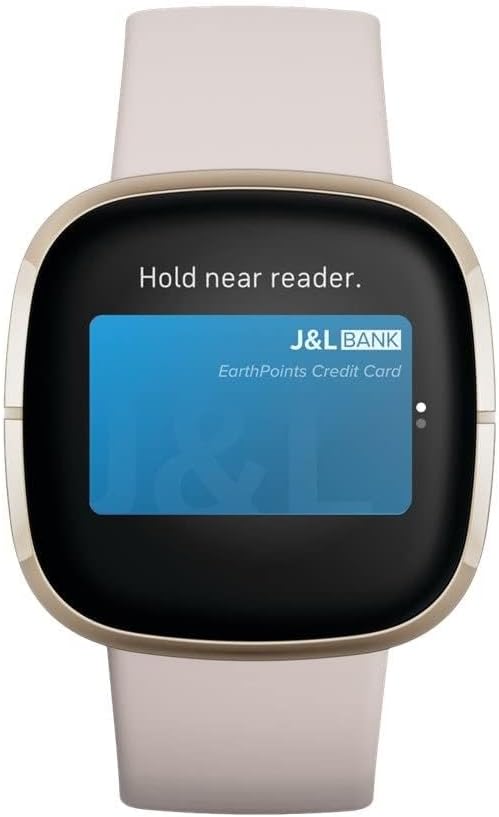
Image: The Fitbit Sense display showing the Fitbit Pay interface, ready for contactless payment.

Image: The Fitbit app displaying personalized health and fitness guidance, including guided programs.
5. Pleje og vedligeholdelse
- Rensning: Regularly clean your Fitbit Sense and its bands to prevent skin irritation and maintain device functionality. Use a soft, lint-free cloth. For the bands, a mild soap-free cleanser can be used. Ensure the device is completely dry before wearing or charging.
- Vandtæthed: The Fitbit Sense is water-resistant up to 50 meters. It can be worn in the shower, pool, or ocean. However, it is recommended to dry the device and bands after getting them wet to prolong their lifespan and prevent skin irritation. Do not use in a hot tub or sauna.
- Opladningskontakter: Periodically clean the charging contacts on the back of your watch and on the charging cable with a soft, dry cloth to ensure optimal charging.
- Opbevaring: When not in use for extended periods, store your Fitbit Sense in a cool, dry place away from direct sunlight and extreme temperatures.
6. Fejlfinding
If you encounter issues with your Fitbit Sense, try the following common troubleshooting steps:
- Enheden reagerer ikke: If your Sense is unresponsive, try restarting it. Press and hold the inductive button for about 10 seconds until you see the Fitbit logo on the screen.
- Synkroniseringsproblemer: Ensure Bluetooth is enabled on your smartphone and the Fitbit app is open. Try restarting both your phone and your Sense. If issues persist, unpair and re-pair the device in your phone's Bluetooth settings and the Fitbit app.
- Upræcise læsninger: Ensure your Sense is worn correctly – not too tight or too loose, and positioned about a finger's width above your wrist bone. Clean the sensors on the back of the device.
- Batteriet aflades hurtigt: Frequent use of GPS, continuous heart rate monitoring, and voice assistant features can reduce battery life. Try disabling features you don't need constantly. Ensure background app refresh for Fitbit is optimized on your phone.
- Notifikationer vises ikke: Check notification settings in both your phone's system settings and the Fitbit app to ensure they are enabled for the Sense.
For mere detaljeret fejlfinding eller vedvarende problemer, se den officielle Fitbit-support website or the user guide PDF.
7. Specifikationer
| Feature | Detalje |
|---|
| Modelnummer | FB512GLWT |
| Produktdimensioner | 1.59 x 1.59 x 0.49 tommer; 1.1 ounce |
| Operativsystem | Android (compatible with iOS) |
| Hukommelseslagringskapacitet | 6400 MB |
| Særlige funktioner | GPS, Heart Rate Monitor, Notifications, Sleep Monitor, ECG, Stress Tracking, Time Display |
| Batterikapacitet | 266 mioamp Timer |
| Forbindelsesteknologi | Bluetooth |
| Standard for trådløs kommunikation | Bluetooth |
| Battericellesammensætning | Lithium Ion |
| Skærmstørrelse | 1.58 tommer |
| Fabrikant | Fitbit Inc |
| Dato først tilgængelig | 25. august 2020 |
8. Garanti og support
For detaljerede garantioplysninger henvises til den officielle Fitbit-butik website or the warranty card included with your product. Fitbit offers various support resources to assist you with your device.
- Brugervejledning: A comprehensive user guide in PDF format is available for download: Download brugervejledning (PDF).
- Online support: Visit the official Fitbit support website for FAQs, troubleshooting articles, and community forums.
- Kontakt support: If you require further assistance, contact Fitbit customer support through their official channels.
- Beskyttelsesplaner: Extended protection plans may be available for purchase to cover your device beyond the standard warranty.


