1. Introduktion
The ELECDER D19 True Wireless Earbuds are designed to provide a superior audio experience with advanced features such as Bluetooth 5.0 connectivity, noise cancellation, and IPX7 waterproofing. This manual provides comprehensive instructions for setting up, operating, and maintaining your earbuds to ensure optimal performance and longevity.
Nøglefunktioner:
- Bluetooth 5.0: Fast and stable wireless transmission with CVC8.0 noise cancellation for clear calls.
- Premium Hi-Fi Stereo Audio: APTX audio for lossless transmission, delivering immersive sound with crystal clarity and deep bass.
- IPX7 Vandtæt: Resistant to sweat, water, and rain, ideal for workouts and outdoor activities.
- Ergonomisk design: Lightweight (5g per earbud) with flexible silicone ear-fins and S/M/L ear caps for a secure and comfortable fit.
- Quick Pairing Technology: Automatic power-on and pairing upon removal from the charging case.
- USB Quick Charge & Wireless Charging: Up to 4.5 hours of music on a single charge, with an additional 18 hours from the charging case, supporting both USB and wireless charging.
2. Produktet er slutview

Figure 2.1: ELECDER D19 True Wireless Earbuds in their charging case. The earbuds are black, sleek, and designed for in-ear use, while the compact charging case is also black with a smooth finish.
Hvad er der i æsken:
- ELECDER D19 ægte trådløse øretelefoner (venstre og højre)
- Opladningsetui
- USB opladningskabel
- Ørepropper (S/M/L størrelser)
- Brugervejledning (dette dokument)
3. Opsætningsvejledning
3.1 Opladning af øretelefoner og etuiet
Before first use, fully charge the earbuds and the charging case. The charging case supports both USB cable charging and wireless charging.
- USB-opladning: Connect the provided USB cable to the charging port on the case and plug the other end into a USB power source (e.g., computer, wall adapter). The indicator light on the case will show charging status.
- Trådløs opladning: Place the charging case on a compatible wireless charging pad. The indicator light will flash to confirm charging.

Figure 3.1: The ELECDER D19 charging case being charged wirelessly on a charging pad, also showing the Micro USB port for wired charging. This image highlights the dual charging capabilities of the case.
A full charge for the earbuds provides approximately 4.5 hours of music playback, and the charging case provides an additional 18 hours of battery life.
3.2 Parring med din enhed
The ELECDER D19 earbuds feature quick pairing technology for seamless connection.
- Trin 1: Open the charging case and take out both earbuds. They will automatically power on and pair with each other.
- Trin 2: Gå til Bluetooth-indstillingerne på din smartphone eller Bluetooth-aktiverede enhed.
- Trin 3: Søg efter available devices and select "Elecder D19" from the list to connect.
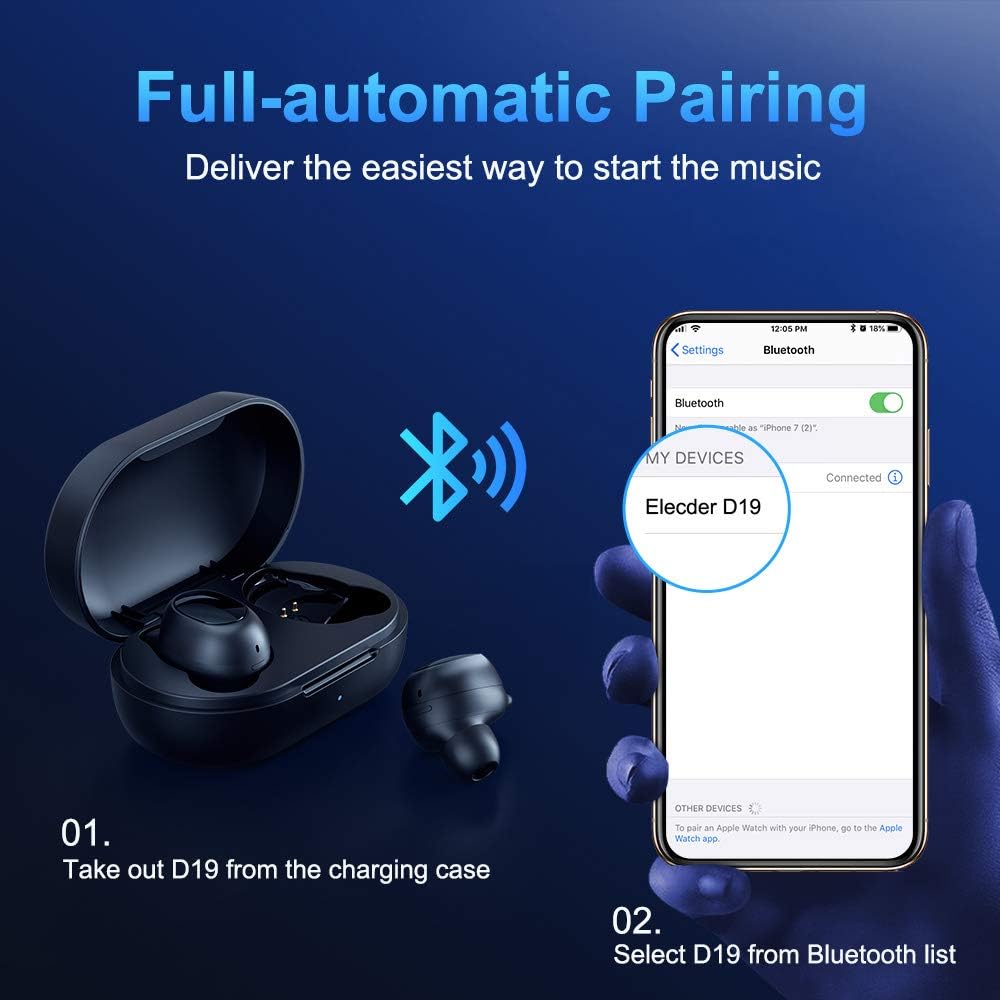
Figure 3.2: A visual guide demonstrating the automatic pairing process. The image shows the earbuds being taken out of the case and then the "Elecder D19" option appearing in a smartphone's Bluetooth settings for connection.
Efter den første parring opretter ørepropperne automatisk forbindelse til den sidst parrede enhed, når de tages ud af opladningsetuiet.

Figure 3.3: An illustration showing the stable Bluetooth connection between the ELECDER D19 earbuds and various smart devices, including smartphones and tablets.
4. Betjeningsvejledning
4.1 Sådan tager du ørepropperne på
For optimal sound quality and comfort, choose the ear tips that best fit your ears. The earbuds come with S, M, and L sizes. Insert the earbuds into your ears and gently rotate them to find a secure and comfortable fit. The ergonomic ear-fin design helps ensure stability during movement.
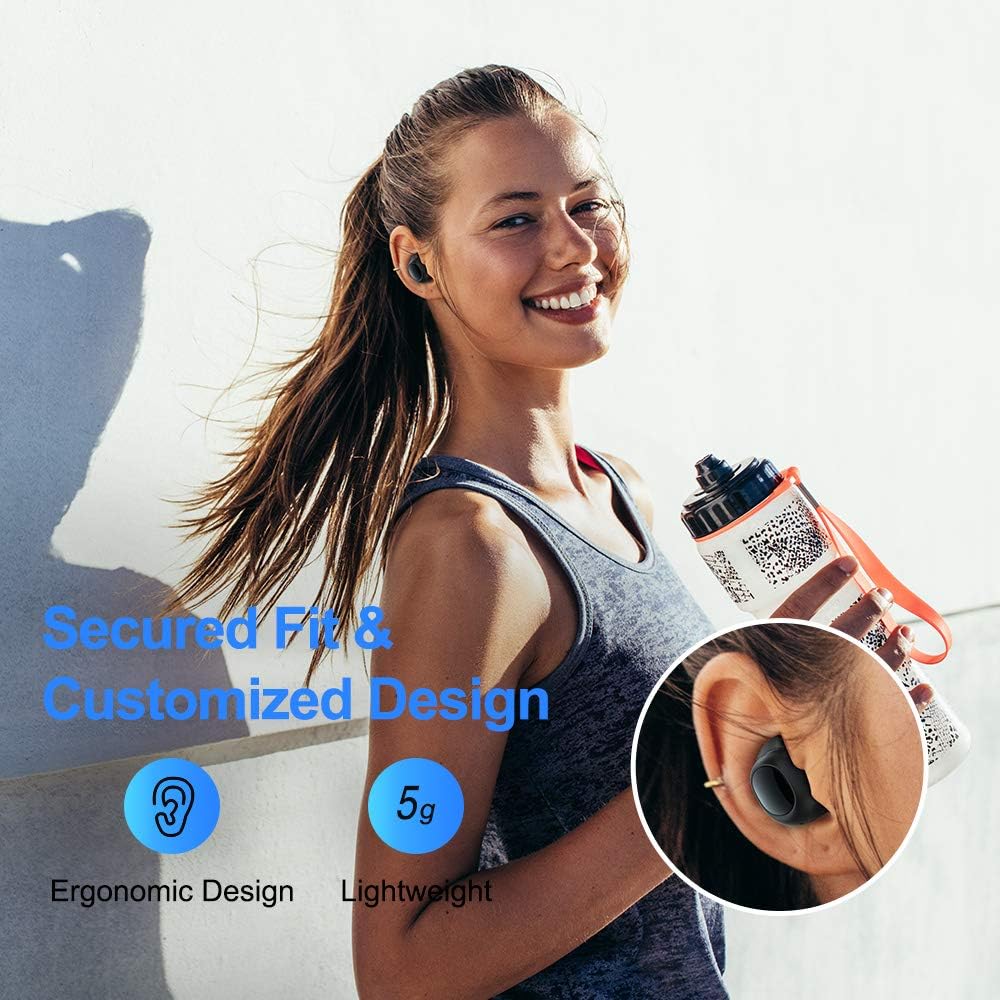
Figure 4.1: A person wearing the ELECDER D19 earbuds during a workout, demonstrating the secure and comfortable fit provided by the ergonomic design and customizable ear tips.
4.2 Mediekontrol
The ELECDER D19 earbuds feature physical buttons for media control. Specific button functions may vary slightly based on the device and operating system, but common controls include:
- Afspil/pause: Enkelt tryk på begge øretelefoner.
- Næste nummer: Dobbelttryk på den højre øreprop.
- Forrige nummer: Dobbelttryk på den venstre øreprop.
- Lydstyrke op: Tryk tre gange på den højre øreprop.
- Skrue ned for lyden: Triple press on the left earbud.
4.3 Opkaldshåndtering
Manage your calls directly from the earbuds:
- Besvar/afslut opkald: Enkelt tryk på begge øretelefoner.
- Afvis opkald: Tryk på en af øretelefonerne, og hold den nede i 2 sekunder.
- Aktiver stemmeassistent: Tryk og hold en af øretelefonerne nede i 3 sekunder (f.eks. Siri, Google Assistant).
5. Vedligeholdelse og pleje
Proper maintenance ensures the longevity and optimal performance of your ELECDER D19 earbuds.
5.1 Rengøring
- Rengør regelmæssigt ørepropperne og opladningsetuiet med en blød, tør og fnugfri klud.
- Fjern ørepropperne, og rengør dem med mild sæbe og vand. Tør dem derefter grundigt, inden de sættes på igen.
- Use a cotton swab or small brush to gently clean the charging contacts on both the earbuds and the case.
- Undgå at bruge slibende materialer, alkohol eller kemiske rengøringsmidler.
5.2 Vandtæthed (IPX7)
The ELECDER D19 earbuds are IPX7 waterproof, meaning they can withstand submersion in up to 1 meter of water for 30 minutes. This makes them suitable for protection against sweat, rain, and accidental splashes.

Figure 5.1: The ELECDER D19 earbuds shown with water droplets, illustrating their IPX7 waterproof rating, which protects them from sweat, rain, and splashes.
Note: The charging case is not waterproof. Ensure earbuds are dry before placing them back into the charging case.
5.3 Opbevaring
Når ørepropperne ikke er i brug, skal de opbevares i deres opladningsetui for at beskytte dem og holde dem opladet. Opbevar etuiet et køligt og tørt sted væk fra ekstreme temperaturer og direkte sollys.
6. Fejlfinding
Hvis du støder på problemer med dine ELECDER D19-ørepropper, kan du bruge følgende almindelige løsninger:
| Problem | Mulig årsag | Løsning |
|---|---|---|
| Øretelefoner parres ikke med enheden. | Bluetooth er slået fra på enheden; øretelefoner er ikke i parringstilstand; tidligere parrede enheder forstyrrer. | Ensure Bluetooth is enabled. Place earbuds back in case, then take them out to re-enter pairing mode. Forget "Elecder D19" from your device's Bluetooth list and re-pair. |
| Kun én øreprop virker. | Earbuds not paired with each other; low battery on one earbud. | Place both earbuds back into the charging case, close the lid, wait a few seconds, then open and take them out again. Ensure both earbuds are charged. |
| Ingen lyd eller lav lydstyrke. | Device volume too low; ear tips not properly sealed; debris in earbud nozzle. | Increase volume on your device. Adjust earbud position or try different sized ear tips for a better seal. Clean earbud nozzles. |
| Opladningsetuiet oplader ikke. | Faulty cable/charger; improper placement on wireless charger. | Try a different USB cable and power adapter. Ensure the case is correctly aligned on the wireless charging pad. |
| Bluetooth-forbindelsen er ustabil. | Interference; distance from device; low earbud battery. | Reduce distance between earbuds and device. Avoid environments with strong Wi-Fi or other Bluetooth signals. Ensure earbuds are fully charged. |
7. Specifikationer
Detailed technical specifications for the ELECDER D19 True Wireless Earbuds:
| Feature | Detalje |
|---|---|
| Modelnavn | ELECDER D19 |
| Forbindelsesteknologi | Trådløs (Bluetooth 5.0) |
| Bluetooth rækkevidde | 33 fod |
| Øreplacering | In Ear |
| Formfaktor | In Ear |
| Støjkontrol | Aktiv støjreduktion (CVC8.0) |
| Mikrofon | Inkluderet |
| Vandmodstandsniveau | IPX7 vandtæt |
| Batterilevetid (ørepropper) | Up to 4.5 hours (music) / 4 hours (calling) |
| Charging Case Additional Playtime | 18 timer |
| Opladningstid | Cirka 2 timer |
| Opladningsgrænseflade | Micro USB, Wireless Charging |
| Varens vægt | 1.92 ounces (total) / 5g (each earbud) |
| Produktdimensioner | 3.89 x 3.89 x 1.65 tommer |
| Kompatible enheder | iOS- og Android-smartphones |
| Materiale | Silikone (ørepropper) |
| Farve | Sort |

Figure 7.1: An infographic detailing the battery life of the ELECDER D19 earbuds and charging case, showing 4 hours for calls, 4.5 hours for music, and a total of 18 hours with the 500mAh charging case.
8. Garanti og support
ELECDER products are manufactured to high quality standards. For information regarding warranty coverage, technical support, or service inquiries, please refer to the contact information provided with your product packaging or visit the official ELECDER webwebsted.
For yderligere assistance kan du også kontakte den forhandler, hvor du købte produktet.


