1. Introduktion
This manual provides detailed instructions for the setup, operation, maintenance, and troubleshooting of your MYPIN Infrared Remote Control. This remote is specifically designed to work with MYPIN 4K Media Players, including models B07WPY8VKL and B07PGFCPTV.
Please read this manual thoroughly before using the remote control to ensure proper functionality and to maximize your user experience.
2. Pakkens indhold
- 1 x MYPIN Infrared Remote Control
Bemærk: AAA-batterier er ikke inkluderet og skal købes separat.
3. Opsætning
3.1 Batteriinstallation
- Find batterirummet på bagsiden af fjernbetjeningen.
- Skub batteridækslet nedad for at åbne det.
- Isæt to (2) AAA-batterier, og sørg for, at de positive (+) og negative (-) poler er korrekt justeret med markeringerne inde i batterirummet.
- Skub batteridækslet tilbage på plads, indtil det klikker sikkert.
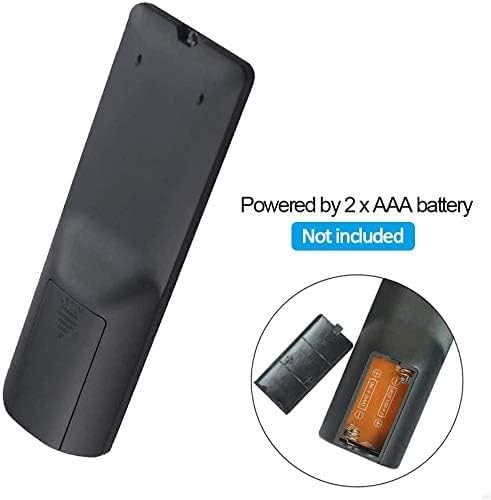
Figur 3.1: Battery installation for the MYPIN Infrared Remote Control. Ensure correct polarity when inserting two AAA batteries.
3.2 Kompatibilitet
This remote control is designed exclusively for MYPIN 4K Media Players. It is compatible with models such as B07WPY8VKL and B07PGFCPTV. It may not function correctly with other brands or models of media players.
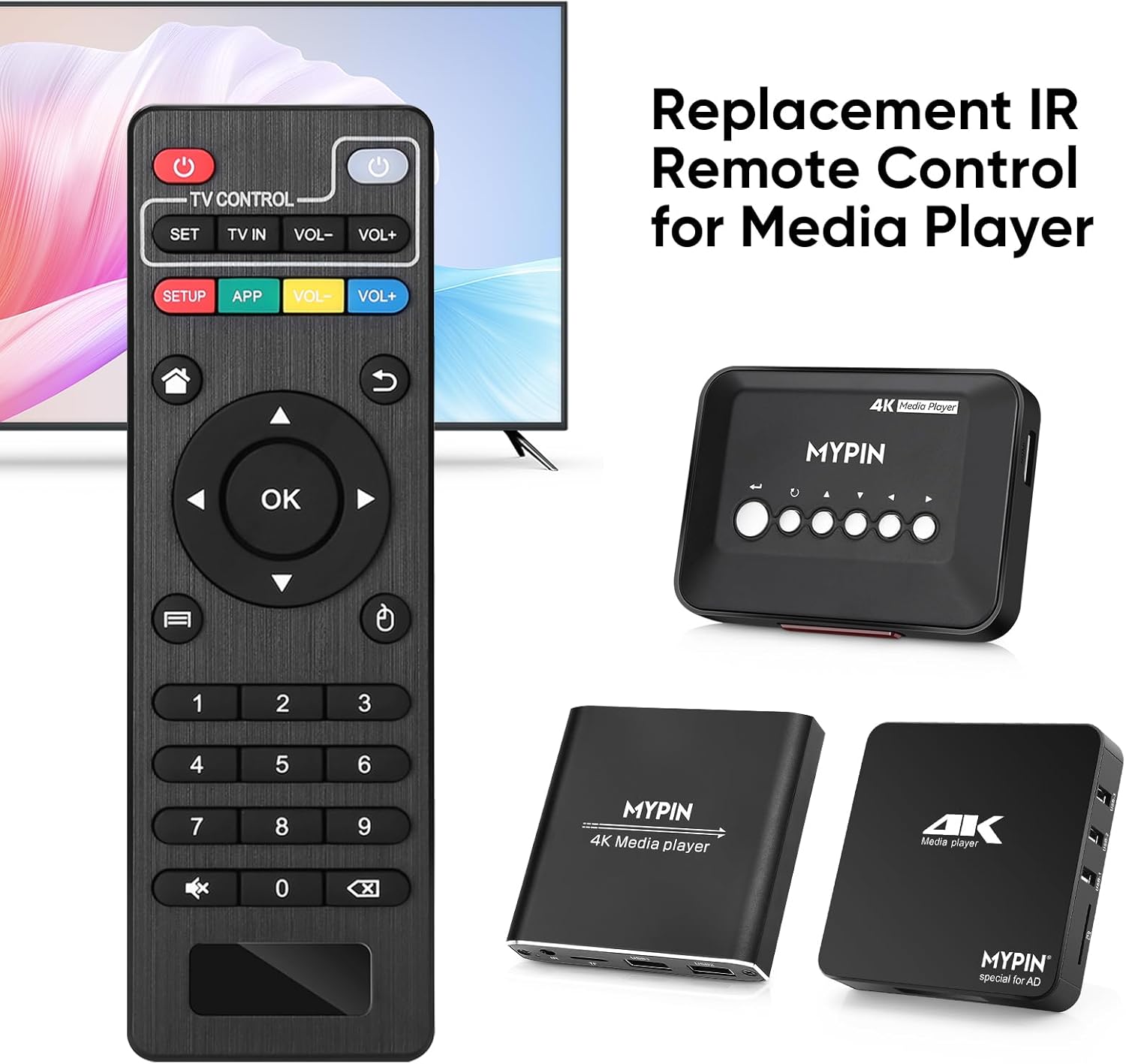
Figur 3.2: The MYPIN remote control shown with compatible MYPIN 4K Media Players.
3.3 Første tilslutning
The MYPIN Infrared Remote Control operates via infrared (IR) signals. No pairing process is required. Simply point the remote control directly at the IR receiver of your MYPIN 4K Media Player. Ensure there are no obstructions between the remote and the media player.

Figur 3.3: Using the MYPIN remote control with an optional IR cable for discreet placement of the media player.
4. Betjeningsvejledning
The MYPIN Infrared Remote Control features a standard layout for intuitive control of your media player. Below is a guide to its primary functions:

Figur 4.1: Key functional areas of the MYPIN Remote Control.
4.1 Knapfunktioner
- Power Button (Red, Top Left): Turns the media player on or off.
- TV Control Section (Top Row):
- TV Learning Button (1): Used to program basic TV functions (e.g., TV Power, Volume). Refer to your TV's manual for learning remote functions.
- SÆT: Used for TV learning mode.
- TV IN: Switches TV input source.
- VOL- / VOL+: Justerer TV-lydstyrken.
- SETUP / APP / VOL- / VOL+ (Colored Buttons): These buttons provide quick access to specific media player functions or applications. Their exact function may vary depending on the media player's software.
- Hjem-knap (husikon): Returns to the main menu or home screen of the media player.
- Return/Back Button (Arrow Icon): Navigerer tilbage til den forrige skærm eller menu.
- Direction Keys (2 - Up, Down, Left, Right): Navigates through menus and content. When playing videos or music, Up/Down typically selects previous/next track, and Left/Right performs fast backward/forward.
- OK-knap (midt): Confirms selections or plays content.
- Menu Key (3 - Three Horizontal Lines Icon): Accesses context-sensitive menus or playback options.
- Nummertastatur (0-9): Used for direct input of numbers, such as channel selection or specific menu options.
- Mute Button (Crossed Speaker Icon): Mutes or unmutes the media player's audio.
- Context Menu Button (Box with Arrow Icon): Opens additional options or settings.

Figur 4.2: Accessing playback options using the Menu key on the MYPIN remote control.
5. Vedligeholdelse
5.1 Udskiftning af batteri
When the remote control's performance degrades (e.g., reduced range, unresponsive buttons), it is likely time to replace the batteries. Follow the battery installation steps in Section 3.1 to replace the two AAA batteries.
5.2 Rengøring
For at rengøre fjernbetjeningen skal du forsigtigt tørre dens overflade af med en blød, tør klud. Ved genstridigt snavs skal du let tørre den af.ampen the cloth with water or a mild, non-abrasive cleaner. Avoid using harsh chemicals or excessive moisture, as these can damage the remote's electronics.
5.3 Opbevaring
Opbevar fjernbetjeningen et køligt, tørt sted væk fra direkte sollys og ekstreme temperaturer. Hvis fjernbetjeningen ikke skal bruges i længere tid, anbefales det at fjerne batterierne for at forhindre lækage og potentiel skade.
6. Fejlfinding
- Remote is unresponsive:
- Sørg for, at nye AAA-batterier er isat korrekt.
- Point the remote directly at the media player's IR receiver.
- Remove any obstructions between the remote and the media player.
- Check the operating distance; the remote has an infrared range of approximately 7 meters.
- If the remote initially seems unresponsive after battery installation, allow a short period for it to initialize, as some users have reported spontaneous functionality after a delay.
- Knapper udfører ikke forventede funktioner:
- Verify that the remote is compatible with your specific MYPIN media player model.
- Some buttons (e.g., SETUP, APP) may have functions determined by the media player's software and may not be universally assigned.
- TV Control buttons not working:
- Ensure you have successfully programmed the TV Learning Button functions according to your TV's instructions.
7. Specifikationer
| Feature | Detalje |
|---|---|
| Forbindelsesteknologi | Infrarød (IR) |
| Kompatible enheder | MYPIN media players (e.g., B07WPY8VKL, B07PGFCPTV) |
| Maks. antal understøttede enheder | 1 (for media player control) |
| Speciel funktion | Ergonomisk design |
| Strømkilde | 2 x AAA batterier (medfølger ikke) |
| Infrarød afstand | Op til 7 meter |
| Infrarød vinkel | 30 grader |
| Varens vægt | 1.13 ounce |
| Pakkedimensioner | 5.43 x 1.81 x 0.71 tommer |
| Modelnummer | B08CDNZMJG |
8. Garantioplysninger
MYPIN products are manufactured to high-quality standards. For specific warranty details regarding your remote control, please refer to the documentation included with your MYPIN 4K Media Player or visit the official MYPIN webwebsted. Gem din købskvittering som købsbevis i tilfælde af garantikrav.
9. Support
If you encounter any issues not covered in this manual or require further assistance, please contact MYPIN customer support through the retailer where you purchased the product or visit the official MYPIN support webwebsted for kontaktoplysninger.


