1. Introduktion
This manual provides detailed instructions for the installation, operation, and maintenance of your Imou Bullet 3 5MP/3K Outdoor Camera. Please read this manual thoroughly before using the product to ensure proper setup and functionality. Keep this manual for future reference.
2. Produktet er slutview
The Imou Bullet 3 is a high-performance outdoor security camera designed for reliable surveillance. It features 5-megapixel (3K) resolution, color night vision, Wi-Fi 6 connectivity, and an IP67 weather-resistant rating, making it suitable for various outdoor environments.
Nøglefunktioner:
- 5MP/3K Ultra HD Resolution for clear and detailed imaging.
- Color Night Vision for enhanced visibility in low-light conditions.
- Wi-Fi 6 support for stable and efficient wireless connection.
- IP67 Weatherproof rating for outdoor durability.
- Human and vehicle detection for accurate alerts.

Figur 2.1: Forside view of the Imou Bullet 3 Outdoor Camera, showing the lens, two antennas, and mounting base.
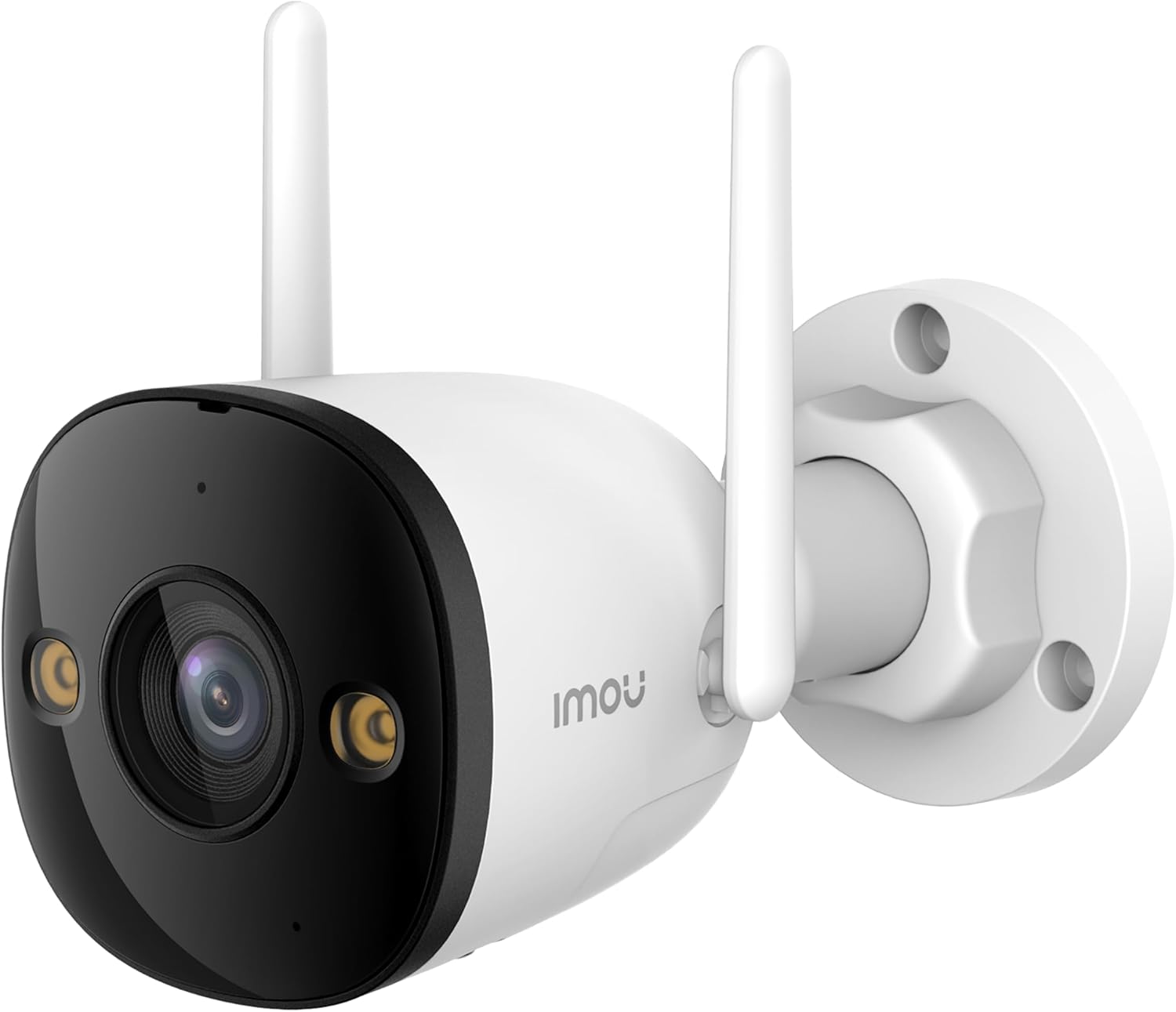
Figure 2.2: The Imou Bullet 3 camera, highlighting the Imou brand logo on its side.

Figure 2.3: Illustrates the camera's 3K UHD resolution capability, providing clear and detailed images.

Figure 2.4: Depicts the IMOU SENSE™ precision AI chip, which powers advanced features like detection.
3. Opsætning og installation
Before installation, ensure you have all necessary components: the Imou Bullet 3 camera, power adapter, mounting screws, and a drilling template (if provided). It is recommended to test the camera's functionality and Wi-Fi signal strength at the desired installation location before permanent mounting.
3.1 Montering af kameraet
- Vælg et passende udendørs sted med en klar view af det område, du ønsker at overvåge.
- Use the provided drilling template to mark the screw holes on the wall or ceiling.
- Bor huller og isæt vægankre om nødvendigt.
- Fastgør kameraets monteringsbase til overfladen med skruerne.
- Juster kameravinklen efter behov.
3.2 Tænd og tilslutning
Connect the camera to a power source using the provided power adapter. The camera supports both Wi-Fi and Power over Ethernet (PoE) connections for flexible installation.
- Wi-Fi-forbindelse: Power on the camera and follow the instructions in the Imou Life app to connect it to your Wi-Fi network.
- PoE-forbindelse: If your network supports PoE, connect an Ethernet cable from your PoE-enabled router or switch directly to the camera. This provides both power and data through a single cable.
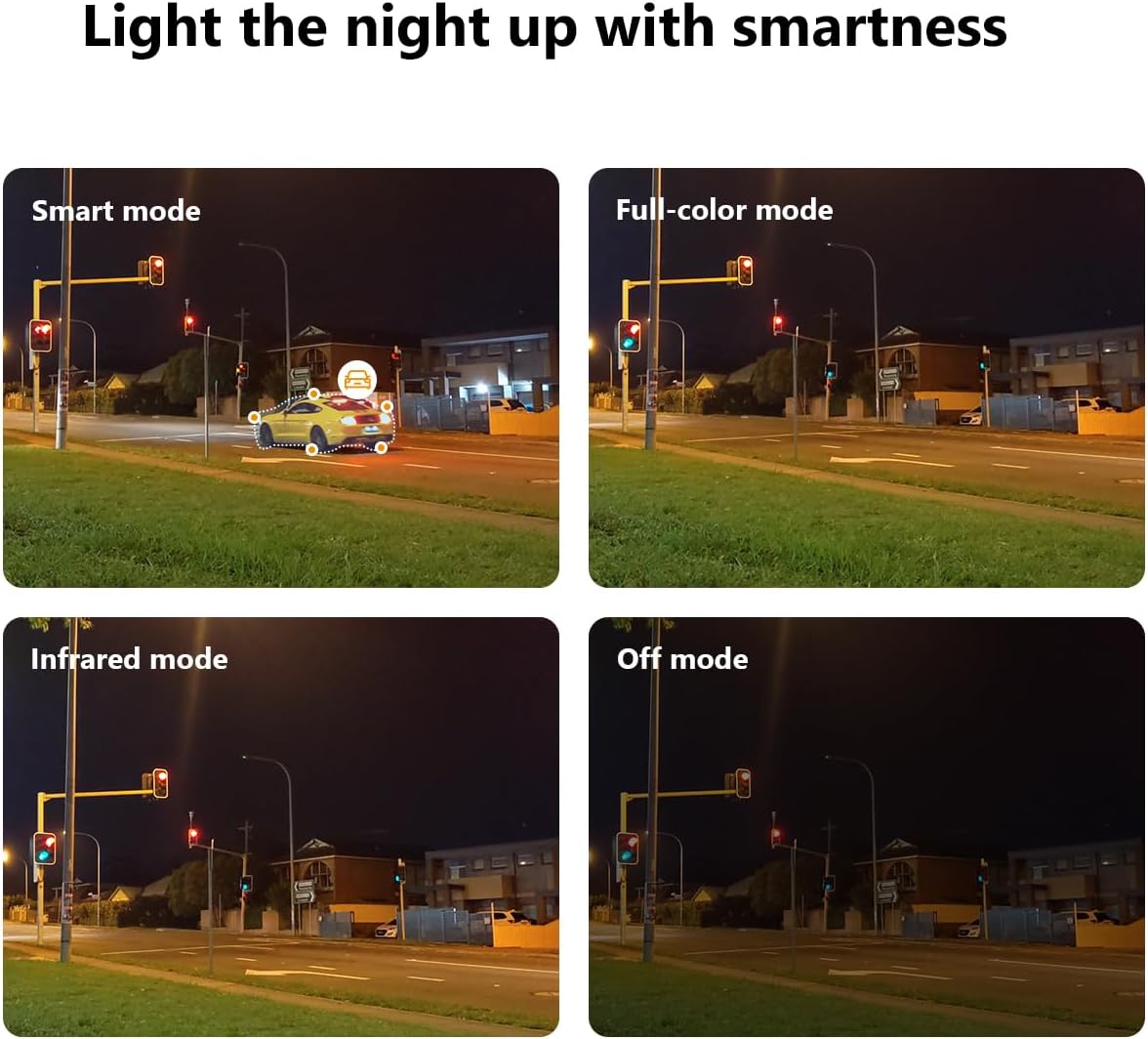
Figure 3.1: Illustrates the two primary connection methods: Wi-Fi for wireless setup and PoE for combined power and data via Ethernet cable.
4. Betjeningsvejledning
The Imou Bullet 3 camera offers various features to enhance your security monitoring. All advanced settings and live viewing are accessible through the Imou Life mobile application.
4.1 Nattesynstilstande
The camera provides multiple night vision modes to suit different lighting conditions:
- Smart Mode: Skifter automatisk mellem infrarødt og fuldfarvet nattesyn baseret på registreret bevægelse.
- Fuldfarvetilstand: Bruger indbyggede spotlights til at give farvevideo, selv i fuldstændig mørke.
- Infrarød tilstand: Uses infrared LEDs for black and white video in low light, conserving power.
- Fra-tilstand: Disables night vision features.

Figure 4.1: Comparison of the camera's night vision capabilities, including Smart, Full-color, Infrared, and Off modes.
4.2 Customizable Detection Zone
You can define specific areas within the camera's field of view for motion detection. This helps reduce false alarms from irrelevant areas.
- Open the Imou Life app and select your camera.
- Navigate to the detection settings.
- Draw or select the desired detection zones on the live view.
- Gem dine indstillinger.

Figur 4.2: Et example of a customizable detection zone, highlighted over a pool area to focus surveillance on specific regions.
4.3 Deterring Unwelcome Visitors
The camera is equipped with features to actively deter intruders, such as a built-in spotlight and siren. These can be triggered automatically upon detection or manually through the app.

Figure 4.3: The Imou camera with its integrated spotlights activated, designed to deter intruders and provide clear night vision.
4.4 Planlægning
You can set up schedules for when the camera's detection features are active. This allows you to customize surveillance based on your daily routine.
- In the Imou Life app, go to the camera settings.
- Find the 'Detection Schedule' option.
- Set specific times and days for motion detection and alerts to be active.

Figure 4.4: A smartphone screen displaying the detection scheduling interface within the Imou Life app, allowing users to set active surveillance times.
5. Vedligeholdelse
Regular maintenance ensures the longevity and optimal performance of your Imou Bullet 3 camera.
5.1 Rengøring
- Tør kameralinsen og huset af med jævne mellemrum med en blød klud.amp klud til at fjerne støv og snavs.
- Do not use harsh chemicals or abrasive cleaners, as they may damage the camera's finish or lens coating.
5.2 Miljøhensyn
- Ensure the camera's power connection is secure and protected from moisture.
- While IP67 rated, avoid submerging the camera in water or exposing it to extreme pressure washing.
6. Fejlfinding
If you encounter issues with your Imou Bullet 3 camera, refer to the following common problems and solutions:
6.1 Ingen strøm/Kamera offline
- Tjek strøm: Sørg for, at strømadapteren er korrekt tilsluttet kameraet og en fungerende stikkontakt.
- Wi-Fi-forbindelse: Bekræft, at dit Wi-Fi-netværk er aktivt, og at kameraet er inden for rækkevidde. Genstart din router, hvis det er nødvendigt.
- Nulstil: If the issue persists, locate the reset button (refer to the camera's physical diagram) and press it for 10 seconds to restore factory settings. Reconfigure the camera afterward.
6.2 Dårlig billedkvalitet
- Ren linse: Rengør kameralinsen som beskrevet i afsnittet Vedligeholdelse.
- Netværksstabilitet: Ensure a stable internet connection. Poor Wi-Fi signal can affect video streaming quality.
- Belysning: Juster kameraets placering for at undgå direkte genskin eller utilstrækkelig belysning.
6.3 Problemer med bevægelsesdetektion
- Detektionszone: Verify that the detection zones are correctly configured in the Imou Life app.
- Følsomhed: Juster indstillingerne for bevægelsesdetektionsfølsomhed i appen.
- Forhindringer: Sørg for, at der ikke er nogen fysiske forhindringer, der blokerer kameraets view.
7. Specifikationer
| Specifikation | Værdi |
|---|---|
| Mærke | Imou |
| Modelnummer | IPC-S3EP-5M0WE(Bullet3 5MP) |
| Forbindelsesteknologi | Trådløs (Wi-Fi) |
| Indendørs/Udendørs brug | Udendørs |
| Farve | Flerfarvet |
| Materiale | Plast |
| Voltage | 12 volt |
| Strømforbrug | 5.3 watt |
| Varedimensioner (L x B x H) | 14.77 x 7.42 x 7.56 cm |
| Varens vægt | 560 g |
| Anbefalede anvendelser | Video sensor, human and vehicle detection |
| Speciel funktion | Transportabel |
| Antal genstande | 1 |
| Antal kanaler | 4 |
8. Garanti og support
For garantioplysninger og teknisk support henvises til den officielle Imou-side. webwebstedet eller kontakt deres kundeservice. Gem din købskvittering som købsbevis i tilfælde af garantikrav.
For yderligere hjælp, besøg: www.imoulife.com


