1. Introduktion
Thank you for choosing the Lepro Smart LED Strip Light. This manual provides essential information for the safe and efficient use of your new LED strip light. Please read these instructions carefully before installation and operation, and retain them for future reference.
2. Sikkerhedsoplysninger
- Sørg for, at strømforsyningen er afbrudt før installation eller vedligeholdelse.
- Driftsvoltage is 12V. Use only the provided power adapter.
- This product is IP65 waterproof, suitable for both indoor and outdoor use. However, the power adapter and controller are not waterproof and must be protected from moisture.
- Do not bend the LED strip sharply or apply excessive force, as this may damage the circuit.
- Opbevares utilgængeligt for børn.
- The LED strip is designed with short-circuit protection for enhanced safety.
- Avoid direct eye exposure to the light source for prolonged periods.
3. Pakkens indhold
Bekræft at alle komponenter er til stede i pakken:
- 5m RGB IP65 Waterproof LED Strip
- WiFi-controller
- Power Adapter (European Adapter 12V 1.5A)
- Fjernbetjening
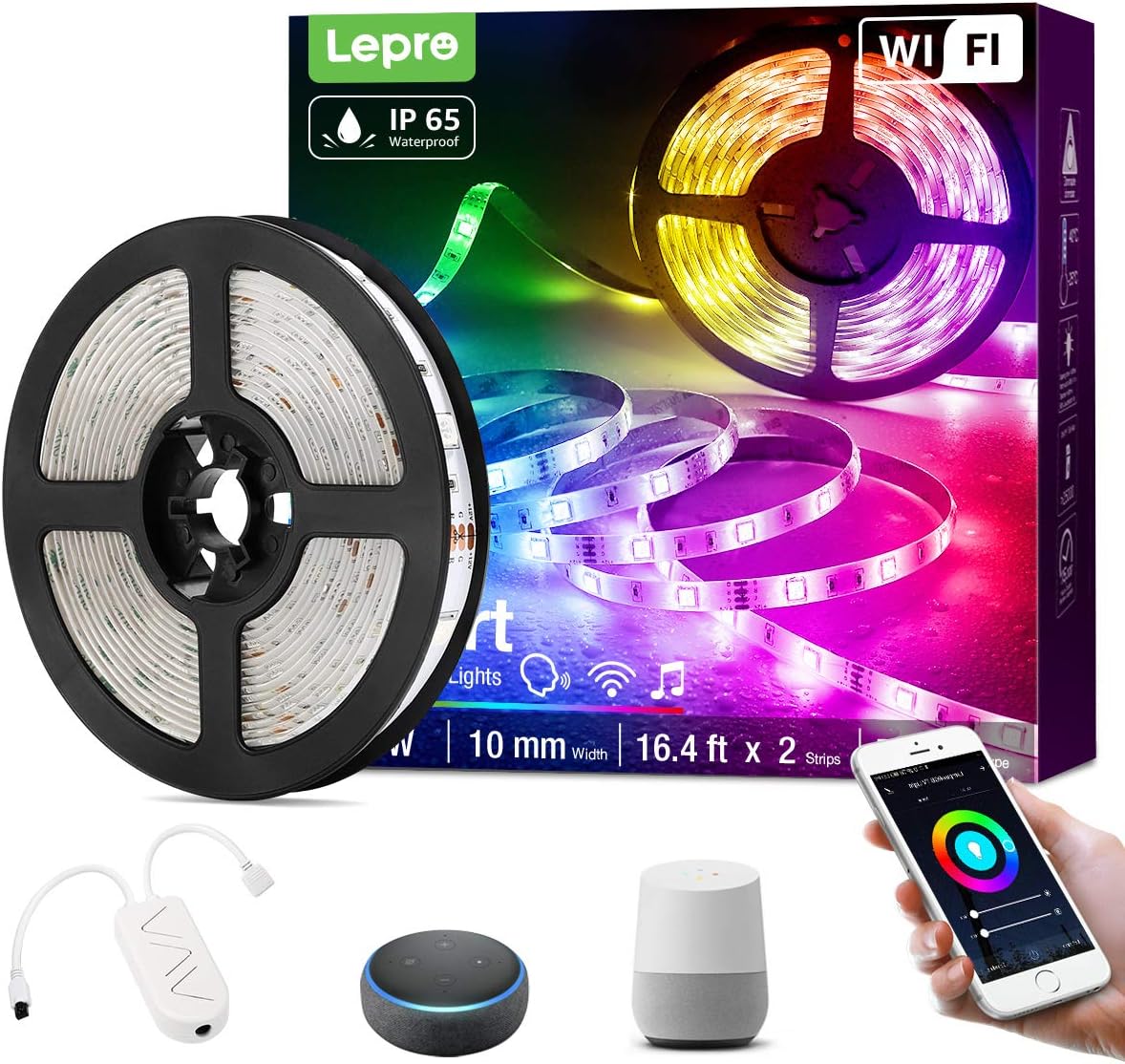
Billede 3.1: Overview of the Lepro Smart LED Strip Light and its included components, such as the LED strip reel, WiFi controller, and power adapter.
4. Produktfunktioner
- Smart kontrol: Connects via WiFi (2.4 GHz only) for stable control.
- Stemmestyring: Compatible with Amazon Alexa and Google Assistant, no additional hub required.
- App funktionalitet: Features include countdown, automatic execution, timer function for preset scenarios, and various scene modes.
- Dimmable RGB: Offers a wide range of colors and adjustable brightness.
- IP65 vandtæt: Designed for versatile indoor and outdoor decoration.
- Høj lysstyrke: Equipped with 30 LEDs per meter for enhanced illumination.
- Sikker at røre ved: Operates at a low 12V, ensuring minimal heat and safety.

Billede 4.1: The IP65 waterproof LED strip installed in an outdoor setting, demonstrating its suitability for various environments.

Billede 4.2: Top image shows a hand safely holding the illuminated LED strip. Bottom image provides a close-up view of the IP65 waterproof coating on the LED strip.
5. Installationsvejledning
- Rengør overfladen: Ensure the installation surface is clean, dry, and smooth.
- Mål og skær (valgfrit): If necessary, measure the desired length and cut the LED strip only at the designated cutting marks (usually indicated by a scissor icon or copper pads).
- Skræl og stick: Remove the adhesive backing from the LED strip and firmly press it onto the desired surface.
- Forbind komponenter: Connect the LED strip to the WiFi controller, and then connect the controller to the power adapter.
- Tilslut: Sæt strømadapteren i en almindelig stikkontakt.
6. Betjeningsvejledning
6.1 Basic Control with Controller Button
After plugging in the strip, you can use the physical button on the controller to:
- Turn the lights ON/OFF.
- Cycle through different scene modes.
- Reset the device (usually by holding the button for several seconds).
6.2 Smart Control via Lepro LampUX App
For full functionality, download the "Lepro LampUX" app from your smartphone's app store.
- Download app: Søg efter "Lepro LampUX" and install it.
- Registrer/Log ind: Opret en konto eller log ind.
- Tilføj enhed: Follow the in-app instructions to add your LED strip light. Ensure your phone is connected to a 2.4 GHz WiFi network during setup.
- Kontrollere: Once connected, you can control power, color, brightness, set timers, schedules, and customize scene modes directly from the app.

Billede 6.1: A smartphone screen showing the Lepro LampUX app interface, including a color wheel for light customization and options for smart control. The image also depicts a modern home with LED strip lighting.

Billede 6.2: A collage of smartphone screens illustrating various features of the Lepro LampUX app, such as timer settings, scheduling, color options, smart modes, scene modes, and DIY customization.
6.3 Voice Control with Alexa/Google Assistant
To enable voice control, link your Lepro LampUX account with Amazon Alexa or Google Assistant:
- Open Smart Assistant App: Open the Amazon Alexa or Google Home app on your smartphone.
- Aktivér færdighed/handling: Søg efter the "LE Lampux" skill (for Alexa) or action (for Google Assistant) and enable it.
- Tilknyt konto: Follow the prompts to link your Lepro LampUX account.
- Opdag enheder: Once linked, ask your smart assistant to discover new devices.
- Stemmekommandoer: You can now use voice commands such as "Alexa, turn on the bedroom light" or "Hey Google, change the strip light to purple."

Billede 6.3: A visual guide on a smartphone screen demonstrating the process of linking the Lepro LampUX app with Amazon Alexa, showing the steps to enable the skill and connect accounts.

Billede 6.4: A family enjoying LED strip lighting in their living room, with smart speakers visible, illustrating the convenience of voice control with commands like "Alexa, change the strip light to purple."
7. Vedligeholdelse
- Rensning: Gently wipe the LED strip with a soft, dry cloth. Do not use abrasive cleaners or solvents.
- Inspektion: Periodically check the strip and connections for any signs of damage or wear.
- Opbevaring: If storing the strip for an extended period, ensure it is clean, dry, and coiled loosely to prevent damage.
8. Fejlfinding
| Problem | Mulig årsag | Løsning |
|---|---|---|
| LED-striben lyser ikke. | Ingen strøm, løs forbindelse, defekt adapter. | Kontroller stikkontakten, sørg for at alle tilslutninger er sikre, og prøv en anden stikkontakt. |
| Kan ikke oprette forbindelse til WiFi. | Incorrect WiFi band (not 2.4 GHz), incorrect password, too far from router. | Ensure your router is broadcasting a 2.4 GHz signal. Verify WiFi password. Move the strip closer to the router. Reset the controller and try again. |
| Stemmestyring virker ikke. | Skill/Action not enabled, account not linked, incorrect commands. | Check if the "LE Lampux" skill/action is enabled and your account is linked in the Alexa/Google Home app. Use precise commands. |
| Colors are inconsistent or incorrect. | Damaged section of the strip, connection issue. | Inspect the strip for physical damage. Ensure connections are firm. |
9. Specifikationer
| Attribut | Detalje |
|---|---|
| Mærke | Lepro |
| Modelnummer | PR904116-RGB-WP-EU |
| Produktdimensioner | 16.5 x 16.5 x 6.5 cm (packaged) |
| Varens vægt | 320 gram |
| Længde | 5 meter |
| Farve | RGB |
| Vandtæt vurdering | IP65 (LED Strip only) |
| Voltage | 12 volt |
| Magt | 24 watt |
| Pære type | LED |
| Forbindelse | WiFi (2.4 GHz only) |
| Kompatibilitet | Amazon Alexa, Google Assistant |
| Inkluderede komponenter | LED Strip, WiFi Controller, Remote Control, Power Adapter |
10. Garanti og support
For warranty information or technical support, please refer to the documentation included with your purchase or visit the official Lepro website. Contact details for customer service are typically available on the product packaging or the brand's online support page.


