1. Introduktion
Thank you for choosing the BIOS Living Digital Pedometer 335FC. This compact and smart device is designed to help you maintain a healthy and active lifestyle by accurately tracking your daily physical activity.
It counts your steps walked, distance traveled, and calories burned, all displayed on a large, easy-to-read LCD screen. The pedometer is designed for convenience, easily clipping to your belt or waistband, and offers both 12/24 hour time formats and imperial/metric unit options.
2. Sikkerhedsoplysninger
- Hold enheden væk fra vand og overdreven fugt.
- Do not expose the pedometer to extreme temperatures (hot or cold).
- Undgå at tabe eller udsætte enheden for kraftige stød.
- Do not attempt to disassemble or repair the pedometer yourself. Refer to qualified service personnel.
- Opbevar batterier utilgængeligt for børn. Søg omgående læge ved indtagelse.
- Bortskaf batterier og enheden i henhold til lokale regler.
3. Produktet er slutview
Familiarize yourself with the components of your BIOS Living Digital Pedometer 335FC.

Figur 3.1: Forside View of Pedometer
This image shows the front of the BIOS Living Digital Pedometer 335FC. It features a prominent LCD screen displaying "23 STEP" and three buttons below it: "RESET", "SET", and "MODE". The device is white with a blue accent around the screen, and "BIOS living" is printed at the top.
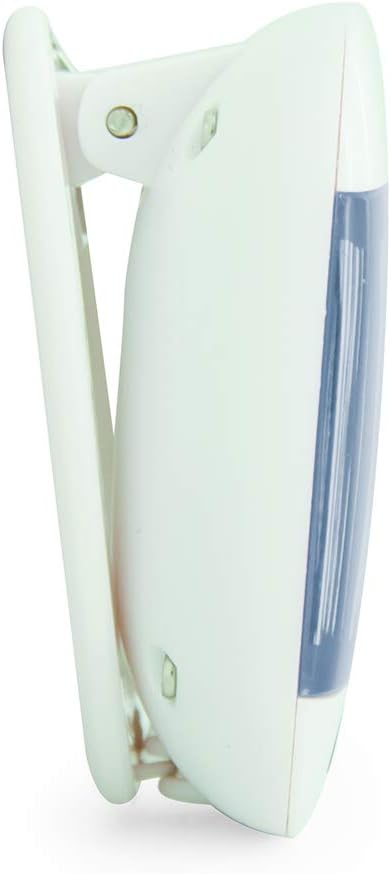
Figur 3.2: Side View with Belt Clip
Dette billede viser et sideprofile of the BIOS Living Digital Pedometer 335FC. It highlights the integrated white clip mechanism designed for attaching the pedometer to clothing, such as a belt or waistband. The blue accent on the front is visible from this angle.

Figur 3.3: Tilbage View med batterirum
This image shows the back of the BIOS Living Digital Pedometer 335FC. It clearly displays the battery compartment cover, which can be opened to insert or replace the battery. The back is white with some regulatory markings and the brand "HAPTIME" embossed.
Nøglekomponenter:
- LCD-skærm: Stor skærm for nem viewing of steps, distance, calories, and time.
- Genstarts knap: Used to clear current readings or reset settings.
- SET -knap: Used to confirm settings or enter setting mode.
- MODE knap: Used to cycle through different display modes (Steps, Distance, Calories, Time).
- Bælteklips: Integrated clip for secure attachment to clothing.
- Batterirum: Placeret på bagsiden til installation af batteri.
4. Opsætning
4.1 Batteriinstallation
Your pedometer comes with a battery. Follow these steps to install it:
- Locate the battery compartment on the back of the pedometer (refer to Figure 3.3).
- Åbn forsigtigt batteridækslet med en lille skruetrækker eller mønt.
- Insert the provided battery, ensuring the correct polarity (+/-) as indicated inside the compartment.
- Sæt batterirummets dæksel på igen og fastgør det.
4.2 Initial Settings (Time & Units)
After battery installation, the device may prompt you to set the time and units. If not, press and hold the SÆT knappen for at gå ind i indstillingstilstand.
- Tidsformat: The display will flash "12H" or "24H". Use the MODE button to toggle between 12-hour and 24-hour formats. Press SÆT for at bekræfte.
- Indstil tid: Timecifret vil blinke. Brug MODE knappen for at justere timetallet. Tryk på SÆT for at bekræfte. Gentag i flere minutter.
- Enhedssystem: The display will flash "KM" (metric) or "MI" (imperial). Use the MODE button to select your preferred unit system. Press SÆT for at bekræfte.
- Stride Length (for distance accuracy): If prompted, enter your average stride length. This can be estimated by walking 10 steps and dividing the total distance by 10. Use MODE at justere og SÆT for at bekræfte.
- Weight (for calorie accuracy): If prompted, enter your weight. Use MODE at justere og SÆT for at bekræfte.
The pedometer is now ready for use.
5. Betjeningsvejledning
5.1 Wearing the Pedometer
For accurate readings, clip the pedometer securely to your belt or waistband, preferably near your hip. Ensure it is positioned vertically.
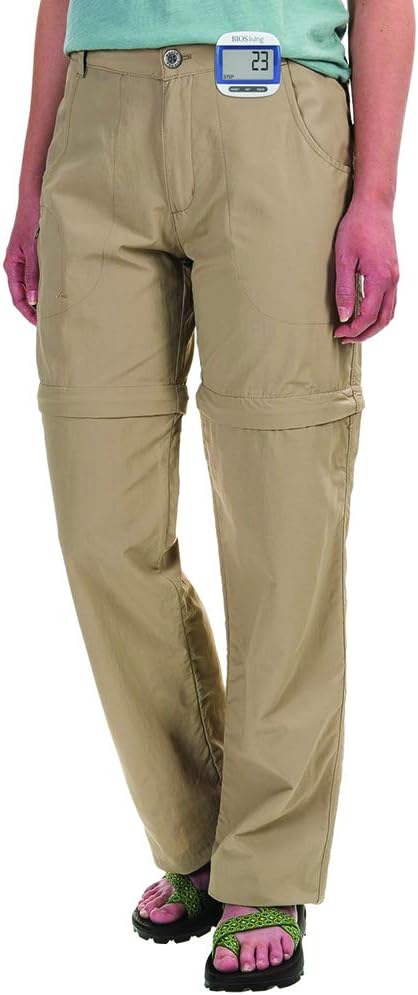
Figure 5.1: Correct Pedometer Placement
This image shows a person wearing the BIOS Living Digital Pedometer 335FC. The pedometer is clipped to the waistband of their khaki pants, positioned on the side of their hip, demonstrating the recommended placement for accurate step counting.
5.2 Skærmtilstande
Tryk på MODE knappen for at skifte mellem følgende visningstilstande:
- Trin: Viser det samlede antal taget skridt.
- Afstand: Displays the total distance traveled (in KM or MI).
- Kalorier: Displays the estimated calories burned (in KCAL).
- Tid: Viser det aktuelle klokkeslæt.

Figure 5.2: Time Display Mode
This image shows the BIOS Living Digital Pedometer 335FC displaying the time. The large LCD screen shows "2:34 P", indicating 2:34 PM. A small clock icon is visible on the bottom left of the display.

Figure 5.3: Distance Display Mode
This image shows the BIOS Living Digital Pedometer 335FC displaying distance. The screen shows "1.25" with "DIST" and "KM" below it, indicating a distance of 1.25 kilometers.

Figure 5.4: Calories Display Mode
This image shows the BIOS Living Digital Pedometer 335FC displaying calories burned. The screen shows "4.87" with "KCAL" below it, indicating 4.87 kilocalories.
5.3 Nulstilling af data
To reset your daily steps, distance, and calorie count to zero, press and hold the NULSTIL button until the display clears. This is typically done at the start of a new day or activity.
6. Vedligeholdelse
6.1 Rengøring
Tør skridttælleren af med en blød, tør klud. Brug ikke slibende rengøringsmidler, og nedsænk ikke enheden i vand.
6.2 Udskiftning af batteri
When the display becomes dim or the device stops responding, it's time to replace the battery. Follow the battery installation steps in Section 4.1.
7. Fejlfinding
| Problem | Mulig årsag | Løsning |
|---|---|---|
| Skærmen er tom eller svag. | Lavt eller dødt batteri. | Udskift batteriet (se afsnit 6.2). |
| Unøjagtigt antal skridt. | Incorrect placement of pedometer; irregular walking motion; incorrect stride length setting. | Ensure pedometer is clipped securely and vertically to your belt/waistband. Walk naturally. Re-enter stride length in settings (Section 4.2). |
| Knapperne reagerer ikke. | Battery issue; temporary software glitch. | Replace battery. If problem persists, try removing and reinserting the battery to perform a hard reset. |
| Kan ikke ændre indstillinger. | Not in setting mode. | Tryk og hold på SÆT knappen for at gå ind i indstillingstilstand. |
8. Specifikationer
| Feature | Detalje |
|---|---|
| Modelnummer | 335FC |
| Farve | Blå |
| Materiale | Plast |
| Dimensioner (L x B x H) | Ca.. 5 x 2 x 2 cm |
| Vægt | Ca. 31.81 g |
| Vise | Stor LCD |
| Funktioner | Steps, Distance, Calories, Time |
| Tidsformat | 12/24 timers valgbar |
| Enheder | Imperial/Metric selectable |
| Batteri inkluderet | Ja |
| Batterilevetid | 24 Hours (Note: This might refer to continuous operation or a specific test condition, typical pedometer battery life is much longer) |
| UPC | 057475335632 |
9. Garanti og support
This BIOS Living Digital Pedometer 335FC is covered by a manufacturer's warranty against defects in materials and workmanship. Please refer to the warranty card included with your purchase for specific terms and conditions, including the warranty period and how to make a claim.
For technical support, troubleshooting assistance, or warranty inquiries, please contact BIOS Living customer service. Contact information can typically be found on the product packaging or the manufacturer's official webwebsted.
Gem venligst din købsbevis af garantihensyn.


