1. Introduktion
The DSC PG9985 PowerSeries Neo Wireless PowerG Flood Detector is designed to provide early warning of water leaks and potential flooding in residential and commercial environments. This device utilizes PowerG wireless technology for secure and reliable communication with compatible DSC PowerSeries Neo security systems. It is an essential component for protecting property from water damage by detecting the presence of water at critical locations.
2. Sikkerhedsoplysninger
Please read and understand all safety instructions before installing and operating this device. Failure to follow these instructions may result in damage to the product, property, or personal injury.
- Batterihåndtering: Use only the specified battery type. Do not mix old and new batteries. Dispose of used batteries according to local regulations.
- Placering: Ensure the detector is placed in an area where it will not be exposed to extreme temperatures, direct sunlight, or excessive humidity, unless specifically designed for such conditions.
- Opretholdelse: Forsøg ikke at reparere eller ændre enheden. Overlad al service til kvalificeret personale.
- Vandeksponering: While designed to detect water, the main unit itself is not waterproof and should not be submerged. Only the sensor probe is designed for direct contact with water.
3. Pakkens indhold
Bekræft at alle varer er til stede i pakken:
- DSC PG9985 Wireless Flood Detector Main Unit
- Wired Flood Sensor Probe
- Monteringsudstyr (skruer, ankre)
- Installationsvejledning (dette dokument)
4. Produktet er slutview
The DSC PG9985 consists of a main wireless transmitter unit and a wired flood sensor probe. The main unit communicates with your security system, while the probe detects water.
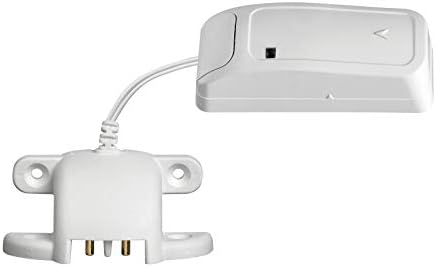
Figur 1: DSC PG9985 Wireless Flood Detector, showing the main unit connected to the wired sensor probe. The main unit is a compact white rectangular device, and the probe is a flat, white component with two metal contacts at its base, designed to be placed on a surface.

Figur 2: DSC PG9985 Wireless Flood Detector in a vertical orientation, highlighting the connection between the main unit and the wired sensor probe. This view emphasizes the compact design of both components.
4.1. komponenter
- Hovedenhed: Houses the wireless transmitter, battery, and status indicator.
- Wired Flood Sensor Probe: Contains two metal contacts that detect the presence of water. It connects to the main unit via a cable.
- Status Indicator (LED): Provides visual feedback on the device's status (e.g., alarm, low battery, communication).
- Monteringshuller: Located on the sensor probe for secure installation.
5. Opsætning og installation
Proper installation is crucial for the reliable operation of the flood detector.
5.1. Batteriinstallation
- Open the main unit's casing.
- Insert the specified Lithium battery, observing correct polarity.
- Luk casing securely. The LED may flash to indicate power-up.
5.2. Montering af hovedenheden
The main unit is designed for tabletop mounting or wall mounting near the area to be monitored. Ensure it is placed in a dry location, away from direct contact with water.
- Bordplademontering: Place the main unit on a flat, stable surface within range of your PowerSeries Neo system.
- Vægbeslag: Use the provided screws and anchors to secure the main unit to a wall. Ensure the mounting location allows for easy access to the battery compartment.
5.3. Placing the Flood Sensor Probe
The flood sensor probe should be placed at the lowest point of the area where water accumulation is expected.
- Position the probe with its metal contacts facing downwards, directly on the surface where water would first appear (e.g., basement floor, near a water heater, under a sink).
- Secure the probe using its mounting holes and screws if necessary, to prevent accidental displacement.
- Ensure the cable connecting the probe to the main unit is not pinched or damaged.
5.4. Enrolling with the PowerSeries Neo System
Refer to your PowerSeries Neo control panel's installation manual for specific enrollment procedures. Generally, the steps involve:
- Access the system's programming menu.
- Select the option to add a new wireless device or zone.
- Activate the flood detector (e.g., by pressing a tamper switch or triggering a flood event) to transmit its unique ID to the panel.
- Assign the detector to an appropriate zone and configure its attributes (e.g., 24-hour flood zone).
- Test the communication and flood detection functionality.
6. Betjeningsvejledning
Once installed and enrolled, the PG9985 operates automatically.
6.1. Water Detection
When water bridges the two metal contacts on the sensor probe, the detector will immediately transmit a flood alarm signal to the PowerSeries Neo control panel. The panel will then initiate the programmed response, which may include sounding an alarm, sending notifications, or activating other connected devices.
6.2. Statusindikator
The LED on the main unit provides visual status indications:
- Hurtigt blinkende: Indicates a flood alarm transmission.
- Langsomt blinkende: May indicate a low battery condition or a communication issue.
- Intet lys: Normal standby operation or no power.
6.3. Test af detektoren
Regelmæssig testning sikrer, at detektoren fungerer korrekt.
- Place a small amount of water (e.g., a few drops) on the metal contacts of the sensor probe.
- Observe the main unit's LED for a rapid flash, indicating an alarm transmission.
- Verify that your PowerSeries Neo system receives the flood alarm.
- Dry the sensor probe thoroughly after testing.
7. Vedligeholdelse
Minimal maintenance is required to keep your flood detector in optimal condition.
7.1. Udskiftning af batteri
When the system indicates a low battery for the PG9985, replace the battery promptly to ensure continuous protection.
- Disarm your security system to prevent false alarms during battery replacement.
- Open the main unit's casing.
- Remove the old battery and insert a new Lithium battery of the same type, ensuring correct polarity.
- Luk casing sikkert.
- Test the detector after battery replacement to confirm proper operation.
7.2. Rensning
Periodically inspect the sensor probe for dirt, dust, or corrosion on the metal contacts. Clean with a soft, dry cloth. Do not use abrasive cleaners or solvents.
7.3. Regelmæssig testning
It is recommended to test the flood detector at least once a month to ensure its functionality. Refer to Section 6.3 for testing procedures.
8. Fejlfinding
If you encounter issues with your flood detector, refer to the following common problems and solutions.
| Problem | Mulig årsag | Løsning |
|---|---|---|
| Detector does not respond to water. | Tæt eller lavt batteri. Sensor contacts are dirty or corroded. Probe not making proper contact with water. Device not enrolled or configured correctly. | Udskift batteriet. Clean sensor contacts. Reposition probe to ensure contacts are submerged. Verify enrollment and zone programming in the control panel. |
| Falske alarmer. | Condensation or moisture on contacts. Probe placed in an area with high humidity. Faulty probe or main unit. | Ensure contacts are dry. Relocate probe to a drier area if possible. Kontakt teknisk support, hvis problemet fortsætter. |
| Lavt batteri indikation. | Batteriet er ved at være brugt op. | Udskift batteriet med det samme. |
| No communication with control panel. | Uden for rækkevidde. Interferens. Device not enrolled. | Relocate detector closer to the control panel or a wireless repeater. Tjek for interferenskilder. Re-enroll the device. |
If troubleshooting steps do not resolve the issue, contact your security system installer or technical support.
9. Specifikationer
| Feature | Detalje |
|---|---|
| Modelnummer | PG9985 |
| Mærke | DSC |
| Sensor Technology | Vandføler |
| Kontrolmetode | Touch (for enrollment/testing) |
| Monteringstype | Bordplademontering |
| Strømkilde | Batteridrevet |
| Batteritype | Lithium (specific type not provided, refer to device label) |
| Varens vægt | Cirka 1 pund |
| Produktdimensioner | Cirka 1 x 1 x 1 cm (hovedenhed) |
| Farve | Hvid |
| UPC | 738714001753 |
10. Garanti og support
For warranty information, please refer to the documentation provided with your DSC PowerSeries Neo security system or contact your authorized DSC dealer. Technical support is typically provided by your security system installer or the dealer from whom you purchased the product.
For further assistance, please contact your local DSC representative or visit the official DSC webwebsted.


