Indledning
Tak for købetasing the Korg XE20 Digital Ensemble Piano. This instrument combines the authentic feel of an acoustic piano with a wide array of sounds and automatic accompaniment features, making it ideal for practice, performance, and creative exploration. This manual provides essential information for setting up, operating, and maintaining your XE20.
Produkt overview
The Korg XE20 is an 88-key digital piano equipped with a Natural Weighted Hammer Action (NH) keyboard, providing a realistic playing experience. It features a powerful sound engine with over 705 diverse sounds, including two distinct concert grand pianos (German and Italian). The integrated arranger functionality offers 280 accompaniment styles and 64 music styles, allowing you to play along with a full band. The built-in speaker system ensures clear and rich audio output.

Figur 1: Forside view of the Korg XE20 Digital Ensemble Piano.
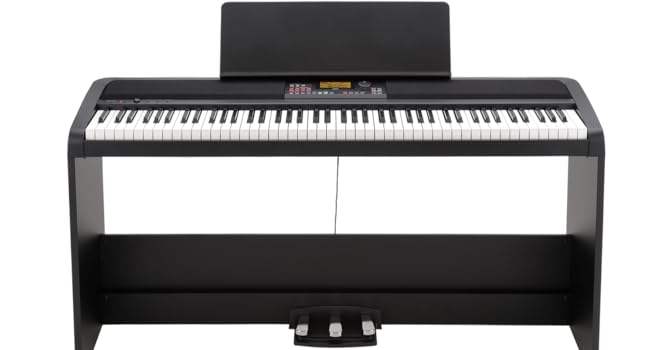
Figure 2: Korg XE20 with optional stand and three-pedal unit.
Opsætning
1. Udpakning og indhold
Carefully remove the XE20 from its packaging. Ensure all components are present:
- Korg XE20 Digital Ensemble Piano
- AC-adapter (DC 19V)
- Damper pedal
- Musik hvile
- Hurtig startvejledning
Note: The stand and three-pedal unit are sold separately.
2. Tilslutning af strøm
Connect the supplied AC adapter to the DC 19V input jack on the rear panel of the XE20. Plug the other end of the adapter into a standard AC outlet.
3. Tilslutning af pedaler
Tilslut den medfølgende damper pedal to the FOOT CONTROLLER jack on the rear panel. If using an optional three-pedal unit, connect it to the dedicated multi-pin connector.
4. Tilslutning til eksterne enheder
The XE20 offers various connectivity options:
- Audio In (R, L/MONO): Connect external audio players or instruments.
- Audio Out (R, L/MONO): Connect to external ampmixere, mixere eller optageenheder.
- Headphones Jack (3.5mm): For private practice.
- USB TIL HOST: Connect to a computer for MIDI data transfer.
- USB TIL ENHED: Connect a USB flash drive for data storage or loading styles/songs.

Figure 3: Rear panel of the Korg XE20, displaying all input and output ports.

Figur 4: Detaljeret view of the Korg XE20's rear connectivity, including power, audio, and USB ports.
5. Første opstart
After connecting power, press the MAGT button located on the left side of the control panel to turn on the instrument. The display will illuminate, and the XE20 will be ready for use.
Operating the XE20
1. Grundlæggende kontroller
The main volume knob is located on the left side of the control panel. Rotate it clockwise to increase volume and counter-clockwise to decrease. The PIANO 1/2 buttons allow quick selection between the two primary piano sounds.

Figure 5: Close-up of the Korg XE20's control panel, showing the volume knob and quick access buttons.
2. Key Action
The XE20 features an 88-key Natural Weighted Hammer Action (NH) keyboard. This action is designed to replicate the feel of an acoustic piano, with heavier touch in the lower register and lighter touch in the upper register. The touch sensitivity can be adjusted in the settings to suit your playing style.
3. Sound Selection (Voices)
The XE20 offers over 705 instrument sounds. To select a sound:
- Brug KATEGORI buttons to navigate through instrument groups (e.g., Piano, Electric Piano, Strings).
- Once a category is selected, use the jog wheel to scroll through the available sounds within that category.
- Press the jog wheel or the corresponding button to confirm your selection.
The two main piano sounds, German Grand Piano and Italian Grand Piano, are accessible directly via the PIANO 1/2 knapper.
4. Accompaniment Styles
The XE20 includes 280 general accompaniment styles and 64 music styles. These styles provide a full backing band that follows your chords. To use accompaniment styles:
- Tryk på STIL button to enter Style mode.
- Brug KATEGORI buttons and jog wheel to select a desired style.
- Trykke START/STOP for at begynde akkompagnementet.
- Brug VARIATION buttons (1-4) to switch between different musical sections within a style.
- Trykke UDFYLD to insert a short musical transition.
5. Layering Sounds
The XE20 allows you to layer up to three different sounds simultaneously to create rich, complex textures. Refer to the full owner's manual for detailed instructions on layering and splitting the keyboard.
6. Brugergrænsefladenavigation
The central display and surrounding buttons provide intuitive navigation. The jog wheel is used for scrolling through lists and adjusting values. Dedicated buttons for MODE, SANG, INDSTILLING, og FLYTTE allow access to various functions and parameters.

Figur 6: Detaljeret view of the Korg XE20's display and main control buttons.
7. Højttalersystem
The XE20 features a powerful built-in speaker system designed to deliver clear and dynamic sound. The speakers are located on the top panel, beneath the fabric grilles. Ensure they are not obstructed for optimal sound projection.
Opretholdelse
1. Rensning
To clean the XE20, use a soft, dry cloth. For stubborn dirt, slightly dampen the cloth with water and a mild, non-abrasive cleaner, then wipe dry immediately. Avoid using harsh chemicals, solvents, or abrasive materials, as these can damage the finish and electronic components.
2. Opbevaring
When not in use, store the XE20 in a cool, dry place away from direct sunlight, extreme temperatures, and high humidity. If transporting, use a padded gig bag or case to protect the instrument from physical damage.
3. Softwareopdateringer
Tjek regelmæssigt den officielle Korg website for firmware updates. Updates may provide new features, improved performance, or bug fixes. Follow the instructions provided on the Korg website for any update procedures.
Fejlfinding
If you encounter issues with your Korg XE20, refer to the following common troubleshooting steps:
| Problem | Mulig årsag | Løsning |
|---|---|---|
| Ingen lyd eller lav lydstyrke | Volume knob is low; headphones connected; external audio connections incorrect. | Increase volume; disconnect headphones; check all audio cables and connections. |
| Keys produce muffled or inconsistent sound | Dust or debris under keys; internal sensor issue. | Gently clean around keys; if problem persists, contact Korg support. |
| Accompaniment not playing | Style not selected; START/STOP not pressed; volume of accompaniment parts is low. | Select a style; press START/STOP; check accompaniment volume settings. |
| Skærmen er tom eller frosset | Power issue; system error. | Ensure power adapter is securely connected; power off and on the instrument. If issue persists, perform a factory reset (refer to full manual). |
For more detailed troubleshooting or issues not listed here, please consult the comprehensive Korg XE20 Owner's Manual available on the official Korg website or contact Korg customer support.
Specifikationer
| Feature | Detalje |
|---|---|
| Antal nøgler | 88 |
| Nøglehandling | Natural Weighted Hammer Action (NH) |
| Dimensioner (L x B x H) | 51.65 x 13.23 x 4.65 tommer (131.2 cm x 33.6 cm x 11.8 cm) |
| Varens vægt | 31.1 pund (14.12 kilo) |
| Lyde | 705+ |
| Akkompagnement stilarter | 280 General Styles, 64 Music Styles |
| Højttaler output | 18 watt |
| Forbindelse | USB Type B (TO HOST), USB Type A (TO DEVICE), Audio In (R, L/MONO), Audio Out (R, L/MONO), Headphones (3.5mm Jack), Foot Controller |
| Strømkilde | DC 19V (AC Adapter) |
| Farve | Sort |
| Materiale Type | Plastic/Synthetic |
Garanti og support
The Korg XE20 Digital Ensemble Piano comes with a manufacturer's warranty. For specific warranty terms and conditions, please refer to the warranty card included with your product or visit the official Korg website. For technical support, product registration, or to download the full owner's manual, please visit the Korg support page:
Korg Official Support Webwebsted
Please have your product model number (XE20) and serial number ready when contacting support.


