1. Produktet er slutview
The Onforu 75W LED Security Light is an outdoor floodlight designed to provide high-brightness illumination for various exterior areas. It features three adjustable LED heads, a robust aluminum construction, and IP65 waterproofing for durability in diverse weather conditions. This light is switch-controlled and does not include motion sensing, solar power, or dusk-to-dawn functionality.

Figure 1: Onforu 75W LED Security Light (Model BDBC75-3)
2. Sikkerhedsoplysninger
WARNING: Risk of electric shock. Turn off power at the circuit breaker before installation or servicing.
- Sørg for, at alle elektriske tilslutninger overholder lokale forskrifter og bestemmelser.
- Use appropriate wire connectors for secure connections.
- Hvis du er usikker på den elektriske ledningsføring, skal du kontakte en kvalificeret elektriker.
- Produktet må ikke ændres på nogen måde, som ikke er beskrevet i denne manual.
3. Installation
This LED security light is designed for hardwired installation to a junction box. It can be mounted on a wall or soffit.
3.1 Pakkens indhold
- Onforu 75W LED Security Light fixture
- Monteringsbeslag
- Pakning
- Trådmøtrikker
- Monteringsskruer
3.2 Nødvendigt værktøj (medfølger ikke)
- Skruetrækker (Phillips-skruetrækker anbefales)
- Afisoleringstænger
- Electrical tape (optional, for added insulation)
3.3 Trin-for-trin installation
- Sluk for strømmen: Find afbryderen, der styrer lysarmaturet, og sluk for strømmen. Kontroller, at strømmen er slukket, ved hjælp af en lydstyrkemåler.tage tester.
- Fjern gammel armatur: Carefully remove the existing light fixture from the junction box. Disconnect the old wiring.
- Monter monteringsbeslag: Attach the provided mounting bracket to the junction box using the appropriate screws. Ensure the bracket is secure.
- Forbered ledningsføring: The security light comes with three wires: black (live), white (neutral), and green (ground). Strip the ends of the wires if necessary.
- Tilslut ledninger: Using the provided wire nuts, connect the wires as follows:
- Black fixture wire to black supply wire.
- White fixture wire to white supply wire.
- Green fixture wire to bare copper or green ground wire from the supply, or to the green ground screw on the mounting bracket.
Figure 2: Wiring Diagram (Consult local electrical codes for specific requirements)
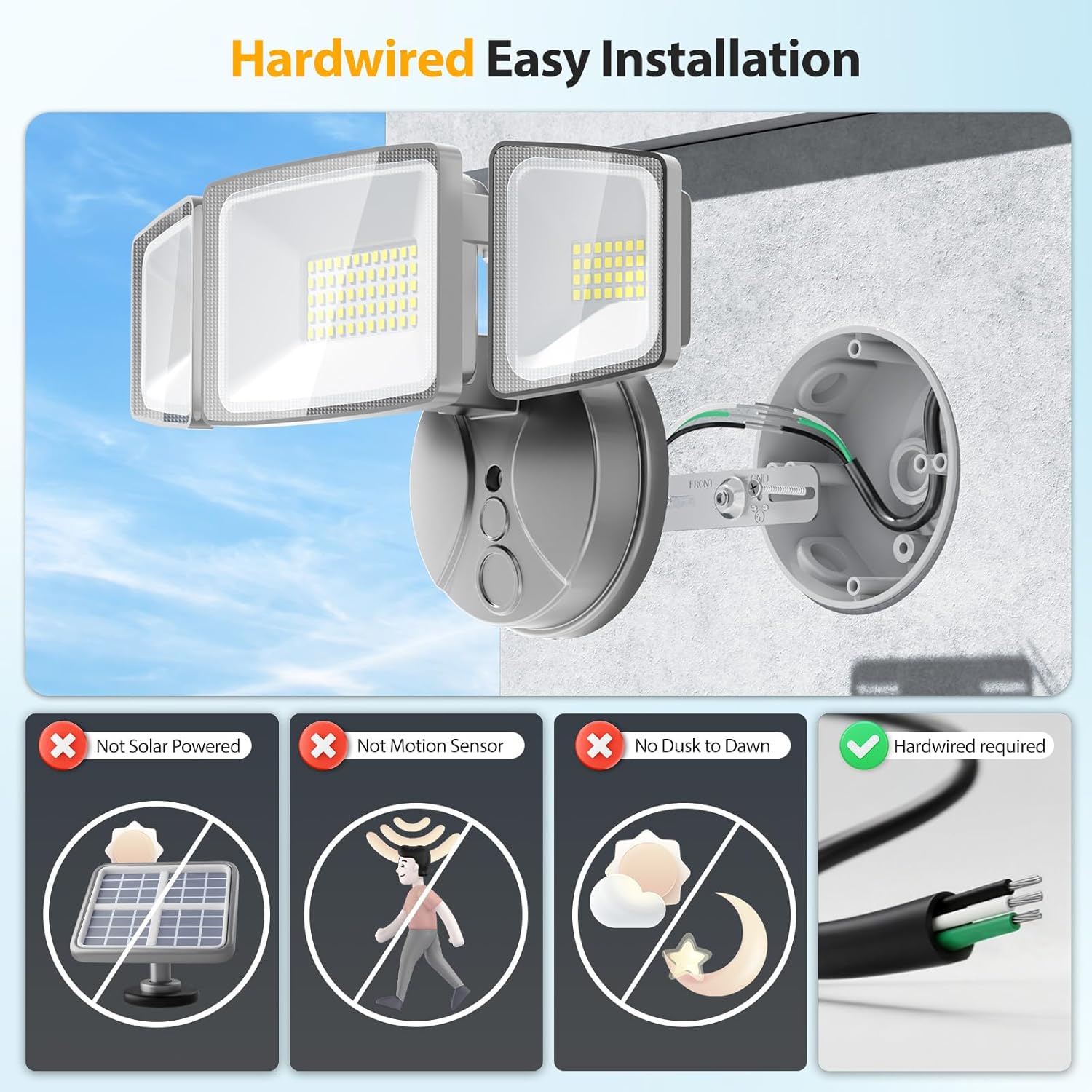
Figure 3: Hardwired installation example.
- Secure Gasket: Place the provided gasket around the lip of the junction box to ensure a waterproof seal.
- Monteringsbeslag: Carefully tuck all wires into the junction box. Align the light fixture with the mounting bracket and secure it with the central screw. Ensure no wires are pinched.
- Juster lyshoveder: Loosen the screws on the side of the light heads to adjust their angle and direction. Tighten the screws once the desired position is achieved. The main light can be pivoted for optimal coverage.
- Gendan strøm: Tænd for strømmen igen ved afbryderen.

Figure 4: Adjustable Light Heads for customized illumination.
Video 1: Official Onforu 6000LM Energy Saving LED Flood Light overview, demonstrating features and installation flexibility.
4. Betjeningsvejledning
This Onforu 75W LED Security Light is controlled by a standard wall switch. It does not feature a motion sensor, solar power, or dusk-to-dawn sensor. To operate:
- Flip the connected wall switch to the 'ON' position to turn the light on.
- Flip the connected wall switch to the 'OFF' position to turn the light off.

Figure 5: Manual switch control for the security light.
5. Vedligeholdelse
Regelmæssig vedligeholdelse sikrer optimal ydeevne og levetid for din sikkerhedslampe.
- Rensning: Periodically clean the light heads with a soft, damp klud til at fjerne snavs og rester. Brug ikke slibende rengøringsmidler eller opløsningsmidler.
- Inspektion: Annually inspect the wiring and mounting for any signs of wear, damage, or loose connections. Address any issues promptly.
- Varmeafledning: The fixture is designed with efficient heat dissipation. Ensure the heat fins on the back of the light heads are not obstructed to maintain optimal cooling.
6. Fejlfinding
If your Onforu 75W LED Security Light is not functioning as expected, refer to the following common issues and solutions:
| Problem | Mulig årsag | Løsning |
|---|---|---|
| Lyset tændes ikke. | Ingen strøm til armaturet. | Kontroller afbryderen og vægkontakten. Sørg for, at strømmen er genoprettet. |
| Løs eller forkert ledningsføring. | Turn off power at the breaker. Inspect wire connections and tighten if loose. Ensure correct wiring (black to black, white to white, green to ground). | |
| Lyse flimrer. | Løs ledningsforbindelse. | Turn off power at the breaker. Check and tighten all wire connections. |
| Reduceret lysstyrke. | Dirt or debris on light heads. | Clean the light heads with a soft, damp klæde. |
| Overheating due to obstructed heat dissipation. | Ensure heat fins are clear of obstructions. |
7. Specifikationer
| Feature | Detalje |
|---|---|
| Mærke | Onforu |
| Modelnavn | BDBC75-3 |
| Wattage | 75 watt |
| Lysstyrke | 7000 lumen |
| Farvetemperatur | 6500K dagslys hvid |
| Voltage | 120 volt |
| Materiale | Aluminium, PC |
| Vandmodstandsniveau | IP65 vandtæt |
| Installationstype | Soffit Mounted, Wall Mount |
| Kontrolmetode | Switch Controlled (No motion sensor, no solar, no dusk to dawn) |
| Produktdimensioner | 10.7 cm L x 5.8 cm B x 4.7 cm H |
| Varens vægt | 1.59 pund |
| Dækning | 1150 ft² |

Figure 6: Product Dimensions and Adjustable Angles.
8. Garanti og support
For warranty information or technical support regarding your Onforu 75W LED Security Light, please refer to the official Onforu webwebstedet eller kontakt deres kundeservice direkte. Gem din købskvittering til garantikrav.


