1. Introduktion
This manual provides detailed instructions for the Xtrike Me GK-979 Mechanical Gaming Keyboard. Please read this manual carefully before using the product to ensure proper operation and longevity. The GK-979 is a wired mechanical keyboard designed for gaming, featuring rainbow backlighting and a durable build.
2. Opsætning
2.1 Pakkens indhold
- Xtrike Me GK-979 Mechanical Gaming Keyboard
- Brugermanual
2.2 Tilslutning af tastaturet
- Find en ledig USB 2.0-port på din computer.
- Plug the USB connector of the GK-979 keyboard into the USB port.
- Tastaturet er plug-and-play og kræver ikke yderligere drivere for grundlæggende funktionalitet. Dit operativsystem burde automatisk registrere og installere de nødvendige drivere.
2.3 Systemkrav
- Operating System: Windows 7 or newer
- Interface: USB 2.0 port
3. Betjeningsvejledning
3.1 Grundlæggende tastaturfunktioner
The GK-979 features 87 standard keys with mechanical blue switches, providing tactile feedback and an audible click. All keys function as standard keyboard inputs.

Billede 1: Top-down view of the GK-979 keyboard, showcasing its 87-key layout and active rainbow backlighting.
3.2 Backlight Control
The keyboard features rainbow backlighting with multiple modes:
- Fast tilstand: The backlight remains constantly lit.
- Åndedrætstilstand: The backlight slowly fades in and out.
Specific key combinations for changing backlight modes or brightness are typically indicated on the keyboard itself or can be found through experimentation with the 'Fn' key combined with other function keys (e.g., Fn + Scroll Lock, Fn + Home/End, or arrow keys).

Billede 2: Vinklet view of the GK-979 keyboard, demonstrating the vibrant rainbow backlighting and the compact, frameless design.
3.3 Multimediefunktioner
The GK-979 keyboard includes multimedia functions accessible via the Fn key combined with the F1-F12 keys. These functions allow for quick control over media playback, volume, and other system features.
- Fn + F1-F12: Refer to the icons printed on the F-keys for their specific multimedia functions (e.g., volume control, media play/pause, track skip, email, web browser).

Image 3: Feature overview of the GK-979, illustrating multimedia key functions and anti-ghosting capabilities.
3.4 Anti-ghosting
The keyboard supports 29-key rollover, which means it can accurately register up to 29 simultaneous key presses. This feature is beneficial for gaming, ensuring all commands are recognized during intense gameplay.
4. Vedligeholdelse
4.1 Rengøring af tastaturet
The GK-979 features a suspended keycap design, which facilitates easier cleaning. To maintain optimal performance and appearance:
- Frakobl tastaturet fra computeren, før du rengør det.
- Brug en blød, tør klud til at tørre tastaturets overflade af.
- Brug trykluft til at fjerne støv og snavs mellem tasterne.
- Undgå at bruge skrappe kemikalier eller slibende materialer, da disse kan beskadige tastaturets finish eller tastaturforklaringer.

Billede 4: Side profile of the GK-979, illustrating the high-height, suspended keycap design for easy cleaning and a modern aesthetic.
5. Fejlfinding
If you encounter issues with your Xtrike Me GK-979 keyboard, please refer to the following common solutions:
- Tastaturet reagerer ikke:
- Sørg for, at USB-kablet er korrekt tilsluttet både tastaturet og computeren.
- Prøv at tilslutte tastaturet til en anden USB-port på din computer.
- Genstart din computer.
- Baggrundsbelysningen virker ikke:
- Check if the backlight function is enabled using the designated key combination (e.g., Fn + Scroll Lock).
- Sørg for, at tastaturet modtager tilstrækkelig strøm fra USB-porten.
- Nøgler registreres ikke korrekt:
- Clean the area around the affected keys to remove any debris.
- Test tastaturet på en anden computer for at afgøre, om problemet skyldes tastaturet eller computerens software/drivere.
If these steps do not resolve the issue, please contact Xtrike Me customer support for further assistance.
6. Specifikationer
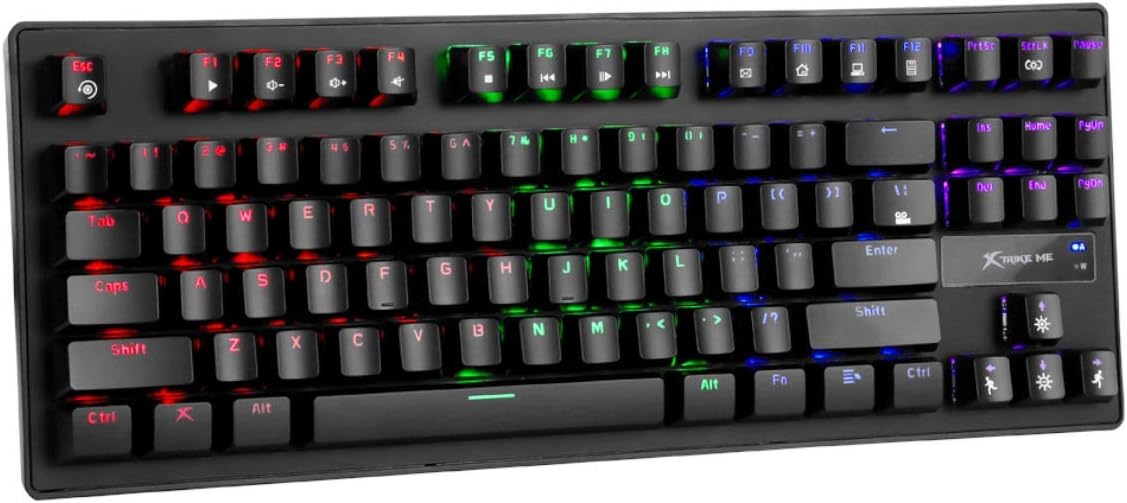
Billede 5: Vinklet view of the GK-979 keyboard, showcasing the individual key illumination and overall design.
| Feature | Specifikation |
|---|---|
| Nøgler | 87 |
| Switch Type | Mekanisk (blå) |
| Skift vurdering | 50 millioner presser |
| Nøglerute | 4.0 ± 0.4 mm |
| Driftsstyrke | 60 ± 5 g |
| Baggrundsbelysning | 5 colors (Rainbow), Solid and Breathing modes |
| Anti-Ghosting | 29-key rollover support |
| Interface | USB 2.0 |
| Kabellængde | 1.5 m |
| OS Support | Windows 7 eller nyere |
| Produktmål (L x B x H) | 38 x 16.5 x 15 cm |
| Vægt | 820 g |
| Farve | Sort |
| Strømkilde | USB-strøm |
7. Garanti og support
For garantioplysninger og teknisk support henvises til den officielle Xtrike Me webwebstedet eller kontakt din forhandler. Gem din købskvittering som købsbevis i tilfælde af garantikrav.


