Indledning
The Forty4 Wireless Gaming Controller is designed to provide a versatile and immersive gaming experience across multiple platforms. Featuring 2.4GHz wireless technology, dual vibration motors, and programmable M buttons, this gamepad offers precise control and enhanced realism for your gaming sessions. It supports both wireless and wired modes, ensuring uninterrupted gameplay.
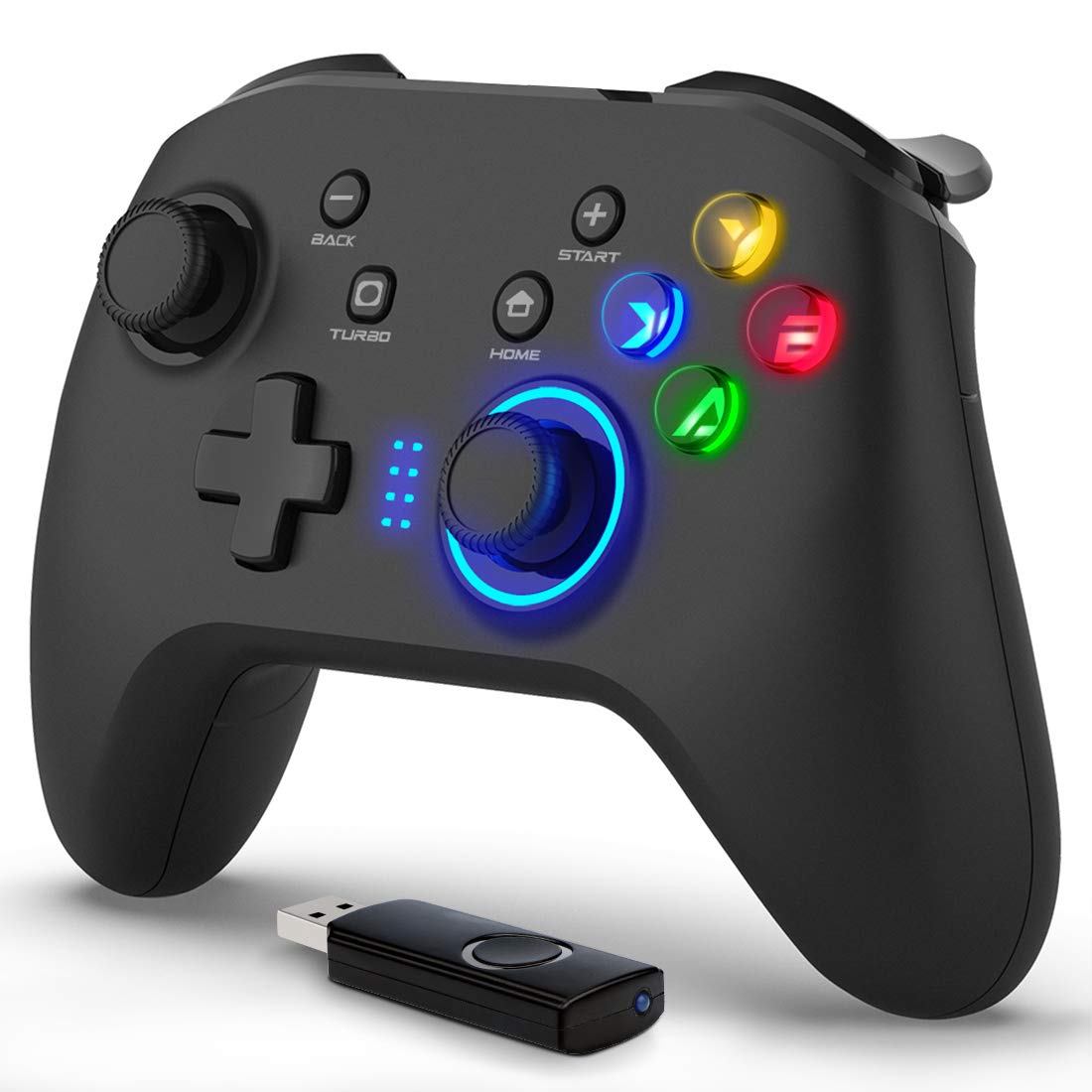
Billede: Forside view of the Forty4 Wireless Gaming Controller, showcasing dens ergonomiske design og knaplayout.
Nøglefunktioner
- 2.4 GHz trådløs teknologi: Offers a long transmission distance, bidirectional transmission, and substantial anti-interference for a reliable connection.
- Bred kompatibilitet: Compatible with Windows (Xinput and Dinput), PS3, and Switch. (Not compatible with Xbox 360, Xbox One, Mac, iOS, PlayStation 4, Amazon Fire TV, Amazon Fire Stick).
- M Buttons: Features programmable M buttons (M1, M2) on the back, allowing users to assign complex operations for enhanced control. Combination keys include A, B, X, Y, LB, RB, L3, LT, RT, R3, and directional keys (up, down, left, right).
- Dobbelt vibration: Asymmetrical and linear vibrating motors provide distinct feedback during gameplay, increasing the realism of game scenarios and immersion.
- Wireless & Wired Mode: Seamlessly switch between wireless and wired modes. If the battery runs low, simply connect the USB cable to continue playing while charging.

Image: Illustration of the dual vibration motors within the controller, highlighting the immersive gaming experience.
Pakkens indhold
Når du åbner pakken, skal du sørge for, at alle følgende varer er til stede:
- Forty4 Wireless Gaming Controller (Model: GC201)
- 2.4GHz USB Receiver (Wireless Dongle)
- USB-C ladekabel
- Brugervejledning (dette dokument)
Video: Unboxing the Forty4 Wireless Gaming Controller, showing the controller, USB receiver, and charging cable.
Opsætningsinstruktioner
1. Trådløs forbindelse
- Insert the 2.4GHz USB receiver into an available USB port on your PC, PS3, or Switch dock.
- Press the "Home" button on the controller to power it on. The indicator lights will illuminate.
- The controller should automatically pair with the USB receiver. If not, hold the "Home" button for a few seconds to cycle through connection modes until it connects (often indicated by a steady light). For Windows, ensure the controller is in X-input mode for optimal compatibility.

Image: The Forty4 controller and its USB receiver, demonstrating how to connect wirelessly to a computer.
2. Kablet forbindelse
- Connect one end of the provided USB-C charging cable to the USB-C port on the top of the controller.
- Connect the other end of the USB-C charging cable to an available USB port on your PC, PS3, or Switch dock.
- The controller will automatically switch to wired mode and begin charging if needed.

Image: A visual representation of both wireless and wired connection methods for the Forty4 controller.
Betjeningsvejledning
Knaplayout og funktioner
The Forty4 controller features a standard button layout for intuitive gameplay:
- Venstre/højre analoge pinde: For præcis 360-graders bevægelse og kamerakontrol.
- D-Pad: Til retningsbestemt input.
- Handlingsknapper (A, B, X, Y): Standard action inputs.
- Skulderknapper (LB, RB): Top-mounted buttons for various in-game actions.
- Udløsere (LT, RT): Analog triggers for nuanced control, especially in racing or shooting games.
- TILBAGE/VÆLG-knap: Typically used for menu navigation or secondary functions.
- START-knap: Bruges typisk til at sætte spil på pause eller til at få adgang til menuer.
- HJEM knap: Powers the controller on/off and can be used to switch controller modes (e.g., X-input/D-input).
- TURBO knap: Aktiverer turbofunktionen ved hurtige knaptryk.
- M Buttons (M1, M2): Programmable back buttons for custom macros or remapping. Refer to the detailed manual for programming instructions.

Image: Close-up of the back of the controller, highlighting the M1 and M2 programmable buttons for advanced customization.
Dobbelt vibrationsfeedback
The controller's dual vibration motors provide tactile feedback during gameplay, enhancing immersion. You will feel vibrations for in-game events such as explosions, impacts, or specific actions, making the experience more realistic.
Controller in Action
Video: Demonstration of the Forty4 Wireless Gaming Controller's features and responsiveness during gameplay.
Opladning af controlleren
To charge the controller, connect it to a USB power source (e.g., computer USB port, USB wall adapter) using the provided USB-C cable. The indicator lights may show charging status and turn off or change color when fully charged.
Opretholdelse
- Rensning: Brug en blød, tør klud til at rengøre controlleren. Undgå at bruge skrappe kemikalier eller slibende materialer.
- Opbevaring: Opbevar controlleren et køligt, tørt sted væk fra direkte sollys og ekstreme temperaturer.
- Batteripleje: For at forlænge batteriets levetid bør du undgå at aflade controlleren helt ofte. Oplad den regelmæssigt, selvom den ikke er i konstant brug.
Fejlfinding
Controlleren opretter ikke forbindelse/svarer ikke
- Tjek USB-modtager: Ensure the 2.4GHz USB receiver is securely plugged into a working USB port on your device.
- Tænd: Make sure the controller is powered on by pressing the "Home" button.
- Skift tilstand: Hold the "Home" button to cycle through different connection modes (e.g., X-input, D-input) until the controller is recognized by your system. For PC, X-input mode is generally recommended.
- Reparation: If issues persist, try unplugging and replugging the USB receiver, then re-powering the controller to re-establish the connection.
- Batteriniveau: Ensure the controller has sufficient battery charge. Connect it via the USB-C cable to check if it functions in wired mode.
Input Delay in Wireless Mode
- If you experience noticeable input delay in wireless mode, try switching to wired mode using the provided USB-C cable for a more direct connection.
Stick Drift or Unresponsive Buttons
- While designed for durability, prolonged heavy use can sometimes lead to wear. If you experience stick drift or unresponsive buttons, try recalibrating the controller through your device's settings. If the issue persists, please contact customer support.
Specifikationer
| Feature | Detalje |
|---|---|
| Modelnummer | GC201 |
| Forbindelse | 2.4GHz Wireless, Wired (USB-C) |
| Kompatibilitet | PC (Windows 7/8/10/11 - Xinput & Dinput), PS3, Switch |
| Vibration | Dobbelte vibrationsmotorer |
| Særlige funktioner | Programmable M Buttons, Colorful Backlight |
| Strømkilde | 1 lithium-ion batteri (medfølger) |
| Varens vægt | 11.6 ounce |
| Pakkedimensioner | 6.38 x 4.69 x 2.8 tommer |
| Fabrikant | Fyrre4 |
| Dato først tilgængelig | 25. maj 2020 |
Garanti og support
The Forty4 Wireless Gaming Controller comes with a Et års garanti. For any troubleshooting assistance, warranty claims, or product inquiries, please contact Forty4 customer service.
For additional information, you may refer to the official User Manual PDF: Brugervejledning (PDF)

