Indledning
This manual provides essential instructions for the setup, operation, and maintenance of your DOYO R270 Racing Steering Wheel. This device is designed to enhance your racing simulation experience across multiple gaming platforms, including PC, Xbox Series X|S, Xbox One, PS4, PS3, and Nintendo Switch. Please read this manual thoroughly before use to ensure optimal performance and longevity of your product.
Pakkens indhold
- DOYO R270 Racing Steering Wheel
- Pedalenhed (gaspedal og bremse)
- Gearskifter
- Montering Clamps
- Brugermanual (dette dokument)
Produkt overview
Familiarize yourself with the components of your DOYO R270 Racing Steering Wheel system.

Image: The complete DOYO R270 Racing Steering Wheel setup, including the steering wheel, pedal unit, and gear shifter.
Nøglekomponenter:
- Rat: Hovedstyreenhed med knapper, D-pad og skiftegreb.
- Pedalenhed: Separat enhed med gaspedal og bremsepedal.
- Gearskifter: External lever for manual gear changes.
- Montering Clamps: Til fastgørelse af rattet til et skrivebord eller bord.
Opsætningsinstruktioner
1. Montering af rattet
The steering wheel can be securely attached to a desk or table using the included clamps. Alternatively, its curved base allows for comfortable lap play.

Billede: Detaljeret view af clamp mounting system, showing how to attach the steering wheel to surfaces of varying thickness (0.2 inches to 2.44 inches).
- Place the steering wheel on a stable surface.
- Fastgør beslaget clamps to the underside of the steering wheel and tighten them to secure the unit to your desk or table. Ensure the clamps are firmly fastened to prevent movement during use.
2. Connecting Pedals and Gear Shifter
Connect the pedal unit and gear shifter to the designated ports on the back of the steering wheel unit. Ensure all connections are firm.
3. Platform Connection
The DOYO R270 is compatible with multiple platforms. Connect the main USB cable from the steering wheel to an available USB port on your gaming console or PC.

Image: Visual representation of the steering wheel's compatibility with various gaming platforms, including Xbox One, PS4, PC, Xbox 360, Nintendo Switch, PS3, and Android TV.
- PC: Connect via USB. Drivers may be required for some games; check the DOYO support website for the latest drivers if needed.
- Xbox Series X|S / Xbox One / PS4 / PS3 / Nintendo Switch: Connect via USB. The system should automatically recognize the device.
Betjeningsvejledning
1. Grundlæggende kontroller
- Styretøj: The wheel offers 270 degrees of rotation for precise control.
- Acceleration: Tryk på den højre pedal på pedalenheden.
- Bremsning: Tryk på venstre pedal på pedalenheden.
- Gearskift: Use the external gear shifter or the paddle shifters located behind the steering wheel.

Image: A user demonstrating the 270-degree rotation capability of the DOYO R270 steering wheel, highlighting its range of motion.
2. Følsomhedsjustering
The steering wheel features 7 levels of sensitivity adjustment to suit different driving styles and game requirements. The default setting is Grade 4.

Image: A close-up of the steering wheel's 'SEN' button and corresponding LED indicators, illustrating the 7-level sensitivity modes from Grade 1 to Grade 7.
To adjust sensitivity, press the 'SEN' button on the steering wheel. The LED indicators will change to reflect the current sensitivity grade.
3. Dobbelt vibrationsfeedback
The steering wheel is equipped with dual vibration motors that provide realistic force feedback, simulating in-game events such as collisions, road textures, and engine vibrations.
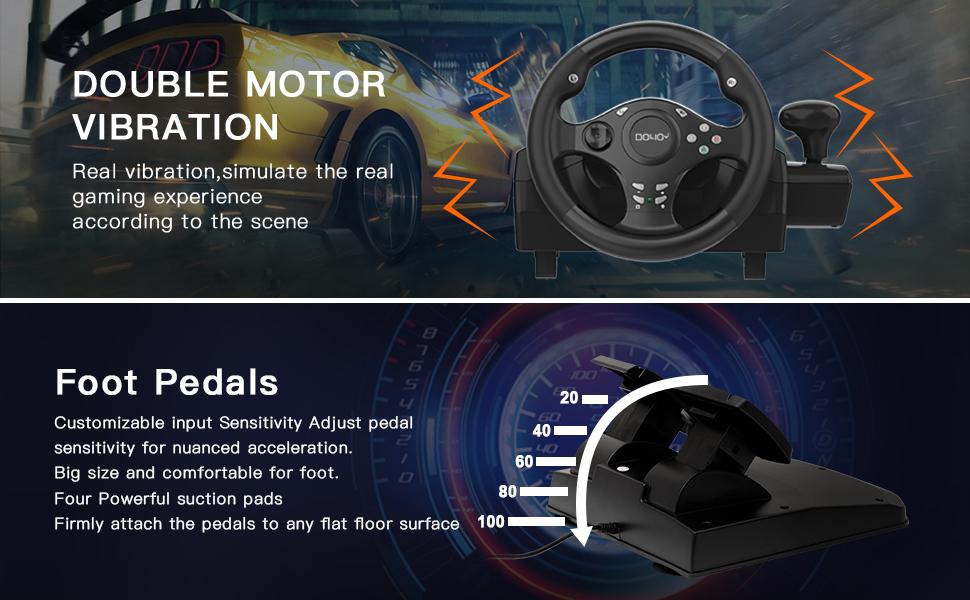
Image: An illustration highlighting the dual motor vibration feature of the steering wheel and the customizable input sensitivity of the foot pedals, which include four powerful suction pads for stability.
4. Analog Pedal Control
The pedal unit features 256-level analog change, allowing for nuanced acceleration and braking control, enhancing the realism of your driving experience.

Image: A close-up of the pedal unit, illustrating the 256-level analog change capability for precise control over acceleration and braking.
5. Recommended Games
The DOYO R270 Racing Steering Wheel is compatible with a wide range of racing titles across various platforms.
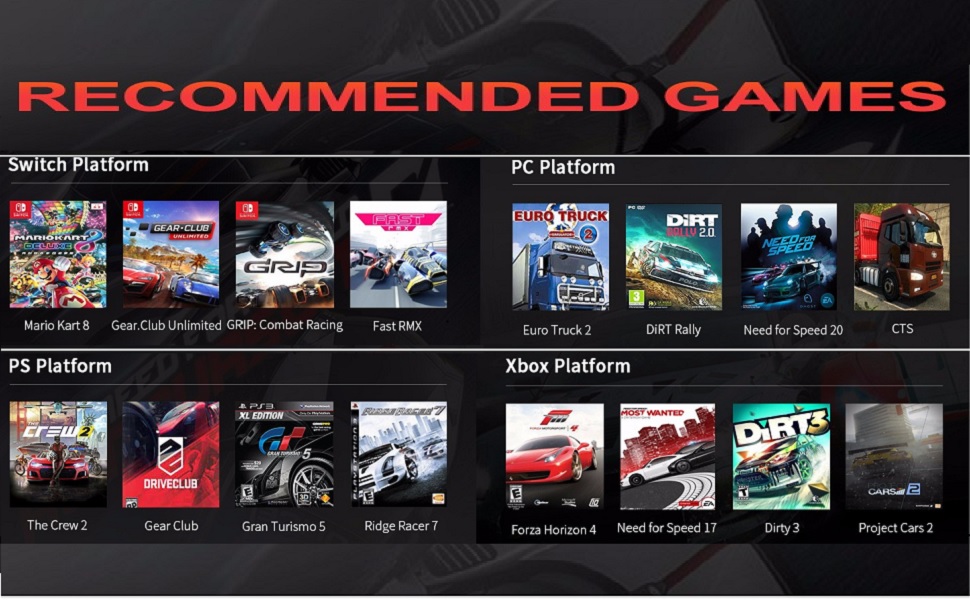
Image: A grid displaying recommended racing games categorized by platform (Switch, PC, PlayStation, Xbox) that are compatible with the DOYO R270 Racing Steering Wheel.
Opretholdelse
- Rensning: Use a soft, dry cloth to clean the steering wheel, pedals, and shifter. Avoid using abrasive cleaners or solvents.
- Opbevaring: Når enheden ikke er i brug, skal den opbevares et rent og tørt sted, væk fra direkte sollys og ekstreme temperaturer.
- Kabelstyring: Sørg for, at kablerne ikke filtres sammen eller kommer i klemme, for at forhindre skader.
Fejlfinding
Hvis du støder på problemer, kan du bruge følgende almindelige løsninger:
- Enhed ikke genkendt: Ensure all USB cables and interfaces are firmly connected. Try connecting to a different USB port. Restart your console or PC.
- Abnormal Input / Calibration Issues: Check your console or PC button mapping and driver settings. Recalibrate the device within the game settings if necessary. If using a wireless receiver (not applicable for this wired model, but generally for other devices), check for possible signal interference.
- Ingen vibrationsfeedback: Verify that vibration settings are enabled in your game and system settings. Ensure the device is properly connected.
- Pedaler reagerer ikke: Check the connection of the pedal unit to the steering wheel. Ensure no debris is obstructing the pedals.
Specifikationer
| Modelnummer | R270 |
| Rotationsvinkel | 270 grader |
| Vibration | Dobbelt motorvibrationsfeedback |
| Pedaltype | Analog (256-level change) |
| Forbindelse | USB kablet |
| Kompatibilitet | PC, Xbox Series X|S, Xbox One, PS4, PS3, Nintendo Switch |
| Produktdimensioner | 9.6 x 13 x 9.6 tommer |
| Varens vægt | 5.73 pund |
Garanti og support
DOYO is committed to providing quality products and customer satisfaction. Your purchase includes reliable customer support. For any issues or inquiries not covered in this manual, please contact DOYO customer service. Specific warranty details may vary by region and retailer; please refer to your purchase documentation for more information.


