Indledning
This manual provides detailed instructions for the MageGee K1 RGB Gaming Keyboard and Mouse combo. Please read this manual carefully before using the product to ensure proper setup and operation. This product is designed for use with personal computers and laptops, offering a full-size keyboard with RGB backlighting and a high-resolution gaming mouse.

Image: The MageGee K1 RGB Gaming Keyboard and Mouse set, featuring a pink keyboard with RGB backlighting and a matching pink mouse.
Pakkens indhold
Sørg for at alle varer er til stede i pakken:
- MageGee K1 RGB Gaming Keyboard
- MageGee K1 Gaming Mouse
- Brugervejledning (dette dokument)
Opsætning
Tilslutning af enheden
- Locate an available USB 2.0 port on your computer or laptop.
- Plug the USB connector of the MageGee K1 Keyboard into the USB port.
- Plug the USB connector of the MageGee K1 Mouse into another available USB port.
- The keyboard and mouse are plug-and-play devices. Your operating system should automatically detect and install the necessary drivers. No additional software or drivers are typically required.
Kompatibilitet
The MageGee K1 RGB Gaming Keyboard and Mouse are compatible with the following operating systems:
- Windows XP
- Windows Vista
- Windows 7
- Windows 8
- Windows 10
- Mac OS
- Linux
Operating the Keyboard and Mouse
Tastaturfunktioner
The K1 keyboard features a full-size 104-key layout with ergonomic design for comfortable use. It includes a numeric keypad and function keys.

Image: Illustration of the ergonomic design of the MageGee K1 keyboard, showing the keycap profile for komfortabel skrivning.
RGB-baggrundsbelysningskontrol
The keyboard features RGB backlighting with multiple customization options:
- Lys farver: 8 distinct colors.
- Belysningstilstande: 5 different lighting effects.
- Lysstyrkeniveauer: Adjustable to suit your preference.
- Hastighedskontrol: Juster hastigheden af dynamiske lyseffekter.
Sådan styres baggrundsbelysningen:
- Refer to the keyboard's dedicated backlight control keys or FN key combinations for specific adjustments.
- The backlight can be turned on or off as needed.

Image: Diagram illustrating the RGB backlight features of the MageGee K1 keyboard, including 5 light modes, 8 light colors, adjustable speed/brightness, and light on/off functionality.
Multimediefunktioner
The keyboard includes multimedia shortcut keys accessible via the FN nøgle:
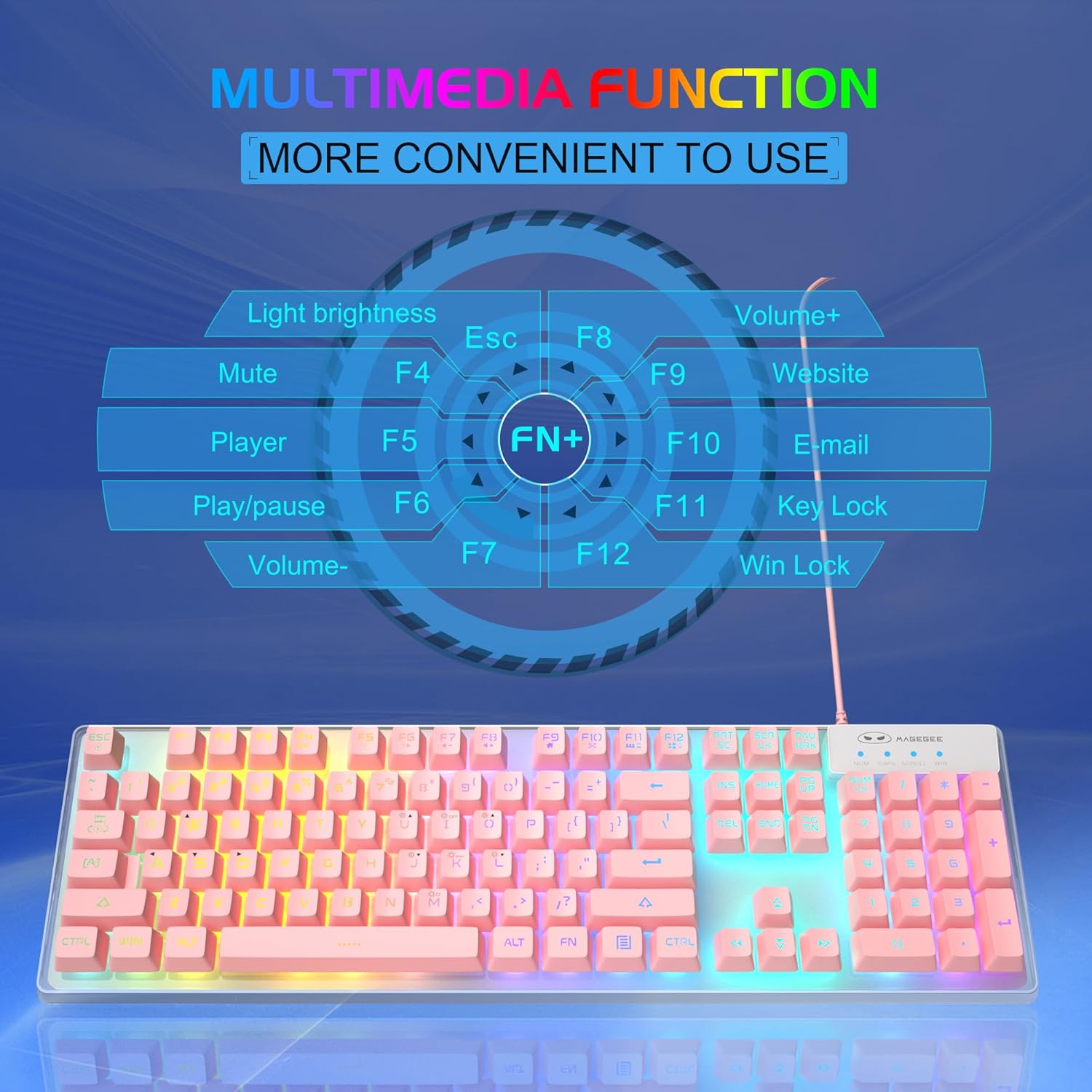
Image: A visual guide to the multimedia functions of the MageGee K1 keyboard, showing FN key combinations for mute, volume control, media playback, website, email, and key lock.
- FN+F1: Stum
- FN+F2: Lydstyrke ned
- FN+F3: Lydstyrke op
- FN+F4: Spiller
- FN+F5: Afspil/pause
- FN+F6: Forrige spor
- FN+F7: Næste spor
- FN+F8: Stop
- FN+F9: E-mail
- FN+F10: Web Browser
- FN+F11: Nøglelås
- FN+F12: Win Lock (disables Windows key)
Musfunktioner
The K1 mouse offers high resolution and responsive tracking for gaming and general computing.
DPI justering
The mouse features 6 adjustable DPI (Dots Per Inch) levels to match your precision and speed requirements:
- DPI niveauer: 600 / 800 / 1200 / 1600 / 2400 / 3200
To change DPI, press the dedicated DPI button on the mouse. Each press cycles through the available DPI settings.

Image: Diagram showing the MageGee K1 mouse with its 6 DPI levels (600-3200) and instructions for changing and locking the 7-color LED backlight.
LED Backlight Control (Mouse)
The mouse features a 7-color LED backlight with a breathing effect. To lock the mouse LED backlight to a specific color:
- While the mouse cycles through colors, press the side knap (forward button) and the midterste knap (scroll wheel click) simultaneously. This will lock the current color.

Image: Display of the MageGee K1 mouse showing its 7-color cycled breathing LED lights in green, yellow, purple, cyan, red, and white.
Opretholdelse
Rensning
To maintain the performance and appearance of your MageGee K1 keyboard and mouse:
- Frakobl enhederne fra din computer før rengøring.
- Brug en blød, fnugfri klud lidt dampafsluttes med vand eller en mild rengøringsopløsning.
- Avoid using harsh chemicals, abrasive cleaners, or solvents, as these can damage the surface and keycap legends.
- Til tastaturet kan du bruge trykluft til at fjerne støv og snavs mellem tasterne.
- For the mouse, gently wipe the surface and the optical sensor area.
Almen pleje
- Undgå at udsætte enhederne for ekstreme temperaturer, direkte sollys eller høj luftfugtighed.
- Do not drop or subject the devices to strong impacts.
- Keep liquids away from the keyboard and mouse. While the keyboard has some water-resistant features, it is not fully waterproof.
Fejlfinding
If you encounter issues with your MageGee K1 keyboard and mouse, refer to the following common solutions:
| Problem | Mulig løsning |
|---|---|
| Tastatur/mus reagerer ikke |
|
| Backlight not working (Keyboard) |
|
| Problemer med musesporing |
|
| Multimedietasterne virker ikke |
|
Specifikationer
Below are the technical specifications for the MageGee K1 RGB Gaming Keyboard and Mouse:

Image: Detailed dimensions of the MageGee K1 keyboard (438mm x 137mm x 35mm) and mouse (123mm x 63mm x 39mm).
| Feature | Detalje |
|---|---|
| Mærke | MageGee |
| Modelnummer | K1 |
| Farve | K1 Pink |
| Forbindelsesteknologi | Wired USB 2.0 (Gold-plated interface, Anti-interference magnetic ring) |
| Tastaturlayout | Full-size 104 keys |
| Tastaturbaggrundslys | RGB (8 colors, 5 modes, adjustable brightness/speed) |
| Keycap Type | Double-shot injection molded, Membrane style |
| Special Keyboard Features | Ergonomic, Backlit, Shortcut and Multimedia keys, Anti-ghosting (19 keys) |
| Musesensorteknologi | Optisk |
| Musens DPI-niveauer | 600/800/1200/1600/2400/3200 |
| Musens baggrundslys | 7-color cycled breathing LED |
| Kompatible operativsystemer | Windows XP/Vista/7/8/10, Mac, Linux |
| Materiale | ABS Engineering Plast |
| Strømkilde | USB-drevet (ingen batterier kræves) |
Garanti og support
Information regarding specific warranty terms and customer support contact details for the MageGee K1 RGB Gaming Keyboard and Mouse is not available in this document. Please refer to the product packaging or the official MageGee website for warranty information and customer service contacts.


