1. Introduktion
This manual provides detailed instructions for the proper operation and maintenance of your WOUXUN KG-UV2D Dual Band Two-Way Radio. Please read this manual thoroughly before using the radio to ensure safe and efficient operation. Keep this manual for future reference.
2. Sikkerhedsoplysninger
To prevent personal injury or property damage, observe the following safety precautions:
- Brug ikke radioen i eksplosive atmosfærer (f.eks. brandfarlige gasser, støvpartikler, metalpulver).
- Send ikke uden en antenne monteret.
- Use only WOUXUN approved batteries and chargers. Improper use may cause fire, explosion, or injury.
- Udsæt ikke radioen for direkte sollys i længere perioder, og placer den ikke i nærheden af varmeapparater.
- Hold radioen væk fra medicinsk udstyr for at undgå interferens.
- Radioen må ikke skilles ad eller ændres. Reparationer bør kun udføres af kvalificerede teknikere.
3. Pakkens indhold
Bekræft at alle varer er til stede i din pakke:
- WOUXUN KG-UV2D Transceiver
- 7.4V 1700mAh litium-ion-batteri
- Antenne
- Smart Desktop Charger (220 VAC)
- Quick Charge Clip
- Microphone/Headset
- English User Manual (Printed)
4. Produktet er slutview
The WOUXUN KG-UV2D is a robust dual-band two-way radio designed for reliable communication. It features a durable construction and an advanced menu system for various functions. Key features include:
- Dobbeltbåndsdrift: Supports both VHF (136-174 MHz) and UHF (400-480 MHz) frequencies.
- Extended Receive Band: Capable of receiving 88-108 MHz (FM radio), 136-174 MHz, and 400-480 MHz.
- Dobbelt ur funktion: Allows simultaneous monitoring of two frequencies (VV, VU, UU) with on-screen indication.
- DTMF-koder: Til avanceret signalering og kontrol.
- CTCSS/DCS-toner: Programmable sub-audio and digital codes for selective calling.
- Nødalarm: Dedicated button activates a loud alarm and flashing LEDs, transmitting a digital identification signal.
- VOX funktion: Voice-activated transmission with adjustable sensitivity.
- Baggrundsbelyst LCD -skærm: Clear display with blue illumination during transmission.
- PC-programmerbar: Customize settings and channels via optional PC software and cable.
- Customizable Welcome Message: Personalize the radio's power-on display.
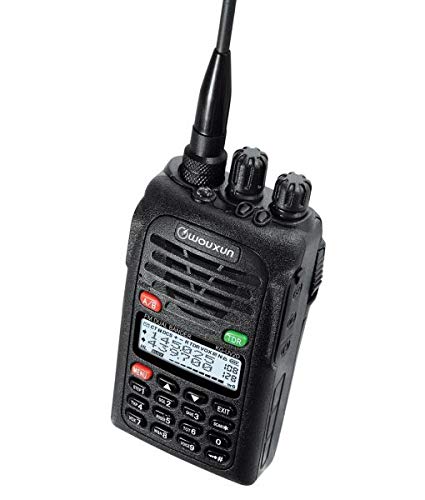
Image 1: The WOUXUN KG-UV2D Dual Band Two-Way Radio. This image shows the front of the radio, including the antenna, control knobs, speaker grille, LCD display, and keypad. The display shows frequency information, and the keypad includes numeric buttons and function keys.
5. Opsætning
5.1 Batteriinstallation
- Juster batteripakken med rillerne på bagsiden af radioen.
- Skub batteripakken opad, indtil den klikker på plads.
- For at fjerne det skal du trykke på batteriets udløserlås (hvis den er til stede) og skubbe batteriet nedad.
5.2 Antennetilslutning
- Skru antennen med uret ind i stikket øverst på radioen, indtil den sidder godt fast.
- Spænd ikke for meget.
5.3 Indledende opladning
Inden første brug skal batteriet oplades helt.
- Place the radio with the battery installed into the smart desktop charger.
- Ensure the charging indicator light on the charger illuminates (typically red).
- Charge for approximately 4-5 hours, or until the indicator light turns green, indicating a full charge.
6. Grundlæggende betjening
6.1 Tænd/sluk
Drej på Strøm-/lydstyrkeknap (top-left knob) clockwise to turn the radio on. Continue rotating to adjust the volume. Rotate counter-clockwise until a click is heard to turn the radio off.
6.2 Valg af frekvens/kanal
- VFO Mode (Frequency Mode): Directly enter frequencies using the numeric keypad. Use the Op/Ned piletaster at finjustere frekvensen.
- Kanaltilstand: Brug Op/Ned piletaster to scroll through programmed memory channels.
- Tryk på VFO/MR button (often labeled A/B or similar) to switch between VFO and Channel modes.
6.3 Sending (PTT)
For at sende, tryk og hold nede PTT-knap (Push-To-Talk) på siden af radioen. Tal tydeligt ind i mikrofonen. Slip PTT-knappen for at stoppe transmissionen og vende tilbage til modtagetilstand.
6.4 Modtagelse
When the radio is on and tuned to an active frequency or channel, you will hear incoming transmissions through the speaker. Adjust the Strøm-/lydstyrkeknap for desired audio level.
7. Avancerede funktioner
7.1 Dual Watch (TDR)
The Dual Watch function allows the radio to monitor two different frequencies or channels simultaneously. If a signal is detected on either frequency, the radio will switch to that frequency. To activate/deactivate, press the TDR button (often green, located near the display).
7.2 CTCSS/DCS-toner
CTCSS (Continuous Tone-Coded Squelch System) and DCS (Digital Coded Squelch) tones are used to filter out unwanted signals and allow for private group communication. These can be programmed via the radio's menu or PC software. Refer to the detailed menu section in the printed manual for specific programming steps.
7.3 VOX-funktion
VOX (Voice Operated Transmit) enables hands-free operation. When VOX is active, the radio will automatically transmit when it detects your voice. The sensitivity of the VOX function can be adjusted through the radio's menu.
7.4 Nødalarm
Pressing the dedicated Nødknappen (often red, labeled 'MENU' or 'EMG') will activate a loud audible alarm and cause the radio's LEDs to flash. It will also transmit a digital identification signal. Press the button again to deactivate the alarm.
7.5 PC-programmering
The WOUXUN KG-UV2D can be programmed using a computer and optional programming software/cable. This allows for easier management of memory channels, CTCSS/DCS settings, and other advanced parameters. Software is typically available for download from the manufacturer's webwebsted.
8. Vedligeholdelse
8.1 Rengøring
Tør radioens overflade af med en blød kludamp klud. Brug ikke skrappe kemikalier eller slibende rengøringsmidler. Sørg for, at radioen er tør før brug.
8.2 Pleje af batterier
- Always use the specified charger.
- Kortslut ikke batteripolerne.
- Hvis radioen ikke skal bruges i længere tid, skal du fjerne batteriet og opbevare det et køligt og tørt sted.
- Undgå at aflade batteriet helt ofte for at forlænge dets levetid.
9. Fejlfinding
| Problem | Mulig årsag | Løsning |
|---|---|---|
| Radioen tændes ikke | Batteriet er lavt eller ikke installeret korrekt. | Oplad batteriet. Sæt batteriet sikkert i igen. |
| Kan ikke sende | Incorrect frequency/channel. PTT button not pressed. Transmit power too low. | Verify frequency/channel. Press PTT firmly. Check transmit power settings. |
| Poor reception or no audio | Volume too low. Squelch level too high. Antenna not connected. Incorrect CTCSS/DCS. | Increase volume. Adjust squelch level. Ensure antenna is attached. Verify CTCSS/DCS settings. |
| Tastaturet reagerer ikke | Tastaturlåsen er aktiv. | Deactivate keypad lock (refer to the printed manual for specific key combination). |
10. Specifikationer
| Feature | Specifikation |
|---|---|
| Mærke | WOUXUN |
| Modelnummer | KG-UV2D |
| Farve | Sort |
| Frekvensområde | VHF: 136-174 MHz; UHF: 400-480 MHz |
| Antal kanaler | 32 |
| Voltage | 7.4 volt |
| Batterikapacitet | 1700 mAh Lithium-ion |
| Impedans | 50 ohm |
| Vandmodstandsniveau | Ikke vandtæt |
| Kompatible enheder | Microphone, Headset |
| Særlige funktioner | Dual band, DTMF encoder, Tone scan, Dual watch, CTCSS/DCS tones, Sub-audio tones, Emergency alarm with flashing LEDs, VOX |
11. Garanti og support
Information regarding specific warranty terms for the WOUXUN KG-UV2D is not available in the provided product details. For warranty claims, technical support, or service inquiries, please contact your authorized WOUXUN dealer or the manufacturer directly. Keep your purchase receipt as proof of purchase.


