Indledning
This manual provides essential information for the proper installation, operation, and maintenance of your RAPTOR by METRA Electronics PRO Series RDB3 2-Position Ground Distribution Block. Please read these instructions thoroughly before installation to ensure safe and correct usage.
The RDB3 Ground Distribution Block is designed to efficiently distribute a single large gauge ground wire into multiple smaller gauge ground wires, providing a reliable common ground point for various automotive electronic components.
Sikkerhedsoplysninger
- Always disconnect the vehicle's battery negative terminal before performing any electrical installation or maintenance.
- Ensure all wiring connections are secure and properly insulated to prevent short circuits and electrical hazards.
- Use appropriate wire gauges as specified for your audio system and the distribution block to prevent overheating and potential damage.
- Mount the distribution block in a dry, secure location away from moving parts, excessive heat, and moisture.
- Hvis du er usikker på nogen del af installationsprocessen, skal du kontakte en kvalificeret professionel installatør.
Pakkens indhold
- RAPTOR RDB3 2-Position Ground Distribution Block (1 unit)
Produkt overview
The RAPTOR RDB3 is a compact and robust ground distribution block designed for automotive applications. It features a single input terminal and two output terminals, allowing for efficient power distribution. The conductor block is 24K gold-plated for optimal conductivity and corrosion resistance. Connections are secured using 3mm Allen screws.
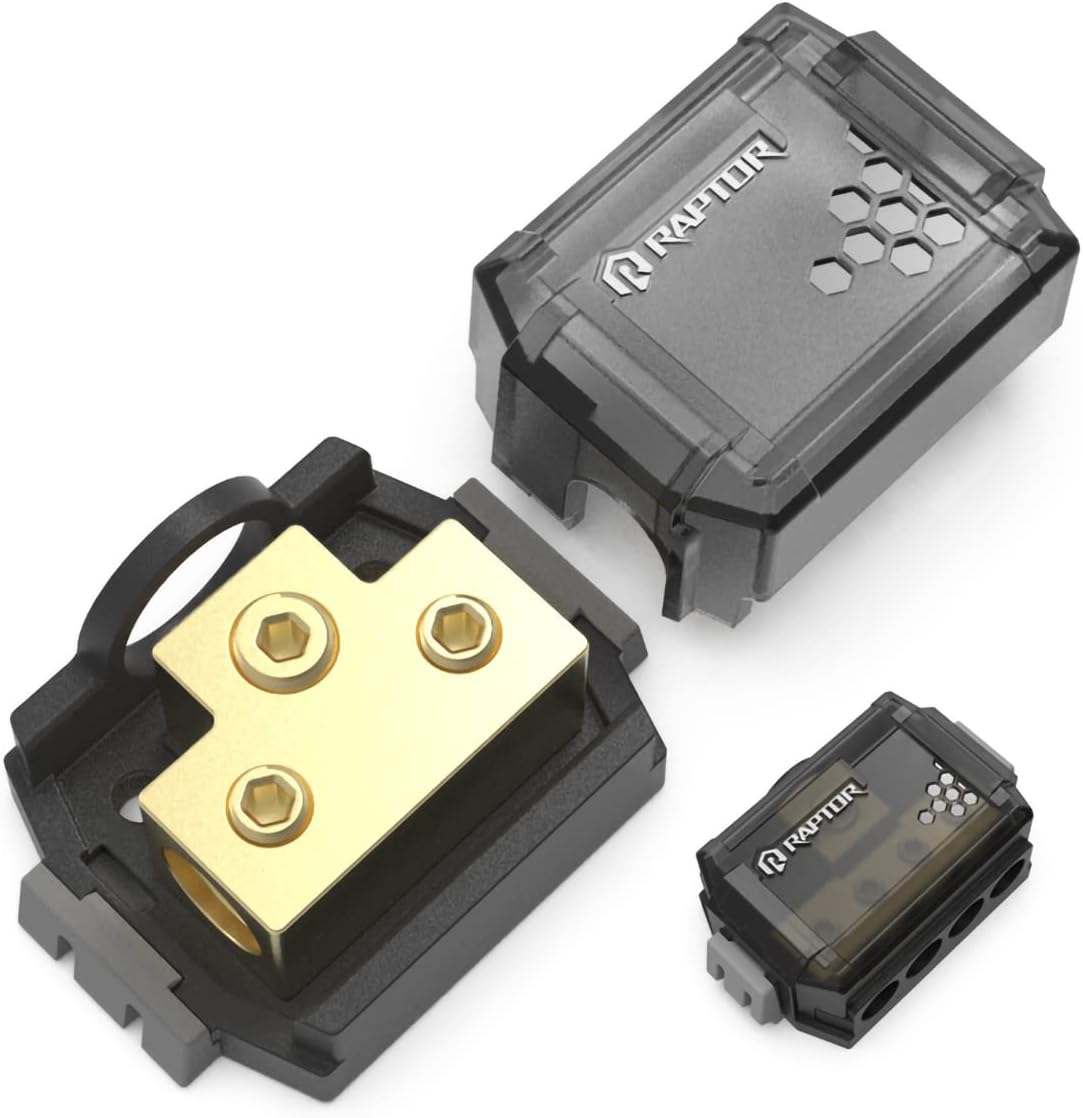
This image displays the RAPTOR RDB3 2-Position Ground Distribution Block. The larger component shows the gold-plated brass conductor block with three hexagonal screw terminals, designed for one input and two outputs, mounted within a black plastic base. A flexible black loop is attached to the base, likely for securing the cover. The transparent dark gray cover, featuring the 'RAPTOR' logo and a honeycomb pattern, is shown detached above the base. A smaller, fully assembled view of the distribution block is visible in the lower right, illustrating its compact size when closed.
Opsætning og installation
Follow these steps for proper installation of the RDB3 Ground Distribution Block:
- Forberedelse: Disconnect the negative terminal of your vehicle's battery to prevent electrical shorts during installation.
- Monteringssted: Select a dry, secure, and easily accessible location for the distribution block. Ensure the mounting surface is flat and stable.
- Sikker montering: Use appropriate screws (not included) to firmly attach the distribution block's base to the chosen mounting surface. Ensure it is stable and will not vibrate loose.
- Input Wire Connection: Connect the main ground wire (1/0 AWG or 4 AWG) from your vehicle's chassis or battery negative terminal to the input terminal of the distribution block. Loosen the 3mm Allen screw, insert the stripped wire end, and tighten securely.
- Output Wire Connections: Connect the ground wires (4 AWG or 8 AWG) from your amplifiers or other electronic components to the two output terminals of the distribution block. Loosen the 3mm Allen screws, insert the stripped wire ends, and tighten each securely.
- Bekræft forbindelser: Double-check all wire connections to ensure they are tight and that no stray wire strands are present that could cause a short circuit.
- Installer dæksel: Place the protective transparent cover over the distribution block and ensure it snaps securely into place. This cover protects the terminals from accidental contact and environmental elements.
- Gentilslut batteri: Tilslut den negative pol på dit køretøjs batteri igen.
Operation
The RAPTOR RDB3 Ground Distribution Block is a passive component. Once properly installed, it functions by providing a common, low-resistance ground path for multiple electronic devices in your vehicle. There are no active controls or operational steps required after installation.
Opretholdelse
- Regelmæssig inspektion: Periodically inspect the distribution block and all connected wires for any signs of corrosion, loose connections, or damage.
- Rensning: If necessary, gently clean the terminals and housing with a dry, soft cloth. Do not use abrasive cleaners or solvents. Ensure the battery is disconnected before cleaning.
- Tilslutningskontrol: Re-tighten the Allen screws if any connections appear loose.
Fejlfinding
| Problem | Mulig årsag | Løsning |
|---|---|---|
| Poor audio quality or component malfunction | Loose ground connection at the distribution block or chassis. | Disconnect battery, inspect and re-tighten all ground connections. Ensure chassis ground point is clean and free of paint/rust. |
| Korrosion på terminaler | Exposure to moisture or harsh environment. | Disconnect battery, clean terminals with a non-abrasive brush and contact cleaner. Ensure cover is properly sealed. Consider relocating if exposed to excessive moisture. |
| Block feels hot | Overloaded circuit or undersized wires. | Verify that the wire gauges used are appropriate for the current draw of the connected components. Ensure all connections are tight. If problem persists, consult a professional. |
Specifikationer
| Feature | Specifikation |
|---|---|
| Modelnummer | RDB3 |
| Input Gauge | (1) 1/0 AWG or 4 AWG |
| Output Gauge | (2) 4 AWG or 8 AWG |
| Plating | 24K Gold-plated |
| Fastgørelsestype | 3mm Allen Screws |
| Connector Type | Skrue |
| Antal kontakter | 1 Input, 2 Outputs |
| Materiale | Plastic (Housing), Brass (Conductor) |
| Dimensioner (L x B x H) | 6 x 4.13 x 1.8 tommer |
| Varens vægt | 6.9 ounce |
| Fabrikant | METRA ELECTRONICS |
| Overholdelse | RoHS |
| Monteringstype | DIN Rail Mount (Note: Typically surface-mounted in automotive applications) |
Garantioplysninger
Specific warranty details for the RAPTOR RDB3 Ground Distribution Block are not provided in this manual. For information regarding warranty coverage, terms, and conditions, please refer to the official RAPTOR or METRA Electronics website, or contact their customer support directly. Keep your proof of purchase for warranty claims.
Support og kontaktoplysninger
For technical support, product inquiries, or further assistance, please visit the official website of RAPTOR or METRA Electronics. You can typically find contact information, FAQs, and additional resources on their support pages.
Webwebsted: Refer to your product packaging or search online for 'RAPTOR Car Audio' or 'METRA Electronics'.


