1. Produktet er slutview
The ProCase Wireless Keyboard (Model PC-08362168) is a compact and portable Bluetooth keyboard designed for multi-device compatibility. It offers a comfortable typing experience with low-profile, quiet keys and an ergonomic design, suitable for use with iOS, Android, and Windows operating systems.

Image: The ProCase Wireless Keyboard, a slim black keyboard with a standard QWERTY layout, designed for portability and multi-device use.
2. Pakkens indhold
- ProCase Wireless Keyboard (Model PC-08362168)
- Brugervejledning (dette dokument)
Note: 2x AAA batteries are required for operation and are not included in the package.
3. Opsætningsvejledning
3.1. Batteriinstallation
- Find batterirummet på bagsiden af tastaturet.
- Åbn batterirummets dæksel.
- Isæt to (2) AAA-batterier, og sørg for at polerne vender korrekt (+/-).
- Luk batterirummets dæksel forsvarligt.

Image: Underside of the keyboard showing the ON/OFF switch, Connect button, and the battery compartment for two AAA batteries.
3.2. Tænd/sluk
Slide the ON/OFF switch, located on the back of the keyboard, to the "ON" position to power on the device. Slide it to "OFF" when not in use to conserve battery life.
3.3. Bluetooth-parring
- Sørg for, at tastaturet er tændt.
- Press the "Connect" button on the back of the keyboard. The Bluetooth indicator light (usually blue) on the keyboard will start blinking, indicating it is in pairing mode.
- On your device (tablet, smartphone, computer), navigate to its Bluetooth settings.
- Aktiver Bluetooth og søg efter tilgængelige enheder.
- Select "ProCase Keyboard" (or similar name) from the list of found devices.
- Follow any on-screen prompts to complete the pairing process. A successful connection will be indicated by the Bluetooth light on the keyboard turning solid or turning off, depending on the model.

Image: Diagram illustrating wide compatibility with Android, Windows, and iOS devices, including iPads, Android tablets, Microsoft Surface, and smartphones. It also notes that a USB drive is not included and only Bluetooth connection is supported.
4. Betjeningsvejledning
4.1. Grundlæggende maskinskrivning
The keyboard features a standard QWERTY layout. Simply begin typing after successful pairing with your device.
4.2. Function Keys (F1-F12) and Hot Keys
The top row of keys serves dual functions: standard F-keys (F1-F12) and special hot keys for media control, volume, and other system functions. To use the F-keys (F1, F2, etc.), you must hold down the Fn key simultaneously with the desired F-key. Pressing the key without holding Fn will activate its associated hot key function.
- Fn + F1: Hjem
- Fn + F2: Søg
- Fn + F3: Select All
- Fn + F4: Kopi
- Fn + F5: Indsæt
- Fn + F6: Cut
- Fn + F7: Forrige spor
- Fn + F8: Afspil/Pause
- Fn + F9: Næste spor
- Fn + F10: Lydløs
- Fn + F11: Skrue ned
- Fn + F12: Lydstyrke op

Billede: Nærbillede view of a keyboard key, illustrating the scissor-cross mechanism for comfortable and responsive keystrokes.

Image: A person typing on the ProCase Wireless Keyboard, positioned next to a tablet, highlighting the comfortable and quiet typing experience.
5. Vedligeholdelse
5.1. Rensning
To clean the keyboard, gently wipe the surface with a soft, dry, lint-free cloth. For stubborn dirt, slightly dampen the cloth with water or a mild cleaning solution. Avoid excessive moisture and do not spray cleaners directly onto the keyboard.
5.2. Opbevaring
When not in use for extended periods, power off the keyboard to conserve battery life. Store it in a cool, dry place away from direct sunlight and extreme temperatures.
6. Fejlfinding
- Tastatur forbinder ikke:
- Sørg for, at tastaturet er tændt og har friske batterier.
- Press the "Connect" button on the back of the keyboard to enter pairing mode.
- Verify Bluetooth is enabled on your device and try re-pairing.
- Flyt tastaturet tættere på din enhed.
- Restart both the keyboard (power off/on) and your device.
- Taster reagerer ikke:
- Kontroller batteriniveauet og udskift det om nødvendigt.
- Sørg for, at tastaturet er korrekt forbundet via Bluetooth.
- Fjern eventuelt snavs omkring tasterne.
- Function (F) keys not working as expected:
- Remember that to activate F1-F12 functions, you must hold down the Fn key simultaneously. Without holding Fn, the keys will activate their assigned hot key functions (e.g., media control). This behavior cannot be changed.
- Kort batterilevetid:
- Ensure the keyboard is powered off when not in use.
- The keyboard features a sleep mode to conserve power during inactivity.
- Brug AAA-batterier af høj kvalitet.
7. Specifikationer
| Feature | Detalje |
|---|---|
| Modelnummer | PC-08362168 |
| Dimensioner (L x B x H) | 11.5 x 4.7 x 0.29 tommer (29.2 x 11.9 x 0.74 cm) |
| Vægt | 10 ounce (283.5 gram) |
| Forbindelse | Bluetooth trådløs |
| Strømkilde | 2 x AAA batterier (medfølger ikke) |
| Materiale | Acrylonitril Butadien Styren (ABS) |
| Farve | Sort |
| Kompatible operativsystemer | iOS, Android, Windows (Note: Does not support Windows 8 Mobile) |
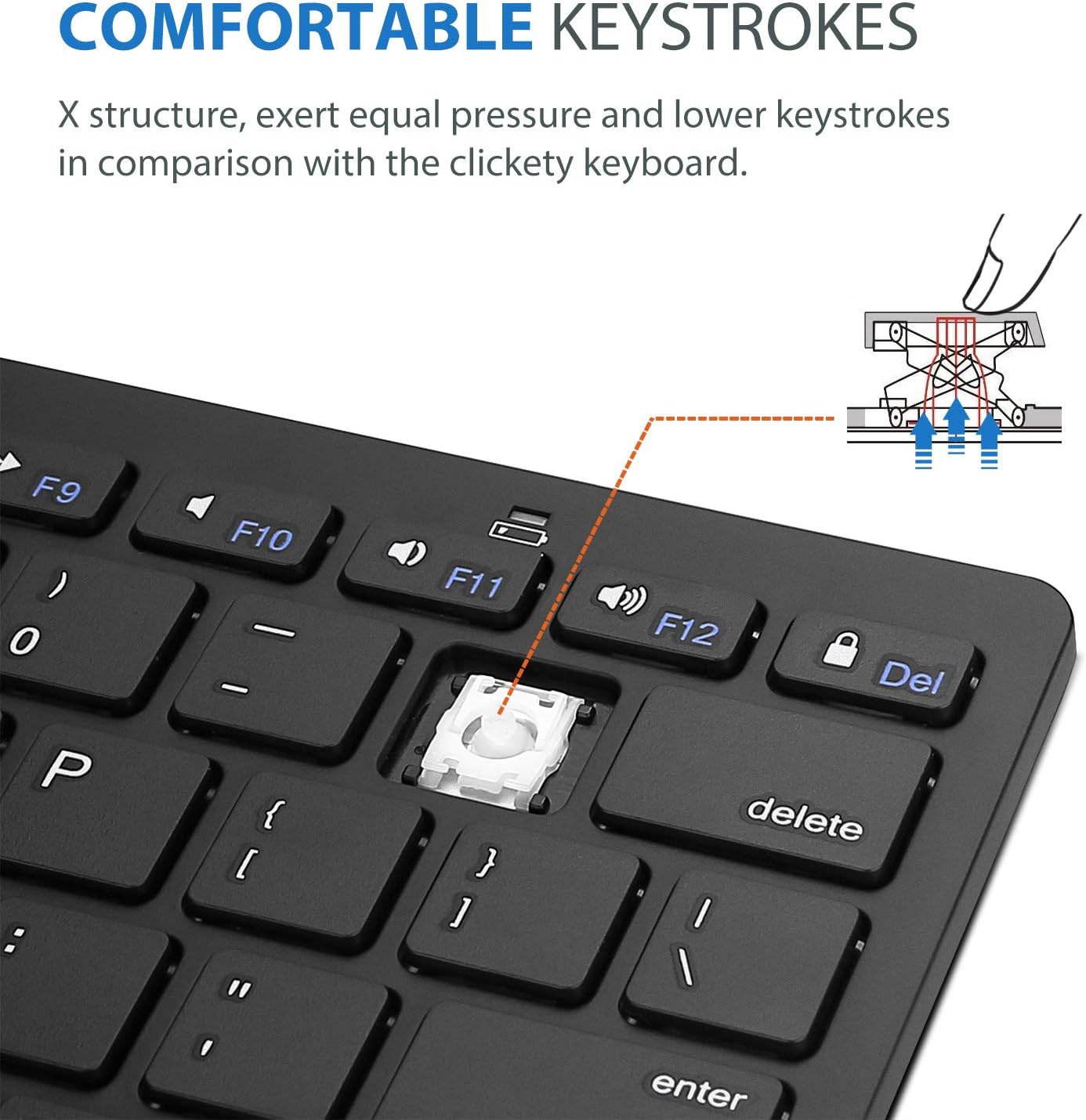
Image: Diagram showing the ultra-slim design and dimensions of the ProCase Wireless Keyboard, measuring 11.2 inches in length, 4.7 inches in width, and 0.19 inches in thickness.
8. Garanti og support
8.1. Garantioplysninger
ProCase products are designed for reliability and performance. For specific warranty details regarding your ProCase Wireless Keyboard, please refer to the warranty card included with your purchase or visit the official ProCase webwebsted. Gem din købsbevis til garantikrav.
8.2. Kundesupport
If you encounter any issues or have questions not covered in this manual, please contact ProCase customer support. You can find contact information on the official ProCase webwebsted eller via din købsplatform.
For mere information, besøg ProCase-butik på Amazon.


