Indledning
This manual provides essential instructions for the safe and efficient operation, maintenance, and troubleshooting of your Xiaomi Mijia Robot 2-in-1 Sweeping and Wet Mopping Robot Vacuum Cleaner. Please read this manual thoroughly before using the product and retain it for future reference.
Vigtige sikkerhedsoplysninger
To reduce the risk of injury or damage, read and follow all safety precautions. This appliance is for household use only.
- Lad ikke børn lege med apparatet.
- Sørg for, at opladningsdokken er placeret på en plan overflade mod en væg.
- Hold hår, løstsiddende tøj, fingre og alle dele af kroppen væk fra åbninger og bevægelige dele.
- Do not operate the robot in areas with open flames or explosive materials.
- Brug ikke robotten til at opsamle stort affald, væsker eller brændende genstande.
- Always remove the water tank and dustbin before moving or cleaning the robot.
- Brug kun den originale strømadapter og opladningsdock, der er leveret af producenten.
Pakkens indhold
Bekræft at alle varer er til stede i pakken:
- 1 x Xiaomi Mijia Sweeping Mopping Robot
- 1 x 2-i-1 vandtank
- 2 x Sidebørste
- 1 x Opladestativ
- 1 x strømadapter
- 1 x Mop Bracket
- 2 x Wiper (Mopping Pad)
Produkt overview
Gør dig bekendt med hovedkomponenterne i din robotstøvsuger.

Billedbeskrivelse: Top view of the Xiaomi Mijia Robot Vacuum Cleaner, showing the main body, the LDS laser navigation system dome, and the power/home buttons.
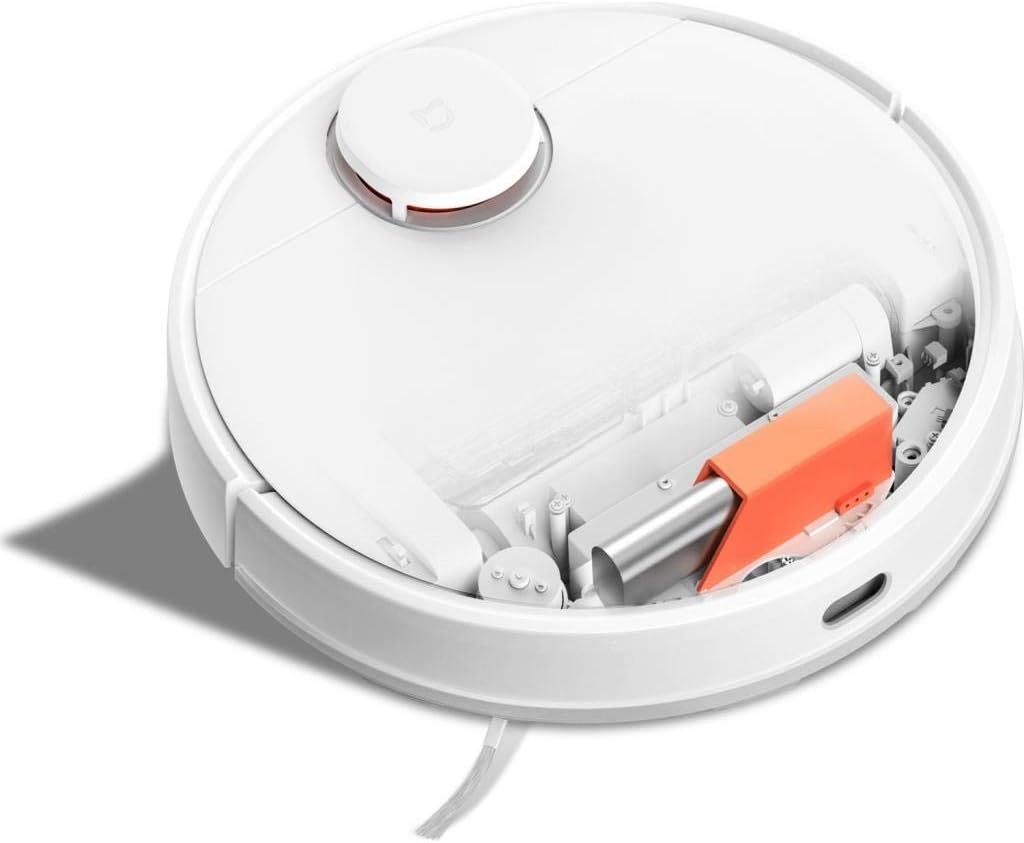
Billedbeskrivelse: Top view of the Xiaomi Mijia Robot Vacuum Cleaner with its top lid open, revealing the dustbin compartment and internal mechanisms, including an orange component.
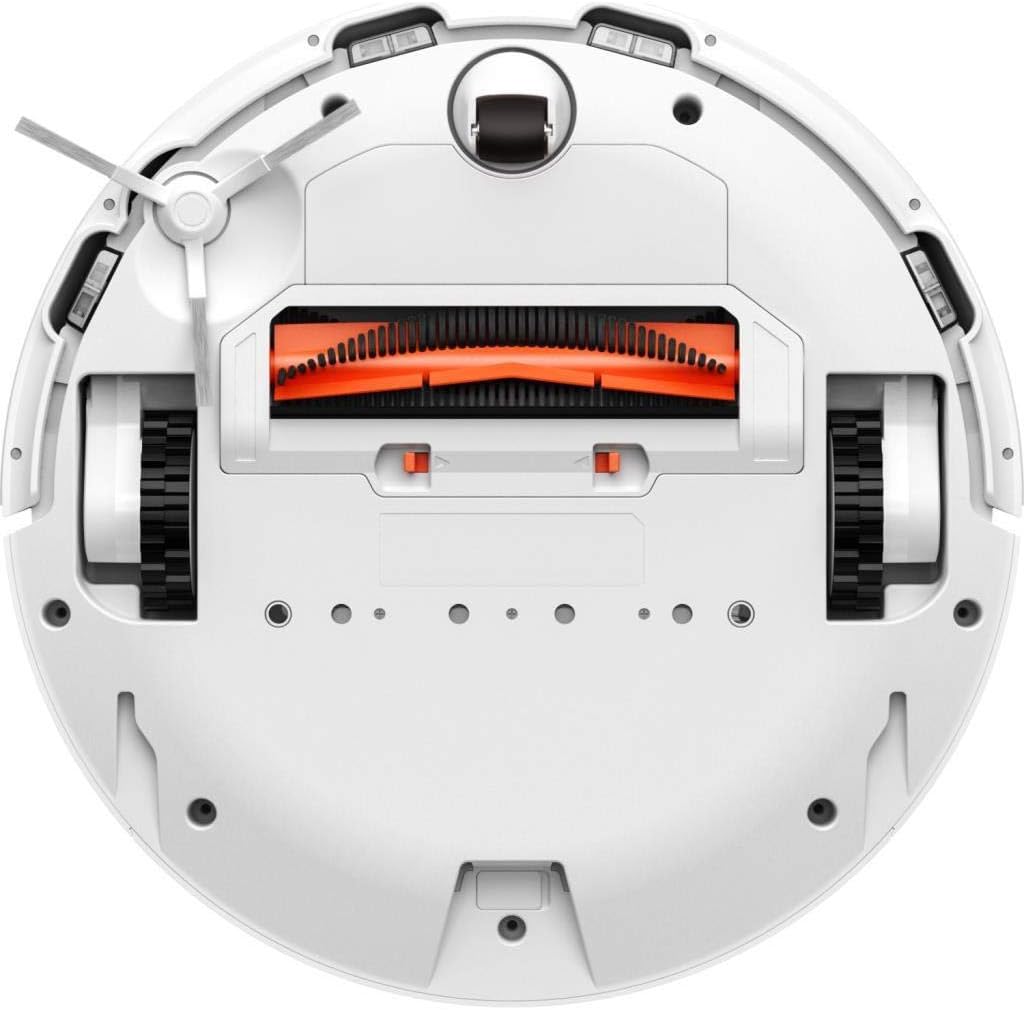
Billedbeskrivelse: Bund view of the Xiaomi Mijia Robot Vacuum Cleaner, displaying the main roller brush (orange), side brushes, charging contacts, and various sensors.
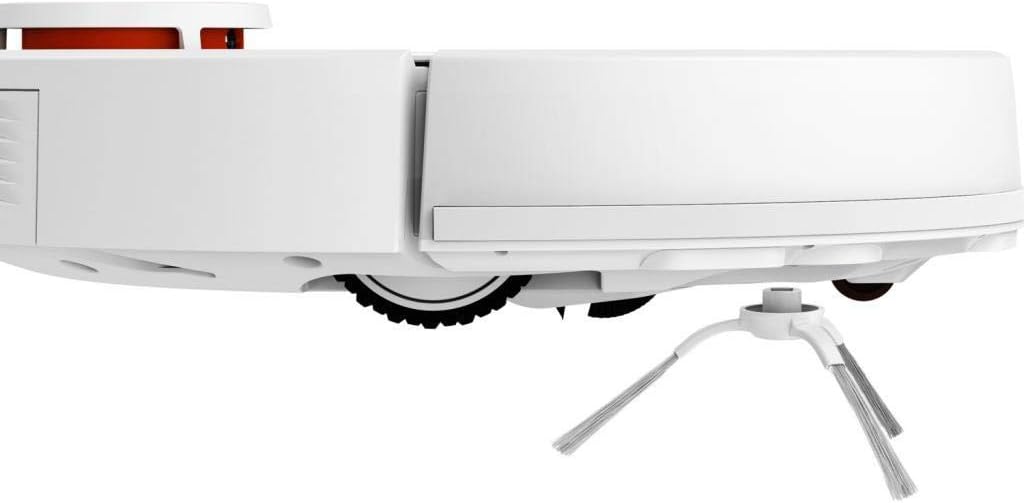
Billedbeskrivelse: Side profile of the Xiaomi Mijia Robot Vacuum Cleaner, highlighting one of the side brushes and a main wheel.
Opsætning
1. Placering af ladestation
Place the charging dock against a wall on a hard, level surface. Ensure there are no obstacles within 0.5 meters (1.6 feet) to either side and 1.5 meters (4.9 feet) in front of the dock. Connect the power adapter to the charging dock and plug it into a power outlet.

Billedbeskrivelse: The Xiaomi Mijia Robot Vacuum Cleaner positioned next to its compact white charging dock, ready for charging.
2. Første opladning
Place the robot onto the charging dock. The robot will automatically align itself and begin charging. For first-time use, ensure the robot is fully charged before operation. A full charge typically takes several hours.
3. Appinstallation og forbindelse
Download the "Mi Home" app from your smartphone's app store. Follow the in-app instructions to add your Xiaomi Mijia Robot Vacuum Cleaner. This process involves connecting the robot to your home's 2.4 GHz Wi-Fi network. The app allows for remote control, scheduling, and map management.
Betjeningsvejledning
1. Rengøringstilstande
The robot supports three cleaning modes:
- Sweeping and Mopping: The robot simultaneously vacuums and mops the floor. Ensure the 2-in-1 water tank with a mop pad is installed.
- Fejning: The robot only vacuums. Use the dustbin for this mode.
- Mopping: The robot only mops. Ensure the 2-in-1 water tank with a mop pad is installed and the HEPA filter is removed from the water tank if only mopping is desired.
2. Start af en rengøringscyklus
Press the power button on the robot or use the Mi Home app to start a cleaning cycle. The robot will automatically map its environment using its LDS laser navigation system and begin cleaning.

Billedbeskrivelse: The Xiaomi Mijia Robot Vacuum Cleaner actively cleaning a modern room with light-colored flooring, demonstrating its compact size and ability to navigate open spaces.
3. Pausing and Stopping
Press the power button once to pause cleaning. Press it again to resume. To stop cleaning and send the robot back to its charging dock, press and hold the power button, or use the app.
4. Planlagt rengøring
Use the Mi Home app to set up cleaning schedules. You can specify times and days for the robot to automatically start cleaning.
5. Zone Cleaning and Virtual Walls
Through the Mi Home app, you can define specific areas for cleaning (zone cleaning) or set up virtual walls and forbidden sweep areas to restrict the robot's access to certain zones.
6. Stemmekontrol
The robot supports voice interaction via the Mi Home app and is compatible with Amazon Echo (Alexa). Follow the instructions in the Mi Home app to link your robot with your voice assistant for hands-free control.
Opretholdelse
Regelmæssig vedligeholdelse sikrer optimal ydeevne og forlænger levetiden på din robotstøvsuger.
1. Dustbin and Water Tank Cleaning
Empty the dustbin after each cleaning cycle. Remove the 2-in-1 water tank, empty any remaining water, and clean the mop pad. The mop pad can be washed and reused.
2. Rengøring af hovedbørste og sidebørste
Periodically remove the main brush and side brushes to clear any tangled hair or debris. Use the cleaning tool provided (if any) or scissors to cut tangled hair.
3. Rengøring af sensorer
Wipe the cliff sensors, wall sensors, and charging contacts with a soft, dry cloth to ensure they remain free of dust and debris. Clean the LDS laser navigation system dome as well.
4. Udskiftning af filter
The HEPA filter in the dustbin should be cleaned regularly and replaced every 3-6 months, depending on usage. Refer to the Mi Home app for filter status and replacement reminders.
Fejlfinding
If you encounter issues with your robot, refer to the following common solutions:
| Problem | Mulig årsag | Løsning |
|---|---|---|
| Robotten starter eller reagerer ikke. | Lavt batteri; tænd/sluk-knappen er ikke trykket korrekt ind. | Ensure robot is fully charged. Press and hold the power button for a few seconds. |
| Robotten kan ikke oprette forbindelse til Wi-Fi. | Forkert Wi-Fi-adgangskode; 5 GHz-netværk brugt; robotten er for langt fra routeren. | Ensure correct 2.4GHz Wi-Fi network and password. Move robot closer to router. Reset Wi-Fi on robot if necessary. |
| Dårlig rengøringsevne. | Full dustbin; clogged brushes; dirty filter. | Empty dustbin. Clean main brush and side brushes. Clean or replace filter. |
| Robotten sidder ofte fast. | Obstacles on the floor; high thresholds; dark surfaces (cliff sensors). | Clear floor of cables and small objects. Use virtual walls for problematic areas. Ensure sufficient lighting for dark floors. |
| Moppefunktionen virker ikke. | Water tank empty; mop pad not installed; water outlet clogged. | Fill water tank. Attach mop pad correctly. Clean water tank outlets. |
Specifikationer
| Feature | Detalje |
|---|---|
| Mærke | XIAOMI |
| Modelnavn | 26200 |
| Speciel funktion | High Precision Sensors, LDS Laser Navigation |
| Farve | Hvid |
| Inkluderede komponenter | Sweeping Mopping Robot, 2-in-1 Water Tank, Side Brushes, Charging Stand, Power Adapter, Mop Bracket, Wipers |
| Filtertype | Klud (HEPA) |
| Batterilevetid | Up to 130 minutes (Sweeping), 60 minutes (Mopping) |
| Voltage | 240 volt (indgang) |
| Skraldespandskapacitet | 0.3 liter |
| Strømkilde | Batteridrevet |
| Kontrolmetode | App (Mi Home) |
| Kompatible enheder | Amazon Echo (Alexa) |
| Formfaktor | Robotisk |
| Produktdimensioner | 13.58 x 13.58 x 3.78 tommer (34.5 x 34.5 x 9.6 cm) |
| Varens vægt | 4.4 pund (2 kg) |
| Batteritype | Lithium-ion (3200mAh capacity) |
| Klatreevne | 2 cm |
Garanti og support
For warranty information and technical support, please refer to the official XIAOMI webwebstedet eller kontakt deres kundeservice. Behold din købskvittering som købsbevis.


