Indledning
This manual provides comprehensive instructions for the operation and maintenance of your NUU Mobile F4L LTE Flip Phone. Please read this manual thoroughly before using your device to ensure proper functionality and to maximize its features. The NUU F4L is a compact and reliable flip phone designed for essential communication, featuring 4G LTE connectivity, a clear internal display, and an external display for quick notifications.
Sikkerhedsoplysninger
Always follow basic safety precautions when using this product to reduce the risk of injury, fire, or damage to the device. Keep the device away from water and moisture. Do not expose to extreme temperatures. Use only manufacturer-approved accessories. Do not attempt to disassemble or repair the device yourself. Dispose of batteries properly according to local regulations.
Pakkens indhold
Bekræft at alle varer er til stede i pakken:
- NUU Mobile F4L LTE Flip Phone
- Batteri (1 litium-ion-batteri medfølger)
- Ladekabel
- Hurtigstartguide (hvis relevant)
Produkt overview
Familiarize yourself with the physical components of your NUU F4L flip phone.

Figur 1: The NUU Mobile F4L LTE Flip Phone in its open position, displaying the internal screen with time and date, and the full alphanumeric keypad below.

Figur 2: Bagsiden view of the NUU Mobile F4L LTE Flip Phone when closed, highlighting the external display which shows time and date, and the rear camera lens positioned above it.
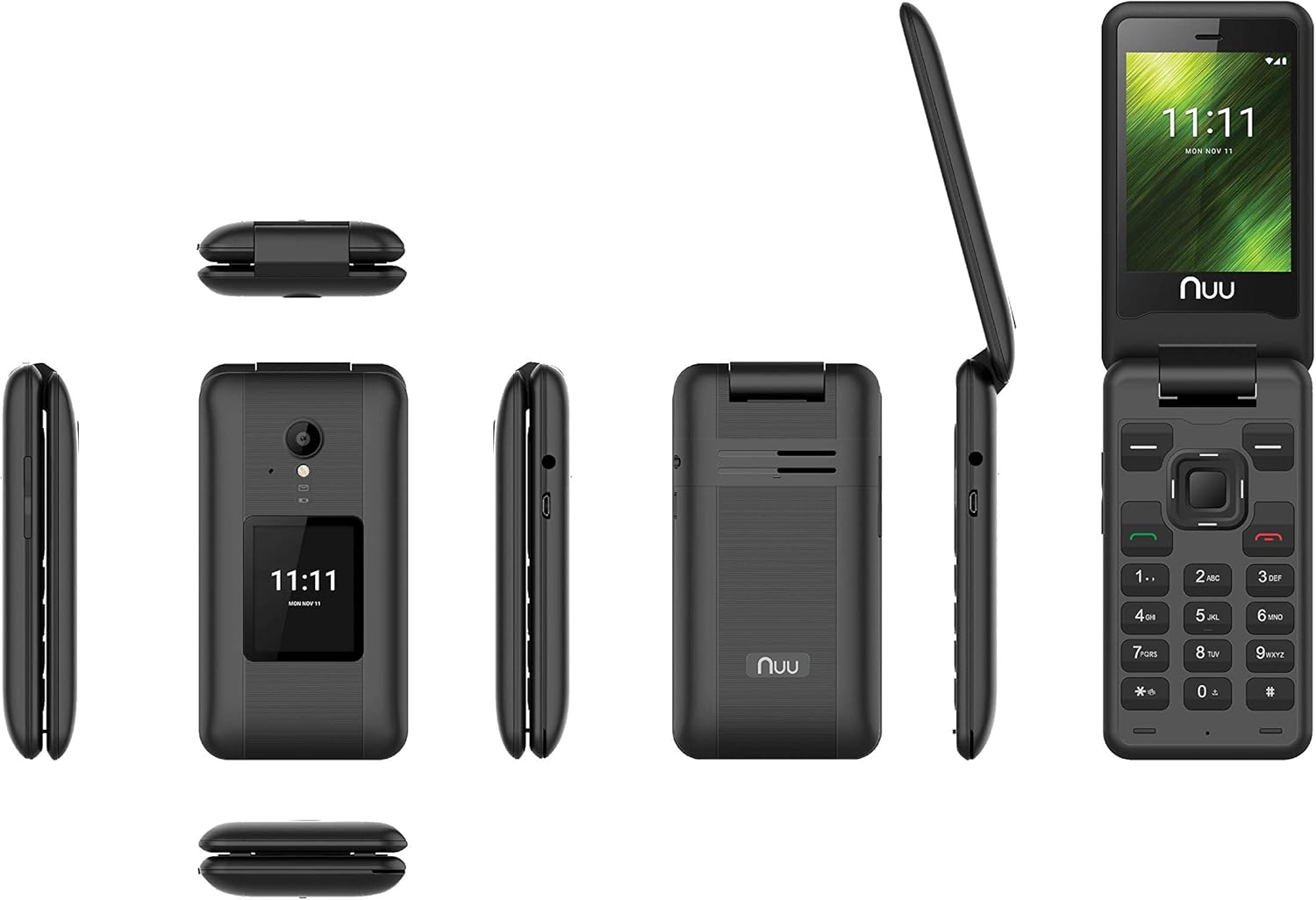
Figur 3: A composite image showing various perspectives of the NUU Mobile F4L LTE Flip Phone, including its front (open and closed), back, and side profiles, providing a comprehensive view of its design and form factor.
Opsætning
1. Batteriinstallation
- Fjern bagcoveret på telefonen ved forsigtigt at lirke det op fra hakket.
- Juster batteriets kontakter med terminalerne inde i batterirummet.
- Tryk batteriet godt ned, indtil det klikker på plads.
- Sæt bagdækslet på igen, og sørg for, at det klikker ordentligt på plads.
2. SIM-kort installation
The NUU F4L supports a standard SIM card. Ensure your SIM card is activated by your carrier (e.g., Verizon).
- Find SIM-kortstikket, når batteriet er fjernet.
- Isæt SIM-kortet med de gyldne kontakter nedad, og det afskårne hjørne flugt med åbningen.
- Tryk forsigtigt SIM-kortet ind, indtil det sidder helt på plads.
- Sæt batteriet og bagdækslet på igen.
3. Første opstart og opladning
- Tryk på tænd/sluk-knappen/afslut opkald, og hold den nede, indtil skærmen lyser.
- If the battery is low, connect the charging cable to the phone's charging port and plug the other end into a power adapter.
- Lad telefonen oplade helt, inden den tages i brug første gang.
Betjeningsvejledning
Grundlæggende navigation
- Navigationstaster: Brug retningsknappen (op, ned, venstre, højre) til at navigere gennem menuer og muligheder.
- Centernøgle: Press the center key to select an option or confirm an action.
- Venstre softkey: Typically used for "Options" or "Menu" functions.
- Højre softkey: Typically used for "Back" or "Cancel" functions.
- Opkaldstast (Grøn): Tryk for at foretage et opkald eller besvare et indgående opkald.
- Afslut opkald/Tænd/sluk-knap (rød): Press to end a call, return to the home screen, or press and hold to power the phone on/off.
Foretage og modtage opkald
- Sådan foretager du et opkald: From the home screen, dial the number using the keypad and press the Green Call key. Alternatively, navigate to "Contacts," select a contact, and press the Green Call key.
- Sådan modtager du et opkald: Når telefonen ringer, skal du trykke på den grønne opkaldstast for at besvare.
- Sådan afslutter du et opkald: Tryk på den røde Afslut opkald-tast.
Text Messaging (SMS)
- Navigate to "Messaging" from the main menu.
- Select "New Message" or "Write Message."
- Indtast modtagerens nummer, eller vælg fra kontakter.
- Type your message using the keypad. The phone supports T9 predictive text input.
- Press the "Send" option (usually the center key or left soft key) to send the message.
Brug af kamera
The NUU F4L features a 2.0 MP rear camera and a 0.3 MP front camera.
- From the main menu, select "Camera."
- Komponer dit billede ved hjælp af skærmen.
- Press the center key or a designated camera button to capture the photo.
- Photos are saved to the phone's internal memory or an installed microSD card.
Wi-Fi-forbindelse
- Navigate to "Settings" from the main menu.
- Select "Wi-Fi" and turn it "On."
- The phone will scan for available networks. Select your desired network.
- If prompted, enter the Wi-Fi password and select "Connect."
Opretholdelse
Rengøring af din enhed
- Use a soft, lint-free cloth to clean the phone's screen and body.
- Undgå at bruge skrappe kemikalier, rengøringsopløsningsmidler eller stærke rengøringsmidler.
- Sprøjt ikke rengøringsmidler direkte på telefonen.
Batteripleje
- To prolong battery life, avoid exposing the phone to extreme hot or cold temperatures.
- Charge the battery regularly, but avoid overcharging or letting it completely drain frequently.
- Hvis telefonen ikke skal bruges i længere tid, skal den oplades til ca. 50%, inden den lægges væk.
Fejlfinding
| Problem | Mulig løsning |
|---|---|
| Telefonen tænder ikke. | Sørg for, at batteriet er korrekt installeret og opladet. Tilslut opladeren, og prøv igen. |
| Kan ikke foretage eller modtage opkald. | Check if the SIM card is correctly inserted and activated. Verify signal strength. Restart the phone. |
| Unable to send/receive text messages. | Check network connection. Verify message center settings (if applicable). Ensure sufficient credit/plan. |
| Dårlig opkaldskvalitet. | Move to an area with better network coverage. Ensure nothing is obstructing the microphone or speaker. |
| Problemer med Wi-Fi-forbindelse. | Ensure Wi-Fi is enabled on the phone. Restart your Wi-Fi router. Re-enter the Wi-Fi password. |
Specifikationer
| Feature | Detalje |
|---|---|
| Modelnavn | F4L |
| Varemodelnummer | S2801L |
| Operativsystem | MyOS |
| Processor | MT6731 Quad-core 1.1 GHz |
| VÆDDER | 512 MB |
| Indbygget opbevaring | 4GB (supports up to 64GB microSD) |
| Internt display | 2.8 Inch QVGA TN 240x320 |
| Eksternt display | 1.77 Inch QQVGA TN 120x160 |
| Bagkamera | 2.0 MP |
| Forreste kamera | 0.3 MP |
| Batterikapacitet | 1,350 mAh Lithium Ion |
| Forbindelse | 4G LTE, Wi-Fi |
| Formfaktor | Flip telefon |
| Farve | Sort |
| Produktdimensioner | 3 x 1.75 x 1 tommer |
| Varens vægt | 10.4 ounce |
Garanti og support
For warranty information and technical support, please refer to the documentation included with your product or visit the official NUU Mobile webwebsted. Gem din købsbevis til garantikrav.
NUU Mobile Official Webwebsted: www.nuumobile.com


