1. Introduktion
Thank you for choosing the Genesis 20-Inch Box Fan. This fan is designed to provide powerful and efficient cooling for various indoor spaces, including bedrooms and offices. Its durable construction and user-friendly features ensure reliable performance.
This manual provides important information regarding the safe operation, setup, maintenance, and troubleshooting of your new Genesis Box Fan. Please read it thoroughly before use and retain it for future reference.

Billede 1.1: Forside view of the Genesis 20-inch Box Fan. The fan features a black square frame with a protective grille and a central Genesis logo on the fan blades.
2. Vigtige sikkerhedsoplysninger
For at mindske risikoen for brand, elektrisk stød eller personskade, bedes du overholde følgende sikkerhedsforanstaltninger:
- Tag altid stikket ud af ventilatoren, inden du rengør eller udfører vedligeholdelse.
- Do not operate the fan with a damaged cord or plug. If the cord or plug is damaged, contact qualified service personnel.
- Hold ventilatoren væk fra vand eller andre væsker. Ventilatoren må ikke nedsænkes i vand.
- Sørg for, at ventilatoren er placeret på en stabil, flad overflade for at forhindre den i at vælte.
- Do not insert fingers or any objects through the grille when the fan is operating.
- This fan is equipped with overload safety protection and a fuse in the plug for added safety. If the fuse blows, replace it only with a fuse of the correct type and rating.
- This product is ETL listed and UL approved, ensuring it meets recognized safety standards.
- Kun til indendørs brug. Må ikke bruges udendørs.

Image 2.1: ETL Listed and Approved Logo, indicating the product meets safety standards.
3. Opsætning og placering
The Genesis 20-Inch Box Fan requires no assembly and is ready for use right out of the box.
- Udpakning: Carefully remove the fan from its packaging. Retain packaging for storage or future transport.
- Placering: Place the fan on a firm, level surface such as a floor, dresser, or table. Ensure there is adequate space around the fan for optimal airflow and to prevent obstruction of the air intake/output.
- Strømtilslutning: Plug the fan's power cord into a standard 120V AC electrical outlet.

Image 3.1: The Genesis Box Fan positioned on the floor in an office environment, demonstrating suitable placement.

Image 3.2: The Genesis Box Fan placed on the floor near a doorway in a home, illustrating its versatility for various room types.
4. Betjeningsvejledning
Your Genesis Box Fan features a simple rotary control knob for power and speed selection.
- Tænd/sluk: Rotate the control knob clockwise from the "OFF" position to turn the fan on. Rotate it counter-clockwise back to "OFF" to turn the fan off.
- Hastighedsvalg: The fan offers three energy-efficient speed settings:
- Indstilling 1 (Lav): For gentle airflow and quiet operation.
- Indstilling 2 (Mellem): For moderate cooling.
- Indstilling 3 (Høj): For maximum airflow and rapid cooling.

Billede 4.1: Nærbillede view of the fan's control knob, located on the top right corner, used to select power and fan speed settings.
5. Pleje og vedligeholdelse
Regelmæssig rengøring vil bidrage til at opretholde din ventilators ydeevne og forlænge dens levetid.
- Rensning: Tag altid stikket ud af ventilatoren før rengøring. Brug en blød, tør klud.amp cloth to wipe the exterior surfaces of the fan. Do not use abrasive cleaners or chemicals.
- Rengøring af gitter: To clean dust from inside the grilles and blades, use a vacuum cleaner with a brush attachment or compressed air. Do not attempt to disassemble the fan for cleaning.
- Opbevaring: If storing the fan for an extended period, cover it to protect it from dust and store it in a cool, dry place.

Billede 5.1: Bagside view of the Genesis Box Fan, showing the back grille which should be kept clean for optimal airflow.
6. Fejlfinding
If you encounter issues with your Genesis Box Fan, please refer to the following common problems and solutions:
| Problem | Mulig årsag | Løsning |
|---|---|---|
| Ventilatoren tænder ikke. | Not plugged in; power outlet not working; fuse blown in plug; control knob not set to a speed. | Ensure fan is securely plugged into a working outlet. Check household circuit breaker. Inspect the fuse in the plug and replace if necessary (refer to safety section). Rotate the control knob to speed setting 1, 2, or 3. |
| Svag luftstrøm. | Fan set to low speed; grilles are obstructed by dust. | Increase the fan speed setting. Clean the front and back grilles as described in the maintenance section. |
| Usædvanlig støj eller raslen. | Fan not on a level surface; foreign object caught in grille. | Ensure the fan is on a stable, flat surface. Unplug the fan and carefully check for any obstructions in the grilles. |
Hvis problemet fortsætter efter at have forsøgt disse løsninger, bedes du kontakte kundesupport.
7. Produktspecifikationer
| Feature | Specifikation |
|---|---|
| Mærke | Genesis |
| Modelnummer | G20BOX-BLK |
| Farve | Sort |
| Elektrisk ventilator design | Floor Fan / Box Fan |
| Strømkilde | AC/DC |
| Produktmål (D x B x H) | 4.5" D x 20" B x 20" H |
| Anbefalede anvendelser | Cooling (Indoor) |
| Støjniveau | 73 dB |
| Wattage | 53 watt |
| Antal blade | 1 |
| Blade Length / Size | 20 tommer |
| Voltage | 120V |
| Inkluderede komponenter | Ventilatorenhed |
| Speciel funktion | Manual Control, Durable Copper Motor, Overload Safety Protection with Fuse in Plug |
| Effektivitet | Energieffektiv |
| Certificeringer | ETL Listed, UL Approved |
| Varens vægt | 8.13 pund |
| Montering påkrævet | Ingen |
| Plejevejledning | Tør rent |
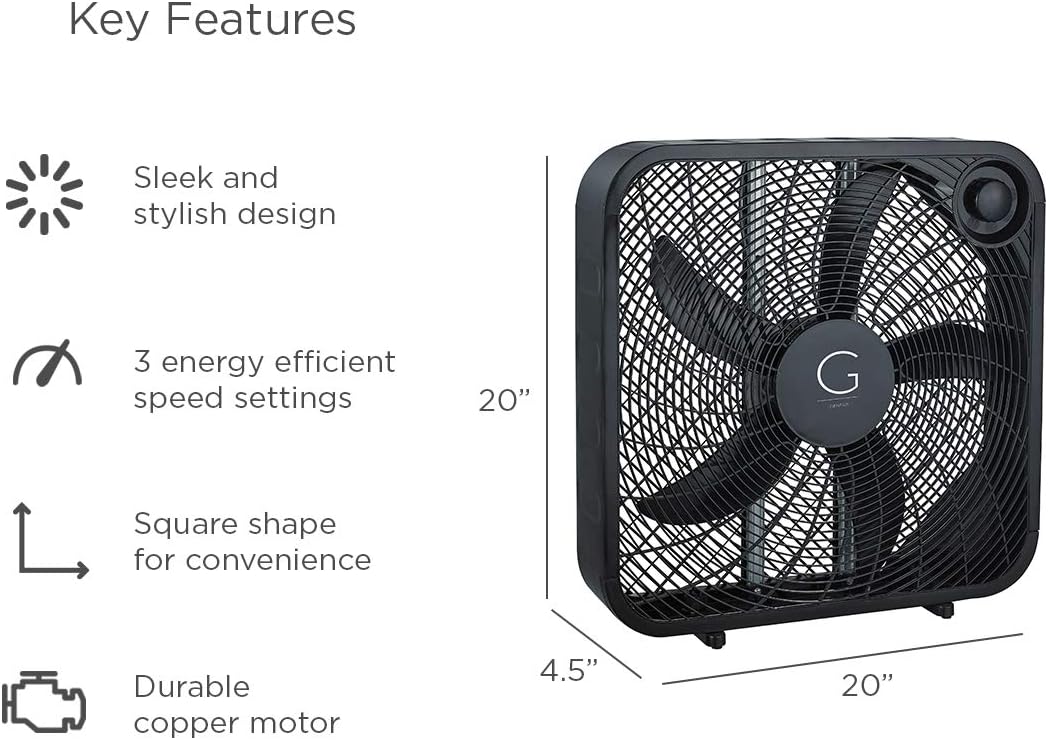
Image 7.1: Visual representation of key features and dimensions (20"W x 20"H x 4.5"D) of the Genesis Box Fan.
8. Garantioplysninger
Specific warranty details for your Genesis 20" Box Fan may vary. Please refer to the warranty card included with your product or visit the official Genesis website for the most up-to-date warranty policy and registration information.
Typically, Genesis products are covered by a limited warranty against defects in materials and workmanship under normal use. Keep your purchase receipt as proof of purchase for warranty claims.
9. Kundesupport
If you have any questions, require technical assistance, or need to report an issue with your Genesis 20" Box Fan, please contact Genesis customer support.
For the most current contact information, please visit the official Genesis webwebstedet eller se kontaktoplysningerne på din produktemballage.
Du kan også besøge Genesis Store on Amazon for yderligere produktinformation og supportressourcer.


