1. Introduktion
Thank you for choosing the TechniSat DIGITRADIO 371 CD BT. This versatile stereo digital radio system offers a wide range of audio entertainment options, including DAB+ digital radio, FM radio, a CD player, Bluetooth audio streaming, and USB playback. This manual provides detailed instructions to help you set up, operate, and maintain your device for optimal performance.
2. Vigtige sikkerhedsinstruktioner
- Læs alle instruktioner omhyggeligt, før du betjener enheden.
- Gem denne vejledning til fremtidig reference.
- Udsæt ikke enheden for regn eller fugt for at forhindre brand eller elektrisk stød.
- Sørg for tilstrækkelig ventilation. Bloker ikke ventilationsåbninger.
- Placer enheden på en stabil, flad overflade.
- Brug kun tilbehør/tilbehør specificeret af producenten.
- Tag stikket ud af enheden under tordenvejr, eller når den ikke skal bruges i længere perioder.
- Overlad al service til kvalificeret servicepersonale.
- The device may only be operated within the specified environmental conditions.
3. Pakkens indhold
Kontroller venligst, at alle varer er til stede i pakken:
- TechniSat DIGITRADIO 371 CD BT unit
- Fjernbetjening
- Brugervejledning (dette dokument)
- 2 AAA-batterier (til fjernbetjening)
4. Produktet er slutview
4.1 Frontpanel

The front panel features a clear color display, control buttons for mode selection, information, menu navigation, and preset access. Two rotary knobs are provided for volume control and tuning/entering selections.
4.2 Bagpanel
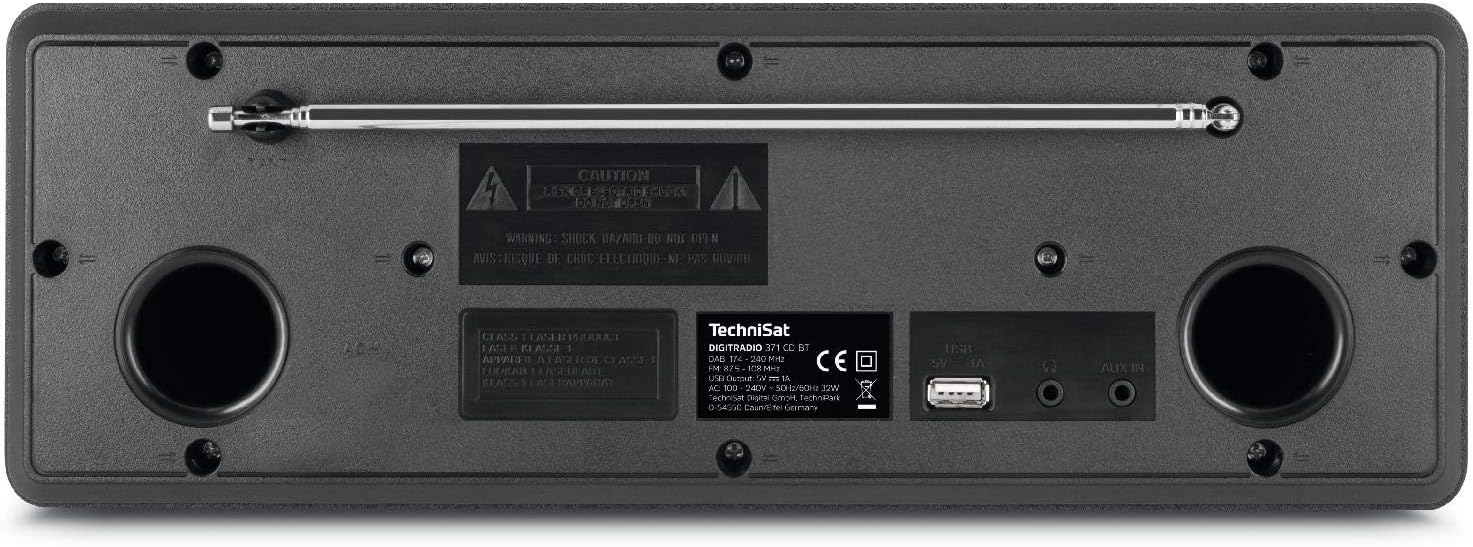
The rear panel includes the telescopic antenna for radio reception, a USB port for MP3 playback and device charging, and a 3.5mm AUX input for connecting external audio sources.
4.3 Fjernbetjening

The included remote control provides convenient access to all functions of the DIGITRADIO 371 CD BT, including power, mode selection, volume, tuning, and preset management.
5. Opsætning
5.1 Strømtilslutning
- Sørg for, at enheden er placeret på en stabil overflade.
- Connect the power cable to the AC inlet on the rear of the unit.
- Plug the other end of the power cable into a standard wall outlet (230V).
5.2 Justering af antenne
For optimal DAB+ and FM radio reception, fully extend the telescopic antenna located on the rear of the unit. Adjust its position and angle to achieve the best signal quality.
5.3 Initial Power On and Scan
- Press the Power button on the front panel or remote control to turn on the device.
- Upon first use, the radio will typically initiate an automatic scan for DAB+ stations. This process may take a few minutes.
- Once the scan is complete, the first available DAB+ station will begin playing.
6. Betjeningsvejledning
6.1 Valg af tilstand
Tryk på MODE button on the front panel or remote control to cycle through available modes: DAB+, FM, CD, Bluetooth, and AUX.
6.2 DAB+ radio
- Vælg DAB+-tilstand ved hjælp af MODE knap.
- If an automatic scan has not been performed or you wish to rescan, navigate to the menu and select 'Full Scan'.
- Brug TUNING/ENTER knob or the navigation buttons on the remote to browse available stations. Press ENTER for at vælge en station.
- For at gemme en station som forudindstilling skal du trykke på og holde FORUDINDSTILLING button, then select a preset number (1-20) and confirm.
6.3 FM radio
- Vælg FM-tilstand ved hjælp af MODE knap.
- To automatically scan for stations, press the SCAN button on the remote or navigate through the menu.
- For at indstille manuelt skal du dreje TUNING/ENTER knop.
- For at gemme en station som forudindstilling skal du trykke på og holde FORUDINDSTILLING button, then select a preset number (1-20) and confirm.
6.4 CD-afspiller
- Vælg CD-tilstand ved hjælp af MODE knap.
- Gently insert an audio CD or MP3 CD into the CD slot. The device will automatically load and begin playback.
- Use the playback control buttons (Play/Pause, Skip Forward/Backward) on the front panel or remote control.
6.5 Bluetooth-lydstreaming
- Vælg Bluetooth-tilstand ved hjælp af MODE button. The display will show 'Pairing'.
- On your Bluetooth-enabled device (e.g., smartphone, tablet), search for available Bluetooth devices and select 'DIGITRADIO 371 CD BT'.
- Once paired, you can stream audio from your device to the DIGITRADIO 371 CD BT.
6.6 USB-afspilning og -opladning
- Indsæt et USB-flashdrev, der indeholder MP3 files i USB-porten på bagpanelet.
- Select USB mode (if available, otherwise it may automatically switch).
- Use the navigation and playback controls to browse and play MP3 files.
- The USB port also provides a charging function for compatible devices like smartphones.
6.7 AUX-indgang
- Connect an external audio device (e.g., MP3 player) to the 3.5mm AUX IN jack on the rear panel using an appropriate audio cable (not included).
- Vælg AUX-tilstand ved hjælp af MODE knap.
- Audio from the external device will now play through the DIGITRADIO 371 CD BT speakers. Control playback from the external device.
6.8 Vækkeur og sleeptimer
- Vækkeur: Få adgang til alarmindstillingerne via MENU button. Follow the on-screen prompts to set alarm time, source (buzzer, radio), and volume.
- Sleep timer: Access the sleep timer settings via the MENU button. Set a duration after which the radio will automatically turn off.
7. Vedligeholdelse
7.1 Rengøring
- Tag altid enheden ud af stikkontakten før rengøring.
- Brug en blød, tør klud til at tørre de udvendige overflader af.
- Brug ikke slibende rengøringsmidler, voks eller opløsningsmidler, da de kan beskadige finishen.
- For the display, use a soft, lint-free cloth.
7.2 Vedligeholdelse af cd-afspiller
- Hold cd'er i kanterne for at undgå fingeraftryk.
- Rengør cd'er med en blød, fnugfri klud, og tør af fra midten og udad.
- Do not use scratched or damaged CDs, as they may harm the player mechanism.
8. Fejlfinding
| Problem | Mulig årsag | Løsning |
|---|---|---|
| Ingen strøm | Strømkabel ikke tilsluttet; Strømudtag ikke aktivt | Kontroller strømkablets forbindelse; prøv en anden stikkontakt |
| Dårlig radiomodtagelse | Antenne ikke strakt ud; Område med svagt signal | Fully extend and adjust antenna; Try repositioning the unit |
| CD'en afspiller ikke | CD inserted incorrectly; CD is dirty or scratched | Reinsert CD correctly; Clean or replace CD |
| Bluetooth forbinder ikke | Device not in pairing mode; Bluetooth disabled on external device | Ensure radio is in Bluetooth mode; Enable Bluetooth on your device and search again |
| Ingen lyd fra AUX | Cable not connected; Incorrect mode selected | Check AUX cable connection; Select AUX mode |
9. Specifikationer
- Modelnummer:
- DIGITRADIO 371 CD BT (0000/2948)
- Dimensioner (B x H x D):
- 34.5 x 12.3 x 21 cm
- Vægt:
- 2.7 kilo
- Strømkilde:
- Wired, internal power supply
- Voltage:
- 230 volt
- Wattage:
- 10 watts (speaker output)
- Talertal:
- 2 (stereo)
- Radiotuner:
- DAB+, FM
- Forbindelse:
- Bluetooth (reception), USB (MP3 playback, charging), 3.5mm AUX In, 3.5mm Headphone Jack
- Vise:
- 2.4 inch color display (dimmable)
- CD-afspiller:
- Plays Audio CDs, MP3 CDs, CD-R, CD-RW
- Funktioner:
- Alarm clock, Sleep timer, Station memory (20x DAB+/20x FM), EQ Predefined
- OSD-sprog:
- engelsk, tysk, fransk, italiensk
10. Garanti og support
For warranty information, please refer to the warranty card included with your product or contact your local TechniSat dealer or customer support. If you encounter any issues not covered in the troubleshooting section, please visit the official TechniSat webwebsted eller kontakt deres kundeservice for at få hjælp.


