1. Introduktion
The INNOVA 3020RS is an easy-to-use diagnostic scan tool designed to help vehicle owners and technicians identify and resolve issues related to the Check Engine Light (CEL) and Anti-lock Braking System (ABS). This device provides essential information for vehicle maintenance, emissions testing, and general diagnostic purposes. It is compatible with most 1996 and newer domestic and import vehicles (OBD2 compliant).
For enhanced functionality, the 3020RS integrates with the free RepairSolutions2 mobile application, offering access to a comprehensive database of verified fixes, part recommendations, maintenance schedules, and technical service bulletins (TSBs).

Image 1.1: The INNOVA 3020RS OBD2 Scan Tool, showing its display and connection cable.
2. Hvad er der i æsken
Når du åbner pakken, skal du sørge for, at alle følgende komponenter er til stede:
- INNOVA 3020RS Code Reader with attached OBD2 Cable
- Hurtig startvejledning
3. Opsætning og første brug
Follow these steps to set up and begin using your INNOVA 3020RS scan tool:
- Find OBD2-porten: The OBD2 (On-Board Diagnostics II) port is typically located under the dashboard on the driver's side of the vehicle. Refer to your vehicle's owner's manual if you have difficulty locating it.
- Connect the Scan Tool: With the vehicle's ignition off, firmly plug the INNOVA 3020RS's OBD2 cable into the vehicle's OBD2 port. Ensure a secure connection.
- Tænd: Turn the vehicle's ignition to the 'ON' position (do not start the engine unless instructed by a specific diagnostic procedure). The scan tool will power on automatically.
- Download RepairSolutions2 App (Optional but Recommended): For advanced features and detailed repair information, download the free RepairSolutions2 app from the Apple App Store or Google Play. This app allows you to connect your 3020RS via Bluetooth for real-time solutions and fixes.
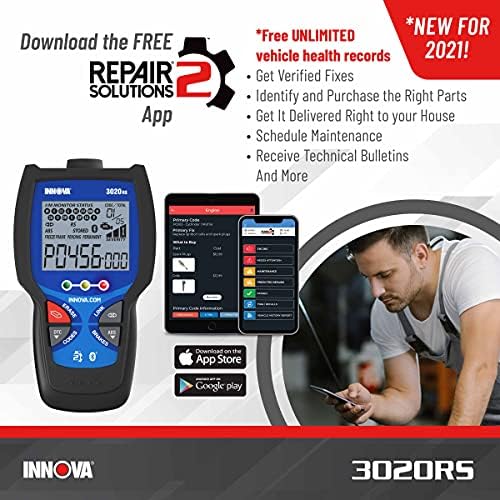
Image 3.1: Illustration showing the INNOVA 3020RS and the RepairSolutions2 app interface on a smartphone, indicating app download availability.
The INNOVA 3020RS is compatible with any foreign or domestic OBD2 car, light truck, SUV, or hybrid vehicle manufactured in 1996 or newer.

Image 3.2: A chart detailing the compatibility of the INNOVA 3020RS with foreign or domestic vehicles from 1996 or newer, including cars, light trucks, SUVs, and hybrid vehicles.
4. Betjeningsvejledning
The 3020RS features an all-in-one display and dedicated hotkeys for quick access to functions.

Image 4.1: Close-up of the INNOVA 3020RS display, highlighting its ability to show over 20 pieces of information on one screen and the presence of dedicated hotkeys for quick function access.
4.1. Læsning og sletning af koder
- Kontrollampe for motor (CEL): To read diagnostic trouble codes (DTCs) related to the Check Engine Light, press the 'CODES' button. The display will show the codes present. To clear these codes, press the 'ERASE' button. Ensure the vehicle's ignition is in the 'ON' position but the engine is not running when clearing codes.
- ABS (Brake) Codes: The 3020RS can diagnose braking system issues on most 2006 and newer domestic and Asian vehicles. Press the 'ABS' button to read ABS-related codes. These can also be cleared using the 'ERASE' button.

Image 4.2: Visual representation of the scan tool's capabilities, including checking engine lights, ABS (brake) codes, and emission status.
4.2. Emissions Status (Smog Check)
The tool includes Smog Check LED indicators that provide an immediate assessment of your vehicle's readiness for an emissions test. This allows you to pre-determine if your vehicle will pass a state vehicle smog test.

Image 4.3: A person in a car looking at the INNOVA 3020RS, illustrating the tool's ability to check smog readiness before a state inspection.
4.3. Code Severity Levels
The 3020RS displays code severity levels, helping you quickly identify if a detected issue requires immediate attention or if it can wait for a more convenient repair time.
4.4. Using the RepairSolutions2 App
The RepairSolutions2 app significantly enhances the diagnostic capabilities of the 3020RS. Once connected via Bluetooth, the app provides:
- Verified Fixes: Access a database of confirmed solutions for diagnostic trouble codes.
- Part Recommendations: Identify the exact parts required for repairs and find purchase options.
- Maintenance Schedules: View recommended maintenance for your specific vehicle.
- Technical Service Bulletins (TSBs) & Recalls: Stay informed about manufacturer-issued TSBs and safety recalls relevant to your vehicle.

Image 4.4: A hand holding the INNOVA 3020RS with a digital overlay showing data flow and connectivity, representing access to a large cloud-based automotive diagnostic database and verified fixes.
5. Vedligeholdelse
To ensure the longevity and optimal performance of your INNOVA 3020RS, follow these maintenance guidelines:
- Rensning: Brug en blød, tør klud til at rengøre enhedens yderside. Brug ikke slibende rengøringsmidler eller opløsningsmidler.
- Opbevaring: Store the scan tool in a cool, dry place away from direct sunlight and extreme temperatures. Keep it in its original packaging or a protective case when not in use.
- Softwareopdateringer: Periodically check the RepairSolutions2 app or the Innova website for available software updates for your 3020RS. Keeping the firmware updated ensures compatibility with newer vehicles and access to the latest diagnostic data.
- Kabelpleje: Avoid bending or crimping the OBD2 cable excessively. Always grasp the connector, not the cable, when plugging or unplugging the device.
6. Fejlfinding
If you encounter issues with your INNOVA 3020RS, refer to the following common troubleshooting steps:
| Problem | Mulig årsag | Løsning |
|---|---|---|
| Enheden tænder ikke. | Loose OBD2 connection; Vehicle ignition off; Blown fuse in vehicle's OBD2 circuit. | Ensure the OBD2 cable is firmly connected. Turn vehicle ignition to 'ON'. Check vehicle's fuse box for a blown fuse related to the OBD2 port. |
| Cannot connect to RepairSolutions2 app via Bluetooth. | Bluetooth not enabled on phone/device; App not installed correctly; Device not in pairing mode. | Ensure Bluetooth is enabled on your mobile device. Reinstall the app. Follow app instructions for pairing the device. |
| Codes do not clear after pressing 'ERASE'. | Vehicle ignition not in 'ON' position; Underlying fault still present; Specific vehicle requirements. | Ensure ignition is 'ON' (engine off). Address the underlying mechanical issue first. Some vehicles may require specific procedures; consult your vehicle's service manual. |
| Unøjagtige eller ingen aflæsninger. | Poor connection; Incompatible vehicle; Damaged cable/device. | Verify secure connection. Confirm vehicle is OBD2 compliant (1996 or newer). If issues persist, contact customer support. |
For more detailed troubleshooting or specific diagnostic guidance, utilize the RepairSolutions2 app or contact Innova customer support.
7. Specifikationer
| Feature | Detalje |
|---|---|
| Mærke | Innova |
| Model | 3020RS |
| Produktdimensioner | 4.5 cm L x 3.29 cm B x 0.7 cm H |
| Varens vægt | 6.7 ounce |
| Operating System (for app) | Android (also compatible with iOS) |
| Automotive Fit Type | Universal Fit (OBD2 compliant vehicles 1996 and newer) |
| Særlige funktioner | ABS/Brake Codes: Read and Clear, Check Engine: Read and Clear Trouble Codes, Emissions/Smog Check Readiness LED Indicators |
| UPC | 042173730209 |

Image 7.1: Diagram illustrating the dimensions of the INNOVA 3020RS scan tool.
8. Garanti og support
Innova products are designed and supported in the USA. The INNOVA 3020RS comes with a limited warranty. For specific warranty terms and conditions, please refer to the documentation included with your product or visit the official Innova webwebsted.
For technical assistance, troubleshooting, or any questions regarding your INNOVA 3020RS, please contact the California-based, ASE-Certified Customer Support Team. They are available to assist you six days a week.

Image 8.1: An image indicating that Innova products are designed and supported in the USA, featuring a customer support representative.


