1. Introduktion
The Celly Pantone PTBS001L is a portable Bluetooth speaker designed for an optimal audio experience both indoors and outdoors. Featuring an elegant fabric-covered body and a 5W output, it delivers clear sound. This manual provides detailed instructions for setting up, operating, and maintaining your speaker.
Nøglefunktioner omfatter:
- 8-timers batterilevetid: Enjoy extended playback on a single charge.
- 5W Audio Output: Provides maximum sound for various environments.
- Dobbelt tilslutning: Connect via Bluetooth 5.0 or the included 3.5mm auxiliary cable.
- Bærbart design: Compact and stylish, making it easy to carry.
2. Sikkerhedsoplysninger
Læs venligst alle sikkerhedsinstruktioner, før du bruger dette produkt. Manglende overholdelse af disse instruktioner kan resultere i elektrisk stød, brand eller andre farer.
- Udsæt ikke højttaleren for ekstreme temperaturer, direkte sollys eller høj luftfugtighed.
- Do not immerse the speaker in water or other liquids.
- Undgå at tabe eller udsætte højttaleren for kraftige stød.
- Forsøg ikke at skille ad, reparere eller modificere højttaleren. Dette vil ugyldiggøre garantien.
- Brug kun det medfølgende opladningskabel eller et tilsvarende certificeret kabel.
- Opbevares utilgængeligt for børn.
- Bortskaf produktet ansvarligt i henhold til lokale regler.
3. Pakkens indhold
Sørg for at alle varer er til stede i pakken:
- Celly Pantone PTBS001L Bluetooth Speaker
- USB opladningskabel
- 3.5mm Auxiliary (AUX) Cable
- Brugervejledning (dette dokument)
4. Produktet er slutview
The Celly Pantone PTBS001L speaker features a minimalist design with intuitive controls. Familiarize yourself with the speaker's components and controls before use.

Figur 1: Front view of the Celly Pantone PTBS001L Bluetooth Speaker. The speaker has a cylindrical shape, covered in a cyan fabric, with a white base featuring the 'PANTONE' logo. The top cap is also cyan.
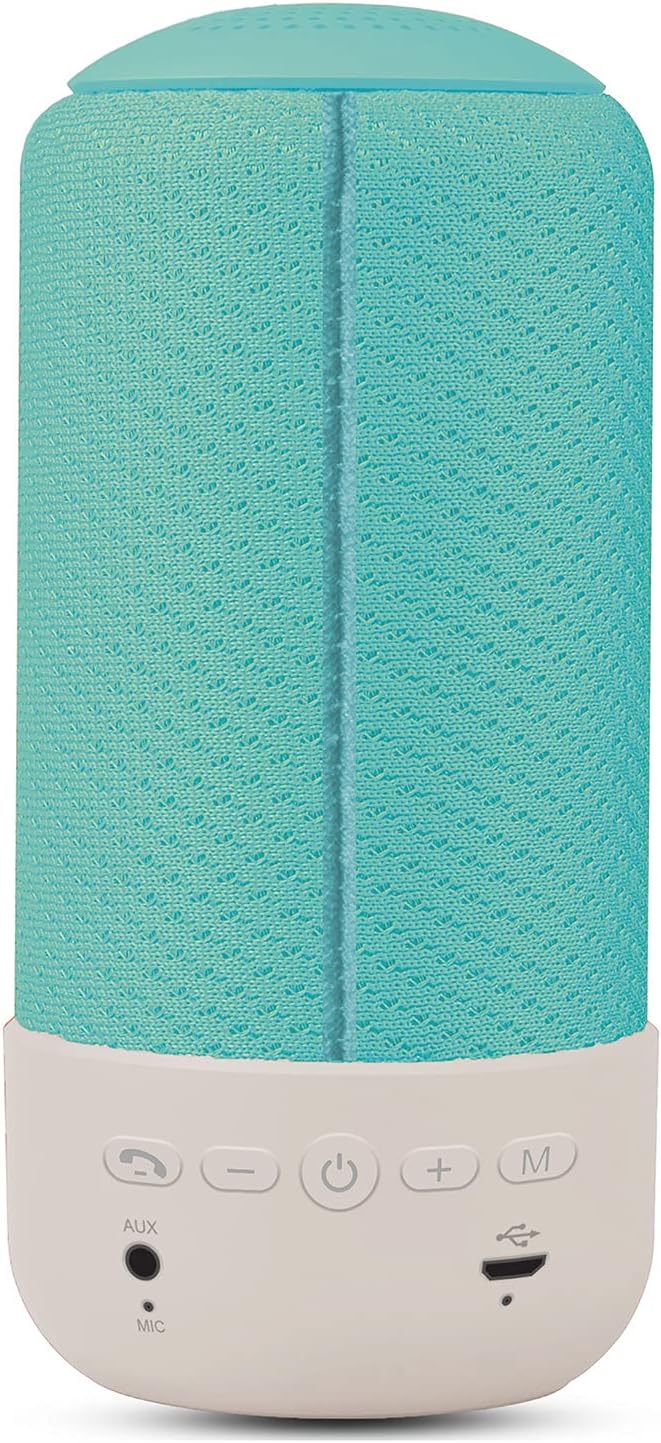
Figur 2: Bag view of the Celly Pantone PTBS001L Bluetooth Speaker. This image highlights the control panel located on the white base. From left to right, the buttons are: Call/Play/Pause, Volume Down (-), Power On/Off, Volume Up (+), and Mode (M). Below these buttons are the AUX input, Microphone (MIC), and Micro USB charging port.
Kontrol og porte:
- Call / Play / Pause Button: Answer/end calls, play/pause music.
- Knap til lydstyrke ned (-): Skru ned for lydstyrken. Tryk og hold nede for at gå til forrige nummer.
- Tænd/sluk-knap (⏻): Tænd/sluk for højttaleren.
- Knap til lydstyrke op (+): Skru op for lydstyrken. Tryk og hold nede for næste nummer.
- Tilstandsknap (M): Switch between Bluetooth and AUX modes.
- AUX-indgang: 3.5 mm jackstik til kablet lydforbindelse.
- MIC: Indbygget mikrofon til håndfri opkald.
- Micro USB-opladningsport: Til opladning af højttalerens interne batteri.
5. Opsætning
5.1 Indledende opladning
Before first use, fully charge the speaker. Connect the Micro USB charging cable to the speaker's charging port and the other end to a USB power adapter (not included) or a computer's USB port. The charging indicator light will illuminate during charging and turn off once fully charged. A full charge takes approximately 2 hours.
5.2 Tænd/sluk
- For at tænde: Press and hold the Power button (⏻) for a few seconds until you hear an audible prompt or see an indicator light.
- For at slukke: Press and hold the Power button (⏻) for a few seconds until you hear an audible prompt or the indicator light turns off.
5.3 Bluetooth -parring
After powering on, the speaker will automatically enter Bluetooth pairing mode if no device is connected. An indicator light will flash, and you may hear an audible prompt.
- Ensure the speaker is powered on and in Bluetooth pairing mode.
- Aktiver Bluetooth på din mobilenhed (smartphone, tablet osv.).
- Søg efter tilgængelige Bluetooth-enheder. Højttaleren vil vises som "PTBS001L" eller lignende.
- Select the speaker from the list to connect. Once connected, you will hear a confirmation sound, and the indicator light will stop flashing.
- Hvis du bliver bedt om en adgangskode, skal du indtaste "0000".
Højttaleren vil automatisk forsøge at genoprette forbindelsen til den sidst parrede enhed, når den tændes, hvis den pågældende enhed er inden for rækkevidde og har Bluetooth aktiveret.
6. Betjeningsvejledning
6.1 Bluetooth-afspilning
- Når parringen er fuldført, skal du åbne din musikapplikation på din enhed og starte afspilningen.
- Afspil/pause: Press the Call/Play/Pause button once.
- Næste nummer: Tryk på knappen Lydstyrke op (+), og hold den nede.
- Forrige nummer: Tryk og hold nede på lydstyrke ned-knappen (-).
6.2 AUX Mode Playback
For devices without Bluetooth, or if you prefer a wired connection:
- Connect one end of the 3.5mm AUX cable to the AUX input port on the speaker.
- Connect the other end of the AUX cable to the headphone jack of your audio device.
- Tryk på Tilstand (M) button on the speaker to switch to AUX mode. You will hear an audible prompt.
- Start playback from your audio device. Volume can be controlled via the speaker or your device. Track control buttons on the speaker may not function in AUX mode.
6.3 Opkaldsfunktion
When connected via Bluetooth, the speaker supports hands-free calling.
- Besvar opkald: Press the Call/Play/Pause button once when an incoming call rings.
- Afslut opkald: Press the Call/Play/Pause button once during a call.
- Afvis opkald: Press and hold the Call/Play/Pause button for 2 seconds when an incoming call rings.
- Genopkald sidste nummer: Double-press the Call/Play/Pause button.
6.4 Lydstyrkekontrol
- Forøg lydstyrke: Tryk på knappen Lydstyrke op (+).
- Skru ned for lydstyrken: Tryk på knappen Lydstyrke ned (-).
7. Opladning af højttaleren
The speaker is powered by an internal rechargeable battery. When the battery is low, you may hear an audible warning, and the indicator light may flash.
- Tilslut Micro USB-opladerkablet til højttalerens opladningsport.
- Tilslut den anden ende af kablet til en USB-strømkilde (f.eks. en vægadapter eller en computers USB-port).
- The charging indicator light will be active during charging.
- Charging typically takes less than 2 hours for a full charge.
- A fully charged speaker provides approximately 8 hours of playback time.
8. Vedligeholdelse
8.1 Rengøring
- Tør højttaleren af med en blød, tør og fnugfri klud.
- Brug ikke slibende rengøringsmidler, alkohol eller kemiske opløsningsmidler, da disse kan beskadige overfladen.
8.2 Opbevaring
- Opbevar højttaleren et køligt, tørt sted væk fra direkte sollys og ekstreme temperaturer.
- Hvis batteriet opbevares i længere tid, skal det oplades med et par måneders mellemrum for at forlænge dets levetid.
9. Fejlfinding
| Problem | Mulig årsag | Løsning |
|---|---|---|
| Højttaleren tænder ikke. | Batteriet er afladet. | Oplad højttaleren i mindst 30 minutter. |
| Ingen lyd fra højttaleren. | Lydstyrken er for lav; Enheden er ikke tilsluttet; Forkert tilstand. | Increase speaker and device volume; Ensure Bluetooth is paired or AUX cable is connected; Press 'M' button to switch modes. |
| Kan ikke parres via Bluetooth. | Højttaler ikke i parringstilstand; Enhedens Bluetooth er slået fra; For langt fra enheden. | Ensure speaker is on and flashing (pairing mode); Turn on Bluetooth on your device; Move speaker closer to your device (within 10m). |
| Dårlig lydkvalitet. | Lavt batteri; Enhed for langt væk; Interferens. | Charge the speaker; Move device closer; Avoid obstacles between speaker and device. |
10. Specifikationer
| Feature | Specifikation |
|---|---|
| Modelnavn | PTBS001L |
| Mærke | Pantone (by Celly) |
| Forbindelsesteknologi | Bluetooth, Auxiliary (3.5 mm jack) |
| Bluetooth version | 5.0 |
| Arbejdsafstand | Op til 10 meter (33 fod) |
| Højttaler udgangseffekt | 5 watt |
| Højttaler specifikationer | 52mm - 4 Ohm |
| Frekvensområde | 60Hz - 20KHz |
| Forvrængning | <3 % |
| Batterikapacitet | 1200mAh |
| Opladningstid | Mindre end 2 timer |
| Spilletid | Mere end 8 timer |
| Særlige funktioner | Bluetooth, Portable, Hands-free Call Function |
| Dimensioner (L x B x H) | 7 x 7 x 15 cm (2.76 x 2.76 x 5.91 tommer) |
| Vægt | 340 gram (0.75 lbs) |
| Farve | Cyan |
11. Garanti og support
This product is covered by a standard manufacturer's warranty. Please refer to the warranty card included with your purchase or visit the official Celly webhjemmeside for detaljerede garantivilkår.
For technical support, troubleshooting assistance, or warranty claims, please contact Celly customer service through their official webwebstedet eller kontaktoplysningerne på din produktemballage.


