Indledning
This manual provides detailed instructions for the FILA Unisex Digital Watch, Model 38-163-001. Please read this manual carefully before using your watch to ensure proper operation and to maximize its lifespan. This watch is designed for both men and women, featuring a comfortable silicone material suitable for sports and casual wear. It includes various functions such as chronograph, calorie consumption, pedometer, timer, lap timer, alarm, time signal, and EL backlight. It is water-resistant for daily life (5 ATM).
Produkt overview
Familiarize yourself with the watch's components and button functions.

Figur 1: Forside View of FILA Digital Watch 38-163-001. This image displays the watch face with the digital display showing time (10:38), day (WED), and date (23). The four control buttons are visible around the bezel, labeled 'LIGHT / RESET' (top left), 'MODE' (bottom left), 'ST./STP./LAP' (top right), and 'EXERCISE' (bottom right). The FILA logo is prominently displayed above the digital screen.
- LIGHT / RESET Button (Top Left): Activates the EL backlight and is used for resetting functions.
- MODE-knap (nederst til venstre): Cycles through different modes (Time, Chronograph, Pedometer, Timer, Alarm).
- ST./STP./LAP Button (Top Right): Starts/stops functions and records lap times.
- EXERCISE Button (Bottom Right): Activates exercise-related functions like pedometer and calorie consumption.
Opsætning
Indstilling af tid og dato
- Fra Tidsvisningstilstand skal du trykke på MODE knappen gentagne gange, indtil tidsindstillingsskærmen vises (normalt angivet med blinkende cifre).
- Brug ST./STP./LAP knappen til at justere det blinkende ciffer (timer, minutter, sekunder).
- Tryk på ØVELSE button to move to the next setting (e.g., minutes, year, month, day).
- Gentag trin 2 og 3, indtil alle ønskede indstillinger er konfigureret.
- Tryk på MODE knappen for at afslutte indstillingstilstanden og vende tilbage til Tidsvisning.
Betjeningsvejledning
Brug af kronografen (stopuret)
- Tryk på MODE button until the Chronograph mode is displayed. The display will show "00:00:00".
- Tryk på ST./STP./LAP knappen for at starte stopuret.
- For at registrere en omgangstid skal du trykke på ST./STP./LAP button while the stopwatch is running. The lap time will be displayed briefly.
- Tryk på ST./STP./LAP knappen igen for at stoppe stopuret.
- For at nulstille stopuret til "00:00:00" skal du trykke på LIGHT / RESET knap.
Pedometer and Calorie Consumption
This watch features a built-in pedometer to track your steps and estimate calorie consumption.
- Tryk på MODE button until the Pedometer mode is displayed.
- Tryk på ØVELSE button to start or pause the pedometer function.
- The display will show your current step count and estimated calories burned.
- To reset the pedometer data, press and hold the LIGHT / RESET button in Pedometer mode.
Indstilling og brug af alarmen
- Tryk på MODE button until the Alarm mode is displayed.
- Tryk på ST./STP./LAP knappen for at justere timetallet, og tryk derefter på ØVELSE at flytte til minutter.
- Tryk på ST./STP./LAP knappen for at justere minutterne.
- Tryk på MODE button to confirm and activate the alarm. An alarm icon will appear on the display.
- For at tænde/slukke alarmen skal du trykke på ØVELSE button in Alarm mode.
EL-baggrundsbelysning
For at oplyse displayet under dårlige lysforhold skal du trykke på LIGHT / RESET knappen. Baggrundsbelysningen vil forblive tændt i et par sekunder.
Opretholdelse
Rengøring af dit ur
The watch case and silicone strap can be cleaned with a soft, damp cloth. For stubborn dirt, use a mild soap solution and rinse thoroughly with clean water. Ensure the watch is completely dry before wearing it again. Avoid using harsh chemicals or abrasive cleaners.
Vandmodstand
This watch is rated for 5 ATM (50 meters) daily life water resistance. This means it is suitable for everyday use and can withstand splashes, rain, and brief immersion in water. It is ikke suitable for swimming, diving, or showering with hot water, as steam and temperature changes can compromise the seals.
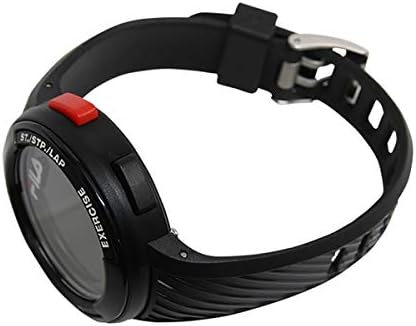
Figur 2: Side View of FILA Digital Watch 38-163-001. This image shows the right side of the watch, highlighting the 'ST./STP./LAP' button (red) and the 'EXERCISE' button (black). The textured silicone strap is also visible, extending from the watch case.
Udskiftning af batteri
The watch is powered by a quartz battery. When the display becomes dim or functions become erratic, it may be time to replace the battery. Battery replacement should be performed by a qualified watch technician to ensure the water resistance seal is maintained. Attempting to replace the battery yourself may void the warranty and damage the watch.
Fejlfinding
| Problem | Mulig årsag | Løsning |
|---|---|---|
| Skærmen er tom eller svag. | Lavt batteri. | Udskift batteriet (professionel service anbefales). |
| Knapperne reagerer ikke. | Midlertidig systemfejl. | Try pressing all buttons firmly. If issue persists, a soft reset might be needed (refer to professional). |
| Tidspunktet er forkert. | Tiden er ikke indstillet korrekt, eller batteriet er lavt. | Re-set the time and date as per "Setting Time and Date" section. If problem persists, consider battery replacement. |
| Vand inde i uret. | Vandtætheden kompromitteret. | Stop using the watch immediately and take it to a qualified watch repair service. Do not attempt to dry it yourself. |
Specifikationer
- Mærke: FILA
- Modelnummer: 38-163-001
- Bevægelse: Kvarts (batteridrevet)
- Vandtæthed: Daily life water resistance (5 ATM / 50 meters)
- Funktioner: Chronograph, Calorie Consumption, Pedometer, Timer, Lap Timer, Alarm, Time Signal, EL Backlight
- Sagsbredde: Approximately 44mm (excluding crown)
- Remmateriale: Silikone
- Håndledsomkreds: Approximately 13cm (min) to 19.5cm (max)
Garanti og support
Garantioplysninger
This FILA watch comes with a 1 års garanti from the date of purchase. The warranty covers manufacturing defects under normal use. It does not cover damage resulting from accidents, improper use, unauthorized repairs, or normal wear and tear of the strap or battery.
Gem venligst dit købsbevis for garantikrav.
Kundesupport
For further assistance, technical support, or warranty service, please contact your retailer or the authorized FILA service center. Refer to the contact information provided with your purchase documentation.


