1. Introduktion
Thank you for choosing the WorkPro LED Desk Lamp. Denne alsidige lamp is designed to enhance your workspace with adjustable illumination, convenient wireless charging, and a USB charging port. Please read this manual thoroughly to ensure proper setup, operation, and maintenance of your new desk lamp.

Image 1.1: The WorkPro LED Desk Lamp, featuring a modern brushed metal finish and adjustable arm.
2. Produktfunktioner
- Justerbar belysning: 5 color temperatures and 6 brightness levels for customized lighting.
- Trådløs opladning: Integrated wireless charging pad on the base for compatible mobile devices.
- USB opladningsport: En 2.4-amp USB port located at the back of the base for additional device charging.
- Fleksibelt design: Adjustable arm, head, and rotatable base for precise light positioning.
- Berøringsknapper: Intuitive touch control panel with memory function.
- Timer funktion: Built-in 1-hour timer for automatic shut-off.
- Natlys: Integrated night light feature.
- Energieffektiv LED: Pre-wired 10-watt LEDs with an average life of approximately 50,000 hours.
- Holdbar konstruktion: Brushed metal body with a modern design.

Image 2.1: The WorkPro LED Desk Lamp integrated into a modern workspace, highlighting its functional design.
3. Pakkens indhold
Tjek venligst pakken for følgende varer:
- WorkPro LED-skrivebord Lamp Enhed
- Strømadapter
- Brugervejledning (dette dokument)
4. Sikkerhedsoplysninger
For at mindske risikoen for brand, elektrisk stød eller personskade, bedes du overholde følgende sikkerhedsforanstaltninger:
- Betjen ikke lamp med en beskadiget ledning eller stik.
- Brug ikke lamp i vådt eller damp forhold.
- Sørg for, at strømadapteren er kompatibel med din lokale strømforsyning.
- Forsøg ikke at adskille eller reparere lamp. Contact qualified service personnel for assistance.
- Behold lamp væk fra varmekilder og direkte sollys.
- The LED light source is not replaceable. Do not attempt to replace the LEDs.
- Placer lamp på en stabil, plan overflade for at forhindre væltning.
5. Opsætning
Follow these steps to set up your WorkPro LED Desk Lamp:
- Pakker ud: Fjern forsigtigt alle komponenter fra emballagen.
- Position: Placer lamp base på en stabil, flad overflade.
- Tilslut strøm: Sæt strømadapterkablet i strømindgangen på bagsiden af l'en.amp Sæt strømadapteren i en almindelig stikkontakt.
- Justere: Juster forsigtigt lamp arm og hoved til den ønskede position.amp features multiple pivot points for flexibility.

Billede 5.1: Lamp adjustability, showing 90-degree head rotation, 120-degree arm articulation, 90-degree base rotation, and 145-degree head tilt.
6. Betjeningsvejledning
6.1. Touch Control Panel Overview
Lamp is operated via a touch-sensitive control panel located on the base. The icons represent various functions:
- Power knap: Drejer l'enamp tænd/sluk.
- Justering af lysstyrke: Adjusts light intensity (6 levels).
- Farvetemperaturjustering: Changes light color (5 modes).
- Timer knap: Activates the 1-hour timer.
- Natlys knap: Activates the night light feature.
6.2. Tænd/sluk
Tryk på Power knap én gang for at dreje l'enamp on. Tap it again to turn the lamp off. The lamp will remember your last brightness and color temperature settings.
6.3. Justering af lysstyrke
Med lamp on, tap the Justering af lysstyrke icons ( /
/  ) to cycle through the 6 available brightness levels.
6.4. Justering af farvetemperatur
Med lamp on, tap the Farvetemperaturjustering ikon ( ) to cycle through the 5 available color temperature modes (e.g., warm white to cool white).

Image 6.1: Visual representation of the 5 color temperature modes and 6 brightness levels.
6.5. Brug af timeren
Tryk på Timer knap ( ) for at aktivere 1-times timeren. lamp will automatically turn off after 60 minutes. Tap again to deactivate.
6.6. Activating the Night Light
Tryk på Natlys knap ( ) to turn on the integrated night light. Tap again to turn it off.
6.7. Trådløs opladning
Place your Qi-compatible mobile device directly onto the wireless charging pad on the lamp base. Ensure the device is centered for optimal charging. A charging indicator (if present on your device) will confirm charging has begun.

Image 6.2: A smartphone being charged wirelessly on the lamp's base.
6.8. USB-opladning
Connect your mobile device's USB charging cable to the 2.4-amp USB port located on the back of the lamp base. Plug the other end into your device to begin charging.
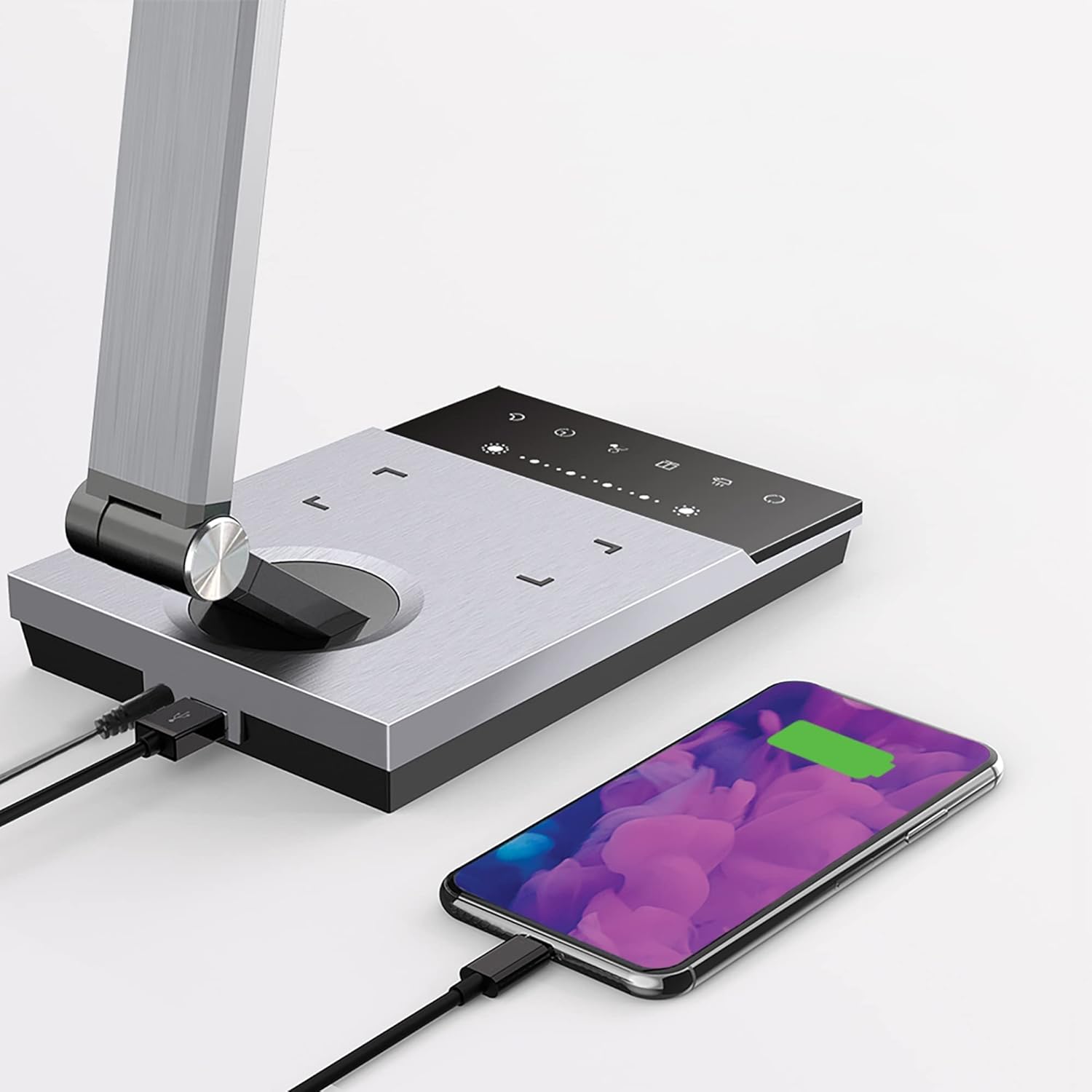
Image 6.3: Simultaneous charging of devices via the USB port and wireless charging pad.
7. Vedligeholdelse
To keep your WorkPro LED Desk Lamp i optimal stand:
- Rensning: Afbryd strømmen før rengøring. Tør l'en afamp with a soft, dry cloth. Do not use abrasive cleaners, solvents, or harsh chemicals.
- Opbevaring: Hvis du opbevarer lamp i længere tid, skal du afbryde strømmen til den og opbevare den et køligt og tørt sted.
- LED-pleje: Den integrerede LED-lyskilde er designet til langvarig brug og kræver ikke udskiftning.
8. Fejlfinding
| Problem | Mulig årsag | Løsning |
|---|---|---|
| Lamp tændes ikke. | Ingen strømtilslutning. | Sørg for, at strømadapteren er korrekt tilsluttet stikketamp og stikkontakten. |
| Trådløs opladning virker ikke. | Device not Qi-compatible or not positioned correctly. | Verify your device supports Qi wireless charging. Reposition the device on the charging pad to ensure proper alignment. Remove any thick phone cases. |
| USB-opladning virker ikke. | USB cable or device issue. | Try a different USB cable or device to isolate the problem. Ensure the lamp er tændt. |
| Lyset flimrer eller er svagt. | Ustabil strømforsyning eller internt problem. | Prøv at tilslutte lamp til en anden stikkontakt. Hvis problemet fortsætter, skal du kontakte kundesupport. |
9. Specifikationer
| Modelnummer | WP3000S |
| Lyskilde | Integreret LED |
| Wattage | 10 watt |
| Lumen output | 600 lumen |
| Farvetemperaturer | 5 niveauer |
| Lysstyrkeniveauer | 6 niveauer |
| USB udgang | 2.4 Amp |
| Materiale | Børstet metal |
| Dimensioner (L x B x H) | 17.5 x 6.5 x 4 tommer |
| Varens vægt | 5.45 pund |
| Strømkilde | Elektrisk med ledning |
| Kontrolmetode | Røre |
10. Garanti og support
WorkPro products are manufactured to high-quality standards. For warranty information or technical support, please refer to the warranty card included with your purchase or visit the official WorkPro webwebsted. Gem venligst din købsbevis til garantikrav.
For further assistance, you may contact the retailer or manufacturer directly.


