1. Introduktion
About Your Samvix Glasba 8 MP3 Player
The Samvix Glasba 8 is a compact and portable MP3 player designed for music playback. It features a color display, built-in memory, and a durable design suitable for various activities. This manual provides comprehensive instructions to help you get the most out of your device.
Hvad er der i æsken
- Samvix Glasba 8 MP3 Player
- USB-A til USB-C ladekabel
- Kablede ørepropper
- Klip

Figure 1: The front of the Samvix Glasba 8 MP3 Player, showing its black casing, display screen, and navigation buttons for playback and menu access.
2. Nøglefunktioner
- 8GB Memory Capacity: Store a variety of music filedirekte på enheden.
- Udvidbar hukommelse: Supports Micro SD cards for additional storage.
- Lang batterilevetid: Built-in lithium-ion battery provides up to 40 hours of playback on a full charge.
- Bright Color Display: Easily visible screen even in strong sunlight.
- Built-In Clip: Designed for sports and active use, allowing secure attachment.
- Bluetooth-forbindelse: Connect to wireless headphones or speakers.
- FM-radio: Lyt til dine yndlingsradiostationer.
- Stemmeoptager: Capture audio recordings.
- Skridttæller og stopur: Integrated tools for fitness tracking.
3. Opsætningsvejledning
3.1 Opladning af enheden
Before initial use, fully charge your Samvix Glasba 8 MP3 Player. Connect the included USB-C cable to the charging port on the device and the USB-A end to a power source (e.g., computer USB port, wall adapter). The device features a built-in lithium battery providing up to 40 hours of battery life.

Figure 2: The black USB charging cable, featuring a USB-A connector on one end and a USB-C connector on the other, used for charging and data transfer.
3.2 Indsættelse af et Micro SD-kort
The device comes with 8GB of internal memory, but you can expand its storage capacity using a Micro SD card. Locate the Micro SD card slot on the side of the player. Gently insert the Micro SD card until it clicks into place.
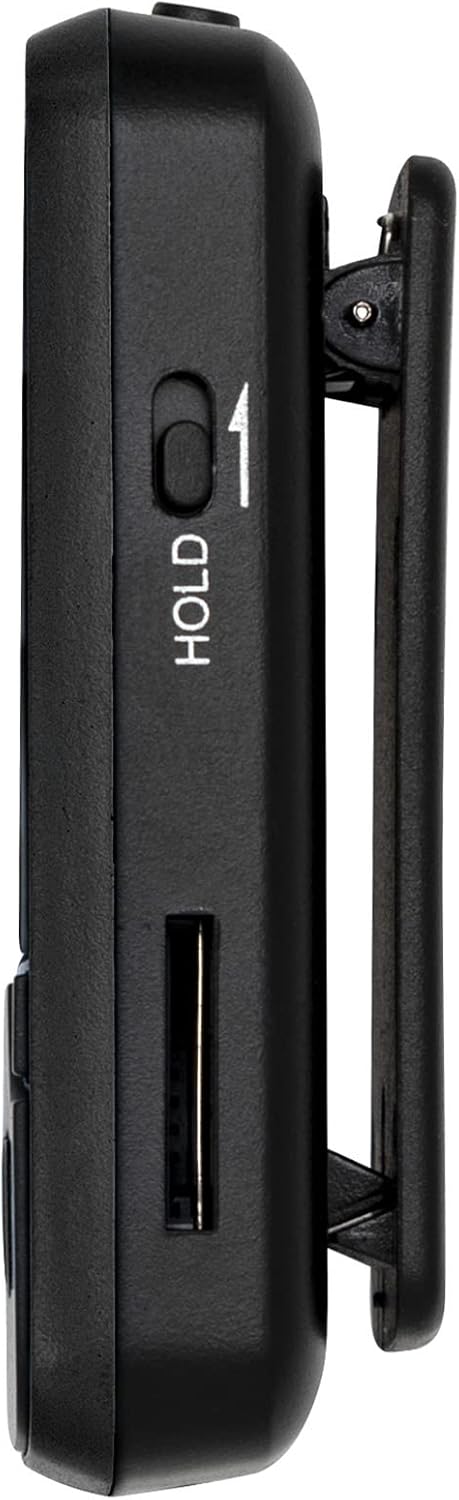
Figur 3: En sideprofile of the MP3 player, highlighting the 'HOLD' switch to prevent accidental button presses and the slot for a Micro SD card to expand storage.
Video 1: Denne video giver et visuelt overblikview of the MP3 player's size and highlights the location of the Micro SD card slot, which is essential for expanding storage.
3.3 Overførsel af musik Files
For at overføre musik files to your MP3 player, connect it to your computer using the provided USB-C cable. The device should appear as a removable drive. You can then drag and drop your music files into the appropriate folders on the device's internal storage or Micro SD card.
Video 2: A step-by-step video guide on how to connect your MP3 player to a MacBook computer to transfer music and other files, ensuring proper connection and file ledelse.
4. Betjeningsvejledning
4.1 Tænd/sluk
- For at tænde: Tryk og hold tænd/sluk-knappen på siden af enheden nede, indtil skærmen lyser.
- For at slukke: Press and hold the Power button until the power-off options appear, then select 'Power Off'.
4.2 Grundlæggende navigation
Use the physical buttons below the screen to navigate through menus and control playback:
- Afspil/pause knap: Starter eller sætter afspilning på pause.
- Venstre/højre pileknapper: Naviger gennem menupunkter eller spring spor over under afspilning.
- Op/ned pileknapper: Rul gennem lister eller juster indstillinger.
- Menu-knap: Access options within the current screen.
- Tilbage knap: Vend tilbage til den forrige skærm.
4.3 Musikafspilning
From the main menu, select 'Music' to access your audio library. You can browse by artist, album, genre, or view all songs. Use the navigation buttons to select and play your desired track.
Video 3: This video illustrates the process of activating the shuffle play feature on the MP3 player, allowing for random playback of your music library.
4.4 Lydstyrkekontrol
Juster lydstyrken ved hjælp af de dedikerede lydstyrkeknapper på siden af enheden.
4.5 Bluetooth-forbindelse
To connect to Bluetooth headphones or speakers, navigate to the 'Bluetooth' option in the main menu. Enable Bluetooth and search for available devices. Select your desired device to pair.
4.6 FM radio
Select 'FM Radio' from the main menu. Ensure wired headphones are connected as they often act as the antenna for better reception. Scan for stations and save your favorites.
4.7 Stemmeoptager
Access the 'Recorder' function from the main menu to start, pause, and save voice recordings.
4.8 Pedometer & Stopwatch
The device includes a pedometer for step tracking and a stopwatch for timing activities. Access these features from the main menu.
4.9 Viewing Pictures & Files
Select 'Pictures' to view images stored on your device. The 'Folder' option allows you to browse all files and folders on the internal memory and Micro SD card.
5. Vedligeholdelse
To ensure the longevity and optimal performance of your Samvix Glasba 8 MP3 Player, follow these maintenance guidelines:
- Rensning: Brug en blød, tør klud til at rengøre enheden. Undgå flydende rengøringsmidler eller slibende materialer.
- Opbevaring: Opbevar MP3-afspilleren et køligt, tørt sted væk fra direkte sollys og ekstreme temperaturer.
- Undgå dråber: Beskyt enheden mod fald og stød, som kan beskadige interne komponenter eller skærmen.
- Vandeksponering: Denne enhed er ikke vandtæt. Undgå udsættelse for vand eller høj luftfugtighed.
6. Fejlfinding
If you encounter issues with your Samvix Glasba 8 MP3 Player, refer to the following common troubleshooting steps:
- Enheden tænder ikke: Sørg for, at batteriet er opladet. Tilslut enheden til en strømkilde, og prøv igen.
- Kan ikke overføres Files: Verify the USB cable is securely connected to both the device and the computer. Ensure the device is in 'File Overførselstilstand, hvis du bliver bedt om det.
- Ingen lyd: Check the volume level. Ensure headphones are properly connected or Bluetooth headphones are paired and connected.
- Screen Frozen: Tryk og hold tænd/sluk-knappen nede i cirka 10-15 sekunder for at fremtvinge en genstart.
- Bluetooth forbinder ikke: Ensure the MP3 player's Bluetooth is enabled and discoverable. Check that the other Bluetooth device is also in pairing mode.
7. Specifikationer
| Feature | Detalje |
|---|---|
| Mærke | SAMVIX |
| Modelnavn | Glasba 8 |
| Hukommelseslagringskapacitet | 8 GB |
| Forbindelsesteknologi | Bluetooth, WiFi |
| Skærmstørrelse | 1.5 tommer |
| Farve | Sort |
| Speciel funktion | Indbygget klip |
| Kompatible enheder | Headphone, Earphone |
| Medietype | Micro SD |
| Produktdimensioner | 7.8 x 3.9 x 1.2 tommer |
| Varens vægt | 4 ounce |
| Fabrikant | Samvix |
8. Garanti og support
The Samvix Glasba 8 MP3 Player comes with a 12-month warranty from the manufacturer. For technical support, warranty claims, or any inquiries, please contact Samvix customer service at support.mp@yoton.co. Please provide your model name (Glasba 8) and purchase details when contacting support.


