1. Introduktion
Tak for købetasing the ICON 12-inch Bluetooth Speaker. This manual provides detailed instructions for the safe and efficient operation of your new speaker. Please read this manual thoroughly before use and retain it for future reference.
2. Pakkens indhold
- ICON 12-inch Bluetooth Speaker
- Strømkabel
- Trådløs mikrofon
- Fjernbetjening
- Brugermanual

Image: The ICON Bluetooth speaker shown with its included wireless microphone and remote control, highlighting the complete package contents.
3. Produktet er slutview
The ICON 12-inch Bluetooth Speaker is a versatile audio system designed for various applications, offering powerful sound output and multiple connectivity options. It features a built-in rechargeable battery for portability and integrated wheels and a retractable handle for easy transport.

Billede: Forside view of the ICON 12-inch Bluetooth Speaker, showcasing its robust design and blue illuminated woofer.

Billede: Bagside view of the ICON 12-inch Bluetooth Speaker, displaying the main control panel and retractable handle.
Nøglefunktioner:
- Powerful 6000W PMPO Output
- Bluetooth Connectivity for Wireless Streaming
- USB and SD Card Playback
- 3.5 mm AUX-indgang
- Indbygget FM-radio
- Mikrofon- og guitarindgange
- Rechargeable Battery for Extended Playtime
- Integrated Equalizer for Sound Customization
- TWS (True Wireless Stereo) Functionality for connecting multiple speakers
- LED lyseffekter

Image: Visual representation of the ICON Bluetooth Speaker's key features, including excellent sound quality, Bluetooth compatibility, AUX input, rechargeable battery, FM radio, and equalizer.
4. Opsætning
4.1 Indledende opladning
Before first use, fully charge the speaker's internal battery. Connect the power cable to the AC INPUT port on the rear panel and plug it into a standard wall outlet. The charging indicator will illuminate. Charging time may vary.
4.2 Kontrolpanel overview
Familiarize yourself with the control panel located on the rear of the speaker.
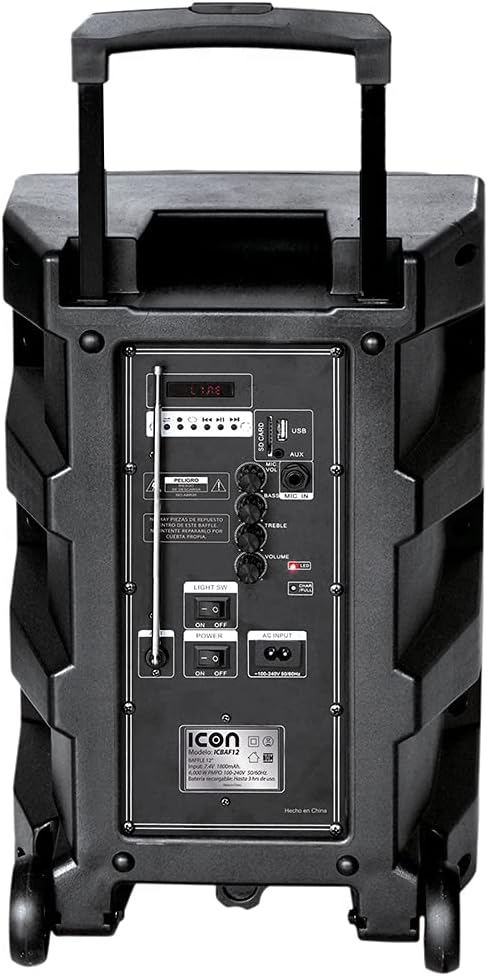
Billede: Detaljeret view of the ICON speaker's rear control panel, showing various inputs, volume, treble, and bass controls.
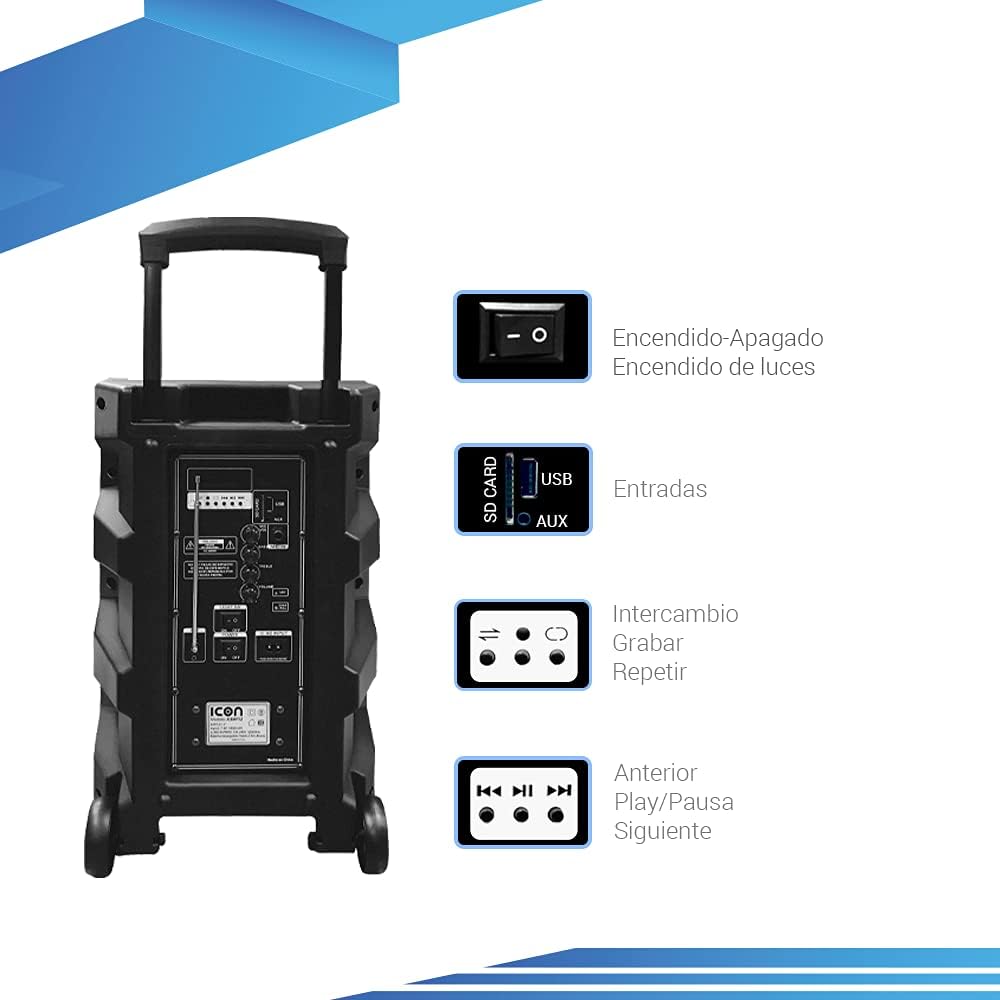
Image: Diagram illustrating key controls on the ICON speaker, including the power switch, light switch, input ports (SD Card, USB, AUX), and playback control buttons (Mode Switch, Record, Repeat, Previous, Play/Pause, Next).
- Afbryderen: Turns the speaker On or Off.
- LET SV: Toggles the LED light effects On or Off.
- SD CARD / USB / AUX Inputs: For connecting external media or devices.
- MODE-omskifter: Skifter mellem inputtilstande (Bluetooth, USB, SD, AUX, FM).
- RECORD knap: Initiates recording (e.g., microphone input to USB/SD).
- REPEAT knap: Gentager det aktuelle nummer eller den aktuelle afspilningsliste.
- PREVIOUS / PLAY/PAUSE / NEXT Buttons: Standardkontroller til afspilning af medier.
- VOLUME knap: Justerer masterlydstyrken.
- TREBLE / BASS Knobs: Adjusts high and low frequencies.
- MIC INPUT / GUITAR INPUT: For connecting microphones and guitars.
5. Betjeningsvejledning
5.1 Tænd/sluk
To turn the speaker ON, flip the MAGT switch to the 'ON' position. To turn it OFF, flip the switch to 'OFF'.
5.2 Bluetooth -parring
- Turn on the speaker. It will automatically enter Bluetooth pairing mode, indicated by a flashing Bluetooth icon on the display.
- Aktiver Bluetooth på din mobile enhed (smartphone, tablet, bærbar computer), og søg efter tilgængelige enheder.
- Select "ICON Speaker" (or similar name) from the list of devices.
- Once paired, the speaker will emit a confirmation sound, and the Bluetooth icon will stop flashing. You can now play audio wirelessly from your device.
5.3 USB/SD-kortafspilning
- Indsæt et USB-flashdrev eller SD-kort (med MP3-lyd) files) ind i den respektive port.
- The speaker will automatically switch to USB/SD mode and begin playing the first compatible track. If not, press the MODE button to select USB/SD mode.
- Brug TIDLIGERE, AFSPIL/PAUSE, og NÆSTE knapper til at styre afspilning.
5.4 AUX-indgang
Connect an external audio device (e.g., MP3 player, computer) to the AUX input using a 3.5mm audio cable. Press the MODE button until AUX mode is selected.
5.5 FM-radiofunktion
- Tryk på MODE knappen for at skifte til FM-radiotilstand.
- Tryk og hold på AFSPIL/PAUSE knappen for automatisk at scanne og gemme tilgængelige FM-stationer.
- Brug TIDLIGERE og NÆSTE knapper til at navigere mellem gemte stationer.
5.6 Microphone and Guitar Usage
Plug your microphone or guitar into the respective MIC-INDGANG or GUITARINPUT jacks. Adjust the volume using the main BIND knob and any dedicated microphone/guitar volume controls if present.
5.7 TWS (ægte trådløs stereo) funktion
The TWS function allows you to connect two ICON speakers wirelessly for a true stereo sound experience.
- Sørg for, at begge højttalere er tændt og ikke er forbundet til nogen Bluetooth-enhed.
- On one speaker (this will be the master), press and hold the TWS button (if available, or a combination of buttons as per specific model instructions, often the 'Mode' button or a dedicated TWS button).
- The speaker will search for another TWS-compatible speaker. Once connected, you will hear a confirmation sound.
- Now, connect your mobile device to the master speaker via Bluetooth as described in section 5.2. Audio will play through both speakers in stereo.
6. Vedligeholdelse
6.1 Rengøring
Tør højttalerens yderside af med en blød, tør klud. Brug ikke slibende rengøringsmidler, voks eller opløsningsmidler. Sørg for, at der ikke kommer væsker ind i højttalerens åbninger.
6.2 Pleje af batterier
- For at forlænge batteriets levetid bør du undgå at aflade batteriet helt ofte.
- Recharge the battery regularly, even if the speaker is not in use for extended periods (e.g., every 3 months).
- Opbevar højttaleren på et køligt, tørt sted, når den ikke er i brug.
6.3 Opbevaring
When storing the speaker for a long time, ensure it is turned off and disconnected from the power source. Store it in a clean, dry environment away from extreme temperatures and direct sunlight.
7. Fejlfinding
| Problem | Mulig årsag | Løsning |
|---|---|---|
| Højttaleren tænder ikke. | Battery is depleted; Power cable not connected; Power switch is OFF. | Charge the speaker; Ensure power cable is securely connected; Flip POWER switch to ON. |
| Ingen lyd. | Lydstyrken er for lav; Forkert inputtilstand valgt; Enheden er ikke tilsluttet korrekt. | Increase volume; Press MODE button to select correct input; Reconnect device/re-pair Bluetooth. |
| Bluetooth-forbindelse mislykkes. | Højttaler ikke i parringstilstand; Enhed for langt væk; Interferens. | Sørg for, at højttaleren er i parringstilstand; Flyt enheden tættere på; Sluk andre Bluetooth-enheder. |
| Forvrænget lyd. | Lydstyrken er for høj; lydkildens kvalitet er dårlig. | Reduce volume; Try a different audio source. |
| Mikrofon virker ikke. | Microphone not plugged in correctly; Microphone volume too low; Microphone batteries dead (if wireless). | Ensure microphone is fully inserted; Adjust microphone volume; Replace microphone batteries. |
8. Specifikationer
| Feature | Specifikation |
|---|---|
| Modelnummer | US-ICBAF12 |
| Udgangseffekt | 6000 watt PMPO |
| Højttaler størrelse | 12 tommer |
| Forbindelsesteknologi | Bluetooth, USB, AUX, SD Card |
| Kompatible enheder | Laptop, smartphone |
| Strømkilde | Rechargeable Battery, AC Input |
| Produktmål (L x B x H) | 38 x 36.5 x 54 cm |
| Produktets vægt | 7.62 kg |
| Særlige funktioner | Bluetooth, FM Radio, Microphone Input, Guitar Input, TWS Function, LED Lights |

Image: Packaging of the ICON Bluetooth Speaker, displaying key features and product dimensions (37.5 cm x 36 cm x 54 cm).
9. Garanti og support
This product is covered by a limited warranty. Please refer to the warranty card included in your package for specific terms and conditions. For technical support, troubleshooting assistance, or warranty claims, please contact your retailer or the manufacturer's customer service department. Keep your purchase receipt as proof of purchase.
For more information, visit the official ICON store on Amazon: ICON Store


