Indledning
The Hyperkin Armor3 NuWave Controller is designed to provide accurate and fluid motion control for your Nintendo Wii U and Wii consoles. Featuring built-in Nu+ technology, this controller enhances your gaming experience by offering a wider range of motion in compatible titles. This manual provides essential information on setting up, operating, maintaining, and troubleshooting your NuWave Controller.
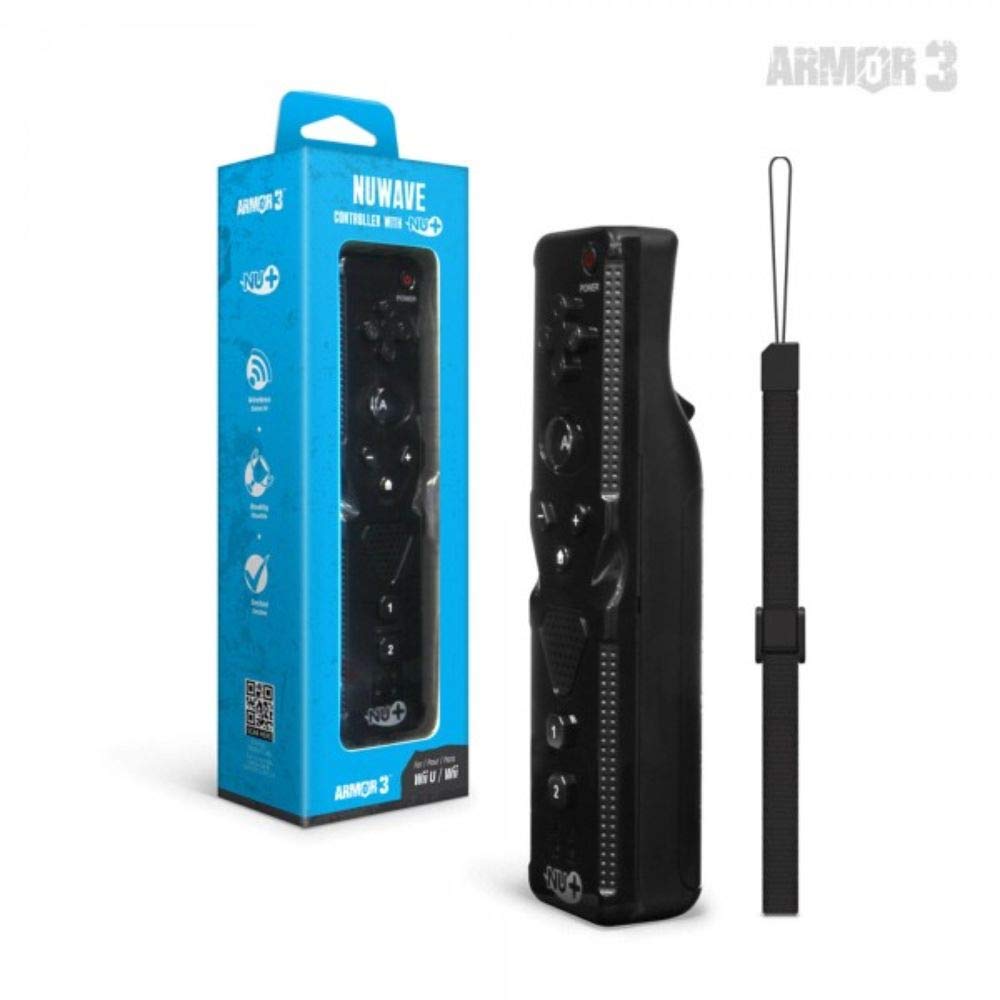
Figur 1: Hyperkin Armor3 NuWave Controller and its packaging. The controller is black with a wrist strap, and the packaging highlights its Nu+ technology and compatibility with Wii U and Wii.
Produkt overview
The Armor3 NuWave Controller is a motion-sensing controller compatible with both Wii U and Wii systems. It integrates advanced Nu+ technology for enhanced motion detection and precision in supported games.
Nøglefunktioner:
- Kompatibilitet: Fully compatible with Nintendo Wii U and Nintendo Wii consoles.
- Nu+ Technology: Built-in technology for a wider range of motion and improved accuracy in compatible titles.
- Ergonomisk design: Designed for comfortable grip and extended gameplay sessions.
- Strømkilde: Kræver 2 AA-batterier (medfølger ikke).
Opsætning
1. Batteriinstallation
- Find batterirummet på bagsiden af controlleren.
- Skub batteridækslet nedad for at åbne det.
- Isæt to (2) AA-batterier, og sørg for korrekt polaritet (+/-) som angivet i batterirummet.
- Sæt batteridækslet på igen ved at skubbe det opad, indtil det klikker på plads.
2. Connecting to Your Console
To connect the NuWave Controller to your Wii U or Wii console, follow these steps:
- Ensure your console is powered on.
- On your Wii U or Wii console, press the SYNC button (usually located near the SD card slot or battery compartment).
- On the NuWave Controller, open the battery cover and locate the small red SYNC button inside the battery compartment.
- Press and release the SYNC button on the controller.
- The player indicator lights on the bottom of the controller will flash. Once a single light remains lit, the controller is successfully connected.
- If connection fails, repeat steps 2-5. Ensure the controller is within range of the console.
Betjeningsvejledning
Grundlæggende kontroller:
- Retningstastatur (D-pad): Used for menu navigation and character movement.
- En knap: Primary action button, often used for selection or interaction.
- B Button (Trigger): Located on the underside, typically used for grabbing or firing.
- 1 & 2 knapper: Auxiliary action buttons, functions vary by game.
- Hjemknappen: Returns to the console's Home Menu.
- Plus (+) & Minus (-) Buttons: Often used for zooming, adjusting settings, or specific in-game actions.
- Power knap: Tænder/slukker controlleren.
Motion Sensing with Nu+ Technology:
The built-in Nu+ technology provides enhanced motion tracking. For games that support it, you will experience more precise and responsive movements. Hold the controller firmly and ensure clear line of sight to the sensor bar for optimal performance.
- Kalibrering: Some games may require initial calibration. Follow on-screen prompts.
- Håndledsrem: Always use the included wrist strap to prevent accidental drops during active gameplay.
Opretholdelse
Rensning:
- Tør controlleren af med en blød, tør klud.
- Til genstridigt snavs, let dampRengør kluden med vand. Brug ikke skrappe kemikalier eller slibende rengøringsmidler.
- Ensure no liquid enters the controller's openings.
Opbevaring:
- Opbevar controlleren et køligt, tørt sted væk fra direkte sollys og ekstreme temperaturer.
- Hvis produktet opbevares i længere tid, skal batterierne fjernes for at forhindre lækage.
Batteripleje:
- Always use new, high-quality AA batteries.
- Bland ikke gamle og nye batterier eller forskellige typer batterier.
- Bortskaf brugte batterier ansvarligt i henhold til lokale regler.
Fejlfinding
| Problem | Mulig årsag | Løsning |
|---|---|---|
| Controlleren tænder ikke. | Døde eller forkert isatte batterier. | Udskift batterierne med nye AA-batterier, og sørg for at polariteten vender korrekt. |
| Controller does not sync with console. | Incorrect syncing procedure; out of range; console interference. | Ensure console is on. Repeat syncing steps (press SYNC on console, then on controller). Move closer to console. Check for other wireless device interference. |
| Knapperne reagerer ikke eller er forsinkede. | Low battery; connection issue; physical obstruction. | Replace batteries. Re-sync the controller. Ensure buttons are not stuck. |
| Motion control is inaccurate. | Sensor bar obstruction; improper calibration; environmental factors. | Ensure clear line of sight to the sensor bar. Re-calibrate in-game if prompted. Avoid strong light sources directly facing the sensor bar. |
Specifikationer
- Model: M07399-bk
- Mærke: Hyperkin
- Kompatibilitet: Nintendo Wii U, Nintendo Wii
- Strømkilde: 2 x AA batterier (medfølger ikke)
- Dimensioner: 2.8 x 1.8 x 8 tommer (ca.)
- Vægt: 3.88 ounces (ca., uden batterier)
- Teknologi: Built-in Nu+ motion technology
- Farve: Sort
Garanti og support
For specific warranty information and terms, please refer to the documentation included with your purchase or visit the official Hyperkin website. Hyperkin provides customer support for their products.
Online support: Visit the official Hyperkin webwebsted for ofte stillede spørgsmål, fejlfindingsvejledninger og kontaktoplysninger. www.hyperkin.com
Kontakte: Refer to the Hyperkin website for the most current customer service contact methods (phone, email, etc.).


