1. Introduktion
The Elitech Tlog B100EH is a wireless temperature and humidity data logger designed for precise environmental monitoring. It features an external sensor, a large recording capacity of 32,000 points, and the ability to generate PDF reports. This manual provides detailed instructions for the setup, operation, maintenance, and troubleshooting of your device.

Image 1.1: Elitech Tlog B100EH Data Logger with external temperature and humidity sensor.
2. Produktet er slutview
Familiarize yourself with the components of your Tlog B100EH data logger.

Image 2.1: Key components of the Elitech Tlog B100EH, including the external sensor, LED indicators, LCD screen, control buttons, and USB cover.
- Ekstern sensor: Måler temperatur og luftfugtighed.
- LED Indicator (Mode): Indicates device status (e.g., logging, stopped).
- LED Indicator (Alarm): Indicates if recorded data exceeds set alarm thresholds.
- LCD skærm: Displays current readings, battery status, and logging status.
- START-knap: Starter datalogning.
- STOP knap: Halts data logging.
- USB-dæksel: Protects the integrated USB connector for PC connection.
3. Opsætning
3.1 Batteriinstallation
The Tlog B100EH uses a replaceable lithium battery (included). Ensure the battery is correctly installed before first use.

Billede 3.1: Bagside view of the data logger showing the battery compartment. Ensure proper battery orientation.
3.2 Installation af software og apps
For at konfigurere dataloggeren og view detailed reports, install the Elitech software on your computer or the Elitech App on your iOS/Android device.
- PC-software: Download the Elitech data management software from the official Elitech webFølg instruktionerne på skærmen for installation.
- Mobil app: Søg efter 'Elitech' in the Apple App Store or Google Play Store and install the application.
3.3 Indledende konfiguration
Before starting a new logging session, connect the device to your computer via USB or pair it with the Elitech App via Bluetooth to set parameters.

Image 3.2: The data logger connected to a computer via USB and displaying data on a mobile application.
Using the software/app, you can configure:
- Logningsinterval
- Start/Stop mode
- Alarm thresholds for temperature and humidity
- Forsinket starttidspunkt
- Unit of measurement (°C/°F)
4. Betjeningsvejledning
4.1 Start og stop af logning
The Tlog B100EH features a button recess design to prevent accidental activation or deactivation during transport.
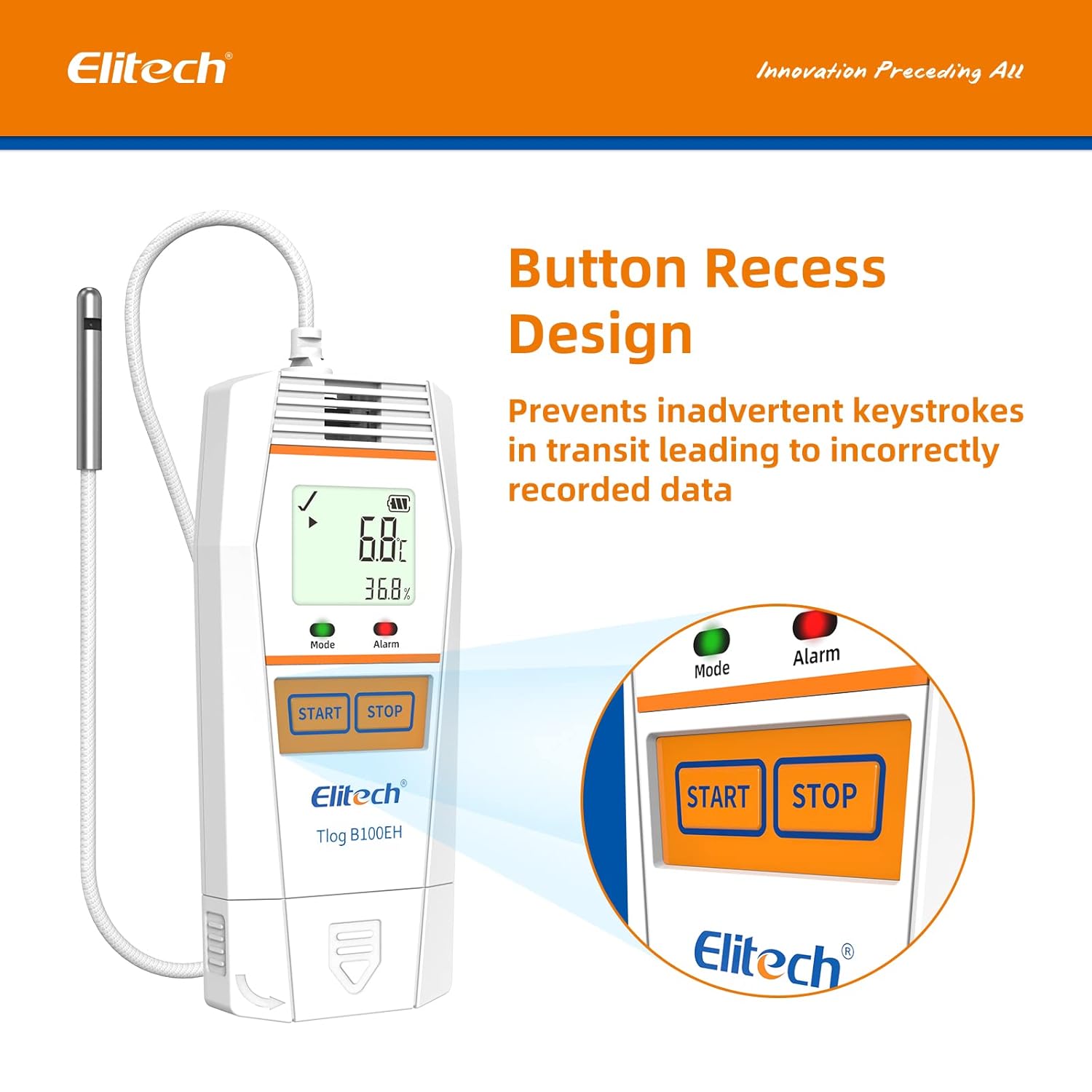
Billede 4.1: Nærbillede view of the recessed START and STOP buttons on the data logger.
- Sådan starter du logføring: Tryk og hold på STARTE button until the 'Mode' LED flashes green, indicating logging has begun.
- Sådan stopper du logføring: Tryk og hold på STOP button until the 'Mode' LED stops flashing, indicating logging has ceased.
4.2 Overvågningsdata
The LCD screen displays real-time temperature and humidity readings, battery level, and logging status. The 'Alarm' LED will illuminate if readings exceed configured thresholds.
4.3 Data Export and Report Generation
After logging is complete, connect the data logger to a computer via USB or use the Elitech App to download the recorded data.

Image 4.2: Data export interface showing the data logger connected to a computer and a mobile device, illustrating multi-format data export options.

Image 4.3: Icons representing the available data report formats: PDF, Excel, and TXT.
The software/app allows you to generate reports in various formats, including PDF, Excel, and TXT, for analysis and record-keeping.
5. Vedligeholdelse
5.1 Udskiftning af batteri
When the battery indicator on the LCD shows low power, replace the lithium battery to ensure continuous operation. Refer to Section 3.1 for battery access.
5.2 Rengøring
Tør enheden af med en blød, tør klud. Brug ikke slibende rengøringsmidler, og enheden må ikke nedsænkes i vand.
5.3 Opbevaring
Store the data logger in a cool, dry place away from direct sunlight and extreme temperatures when not in use.
6. Fejlfinding
- Enheden tænder ikke: Kontroller batteriinstallation og opladningsniveau. Udskift batteriet om nødvendigt.
- Kan ikke oprette forbindelse via Bluetooth: Ensure Bluetooth is enabled on your mobile device and the data logger is within range. Restart both devices and try pairing again.
- Data logges ikke: Verify that logging was initiated correctly by checking the 'Mode' LED. Ensure sufficient memory is available.
- Unøjagtige aflæsninger: Ensure the external sensor is clean and unobstructed. Avoid placing the sensor in direct sunlight or near heat sources.
- Software/App issues: Ensure you have the latest version of the software/app. Refer to the Elitech support website for common software issues.
For further assistance, contact Elitech customer support.
7. Specifikationer

Image 7.1: Physical dimensions and operational temperature/humidity ranges of the data logger.

Image 7.2: Details on sensor accuracy, resolution, and total data logging capacity.

Image 7.3: Visual representation of the temperature and humidity sensor accuracy.
| Feature | Detalje |
|---|---|
| Modelnummer | Tlog B100EH |
| Temperaturområde | -40°F til 185°F (-40°C til 85°C) |
| Fugtighedsområde | 10% til 90% RH |
| Temperatur nøjagtighed | ±0.6℉ (±0.3°C) |
| Fugtighedsnøjagtighed | ±3 % relativ fugtighed |
| Optagelseskapacitet | 32,000 point |
| Batteritype | 1 Lithium Metal batteri (medfølger) |
| Produktdimensioner | 6.12 x 1.85 x 0.64 tommer |
| Varens vægt | 4.97 ounce (0.14 kilo) |
| Monteringstype | Bordplade |
7.1 Quality Certifications

Billede 7.4: Overview of Elitech's quality certifications, including WHO PQS, FDA, and NIST compliance.
The Elitech Tlog B100EH complies with various quality standards, including:
- World Health Organization PQS Approved
- FDA21 CFR Part 11 Compliance
- ISO9001:2015

Billede 7.5: Eks.ample of a calibration certificate, showing calibration and expiration dates.
Calibration certificates are available upon request. Please contact Elitech customer support for details.
8. Garanti
Elitech provides a standard manufacturer's warranty for this product. Please refer to the warranty card included with your purchase or visit the official Elitech webhjemmeside for detaljerede garantivilkår.
9. Support
For technical assistance, troubleshooting, or any inquiries regarding your Elitech Tlog B100EH data logger, please contact Elitech customer support. 24/7 US Technician Support is available via email and phone.
- E-mail: Se din produktemballage eller Elitech webwebsted for kontaktoplysninger.
- Telefon: Se din produktemballage eller Elitech webwebsted for kontaktoplysninger.
- Online ressourcer: Besøg den officielle Elitech webwebsted med ofte stillede spørgsmål, softwaredownloads og yderligere supportmaterialer.


