Indledning
The SilverStone FARA B1 is an ATX tower chassis designed to provide efficient cooling and ample space for various hardware configurations. This manual provides detailed instructions for the assembly, operation, and maintenance of your FARA B1 chassis.

Figure 1: SilverStone FARA B1 ATX Chassis
Opsætning og installation
1. Udpakning og inspektion
Carefully remove the chassis from its packaging. Inspect for any damage that may have occurred during transit. Retain the packaging for future transport or storage.
2. Tempered Glass Side Panel Removal
To access the interior, unscrew the four thumb screws securing the tempered glass side panel. Gently pull the panel away from the chassis and set it aside on a soft, flat surface to prevent scratches.
3. Installation af bundkort
The FARA B1 supports ATX, Micro-ATX, and Mini-ITX motherboards. Ensure the standoffs align with your motherboard's mounting holes. Install the I/O shield into the rear opening of the chassis. Carefully place the motherboard onto the standoffs and secure it with screws.
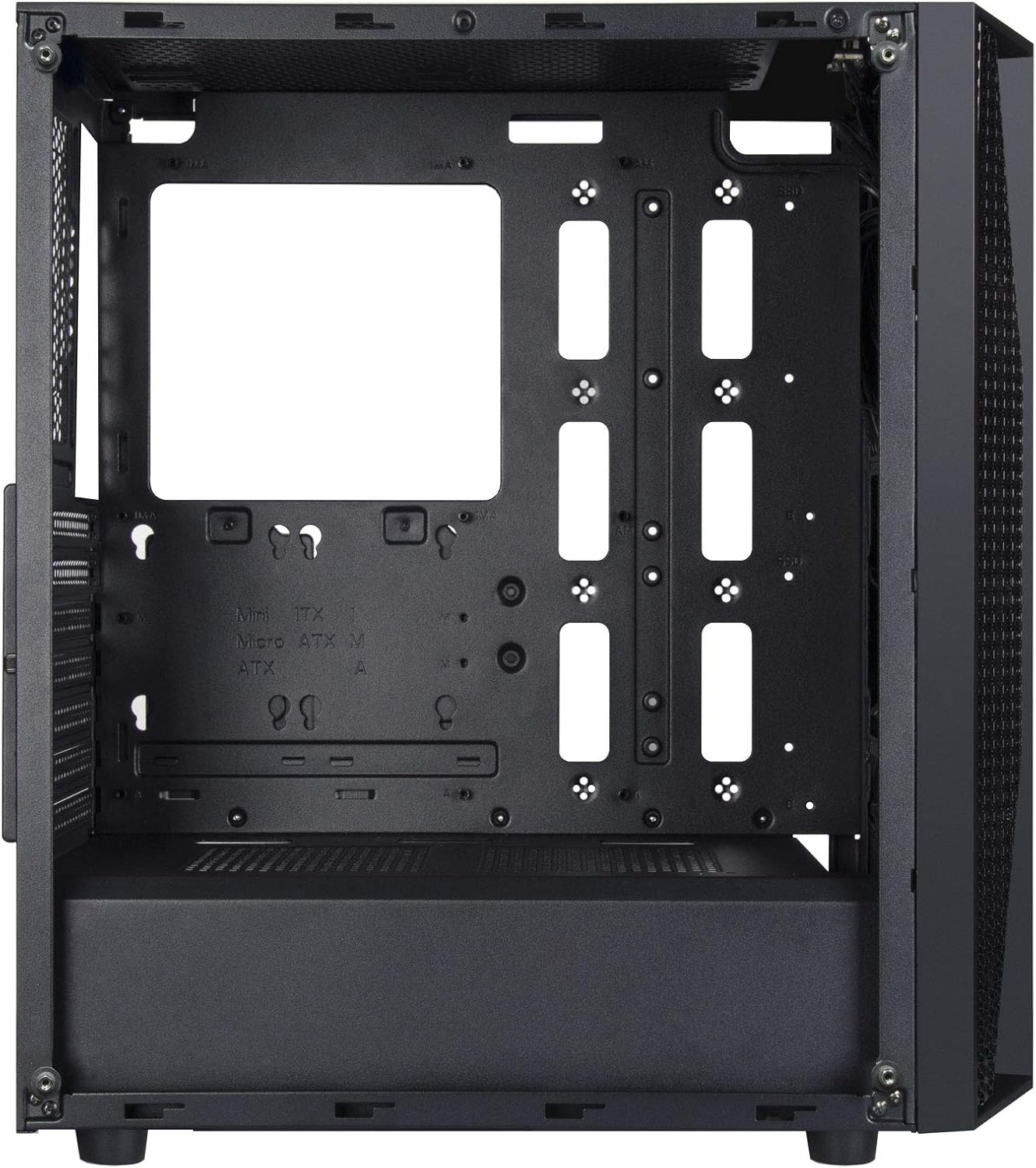
Figure 2: Chassis Interior with Motherboard Tray
4. Installation af lagerdrev
The chassis supports one 3.5" drive and four 2.5" drives.
- 3.5" harddisk: Locate the drive cage beneath the PSU shroud. Slide the 3.5" HDD into the drive tray and secure it with screws.
- 2.5" SSD: Mount 2.5" SSDs to the dedicated mounting points behind the motherboard tray or on top of the PSU shroud. Secure with screws.

Figure 3: 3.5" HDD Drive Cage

Figure 4: 2.5" SSD Mounting Points
5. Installation af strømforsyning
Install the ATX power supply into the dedicated compartment at the bottom rear of the chassis. Secure it with screws from the rear of the case.
6. Installation af grafikkort og udvidelseskort
Remove the necessary PCIe slot covers from the rear of the chassis. Insert your graphics card or other expansion cards into the motherboard's PCIe slots and secure them with screws.
7. Fan and Cooling System Installation
The FARA B1 supports multiple cooling options, including up to four 140mm fans or five 120mm fans. Install fans in the front, top, and rear positions as desired. Ensure proper airflow direction for optimal cooling.
8. Kabelforvaltning
Brug kabelføringsudskæringerne og fastgørelsespunkterne bag bundkortbakken til at håndtere kabler. Dette forbedrer luftgennemstrømningen og æstetikken.
9. Front I/O-forbindelser
Connect the front panel cables (USB 3.0, USB 2.0, HD Audio, Power, Reset, LED indicators) to the corresponding headers on your motherboard. Refer to your motherboard manual for specific header locations.

Figure 5: Top I/O Panel
Betjeningsvejledning
1. Tænd/sluk
Press the power button located on the top I/O panel to turn your system on or off. A short press typically initiates a soft shutdown, while a long press (several seconds) forces a hard shutdown.
2. Using Front Panel Ports
The front I/O panel provides convenient access to USB 3.0, USB 2.0 ports, and a combined 3.5mm audio jack for headphones or headsets with a microphone. Ensure all necessary drivers are installed for proper functionality.

Figur 6: Eksample of a Built System
Opretholdelse
1. Rengøring af støvfilter
The FARA B1 features a magnetic dust filter on the top panel and a removable filter at the bottom for the power supply intake. Regularly clean these filters to maintain optimal airflow and prevent dust buildup inside the chassis.
- Gently lift the magnetic top filter for cleaning.
- Slide out the bottom filter from the rear of the chassis.
- Use compressed air or a soft brush to remove accumulated dust.

Figure 7: Removing Top Dust Filter
2. Generel rengøring
Tør ydersiden af kabinettet af med en blød, tør klud.amp klud. Undgå at bruge barske kemikalier eller slibende materialer, der kan beskadige overfladen eller det hærdede glas.
Fejlfinding
Systemet tænder ikke
- Ensure the power supply is switched on and properly connected to the wall outlet.
- Verify all power cables (24-pin ATX, 8-pin CPU, PCIe power) are securely connected to the motherboard and components.
- Kontroller, at kablet til strømafbryderen på frontpanelet er korrekt tilsluttet til bundkortets frontpanelheader.
Poor Airflow or Overheating
- Rengør alle støvfiltre regelmæssigt.
- Ensure case fans are installed with the correct orientation for intake and exhaust.
- Kontroller, at CPU-køleren og GPU-blæserne fungerer korrekt.
- Forbedr kabelhåndteringen for at reducere hindringer for luftstrømmen.
Front Panel Ports Not Working
- Check that the USB and audio cables from the front panel are securely connected to the corresponding headers on your motherboard.
- Ensure necessary drivers for USB and audio are installed and up to date.
Specifikationer
| Feature | Detalje |
|---|---|
| Mærke | Sølvsten |
| Modelnavn | FARA B1 |
| Varemodelnummer | SST-FAB1B-G |
| Sagstype | Mid Tower |
| Bundkort kompatibilitet | ATX, Micro ATX, Mini ITX |
| Materiale | Hærdet glas, stål |
| Dimensioner (LxBxH) | 15.79 x 8.15 x 17.56 tommer (401 x 207 x 446 mm) |
| Varens vægt | 13.12 pund (5.95 kg) |
| Drive Bays | 1 x 3.5", 4 x 2.5" |
| Afkølingsmetode | Luft, vand |
| Fan Support | Up to four 140mm fans / five 120mm fans |
| Front I / O-porte | USB 3.0 x 2, USB 2.0 x 1, Audio x 1 (combined 3.5mm) |
| Strømforsyningsmonteringstype | Bundmontering |
Garanti og support
For warranty information, technical support, or further assistance, please visit the official SilverStone Technology webwebstedet eller kontakt deres kundeserviceafdeling. Gem din købsbevis til garantikrav.
Officiel SilverStone Webwebsted: www.silverstonetek.com


