Indledning
Tak for købetasing the iLuv Bubble Gum True Wireless Air Earbuds. This manual provides detailed instructions on how to set up, operate, maintain, and troubleshoot your new earbuds. Please read this manual thoroughly before use to ensure proper operation and to maximize the lifespan of your device.
Sikkerhedsoplysninger
To ensure safe and proper use of your iLuv Bubble Gum True Wireless Air Earbuds, please observe the following precautions:
- Udsæt ikke ørepropperne eller opladningsetuiet for ekstreme temperaturer, fugtighed eller væsker.
- Undgå at tabe, udsætte stød for eller skille enheden ad.
- Brug ikke slibende rengøringsmidler eller stærke kemikalier.
- Lyt ved moderat lydstyrke for at undgå høreskader.
- Opbevares utilgængeligt for børn og kæledyr.
Pakkens indhold
Bekræft at alle varer er til stede i din pakke:
- iLuv Bubble Gum True Wireless Air Earbuds (Left and Right)
- Trådløs opladningsetui
- USB-opladerkabel (Type-C)
- Brugervejledning (dette dokument)
Produkt overview

Figur 1: iLuv Bubble Gum True Wireless Air Earbuds in their open charging case. The image shows both earbuds, one in its charging slot and the other slightly elevated, with the charging case open. The iLuv logo is visible on the earbuds, and blue indicator lights are present on both the earbuds and the front of the charging case.
The iLuv Bubble Gum True Wireless Air Earbuds consist of two independent earbuds and a portable charging case. Each earbud features a touch-sensitive surface for controls and an LED indicator. The charging case has LED indicators on the front to show battery status.
Opsætning
1. Opladning af øretelefoner og etuiet
Oplad ørepropperne og opladningsetuiet helt inden første brug.
- Place both earbuds into the charging case. Ensure they are properly seated in their respective slots (L for left, R for right).
- Tilslut USB-opladerkablet til opladningsporten på etuiet og den anden ende til en USB-strømadapter (medfølger ikke) eller en computers USB-port.
- The LED indicators on the charging case will illuminate to show charging status. Once fully charged, the indicators may turn solid or turn off, depending on the model.
- The earbuds' LED indicators will show charging status while inside the case. They will typically turn off when fully charged.
Note: A full charge provides up to 20 hours of total listening power with the charging case.
2. Parring med din enhed
The iLuv Bubble Gum True Wireless Air Earbuds feature 1-step pairing for convenience.
- Sørg for, at Bluetooth er aktiveret på din smartphone, tablet eller anden lydenhed.
- Open the charging case. The earbuds will automatically enter pairing mode. The LED indicator on one of the earbuds will flash, indicating it's ready to pair.
- On your device, search for Bluetooth devices and select "iLuv Bubble Gum Air" (or similar name) from the list.
- Once connected, a voice prompt will confirm successful pairing, and the earbud LED indicators will stop flashing.
Tip: If the earbuds do not connect automatically, try turning off and on your device's Bluetooth, or place the earbuds back in the case, close it, and then reopen it.
Betjeningsvejledning
Iført øretelefoner
Gently insert each earbud into your ear canal. Adjust them for a comfortable and secure fit. The "L" and "R" markings on the earbuds indicate left and right.
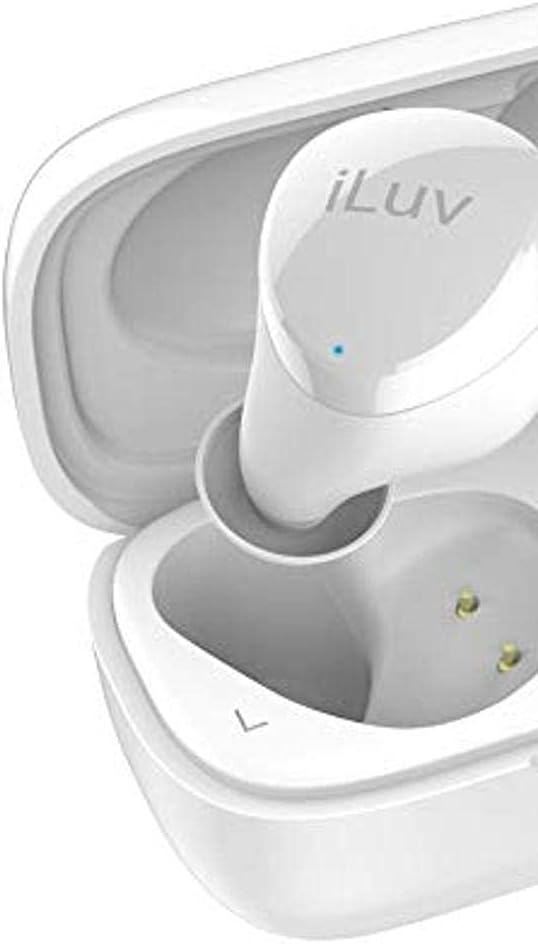
Figur 2: Nærbillede view of the left iLuv Bubble Gum True Wireless Air earbud, showing the "L" marking and the iLuv logo on its surface. A small blue LED indicator is visible near the logo.

Figur 3: Nærbillede view of the right iLuv Bubble Gum True Wireless Air earbud, showing the "R" marking and the iLuv logo on its surface. A small blue LED indicator is visible near the logo.
Tryk på kontrolelementer
The earbuds feature simple touch controls on their outer surface:
- Afspil/pause: Et enkelt tryk på begge øretelefoner.
- Næste nummer: Dobbelttryk på den højre øreprop.
- Forrige nummer: Dobbelttryk på den venstre øreprop.
- Besvar/afslut opkald: Enkelt tryk på begge øretelefoner under et indgående opkald.
- Afvis opkald: Tryk og hold på en af øretelefonerne i 2 sekunder under et indgående opkald.
- Aktiver stemmeassistent: Tryk tre gange på en af øretelefonerne.
Note: Lydstyrkekontrollen styres typisk via din tilsluttede enhed.
Opretholdelse
Rensning
Regelmæssig rengøring hjælper med at opretholde optimal ydeevne og hygiejne:
- Brug en blød, tør og fnugfri klud til at tørre ørepropperne og opladningsetuiet af.
- Til genstridigt snavs, let dampda kluden med vand eller et mildt, ikke-slibende rengøringsmiddel.
- Do not allow any liquid to enter the openings.
- Gently clean the ear tips and speaker mesh with a cotton swab or a small, soft brush to remove earwax or debris.
Opbevaring
Når ørepropperne ikke er i brug, skal de opbevares i deres opladningsetui for at beskytte dem og holde dem opladet. Opbevar etuiet et køligt og tørt sted væk fra direkte sollys og ekstreme temperaturer.
Batteripleje
For at forlænge batterilevetiden:
- Undgå at aflade batteriet helt ofte.
- Oplad enheden regelmæssigt, selvom den ikke bruges i længere perioder.
- Udsæt ikke enheden for temperaturer under 0°C (32°F) eller over 45°C (113°F).
Fejlfinding
Hvis du støder på problemer med dine ørepropper, kan du se følgende almindelige problemer og løsninger:
| Problem | Mulig årsag | Løsning |
|---|---|---|
| Øretelefoner parrer eller opretter ikke forbindelse. | Bluetooth er slået fra på enheden; øretelefoner er ikke i parringstilstand; interferens. | Ensure Bluetooth is on. Place earbuds in case, close, then reopen. Forget device on your phone and re-pair. Move closer to your device. |
| No sound or sound cutting in/out. | Low battery; out of range; interference; earbud not properly seated. | Charge earbuds and case. Stay within 10 meters of your device. Avoid strong Wi-Fi signals. Ensure earbuds are clean and properly inserted. |
| Den ene øreprop har ingen lyd. | Earbud not connected; low battery; earbud issue. | Place both earbuds back in the case, close, then reopen. Ensure both are charged. Try re-pairing. |
| Øretelefonerne oplader ikke. | Problem med opladningskabel; snavsede opladningskontakter; batteri i etuiet er tomt. | Check cable connection. Clean charging contacts on earbuds and case with a dry cotton swab. Charge the case. |
If the problem persists, please contact iLuv customer support.
Specifikationer
| Feature | Detalje |
|---|---|
| Modelnavn | ILVBBGTWSAIROR |
| Trådløs kommunikationsteknologi | Bluetooth 5.0 |
| Formfaktor | In Ear |
| Kontrolmetode | Røre |
| Inkluderede komponenter | Trådløs opladningsetui |
| Battericellesammensætning | Lithium Ion |
| Total Listening Power (with case) | Op til 20 timer |
| Materiale | Plast |
| Farve | Orange (Note: Product title indicates White, but specifications list Orange. User manual will reflect the provided specification data.) |
| Varens vægt | 100 g (Parcel Dimensions) |
Note: Specifikationerne kan ændres uden varsel.
Garanti og support
iLuv products are designed and manufactured to the highest quality standards. For detailed warranty information and customer support, please visit the official iLuv webwebstedet eller kontakt deres kundeserviceafdeling. Gem din købsbevis til garantikrav.
For yderligere hjælp, besøg venligst: www.iluv.com/support


