1. Produktet er slutview
The TOPENS A5S Automatic Solar Single Swing Gate Opener is designed for medium-duty single swing gates, supporting gates up to 16 feet in length or 550 pounds in weight. This system offers convenient and secure gate operation with multiple power options and safety features.

2. Sikkerhedsoplysninger
Always prioritize safety during installation and operation. Read all instructions carefully before beginning. Ensure the gate area is clear of obstructions and people before operating the gate. Keep remote controls out of reach of children. In case of power failure, use the manual release key to operate the gate.
3. Pakkens indhold
The TOPENS A5S kit includes the following main components:
- 1 x A5S Gate Opener Arm
- 1 x kontrolboks
- 2 x 10W Solar Panels
- 1 x Solar Charge Controller
- 2 x M12 fjernbetjeninger
- 1 x Manuel udløserknap
- Monteringsbeslag og hardware
4. Installationsvejledning
4.1 Nødvendigt værktøj
- boremaskine
- Målebånd
- Open End Wrenches (#14 & #17) or Adjustable Wrenches
- Trådstrippere
- C-Clamps (small, medium, and large)
- Niveau
- Hacksav eller Heavy Duty Bolt Cutters
- Phillips-skruetrækker
4.2 Mekanisk installation
Refer to the official installation video for a step-by-step visual guide. The following steps outline the mechanical installation process:
Video 1: How to Install the A5/A5S/A8/A8S Single Gate Opener by TOPENS. This video provides a comprehensive guide to the installation process.
- Assemble Post Bracket and Post Pivot Bracket: Connect the post bracket and post pivot bracket as shown in the manual.
- Attach Bracket to Arm: Securely attach the assembled bracket to the gate opener arm using the provided hardware.
- Release Clutch and Test: Use the manual release key to disengage the clutch and ensure the arm can move freely. This confirms the manual override function is operational.
- Determine Arm Position on Gate: Consult the instruction manual for precise measurements and diagrams to determine the optimal installation location for the arm on your gate. This depends on whether the gate opens inward (pull-to-open) or outward (push-to-open).

Figure 3: Gate capability chart and diagrams illustrating pull-to-open and push-to-open installation modes. - Fix the Post Bracket: Mount the post bracket to the gate post according to the determined measurements.
- Check Bracket Position: Manually open and close the gate to verify that the bracket position allows for full gate movement without obstruction.
- Mark and Drill Holes: Mark the bolt-hole points on the gate for the gate bracket. Remove the arm and drill the necessary holes. Tap the holes if required for secure fastening.
- Screw the Gate Bracket: Securely screw the gate bracket to the gate. Ensure all bolts are tightened.
- Re-attach Arm and Check Installation: Re-attach the gate opener arm to the gate bracket. Verify that the installation is appropriate and the arm moves smoothly.
- Turn Back the Clutch: Re-engage the clutch using the manual release key.
- Install the Control Box: Mount the control box in a suitable, protected location near the gate opener.
5. Strømforsyningstilslutninger
The TOPENS A5S offers flexible power options. Ensure all connections are secure and waterproof.
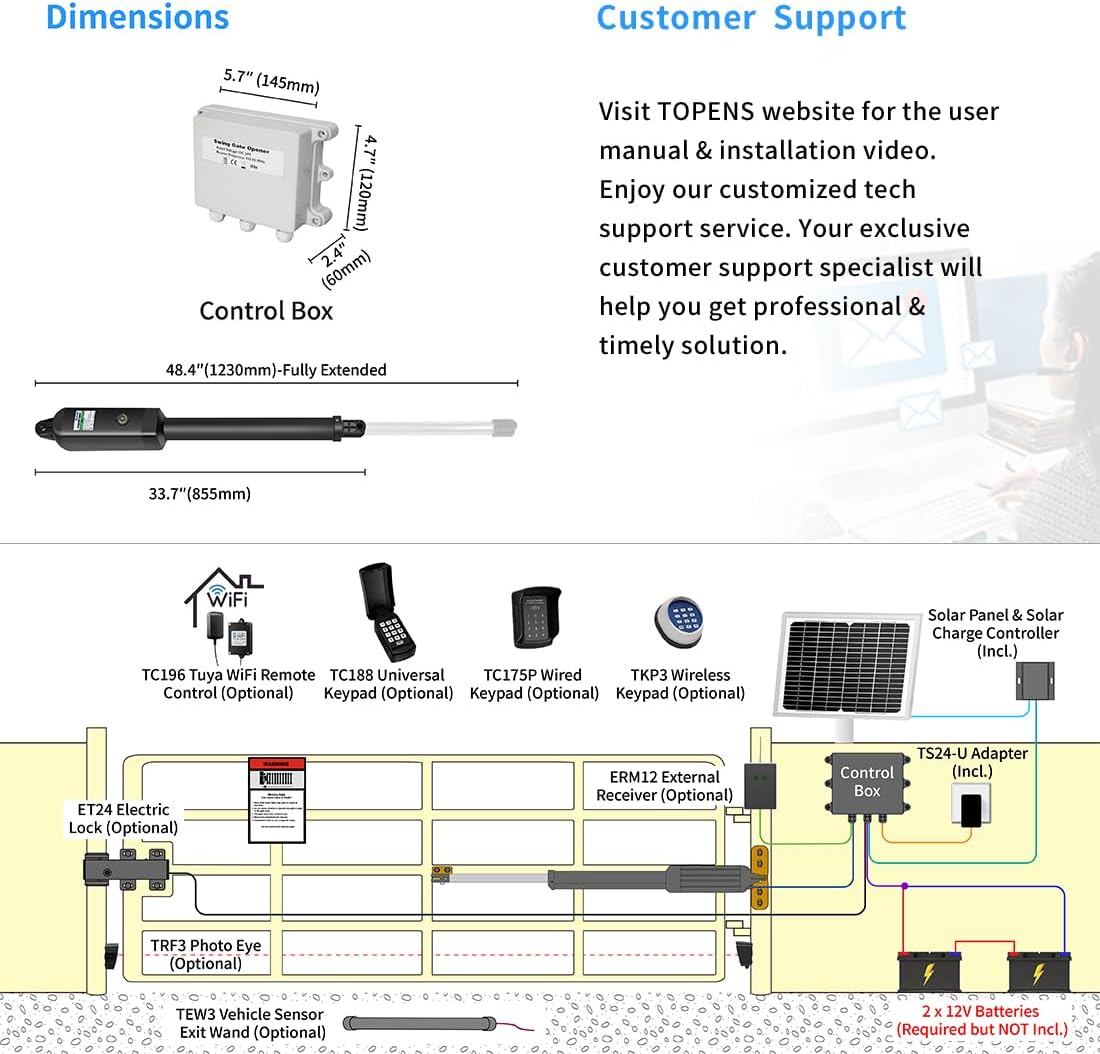
5.1 Power Mode 1: Batteries as Power Source, Adapter for Charging
Connect two 12V batteries in series to achieve 24VDC. Use the provided adapter to charge the batteries. The adapter should only be used for charging, not as the primary power source for the gate opener.
5.2 Power Mode 2: Batteries, Adapter, and Solar Panel for Simultaneous Charging
For continuous power and charging, connect two 12V batteries in series, the adapter, and the solar panel to the solar charge controller. This setup allows the solar panel to charge the batteries while the adapter provides supplemental charging or power when solar input is insufficient.
5.3 Power Mode 3: Batteries and Solar Panel as Power Source
Connect two 12V batteries in series to the solar charge controller, which is then connected to the solar panel. This configuration relies solely on solar power to charge the batteries, which in turn power the gate opener.
5.4 Power Mode 4: AC-DC Power Supply (DPS180-U)
If AC electricity is accessible and stable, the gate opener can be powered by an optional TOPENS DPS180-U AC-DC Power Supply (not included). This unit converts 110-240V AC to 24V DC. The DPS180-U should be connected to the "+ BAT-" terminal on the control board.
6. Betjening
6.1 Programmering af fjernbetjening
To program the remote control, press the 'CODE SW' button on the control board until the 'CODE LED' illuminates. Then, press the desired button on your remote control. The 'CODE LED' will flash, indicating successful programming.
6.2 Adjusting Limit Switches
The limit switches define the open and closed positions of the gate. Adjust them using a screwdriver to set the desired travel limits. Ensure the gate fully opens and closes without excessive force or binding.
6.3 Adjusting Potentiometers and DIP Switches
Refer to the instruction manual for detailed guidance on adjusting the potentiometers and DIP switches on the control board. These settings control various operational parameters such as force, auto-close delay, and soft start/stop functions.
7. Nøglefunktioner
- Strong 24VDC 50W Motor: Operates medium-duty single swing gates up to 550lbs or 16ft.
- Bred brug: Compatible with various single swing gate types, allowing pull-to-open or push-to-open installation.
- Nem installation: Designed for DIY installation with basic tools.
- Flere sikkerhedsfunktioner: Advanced TOPENS code technology for remote security, reliable electromagnetism limit switch, stop-and-reverse function for obstacle detection, auto-close feature, and soft start/stop for extended motor lifespan.
- Personalized Design & Power Options: Energy-conservation design, powered by AC electricity, batteries, and compatible with solar power (2 x 10W Solar Panels & Solar Charge Controller included).


8. Vedligeholdelse
Regular maintenance ensures optimal performance and longevity of your gate opener. Perform the following checks periodically:
- Inspect the gate and hinges for proper alignment and lubrication.
- Check all electrical connections for tightness and signs of corrosion.
- Clean the solar panels regularly to ensure maximum charging efficiency.
- Test safety features, such as obstacle detection, monthly.
- Ensure batteries are fully charged, especially during periods of low sunlight.
9. Fejlfinding
If you encounter issues with your TOPENS A5S gate opener, consider the following common solutions:
- Porten reagerer ikke på fjernbetjeningen: Check remote battery, ensure remote is programmed correctly, and verify power to the control board.
- Gate not opening/closing fully: Re-adjust limit switches, check for physical obstructions, or verify power supply voltage.
- Porten stopper uventet: Check for obstructions, ensure safety sensors (if installed) are clean and aligned, or inspect wiring for damage.
- Solar panels not charging: Clean solar panels, check connections to the charge controller and batteries, and ensure adequate sunlight exposure.
For more detailed troubleshooting, refer to the complete user manual or contact customer support.
10. Produktspecifikationer
| Feature | Specifikation |
|---|---|
| Modelnummer | A5S |
| Max portvægt | 550 pund |
| Max portlængde | 16 fod |
| Motor Voltage | 24VDC |
| Maksimal effekt | 50 watt |
| Strømkilde | Battery & Solar |
| Varens vægt | 25.6 pund |
| Produktdimensioner | 33.66 x 3.31 x 4.09 tommer |
| Materiale | Aluminium |
| Lydniveau | 50 decibel |
| Temperaturområde | Minus 4 to 122 Degrees Fahrenheit |

11. Garanti og support
All TOPENS products come with a 12-month warranty against defects and a 30-day exchange & return policy. For any questions or assistance, TOPENS offers excellent technical support.
You can visit the TOPENS website for the user manual, installation videos, and personalized service. TOPENS is committed to providing professional solutions.
Kontaktoplysninger:
- Webwebsted: www.topenstool.com
- E-mail: support@topenstool.com (Kindly include your Product Model, Purchasing Date & Site, Order #, and your contact information. All your concerns will be replied within 24 hours.)
- Tlf.: +86 (571) 8908 0213 (Kina)
- Servicetider: Man-fre 9:00 - 5:30 (UTC +08: 00)


