Indledning
Tak for købetasing the Caliber Alarm Clock with QI Charging Station. This device combines a digital alarm clock with a convenient wireless charging pad and a USB charging port, designed to simplify your bedside setup. It also features an adjustable night light and a large LED display for clear visibility.
This manual provides detailed instructions on how to set up, operate, maintain, and troubleshoot your new alarm clock. Please read it thoroughly before use to ensure optimal performance and longevity of the product.
Opsætning
Udpakning: Carefully remove the alarm clock from its packaging. Ensure all components are present: the alarm clock unit and the power adapter.
Strømtilslutning: Connect the provided power adapter to the DC input port on the back of the alarm clock. Plug the other end of the adapter into a standard wall outlet. The display will illuminate.
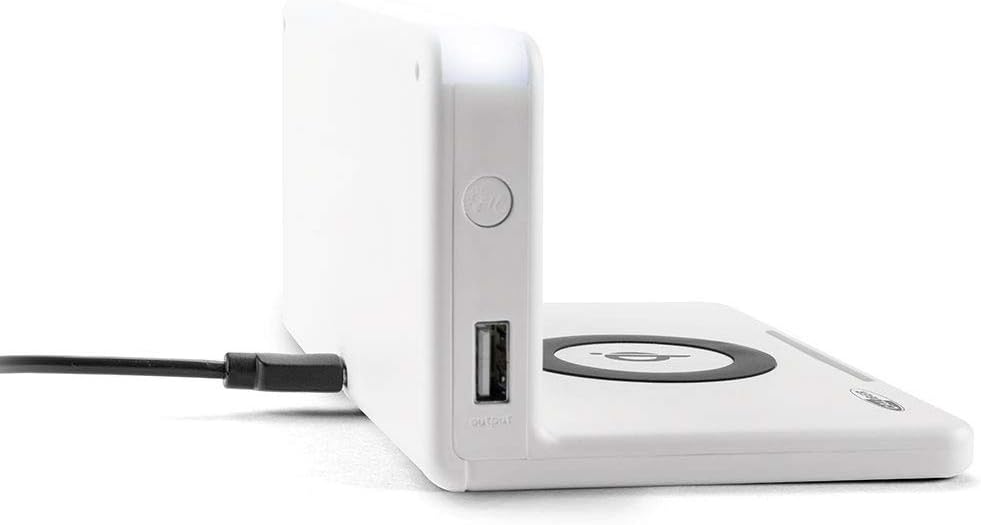
Billede: Side view of the alarm clock, illustrating the power input port (left) and the USB output port (right).
Batteriinstallation (backup): The unit includes 1 Lithium Ion battery for backup. This battery maintains time settings during power outages. No user installation is typically required for this pre-installed battery.
Indstilling af starttidspunkt: Upon first power-up, the clock may display a default time or require manual setting. Refer to the "Operating" section for detailed instructions on setting the time.
Betjeningsvejledning
Indstilling af tid og dato
- Tryk og hold på TIDSINDSTILLING button (location may vary, typically on the back or top) until the hour digits flash.
- Brug + or - knapper for at justere timen.
- Trykke TIDSINDSTILLING igen for at gå til minutter, og juster derefter med + or -.
- Repeat for year, month, and day if applicable.
- Trykke TIDSINDSTILLING one last time to confirm and exit.
Indstilling af alarmer
- Tryk og hold på ALARM SÆT button (or similar) until the alarm hour digits flash.
- Adjust the alarm hour and minutes using the + or - knapper.
- Trykke ALARM SÆT for at bekræfte.
- For at aktivere/deaktivere alarmen skal du trykke på ALARM TIL / FRA knappen. Et alarmikon vil vises/forsvinde på displayet.
- Når alarmen lyder, skal du trykke på SLUM button for a temporary pause, or any other button to turn it off for the day.
Using the QI Wireless Charging Station
The alarm clock features a built-in QI wireless charging pad for compatible devices.
- Sørg for, at vækkeuret er tændt.
- Place your QI-compatible smartphone or device directly onto the charging pad, centering it over the QI-logo.
- A charging indicator (e.g., an LED light or on-screen icon) will illuminate to confirm charging has begun. If charging does not start, reposition your device.

Image: A smartphone placed on the QI charging pad of the alarm clock, showing the charging interface on the phone screen.

Image: The alarm clock with a phone positioned on its wireless charging surface, indicating active charging.
Brug af USB-opladningsporten
A USB output port is available on the side of the unit for charging non-QI compatible devices or for faster wired charging.
- Connect your device's USB charging cable to the USB output port on the alarm clock.
- Tilslut den anden ende af kablet til din enhed. Opladningen starter automatisk.
Adjusting Display Brightness and Night Light
- The alarm clock features adjustable display brightness. Look for a DIMMER or LYSSTYRKE button, typically on the back or top. Press it repeatedly to cycle through brightness levels.
- To activate or adjust the night light, locate the dedicated NATSLYS button. Press it to turn the light on/off or cycle through different brightness settings if available.
Opretholdelse
- Rensning: Disconnect the power adapter before cleaning. Use a soft, dry cloth to wipe the surface of the alarm clock. Do not use abrasive cleaners, waxes, or solvents as they may damage the finish.
- Opbevaring: Hvis enheden opbevares i længere tid, skal den afbrydes fra strømmen og opbevares et køligt og tørt sted.
- Håndtering: Avoid dropping the unit or subjecting it to strong impacts. Keep it away from water and high humidity.
Fejlfinding
| Problem | Mulig årsag | Løsning |
|---|---|---|
| Urdisplayet er tomt. | Ingen strømtilslutning. | Sørg for, at strømadapteren er korrekt tilsluttet enheden og en fungerende stikkontakt. |
| QI charging not working. | Device not QI-compatible; device not properly aligned; foreign objects on pad; phone case too thick. | Verify device compatibility. Reposition device on the center of the pad. Remove any foreign objects. Remove thick phone cases. |
| Alarmen lyder ikke. | Alarm ikke aktiveret; lydstyrke for lav; forkert alarmtidspunkt. | Ensure the alarm icon is displayed. Check alarm volume settings. Verify the alarm time is set correctly. |
| Tidspunktet er forkert. | Tiden er ikke indstillet korrekt; strømafbrydelse. | Reset the time manually. If power was interrupted, the backup battery should maintain time, but a manual check is recommended. |
Specifikationer
| Feature | Detalje |
|---|---|
| Mærke | Kaliber |
| Modelnummer | HCG018QI/W |
| Farve | Hvid |
| Display Type | Digital |
| Speciel funktion | Night light, QI charging station, USB charging port |
| Strømkilde | Elektrisk med ledning |
| Produktdimensioner | 7.09 x 4.25 x 3.86 tommer |
| Varens vægt | 7.9 ounces (225 gram) |
| Batterier | 1 Lithium Ion battery (included, for backup) |
| GTIN | 08714505047157 |
Garanti og support
This Caliber product is designed for reliability and performance. For information regarding warranty coverage, please refer to the warranty card included with your purchase or visit the official Caliber webwebsted.
Should you encounter any issues not covered in the troubleshooting section, or require further assistance, please contact Caliber customer support. Contact details can typically be found on the product packaging or the manufacturer's official webwebsted.


