Produkt overview
This AULCMEET replacement remote control is designed to function as a direct substitute for various original Panasonic Blu-ray Disc Recorder remote controls. It offers full functionality without requiring any complex setup or programming. Simply insert batteries, and the remote is ready for immediate use with your compatible Panasonic device.
Billede: Forside view of the AULCMEET replacement remote control.
Compatible Panasonic Remote Control Models:
- N2QAYB000905
- N2QAYB000349
- N2QAYB000697
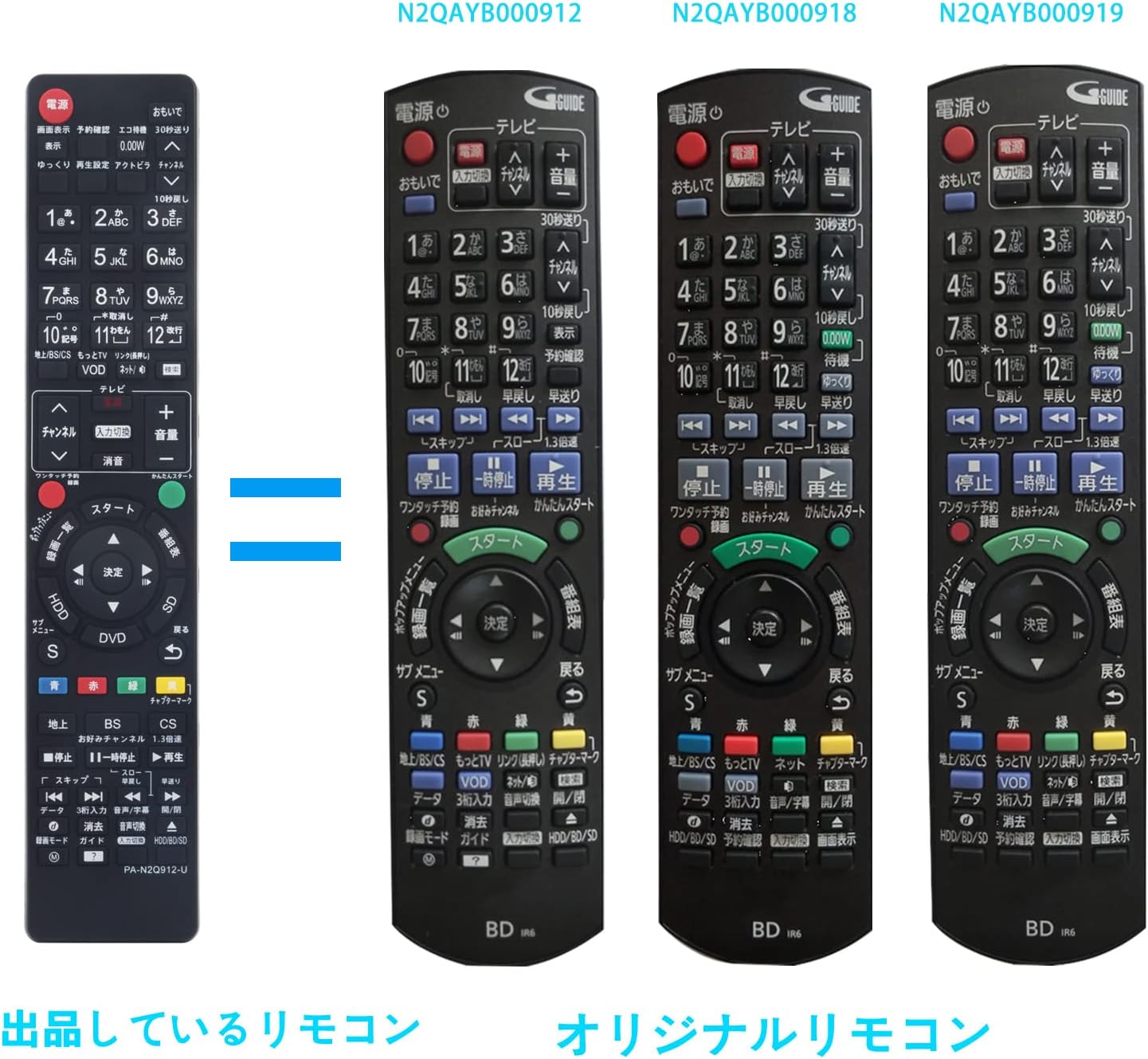
- N2QAYB000912
- N2QAYB000918
- N2QAYB000919
- N2QAYB000902
- N2QAYB000996
- TZT2Q011218
- N2QAYB001218
- N2QAYB000607
- N2QAYB000782
- N2QAYB000783
- N2QAYB000917
Compatible Panasonic Blu-ray Disc Recorder Models:
- DMR-BRT220, DMR-BRT230, DMR-XE1, DMR-BR30
- UN-JL10T1, UN-JL19T1, DMR-HRT300
- DMR-BWT650-S, DMR-BWT650, DMR-BWT550, DMR-BWT560-K, DMR-BWT560, DMR-BWT660
- DMR-BR130-K, DMR-BR160-K, DMR-BR130, DMR-BR160, DMR-BWT660-K, DMR-BWT550-S
- DMR-XE100, DMR-XE100-K, DMR-BRT230-K, DMR-BRT220-K, DMR-BRT250-K, DMR-BRT250
- DMR-SW2000, DMR-BRT260
The remote is designed to replicate the functionality of the original Panasonic remotes, providing a familiar user experience. The layout and button functions are similar to the original units, ensuring ease of transition.

Image: Comparison of the AULCMEET replacement remote (left) with original Panasonic remote models N2QAYB000912, N2QAYB000918, and N2QAYB000919 (right).

Image: Comparison of the AULCMEET replacement remote (left) with original Panasonic remote models N2QAYB000905, N2QAYB000349, and N2QAYB000697 (right).
Opsætning
Installation af batteri
The remote control requires two AAA alkaline batteries (not included). Follow these steps to install the batteries:
- Find batterirummets dæksel på bagsiden af fjernbetjeningen.
- Tryk ned på tappen, og skub dækslet nedad for at åbne rummet.
- Isæt to AAA-batterier, og sørg for, at de positive (+) og negative (-) poler er justeret korrekt med markeringerne inde i batterirummet.
- Skub batteridækslet tilbage på plads, indtil det klikker sikkert.
No additional setup or programming is required. The remote is pre-configured for immediate use with compatible Panasonic Blu-ray Disc Recorders once batteries are installed.

Billede: Bagside view på fjernbetjeningen med batterirummet åbent, der viser, hvor AAA-batterier skal isættes.
Betjeningsvejledning
This remote control provides standard functions for operating your Panasonic Blu-ray Disc Recorder. The button layout is designed to be intuitive and similar to original Panasonic remotes.
Grundlæggende funktioner:
- Power knap: Tænder eller slukker for enheden.
- Nummerknapper (0-9): For direct channel selection or inputting numerical values.
- Kanal op/ned: Navigerer gennem kanaler.
- Lydstyrke op/ned: Justerer lydstyrken.
- Stum: Dæmper lydudgangen.
- Afspilningskontroller (Afspil, Pause, Stop, Spol frem, Spol tilbage, Spring over): Styrer medieafspilning.
- Directional Pad (Up, Down, Left, Right) & Enter/OK: Til menunavigation og valg.
- Menu/Guide: Accesses the device's main menu or program guide.
- Input/kilde: Skifter mellem forskellige inputkilder.
- Farveknapper (rød, grøn, gul, blå): Used for specific functions within menus or applications, as indicated on screen.
Opretholdelse
- Rensning: To clean the remote, wipe it with a soft, dry cloth. Do not use liquid cleaners, sprays, or abrasive materials, as these can damage the remote's surface or internal components.
- Udskiftning af batteri: Udskift batterierne, når fjernbetjeningen reagerer langsomt eller holder op med at virke. Udskift altid begge batterier samtidig med nye af samme type.
- Opbevaring: If the remote will not be used for an extended period, remove the batteries to prevent leakage and potential damage to the remote. Store the remote in a cool, dry place away from direct sunlight and extreme temperatures.
- Undgå dråber: Beskyt fjernbetjeningen mod fald og stød, som kan forårsage indre skader.
Fejlfinding
- Fjernbetjeningen svarer ikke:
- Kontroller, om batterierne er isat korrekt med den korrekte polaritet (+/-).
- Udskift gamle batterier med nye.
- Sørg for, at der ikke er nogen forhindringer mellem fjernbetjeningen og enhedens infrarøde sensor.
- Bekræft, at fjernbetjeningen er rettet direkte mod enheden.
- Specifikke knapper virker ikke:
- Rengør fjernbetjeningens overflade, især omkring de knapper, der ikke reagerer, for at fjerne snavs eller skidt.
- If cleaning and battery replacement do not resolve the issue, the button may be faulty.
- Interferens:
- Bright light sources, such as direct sunlight or fluorescent lights, can interfere with the remote's infrared signal. Try operating the remote in a different lighting condition.
Specifikationer
| Mærke | AULCMEET |
| Modelidentifikator | PA-N2Q912 |
| Funktioner | Replacement remote for Blu-ray Disc Recorders |
| Kompatible enheder | DVD / Blu-ray Players (Panasonic Blu-ray Disc Recorders) |
| Kommunikationsgrænseflade | Infrarød (IR) |
| Antal knapper | 70 |
| Controller type | Knap kontrol |
| Maksimal rækkevidde | 33 fod (ca. 10 meter) |
| Batterier påkrævet | 2 x AAA batteries (Alkaline recommended) |
| Produktets vægt | 80 gram |
| ASIN | B07ZYMB863 |
| GTIN/UPC | 754914024019 |
Garanti og support
This product comes with a one-year warranty from the date of purchase. If you encounter any defects or issues with the product within this period, please contact the seller via email. The seller can provide support, including new product exchanges, to resolve any problems.
For further assistance or inquiries, please refer to the contact information provided by your retailer or the AULCMEET official support channels.