Indledning
The MONODEAL MD102 Portable CD Player is a versatile and compact device designed for personal audio playback. Featuring a large LCD display, anti-skip and anti-shock protection, and a built-in rechargeable battery, it offers up to 15 hours of playback. This player supports various disc formats including CDs, CD-R, HDCDs, and MP3 CDs, making it suitable for listening to music or audiobooks on the go, in your car, or at home.

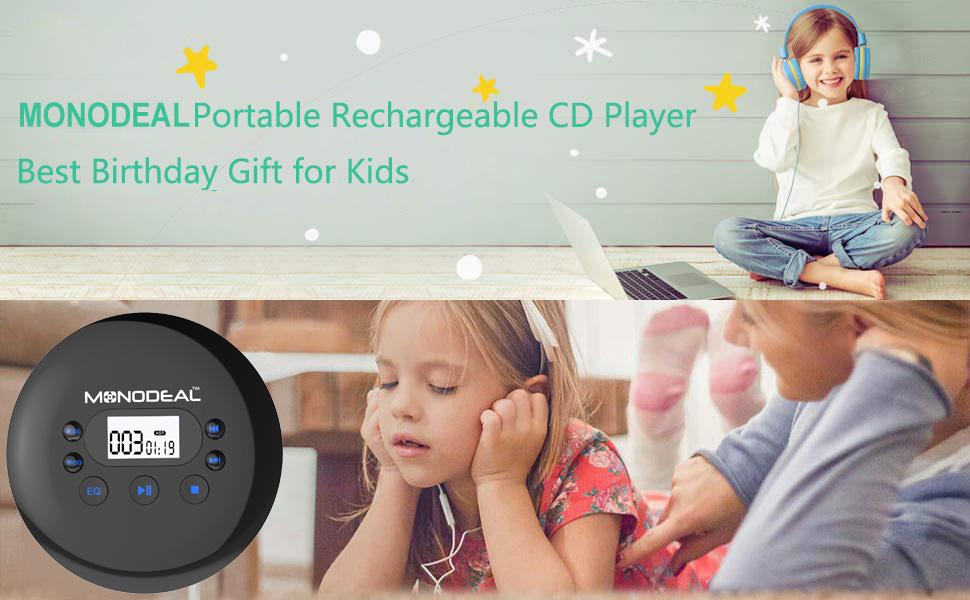
The MONODEAL MD102 Portable CD Player, shown with its included headphones.
Hvad er der i æsken
- 1 x CD-afspiller
- 1 x 3.5 to 3.5mm AUX Cable
- 1 x USB til Type-C ladekabel
- 1 x høretelefoner
- 1 x brugermanual
Opsætning
1. Opladning af enheden
Before first use, fully charge the CD player. Connect the provided USB to Type-C charging cable to the player's charging port and a compatible USB power source (e.g., wall charger, power bank, car charger, or laptop). The charging LED indicator will illuminate during charging and turn off when fully charged. A full charge typically provides up to 15 hours of playback.
The CD player can be conveniently charged via various USB power sources.
2. Isætning af en cd
- Locate the 'OPEN' switch on the side of the player and slide it to open the CD compartment lid.
- Carefully place your CD (CD, CD-R, HDCD, or MP3 CD) onto the central spindle with the label side facing up.
- Gently press the CD down until it clicks into place.
- Luk låget til cd-rummet godt, indtil det klikker på plads.

The player supports multiple CD formats including MP3, CD, CD-R, and HDCD.
3. Connecting Headphones or External Speakers
Plug the included earphones or your preferred 3.5mm audio headphones into the 'EARPHONE PLUG' port on the side of the player. To connect to external speakers or a car's audio system, use the provided 3.5mm AUX cable. Insert one end into the player's earphone jack and the other into the AUX input of your external device.

The CD player can be connected to a car's audio system using the AUX cable.
En overview of the MONODEAL Rechargeable Portable CD Player, demonstrating its features and portability.
Betjeningsvejledning
Kontrol overview

Detaljeret view of the CD player's controls and ports.
- Power ON/OFF Switch/Hold: Slides to turn the player on or off, or to activate the hold function.
- DC In 5V: Strømindgang til opladning.
- Mode: Skifter gennem afspilningstilstande.
- PROG (Program)-knap: Used to program track order or toggle last memory function.
- EQ (Equalizer) Button: Cycles through sound effects.
- Afspil/pause knap: Starter eller sætter afspilning på pause.
- Stop-knap: Stopper afspilning.
- Næste/Spol frem-knap: Skips to the next track or fast forwards within a track.
- Forrige/Tilbagespolingsknap: Skips to the previous track or rewinds within a track.
- Lydstyrkeknap: Justerer lydstyrken for udgangen.
- Open CD: Slide switch to open the CD compartment.
- Opladnings-LED: Angiver opladningsstatus.
- Øretelefonstik: 3.5mm audio output jack.
Grundlæggende afspilning
- Slide the 'Power ON/OFF' switch to 'ON'.
- Insert a CD as described in the Setup section.
- Tryk på Afspil/pause knappen for at starte afspilningen.
- Brug Næste/spol frem og Forrige/spol tilbage buttons to navigate tracks. Hold these buttons to fast forward or rewind within a track.
- Adjust the volume using the 'Volume Knob'.
- Tryk på Stop knappen for at afslutte afspilningen.
Playback Modes and Sound Effects
The player offers 5 playback modes and 5 sound effects to customize your listening experience:
- Afspilningstilstande: Play in order, Repeat one track, Repeat all tracks, Play in random order (Shuffle), Play the first 10 seconds of each track (Intro). Press the MODE knappen for at gennemgå disse muligheder.
- Lydeffekter (EQ): BBS (Bass Boost System), POP, JAZZ, ROCK, CLASSIC. Press the EQ knappen for at gennemgå disse muligheder.
Customize your audio with various playback modes and sound effects.
Anti-Skip & Anti-Shock Protection
The MONODEAL MD102 features enhanced anti-skip and anti-shock technology, which helps prevent interruptions in audio playback even during movement. This allows for stable listening while walking, running, or during car travel.

The anti-skip and anti-shock features ensure smooth playback during movement.
Sidste hukommelsesfunktion
The player includes a last memory function that resumes playback from where you stopped. To toggle this function On/Off, long press the PROG knap.
Using in a Car
This CD player is compatible with cars that have a 3.5mm auxiliary (AUX) port. Use the provided AUX cable to connect the player to your car's audio system. Please note that this CD player does not have built-in speakers and is not compatible with Bluetooth connections for car speakers or headphones.

The CD player is a suitable travel companion for cars equipped with an AUX port.
Opretholdelse
- Rensning: Use a soft, dry cloth to clean the exterior of the player. For the lens, use a specialized CD lens cleaner. Avoid using abrasive cleaners or solvents.
- Opbevaring: Opbevar afspilleren et køligt, tørt sted væk fra direkte sollys, ekstreme temperaturer og fugtighed.
- Batteripleje: For at forlænge batteriets levetid, undgå at aflade batteriet helt ofte. Oplad afspilleren regelmæssigt, selvom den ikke er i brug i længere perioder.
- Håndtering af diske: Always handle CDs by their edges to avoid fingerprints and scratches, which can affect playback quality.
Fejlfinding
| Spørgsmål | Mulig årsag | Løsning |
|---|---|---|
| No sound from player | Player has no built-in speakers; Headphones/external speakers not connected or faulty; Volume too low. | Ensure headphones or external speakers are properly connected. Increase volume. Confirm external device is powered on and set to correct input. |
| Disc skipping or not playing | Disc is dirty, scratched, or damaged; Player is on an unstable surface; Disc inserted incorrectly. | Clean the disc with a soft, lint-free cloth. Try a different disc. Ensure the player is on a stable surface. Re-insert the disc correctly. |
| Displayet er svagt eller ulæselig | Low battery; Backlight not activated. | Charge the player. The display has a backlight feature that can be activated by pressing any button to view information easily. |
| Player does not turn on | Battery is completely drained; Power switch is in 'OFF' or 'HOLD' position. | Connect the player to a power source and allow it to charge. Ensure the 'Power ON/OFF Switch/Hold' is set to 'ON' and not 'HOLD'. |
Specifikationer
| Feature | Detalje |
|---|---|
| Produktdimensioner | 5.6 x 5.6 x 0.75 tommer |
| Varens vægt | 8 ounce |
| Modelnummer | MD102 |
| Batterier | 1 lithium-ion batteri (medfølger) |
| Forbindelsesteknologi | Hjælpe |
| Speciel funktion | Anti-Spring beskyttelse |
| Første ledige dato | 24. oktober 2019 |
| Fabrikant | Yuanj Co.,Ltd |
Garanti & Support
MONODEAL tilbyder en 1-års gratis erstatning og en 60-Day Refund Without Any Reason for this product. Additionally, some customers have reported the availability of a lifetime warranty upon registration. For warranty inquiries or support, you may contact the manufacturer directly.
For lifetime warranty registration or support, you may contact: jenna@monodeal.net
Please refer to the included user manual or product packaging for the most up-to-date warranty terms and contact information.


