1. Introduktion
The HXW SD61-4 electric drum kit is designed as an entry-level instrument suitable for beginners. It is ideal for drum learning, practice sessions, and band rock applications. A key feature is the ability to connect headphones, allowing drummers to practice without disturbing others.
This electronic drum set offers 227 vivid sounds, sampled from world-class acoustic kits. It includes 15 pre-set drum kits and 15 play-along tracks, covering various music styles such as jazz, Latin, and rock.
The pro-performance mesh drum heads provide a realistic response for each beat. The adjustable settings allow users to customize sensitivity, volumes, and trigger parameters to suit their playing style.

Figure 1: Fully assembled HXW SD61-4 Mesh Electric Drum Set.
2. Pakkens indhold
Please verify that all components are present in the package before beginning assembly:
- One (1) 7.5-inch mesh snare drum
- Three (3) 7.5-inch mesh toms
- Three (3) 10-inch cymbals
- One (1) all-in-one hi-hat pedal
- One (1) kick pedal
- Strong iron 4-post racks
- Trommestikker
Hvis nogen varer mangler eller er beskadigede, bedes du kontakte kundesupport med det samme.
3. Opsætning
Assembly of the HXW SD61-4 drum set is straightforward and typically takes less than an hour. The robust 4-post rack system provides a stable foundation for all drum pads and cymbals.
- Udpak komponenter: Tag forsigtigt alle komponenter ud af emballagen, og læg dem på en ren, plan overflade.
- Assemble Rack: Follow the included diagram to connect the iron 4-post racks. Ensure all connections are secure.
- Fastgør pads og bækkener: Mount the snare drum, tom pads, and cymbals onto the rack using the provided clamps. Juster deres positioner for behageligt spil.
- Tilslut pedaler: Place the hi-hat and kick pedals on the floor in their desired positions and connect them to the sound module.
- Tilslut kabler: Connect all drum pads and cymbals to the sound module using the designated cables. Ensure each connection is firm.
- Tænd: Connect the power adapter to the sound module and a power outlet.
For enhanced stability during play, it is recommended to place the assembled drum set on a small area rug, approximately 3' x 4' in size.
4. Betjeningsvejledning
4.1 Sound Module
The sound module is the central control unit for your drum set. It features an intuitive interface with dedicated buttons for various functions:
- Drum Kit Selection: Use the dedicated buttons to cycle through the 15 available drum kits (10 regular, 5 novelty).
- Metronom: Activate the built-in metronome for timing practice.
- Sange: Select and play along to the included songs.
- REC (Optagelse): Record your practice sessions.
- MULTI: Access advanced menus and control start/stop functions.
While the module does not support creating and saving custom drum kits, the volume sensitivity (velocity) of individual samples within each kit can be adjusted through the Advanced menu. Refer to the module's display for navigation.

Figure 2: User-friendly sound module with clear controls.
4.2 Mesh Heads
The mesh drum heads are designed to provide a realistic and responsive playing experience. Their tension can be adjusted to achieve your preferred bounce and feel.

Figure 3: High-quality mesh drum head with adjustable tension.
4.3 Cymbals and Pedals
The set includes three 10-inch cymbals and all-in-one hi-hat and kick pedals. These components are designed for durability and sensitive response, contributing to a comprehensive drumming experience.
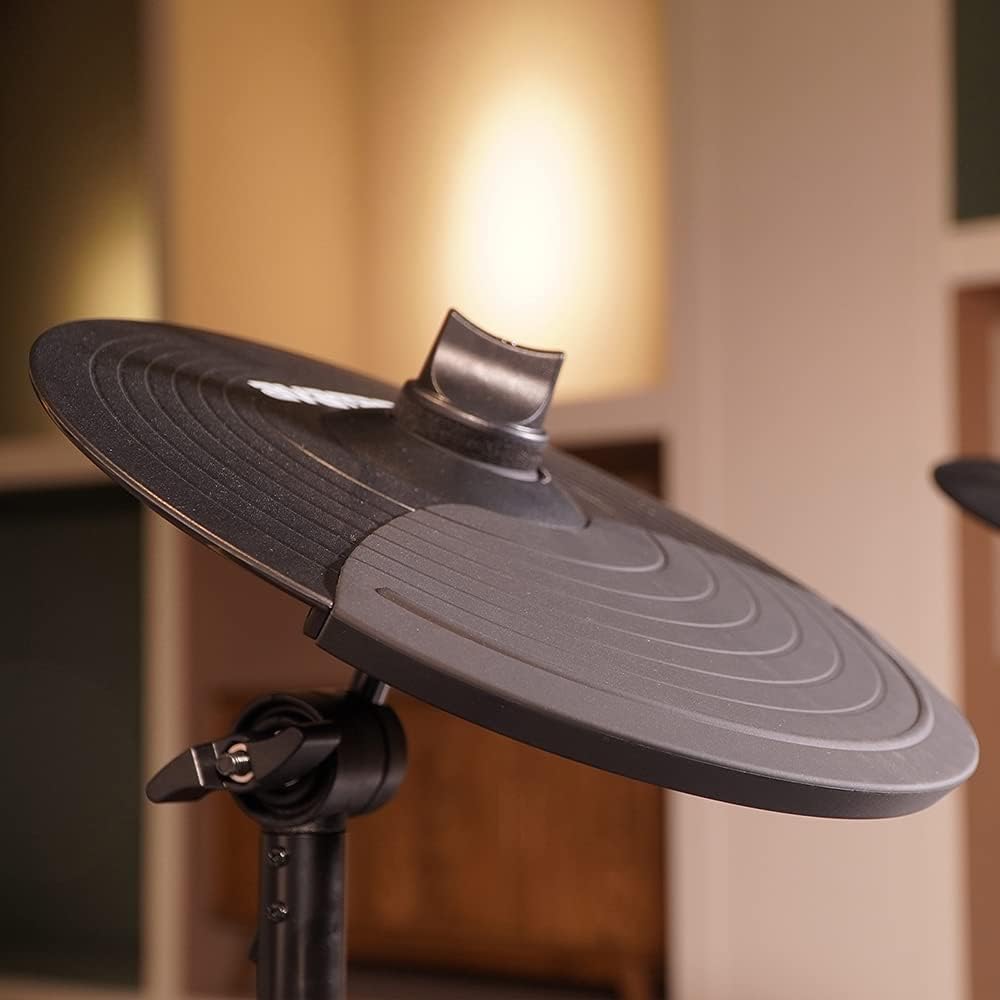
Figure 4: Detail of an electronic cymbal.

Figure 5: All-in-one pedals for hi-hat and kick drum.
4.4 Forbindelse
The SD61-4 offers versatile connectivity options:
- USB-MIDI-port: This port allows for easy connection to a PC, enabling use with various music software and Digital Audio Workstations (DAWs).
- AUX port: Connect an MP3 player, CD player, iPad, phone, or other audio sources via the AUX port to play along with your favorite songs.
- Hovedtelefonstik: The headphone jack provides a mono mix of the selected drum kit, allowing for quiet practice sessions. No latency issues are typically experienced when using the internal drum kits.
Video 1: Demonstration of the HXW SD61-4 Electric Drum Set in use, showcasing its sound and playability.
5. Vedligeholdelse
To ensure the longevity and optimal performance of your HXW SD61-4 drum set, follow these maintenance guidelines:
- Rensning: Regularly wipe down the drum pads, cymbals, and module with a soft, dry cloth. Avoid using abrasive cleaners or solvents.
- Kabelstyring: Keep cables neatly organized and avoid sharp bends or kinks, which can damage internal wires.
- Opbevaring: When not in use for extended periods, store the drum set in a cool, dry place away from direct sunlight and extreme temperatures. The compact design allows for easy storage.
- Spænding af nethoved: Periodically check and adjust the tension of the mesh heads to maintain your preferred feel and response.

Figure 6: The compact design of the drum set facilitates easy storage.
6. Fejlfinding
This section addresses common issues you might encounter with your HXW SD61-4 drum set.
| Problem | Mulig årsag | Løsning |
|---|---|---|
| No sound from a specific pad/cymbal | Loose cable connection; faulty pad/cymbal. | Check and re-secure all cable connections. If the issue persists, contact customer support. |
| Delay in sound when drumming fast | Characteristic of the unit at high speeds. | This is a known characteristic. Ensure all connections are secure to minimize any potential latency. |
| Missing hardware (e.g., nuts) | Packaging error or lost during assembly. | Check all packaging thoroughly. Replacement hardware can often be found at local hardware stores. |
| Component (e.g., hi-hat cymbal) stops working | Internal wiring issue; component failure. | Contact customer support for assistance with replacement parts or repair. |
7. Specifikationer
- Modelnavn: SD61-4
- Mærke: HXW
- Connector Type: USB
- Inkluderede komponenter: Snare, Cymbals, Toms, Pedals, Racks, Drumsticks
- Fabrikant: HXW
- UPC: 192480000134
- Pakkedimensioner: 64.77 x 64.26 x 31.5 cm
- Varens vægt: 16.6 kg (16.65 kg parcel weight)
- Farve: Hvid
- Materiale Type: Legeret stål
- Størrelse: Midt
- Færdighedsniveau: Alle
- Dato først tilgængelig: 22. oktober 2019
8. Garanti og support
For warranty information, technical support, or inquiries regarding replacement parts, please contact the seller or manufacturer directly. Keep your purchase receipt as proof of purchase.


