HXSJ V100 35-tangenters gamingtastatur brugermanual
Model: V100
1. Introduktion
Thank you for choosing the HXSJ V100 35 Keys Gaming Keyboard. This compact, single-hand membrane keyboard is designed to enhance your gaming experience with its ergonomic design, programmable features, and vibrant LED backlighting. This manual provides detailed instructions on how to set up, operate, and maintain your keyboard to ensure optimal performance.
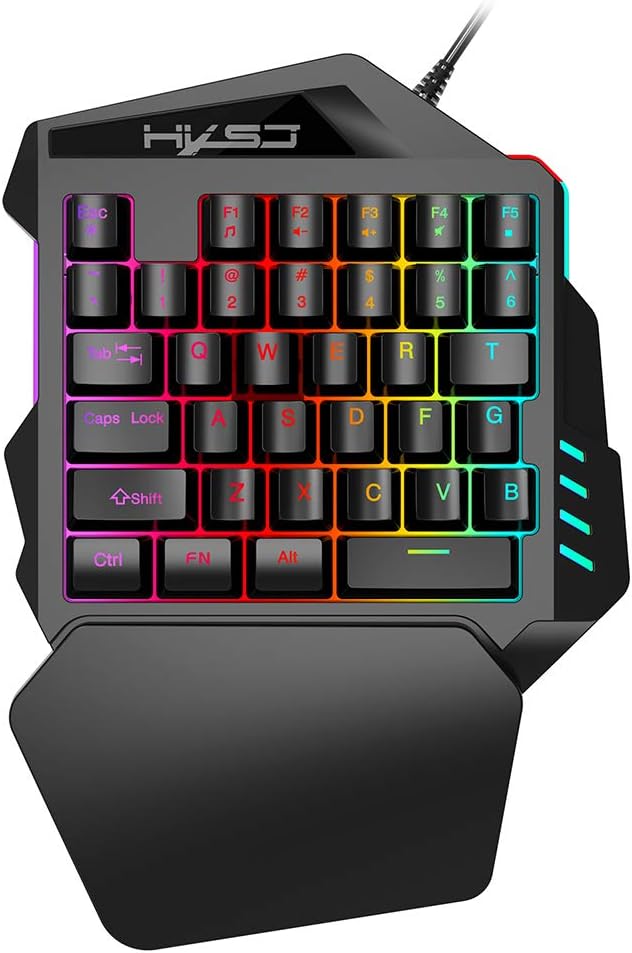
Figure 1: HXSJ V100 35 Keys Gaming Keyboard Overview
The HXSJ V100 is engineered for precision and comfort, making it an ideal companion for games like PUBG, LOL, and CS. Its mini design allows for easy single-hand operation, while the integrated wrist rest provides support during extended gaming sessions.
2. Nøglefunktioner
- Luminous LED Backlight: Features vibrant LED color backlighting for an immersive gaming atmosphere, especially in low-light conditions.
- Programmable Advanced Control: Offers customizable lighting and key functions for a personalized gaming setup.
- Mini bærbart design: Compact 35-key layout provides a super easy single-hand operating experience, optimizing desk space.
- Ergonomisk håndledsstøtte: Designed to fit your hand and wrist comfortably, simplifying complex operations and reducing fatigue.
- Bred kompatibilitet: Supports various operating systems including Win 2000, Win XP, Win ME, Vista, Win7, Win8, Android, Linux, and Apple.

Figure 2: Ergonomic Hand Rest for Enhanced Comfort
3. Pakkens indhold
Kontroller venligst pakkens indhold ved udpakning for at sikre, at alle varer er til stede:
- 1 x HXSJ V100 35 Keys Gaming Keyboard
- 1 x brugermanual
4. Opsætningsvejledning
Setting up your HXSJ V100 Gaming Keyboard is straightforward. Follow these steps to get started:
- Opret forbindelse til enhed: Locate an available USB 2.0 port on your computer, laptop, or compatible gaming device.
- Tilslut: Sæt tastaturets USB-stik i USB-porten.
- Automatisk installation: Dit operativsystem burde automatisk registrere og installere de nødvendige drivere. Denne proces kan tage et par øjeblikke.
- Klar til brug: Once the drivers are installed, the keyboard's LED backlight will illuminate, indicating it is ready for use.

Figure 3: Connecting the HXSJ V100 Keyboard to a Device
5. Betjeningsvejledning
The HXSJ V100 keyboard is designed for intuitive use. Here are the primary functions and special key combinations:
5.1 Standardnøglefunktioner
The keyboard features 35 standard keys, including alphanumeric keys, function keys (F1-F5), and modifier keys (Ctrl, Shift, Alt, FN). These keys operate as standard input devices for your computer or gaming system.

Figure 4: HXSJ V100 Keyboard Key Layout
5.2 FN Combination Functions
The FN key allows access to multimedia functions. Press and hold the FN key, then press the corresponding function key:
- FN+F1: Musikafspiller
- FN+F2: Volume Decrement
- FN+F3: Volume Increment
- FN+F4: Stum
- FN+F5: Pause/Afspil
Note: This keyboard features a single backlight color mode as depicted in the product images. The backlight is not customizable to different colors, but provides a consistent, vibrant illumination.
6. Vedligeholdelse og pleje
To ensure the longevity and optimal performance of your HXSJ V100 Gaming Keyboard, follow these maintenance guidelines:
- Rensning: Use a soft, dry cloth to wipe down the keyboard surface. For stubborn dirt, slightly dampRengør kluden med vand eller et mildt, ikke-slibende rengøringsmiddel. Undgå for meget fugt.
- Fjernelse af støv: Brug trykluft til at fjerne støv og snavs mellem tasterne.
- Undgå væsker: Spild ikke væske på tastaturet. Hvis der spildes væske, skal du straks tage stikket ud af tastaturet og lade det tørre helt, før du tilslutter det igen.
- Opbevaring: Opbevar tastaturet et køligt, tørt sted væk fra direkte sollys og ekstreme temperaturer, når det ikke er i brug i længere perioder.
- Håndteres med forsigtighed: Avoid dropping the keyboard or subjecting it to strong impacts, which can damage internal components.
7. Fejlfinding
If you encounter issues with your HXSJ V100 Gaming Keyboard, please refer to the following common problems and solutions:
| Problem | Mulig årsag | Løsning |
|---|
| Tastaturet reagerer ikke | Løs USB-forbindelse, defekt USB-port, driverproblem. | Sørg for, at USB-kablet er korrekt tilsluttet. Prøv en anden USB-port. Genstart computeren. Tjek Enhedshåndtering for driverproblemer. |
| Baggrundslys virker ikke | Keyboard not powered, backlight setting. | Ensure keyboard is properly connected and receiving power. The backlight is always on when powered. If not, try reconnecting. |
| Nøgler registreres ikke | Dust/debris under keys, software conflict. | Use compressed air to clean around and under the affected keys. Test the keyboard on another computer to rule out software issues. |
| FN multimedia keys not working | Forkert tastekombination, softwarekonflikt. | Ensure you are pressing and holding the FN key before pressing the desired F key. Check if other multimedia software is interfering. |
8. Produktspecifikationer
Detailed technical specifications for the HXSJ V100 Gaming Keyboard:
| Parameter | Værdi |
|---|
| Produktnavn | One-handed Gaming Keyboard |
| Produkt model | V100 |
| Produktgrænseflade | USB 2.0 |
| Tastaturstandard | Mini tastatur |
| Driftsstil | Membran |
| Antal nøgler | 35 nøgler |
| Produktlinjelængde | 1.6 meter |
| Arbejdsstrøm | 100mA |
| Produktets nettovægt | 350 g |
| Produktstørrelse (L*B*H) | 26 x 18 x 4 cm |
| Pakkevægt | 415 g |
| Pakkestørrelse | 26 x 19 x 4 cm |
| Kompatibel OS | Win 2000, Win XP, Win ME, Vista, Win7, Win8, Android, Linux, Apple |
| Baggrundslys farve | RGB (fixed mode) |

Figure 5: Product Label on the Bottom of the Keyboard
9. Garanti og support
HXSJ products are manufactured to high-quality standards. For information regarding warranty coverage, technical support, or service inquiries, please refer to the warranty card included with your product or visit the official HXSJ webwebsted. Gem venligst din købsbevis i tilfælde af garantikrav.


