1. Introduktion
This manual provides essential information for the safe and effective installation, operation, and maintenance of the Autonics TMH2-42CE Advanced Multi-Channel Modular Temperature Controller. Please read this manual thoroughly before using the product to ensure proper functionality and to prevent potential hazards.
1.1 Sikkerhedsforanstaltninger
- Sørg for, at strømforsyningen voltage matches the specified rating (24VDC).
- Enheden må ikke skilles ad eller ændres. Overlad al service til kvalificeret personale.
- Avoid installing the unit in locations subject to direct sunlight, excessive vibration, dust, or corrosive gases.
- Properly ground the unit to prevent electrical shock and ensure stable operation.
- Afbryd strømmen, før du udfører nogen form for ledningsføring eller vedligeholdelse.
2. Produktet er slutview
The Autonics TMH2-42CE is an advanced multi-channel modular temperature controller designed for precise temperature management in industrial applications. It features a compact, modular design allowing for flexible system expansion.
2.1 Nøglefunktioner
- 2 independent control channels.
- CT (Current Transformer) input for current measurement.
- Digital Inputs (DI-1/2) for external control signals.
- 4 configurable alarm outputs (AL1, AL2, AL3, AL4).
- RS485 communication output for system integration.
- Selectable Current or SSR (Solid State Relay) drive output.
- 24VDC strømforsyning.
- Modular design for easy expansion.
2.2 Produktillustration
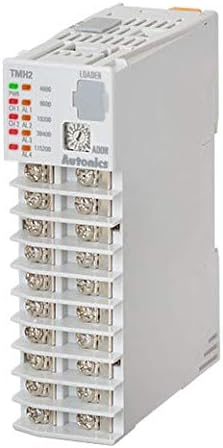
Figur 1: Front view of the Autonics TMH2-42CE modular temperature controller. This image displays the terminal block connections for inputs and outputs, status indicator LEDs for power and channel alarms, and the 'LOADER' port for configuration. The model number 'TMH2' is visible on the top left of the unit's faceplate.
3. Opsætning og installation
Follow these steps for proper installation and wiring of the TMH2-42CE controller.
3.1 Montering
The TMH2-42CE is designed for DIN rail mounting. Securely attach the unit to a standard DIN rail within an appropriate enclosure, ensuring adequate ventilation and clearance for wiring.
3.2 Ledningsføring
All wiring should be performed by qualified personnel with the power disconnected. Refer to the terminal labels on the unit for correct connections.
- Strømforsyning: Connect a 24VDC power source to the designated power terminals. Observe polarity.
- CT input: Connect the Current Transformer (CT) to the CT input terminals for current measurement.
- Digital Inputs (DI-1/2): Connect external switches or control signals to the DI-1 and DI-2 terminals as required for your application.
- Alarm Outputs (AL1-AL4): Connect external alarm devices or indicators to the respective alarm output terminals. These are typically relay outputs.
- RS485 kommunikation: Connect the RS485 communication lines (A and B) to your master device for data exchange and remote control.
- Kontroludgang: Connect your heating/cooling element or SSR to the selectable Current or SSR Drive Output terminals. Ensure the output type is configured correctly in the controller settings.
4. Betjeningsvejledning
Once installed and wired, the TMH2-42CE can be configured and operated.
4.1 Tænd og indledende konfiguration
- Apply 24VDC power to the controller. The power indicator LED should illuminate.
- Access the controller's parameters via the 'LOADER' port using compatible Autonics software or a dedicated programming device.
- Configure basic settings such as input type (CT), output type (Current/SSR), and communication parameters (RS485 address, baud rate).
4.2 Setting Control Parameters
For each of the 2 channels, set the desired temperature setpoints, alarm thresholds, and PID control parameters (if applicable) according to your process requirements. Refer to the detailed programming guide available from Autonics for specific parameter codes and ranges.
4.3 Overvågning og kontrol
Monitor the current temperature readings and output status via the connected communication interface (RS485). The front panel LEDs provide visual indication of channel status and alarm conditions.
5. Vedligeholdelse
Regular maintenance ensures the longevity and reliable operation of your temperature controller.
5.1 Rengøring
Periodically clean the exterior of the unit with a soft, dry cloth. Do not use abrasive cleaners or solvents. Ensure no dust or debris accumulates in the ventilation slots.
5.2 Eftersyn
Regularly inspect wiring connections for tightness and signs of damage. Check for any unusual odors, sounds, or visual anomalies during operation. Ensure the operating environment remains within specified temperature and humidity ranges.
6. Fejlfinding
Dette afsnit indeholder løsninger på almindelige problemer, du kan støde på.
6.1 Almindelige problemer og løsninger
- Ingen strøm: Check the 24VDC power supply connection and ensure it is active. Verify polarity.
- Forkerte aflæsninger: Verify the CT input wiring is correct and the sensor type is properly configured in the controller.
- No Output Control: Check output wiring. Ensure the control output type (Current/SSR) is correctly selected and the setpoint is appropriate. Verify alarm conditions are not preventing output.
- Communication Errors (RS485): Check RS485 wiring (A/B lines), communication parameters (baud rate, parity, stop bits, device ID), and termination resistors if applicable.
- Alarm LEDs Active: Review alarm settings and current process values to determine the cause of the alarm.
If problems persist, consult the detailed Autonics troubleshooting guide or contact technical support.
7. Specifikationer
| Feature | Specifikation |
|---|---|
| Model | TMH2-42CE |
| Mærke | AUTONIKS |
| Kanaler | 2 |
| Input type | CT-indgang |
| Digitale indgange | DI-1/2 |
| Alarmudgange | 4 (AL1, AL2, AL3, AL4) |
| Meddelelse | RS485 |
| Strømforsyning | 24VDC |
| Kontrol output | Selectable Current or SSR Drive Output |
| Fabrikant | Autonics |
| UPC | 645759343475 |
8. Garanti og support
Autonics products are manufactured under strict quality control. This product is covered by a standard manufacturer's warranty against defects in materials and workmanship. For specific warranty terms and conditions, please refer to the official Autonics webwebstedet eller kontakt din lokale forhandler.
8.1 Teknisk support
For technical assistance, detailed product documentation, or service inquiries, please visit the official Autonics website or contact their customer support department. Provide your product model number (TMH2-42CE) when seeking support.
Autonics Official Webwebsted: www.autonics.com


