1. Introduktion
This manual provides detailed instructions for the safe and effective operation of your Hytera VM780 Body-Worn Video Camera and Remote Speaker. The VM780 is designed to capture, store, and share video, audio, and image evidence, integrating a body-worn camera with a remote speaker microphone for enhanced communication and evidence collection.
Please read this manual thoroughly before using the device to ensure proper functionality and to prevent damage.
2. Produktet er slutview
The Hytera VM780 combines a high-definition camera with a remote speaker microphone, offering robust features for professional use. Familiarize yourself with the device's components and controls.

Figur 2.1: Forside View of Hytera VM780. This image shows the front of the VM780 device, featuring its display screen, which currently shows a security guard, signal strength, battery level, and channel information. The camera lens is visible at the top.
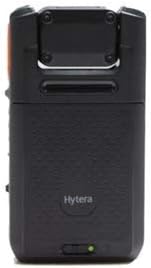
Figur 2.2: Tilbage View of Hytera VM780. This image displays the rear of the VM780, highlighting its textured surface for improved grip and a small green indicator light at the base.

Figur 2.3: Side View with Belt Clip. This image illustrates the VM780 from the side, securely attached to its belt clip, providing a view af dens slanke profile and accessible side buttons/ports.

Figure 2.4: Hytera VM780 Component Diagram. This comprehensive diagram labels the key components of the VM780. It highlights the 216° rotatable camera for HD video, the Micro USB port for charging and data, the Power Button, 2.8" Color Touch Screen, PTT Button, Audio Recording, Photo Taking, Video Recording, Emergency Initiating buttons, 3500mAh Battery, Battery Latch, and Charging Contact.
Nøglekomponenter:
- Rotatable Camera: Captures 1080P HD video, adjustable vertically by 219 degrees.
- 2.8" Color Touch Screen: For viewing footage, navigating menus, and device control.
- Power knap: Styrer enhedens strøm.
- PTT knap: Push-to-Talk button for communication.
- Micro USB -port: Used for charging, data export, and audio output.
- Opladningskontakt: For charging and data collection.
- Battery Latch: Secures the 3500mAh battery.
- Dedikerede knapper: For Audio Recording, Photo Taking, Video Recording, and Emergency Initiating.
3. Opsætning
3.1. Opladning af batteriet
Before initial use, fully charge the device's 3500mAh battery. Use the provided power adapter and USB cable.
- Connect the USB cable to the Micro USB port on the VM780 or place the device on the charging contact.
- Tilslut den anden ende af USB-kablet til strømadapteren.
- Sæt strømadapteren i en stikkontakt.
- The charging indicator will illuminate. Allow several hours for a full charge.
A fully charged battery provides over 9 hours of continuous video recording or 10 days in standby mode.
3.2. Første opstart
- Press and hold the Power Button until the screen illuminates.
- Follow the on-screen prompts for initial setup, which may include language selection and time/date settings.
- If prompted, enter the device PIN or password for authentication.
3.3. Installation af SIM-kort (valgfrit)
For 3G/4G cellular network connectivity, install a compatible SIM card.
- Sluk for enheden.
- Locate the SIM card slot (refer to Figure 2.4 for general location).
- Insert the SIM card according to the diagram near the slot.
- Tænd for enheden.
4. Betjeningsvejledning
4.1. Videooptagelse
To begin video recording:
- Press the dedicated Video Recording button (refer to Figure 2.4).
- A recording indicator will appear on the screen.
- To stop recording, press the Video Recording button again.
The camera lens can be rotated vertically by 219 degrees to achieve the optimal viewing angle for various wearing positions.
4.2. Lydoptagelse
Sådan optager du lyd:
- Press the dedicated Audio Recording button (refer to Figure 2.4).
- An audio recording indicator will appear.
- Tryk på knappen igen for at stoppe.
4.3. Photo Taking
Sådan optager du et stillbillede:
- Press the dedicated Photo Taking button (refer to Figure 2.4).
- The device will capture an image.
4.4. Push-to-Talk (PTT) Communication
The VM780 functions as a remote speaker microphone.
- Press and hold the PTT button to transmit your voice.
- Slip PTT-knappen for at lytte.
4.5. Nødalarm
In critical situations, activate the emergency alarm:
- Press the dedicated Emergency Initiating button (refer to Figure 2.4).
- The device will send an emergency alert to the pre-configured dispatch center.
4.6. Real-time Video Streaming
The VM780 supports real-time video streaming over 3G/4G or Wi-Fi networks.
- Ensure the device is connected to a cellular network (with SIM card) or a Wi-Fi network.
- Initiate video streaming through the device's menu or via dispatch center command.
- The device utilizes H.265 video compression for efficient HD video transmission.
4.7. Audio Group Calls
The VM780 can participate in one-to-one and one-to-many audio calls via 3G/4G or Wi-Fi when managed by a dispatcher.
- Calls are typically initiated by a dispatcher.
- Use the integrated speaker and microphone for communication.
5. Avancerede funktioner
- Drejelig linse: The camera lens can be rotated vertically by 219 degrees, allowing for flexible wearing positions and optimal viewing vinkler.
- Advanced Data Encryption: Employs AES-256 bit encryption to protect all captured evidence (images, audio, videos) both in local storage and during transmission.
- Videostreaming i realtid: Supports live video transmission to a command and dispatch center over 3G/4G and Wi-Fi networks.
- Effektiv videokomprimering: Utilizes H.265 technology, requiring less network bandwidth for HD video streaming compared to H.264.
- Integrated Remote Speaker Microphone: Seamlessly combines video capture with communication capabilities.
- Hytera BWC Manager Software: Allows authorized personnel to configure device settings, set PIN locks, and manage password authentication for secure access to footage.
- Robust forbindelse: Features Bluetooth 4.2, Wi-Fi, and 3G/4G cellular network support.
- Batteri med høj kapacitet: Udstyret med et 3500mAh batteri til længere driftsperioder.
- IP68-klassificeret: Provides protection against dust ingress and immersion in water, ensuring durability in challenging environments.
6. Vedligeholdelse
6.1. Rengøring af enheden
- Tør enhedens yderside af med en blød,amp klæde.
- Brug ikke skrappe kemikalier, opløsningsmidler eller slibende rengøringsmidler.
- Ensure the Micro USB port and charging contacts are free of dust and debris.
6.2. Batteripleje
- Undgå at aflade batteriet helt ofte.
- Opbevar enheden et køligt og tørt sted, når den ikke er i brug i længere perioder.
- Use only Hytera-approved charging accessories.
6.3. Softwareopdateringer
Regularly check for and install software updates provided by Hytera to ensure optimal performance and security. Updates are typically managed via the Hytera BWC Manager Software.
7. Fejlfinding
| Problem | Mulig årsag | Løsning |
|---|---|---|
| Enheden tænder ikke. | Batteriet er afladet eller ikke installeret korrekt. | Charge the battery fully. Ensure the battery is correctly seated and latched. |
| Kan ikke optage video/lyd. | Insufficient storage space or recording function is disabled. | Check available storage. Ensure recording is enabled in settings via BWC Manager Software. |
| No network connectivity (3G/4G/Wi-Fi). | SIM card issue, Wi-Fi out of range, or network settings incorrect. | Verify SIM card installation and activation. Check Wi-Fi connection. Review netværksindstillinger. |
| Dårlig videokvalitet. | Dirty lens or low light conditions. | Clean the camera lens with a soft cloth. Ensure adequate lighting for optimal recording. |
For issues not listed here, please contact Hytera customer support.
8. Specifikationer
| Feature | Detalje |
|---|---|
| Modelnavn | VM780 |
| Mærke | Hytera |
| Lagerkapacitet | 16 GB |
| Batterikapacitet | 3500mAh |
| Battery Life (Continuous Video) | Over 9 timer |
| Batterilevetid (Standby) | 10 dage |
| Skærmstørrelse | 2.8 tommer |
| Videooptagelsesformat | MPEG-4 (H.265 compression supported) |
| Forbindelsesteknologi | USB, Bluetooth 4.2, Wi-Fi, 3G/4G |
| Ingress Protection (IP) Rating | IP68 |
| Rotatable Camera Lens | 219 degrees vertical rotation |
| Kryptering | AES-256 bit |
| Pakkevægt | 250 gram |
9. Garanti og support
For warranty information, please refer to the warranty card included with your product or visit the official Hytera webGarantibetingelserne kan variere fra region til region.
For technical support, service, or additional inquiries, please contact Hytera customer service through their official channels. Keep your purchase receipt and product serial number readily available when seeking support.


