1. Introduktion
The Dragonwar G22 Lancer is a high-performance optical gaming mouse designed for precision and customization. It features an ergonomic design, 7 programmable buttons, and a 7000 DPI optical sensor, providing gamers with enhanced control and accuracy. This manual provides detailed instructions for setting up, operating, and maintaining your Dragonwar G22 Lancer gaming mouse.

Figure 1.1: Dragonwar G22 Lancer Gaming Mouse
2. Nøglefunktioner
- Ergonomisk design: Engineered for comfort during extended gaming sessions.
- 7 Kontrolknapper: Optimize your gameplay with customizable button assignments.
- 7000 DPI Precision Mode: High-resolution optical sensor for accurate tracking and movement.
- Justerbart vægtsystem: Customize the mouse's weight for personalized feel and control.
- Kabelforbindelse: Reliable and responsive connection with a nearly two-meter cable.
- RGB belysning: Customizable lighting effects for aesthetic appeal.
3. Pakkens indhold
- Dragonwar G22 Lancer Gaming Mouse
- Adjustable Weight Set (pre-installed or separate)
- Brugervejledning (dette dokument)
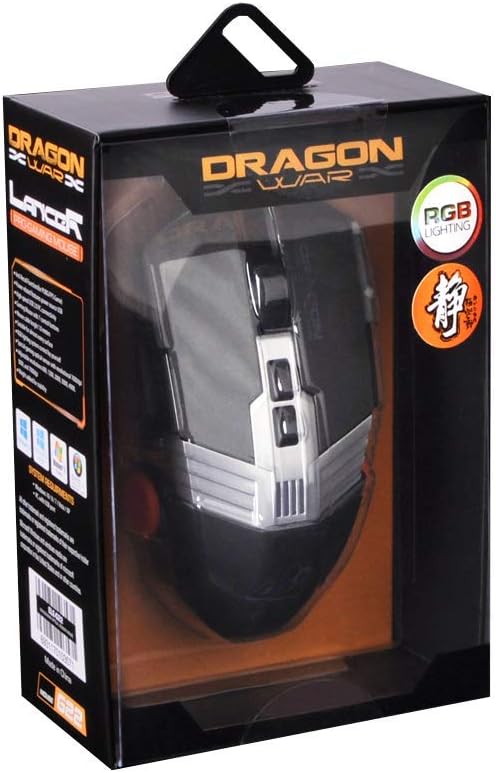
Figur 3.1: Øverst view of the Dragonwar G22 Lancer Gaming Mouse
4. Opsætning
- Tilslut musen: Plug the USB connector of the Dragonwar G22 Lancer mouse into an available USB port on your computer. The mouse is plug-and-play compatible with most operating systems (Windows XP, Linux).
- Driverinstallation (valgfrit): While the mouse functions as a standard HID device, for full customization of buttons, DPI settings, and RGB lighting, it is recommended to download and install the official Dragonwar software from the manufacturer's webFølg instruktionerne på skærmen under installationen.
- Indledende test: Once connected, move the mouse to ensure the cursor responds on your screen. The RGB lighting should illuminate.
5. Betjeningsvejledning
5.1 Knapfunktioner
The Dragonwar G22 Lancer features 7 control buttons. Their default functions are as follows, but can be customized via the Dragonwar software:
- Venstre klik: Primær handling.
- Højreklik: Sekundær handling/kontekstmenu.
- Scroll Wheel (Click): Middle click, often used for opening links in new tabs or specific game functions.
- Scroll Wheel (Up/Down): Scrolling content.
- DPI Cycle Button (behind scroll wheel): Skifter gennem forudindstillede DPI-niveauer.
- Sideknapper (frem/bagud): Bruges typisk til navigation i web browsers or assigned to in-game actions.

Figure 5.1: Detail of Scroll Wheel and Side Buttons
5.2 DPI-justering
The mouse supports up to 7000 DPI. Use the dedicated DPI cycle button located behind the scroll wheel to switch between different sensitivity levels. Each press will cycle to the next preset DPI, allowing you to quickly adjust cursor speed for different tasks or game scenarios.
5.3 RGB-belysning
The Dragonwar G22 Lancer features customizable RGB lighting. Lighting modes and colors can be configured through the Dragonwar software, allowing you to personalize the mouse's appearance to match your setup or mood.
6. Customization: Adjustable Weight System
The Lancer mouse includes an adjustable weight system to fine-tune its feel and balance. This allows you to add or remove small weights to achieve your preferred mouse weight for optimal control and comfort.
- Find vægtrummet: The weight compartment is typically located on the underside of the mouse. Refer to Figure 6.1 for its approximate location.
- Åbent rum: Gently open the cover of the weight compartment.
- Add/Remove Weights: Insert or remove the small metal weights as desired. Experiment with different configurations to find the balance that suits your grip and play style.
- Luk rum: Securely close the weight compartment cover after making adjustments.

Figure 6.1: Adjustable Weight System Components
7. Vedligeholdelse
- Rensning: Brug en blød, tør klud til at tørre musens overflade af. Ved genstridigt snavs, tør let afampRengør kluden med vand. Undgå at bruge skrappe kemikalier eller slibende materialer.
- Sensorpleje: Hold den optiske sensor på undersiden af musen ren og fri for støv og snavs for at sikre nøjagtig sporing.
- Kabelstyring: Avoid sharp bends or excessive pulling on the mouse cable to prevent damage.
8. Fejlfinding
- Musen reagerer ikke:
- Sørg for, at USB-kablet er korrekt tilsluttet en fungerende USB-port.
- Prøv en anden USB-port på din computer.
- Genstart din computer. - Markørbevægelsen er uregelmæssig:
- Rengør den optiske sensor på undersiden af musen.
- Ensure you are using the mouse on a suitable surface (e.g., a mouse pad, not highly reflective surfaces).
- Check DPI settings; a very high DPI might feel erratic if you are not used to it. - Knapper virker ikke:
- Ensure the Dragonwar software is installed correctly if you have customized button functions.
- Try resetting the mouse to factory defaults via the software, if available. - RGB-belysning virker ikke:
- Check the lighting settings within the Dragonwar software.
9. Specifikationer
| Feature | Specifikation |
|---|---|
| Mærke | Dragekrig |
| Model serie | G22 LANCER |
| Varemodelnummer | 6931170103571 |
| Bevægelsesdetekteringsteknologi | Optisk |
| DPI | Op til 7000 DPI |
| Antal knapper | 7 |
| Forbindelsesteknologi | Kablet |
| Kabellængde | Ca.. 2 meter |
| Operativsystemkompatibilitet | Linux, Windows XP (og nyere versioner) |
| Farve | Sort |
| Produktmål (L x B x H) | 19.4 x 7.7 x 36 cm |
| Varens vægt | 248 g |
10. Garanti og support
For warranty information and technical support, please refer to the official Dragonwar webwebstedet eller kontakt deres kundeservice. Gem din købskvittering som købsbevis i tilfælde af garantikrav.
Online support: Visit the official Dragonwar webwebsted med ofte stillede spørgsmål, driverdownloads og kontaktoplysninger.
