1. Introduktion
Welcome to the user manual for your ALLIMITY replacement remote control. This remote is designed to function as a direct replacement for several Panasonic Sound Bar System models, providing seamless control without the need for complex programming.
2. Opsætning
2.1 Isætning af batterier
- Find batterirummet på bagsiden af fjernbetjeningen.
- Skub batteridækslet nedad for at åbne det.
- Insert two AAA batteries (not included), ensuring correct polarity (+/-) as indicated inside the compartment.
- Close the battery compartment by sliding the cover back into place until it clicks securely.
No programming or pairing is required. The remote is ready for use once batteries are installed.
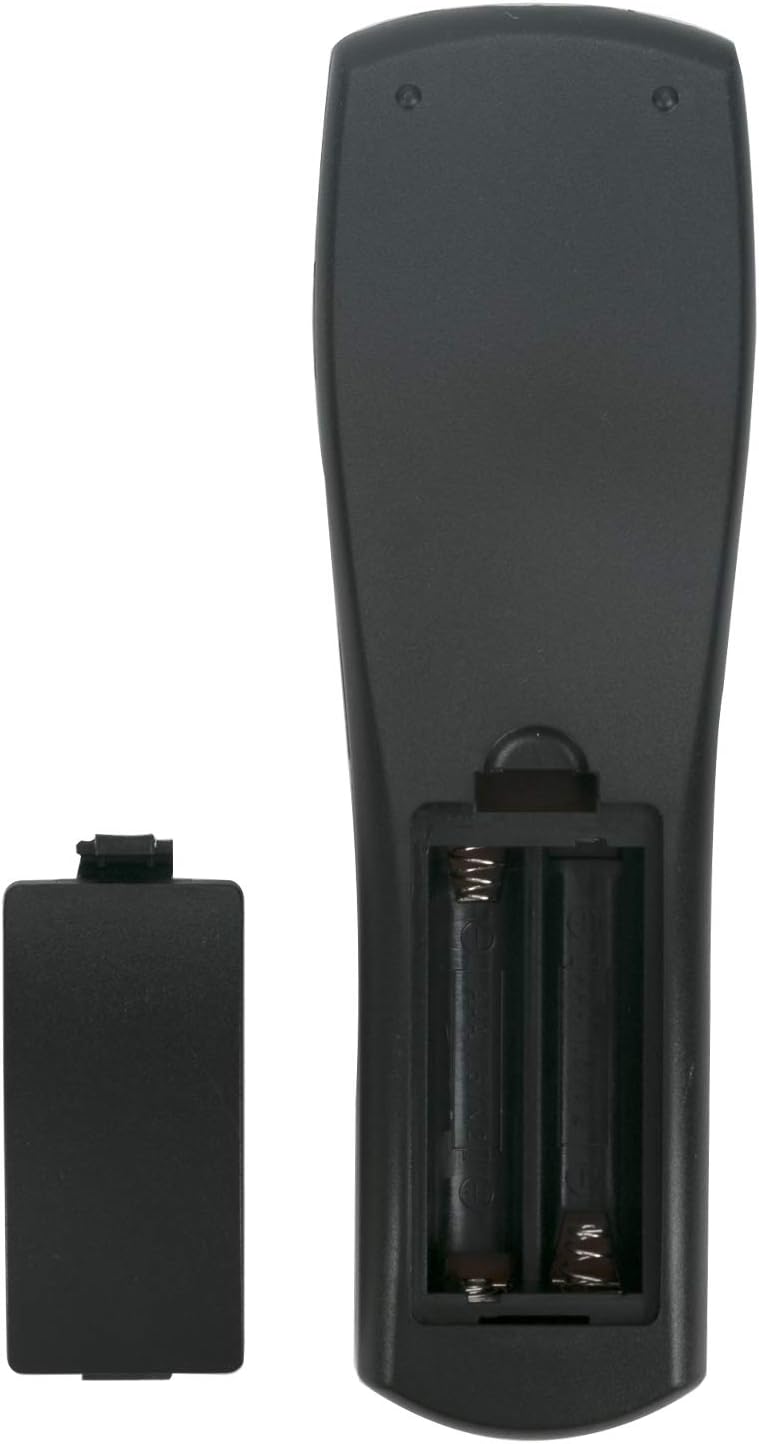
Dette billede viser bagsiden view of the ALLIMITY remote control with the battery cover detached, revealing the two AAA battery slots. Ensure batteries are inserted with the correct polarity.
3. Betjeningsvejledning
This remote control provides full functionality for your compatible Panasonic Sound Bar System. Point the remote directly at the sound bar's infrared receiver for optimal performance.
3.1 Grundlæggende funktioner
- Power knap: Turns the sound bar system on or off.
- Input/Selector: Cycles through available audio input sources (e.g., TV, BD/DVD, AUX).
- Lydstyrke op/ned (VOL +/-): Adjusts the main volume level of the sound bar.
- Stum: Silences or restores the audio output.
- Subwoofer +/-: Adjusts the bass level from the subwoofer.
- Dialog Level +/-: Enhances or reduces the clarity of spoken dialog.
- Lydtilstand: Cycles through various preset sound modes (e.g., Music, Cinema, Standard).
- Link -tilstand: Used for linking with other compatible Panasonic devices or features.
- Opsætning: Accesses the sound bar's on-screen setup menu.
- Navigation Buttons (Up, Down, Left, Right, OK): Used for navigating menus and confirming selections.

This image displays the front of the ALLIMITY remote control, highlighting the layout of all buttons including Power, Input, Volume, Mute, Subwoofer, Dialog Level, Sound Mode, Link Mode, Setup, and navigation controls.
4. Vedligeholdelse
- Keep the remote control clean by wiping it with a soft, dry cloth. Avoid using liquid cleaners.
- Avoid exposing the remote to extreme temperatures, direct sunlight, or moisture, as these can damage internal components.
- Hvis fjernbetjeningen ikke skal bruges i længere tid, skal du fjerne batterierne for at forhindre potentiel lækage og skade.
- Tab ikke fjernbetjeningen, og udsæt den ikke for kraftige stød.
5. Fejlfinding
5.1 Fjernbetjeningen reagerer ikke
- Tjek batterier: Ensure batteries are inserted correctly with the proper polarity and are not depleted. Replace with new AAA batteries if necessary.
- Synslinie: Make sure there is a clear, unobstructed line of sight between the remote control's infrared emitter and the sound bar's infrared receiver. Remove any objects blocking the path.
- Afstand: Operate the remote within the effective range, typically up to 10 meters (33 feet) from the sound bar.
- Interferens: Other electronic devices, strong fluorescent lighting, or direct sunlight might interfere with the remote's infrared signal. Try operating the remote in a different environment or away from potential sources of interference.
- Kompatibilitet: Verify that your specific Panasonic Sound Bar System model is listed as compatible with this ALLIMITY remote control. Refer to the 'Specifications' section for a list of compatible models.
6. Specifikationer
- Mærke: ALLIMITY
- Model: N2QAYC000064 (Replaces N2QAYC000083, N2QAYC000102, N2QAYC000109, N2QAYC000121)
- Forbindelsesteknologi: Infrarød
- Batteritype: 2 x AAA (Alkaline recommended)
- Batterier medfølger: Nej
- Maksimal rækkevidde: 10 meter
- Produktdimensioner: 4 x 0.9 x 19 cm
- Varens vægt: 40 g
- Kompatible enheder: SC-HTB20GK-K, SC-HTB20GN-K, SC-HTB20GS-K, SC-HTB20GSXK, SC-HTB20P-K, SC-HTB550GKK, SC-HTB550GSK, SC-HTB550GSX, SC-HTB550GTK, SC-HTB370, SC-HTB170, SC-HTB65, SC-HTB70, SC-HTB770, SU-HTB370, SU-HTB65, SU-HTB70, SU-HTB770, SC-HTB570, SC-HTB8, SC-HTB8EG-K, SC-HTB485, SC-HTB885EBS, SC-HTB385EBK, SCHTB485EG, SC-HTB885EGS, SC-HTB485EB, SC-HTB885, SC-HTB485GN, SC-HTB385EGK, SB-HWA580EG, SC-ALL30T, SC-ALL30TEB, SC-ALL30TEG, SC-ALL7, SC-ALL70T, SC-ALL70TEG, SC-HTB480EB, SC-HTB580, SC-HTB580EE, SC-HTB580-EGK, SC-HTB580PP, SC-HTB680, SC-HTB680EGS, SC-HTB685, SC-HTB685EGK, SC-HTB690, SC-HTB690EG, SC-HTB690GNK, SC-HTB880, SC-HTB880EGK, SC-HTE180, SC-HTE180EBK, SC-HTE180EBS, SC-HTE180EGK, SC-HTE180EGS, SC-HTE200, SC-HTE200EGK, SC-HTE80, SC-HTE80EB, SC-HTE80EE, SC-HTE80EG, SC-HTE80GN.
7. Garanti og support
This ALLIMITY remote control comes with a 90-day warranty from the date of purchase, covering manufacturing defects.
For any assistance, questions, or issues regarding your remote control, please contact the seller directly through your purchase platform. Provide your order details for prompt support.
