1. Opsætning
1.1 Batteriinstallation
Each GOCOM GO100 Walkie Talkie requires three (3) AAA batteries (not included). To install the batteries, use the provided mini Philips screwdriver to unscrew the battery compartment cover located on the back of the unit. Insert the batteries according to the polarity markings (+/-) inside the compartment. Securely replace the cover and screw it back into place.

Figure 1.1: Battery compartment screw location.
Video 1.1: Demonstration af batteriinstallation og grundlæggende betjening.
1.2 Attaching Lanyards and Belt Clips
The walkie talkies come with lanyards and removable belt clips for convenient carrying. To attach a lanyard, thread the loop of the lanyard through the small hole at the top of the walkie talkie. The belt clips can be attached or removed by sliding them into or out of the designated slot on the back of the unit.

Figure 1.2: Walkie talkies with lanyards and belt clips attached.
2. Betjeningsvejledning
2.1 Tænd/sluk
To turn the walkie talkie on or off, press and hold the power button (usually marked with a power symbol) for approximately 3 seconds. A sound will indicate that the unit is powering on or off.
2.2 Kanalvalg
The GOCOM GO100 features 9 available channels. To change channels, use the 'CH' (Channel) up and down buttons. Ensure both walkie talkies are set to the same channel to communicate.

Figure 2.1: Keypad control and function diagram.
2.3 Talking (PTT Button)
To transmit your voice, press and hold the 'TALK' (PTT - Push-To-Talk) button located on the front of the walkie talkie. Speak clearly into the built-in microphone. Release the button when you are finished speaking to allow the other party to respond.
2.4 Lydstyrkekontrol
Adjust the listening volume using the 'VOL' (Volume) up and down buttons. There are multiple volume levels to suit your environment.
2.5 Tastaturlås
To prevent accidental changes to settings, you can lock the keypad. This feature ensures that children do not inadvertently switch channels or alter volume settings during play. Refer to the keypad diagram for the specific lock button location.
2.6 Opkaldstoner
The walkie talkies offer various call tones. You can cycle through these tones using the designated button (often indicated by a music note symbol) to select your preferred alert sound.
Video 2.1: Overståetview of GOCOM GO100 features and call tones.
2.7 Range Information
The maximum talking range for the GOCOM GO100 is up to 15 miles in optimal conditions (mountain to valley). In open water, the range is approximately 6.5 miles, and in urban or neighborhood environments, it can reach up to 1 mile. Actual range may vary based on terrain, weather, and electromagnetic interference.
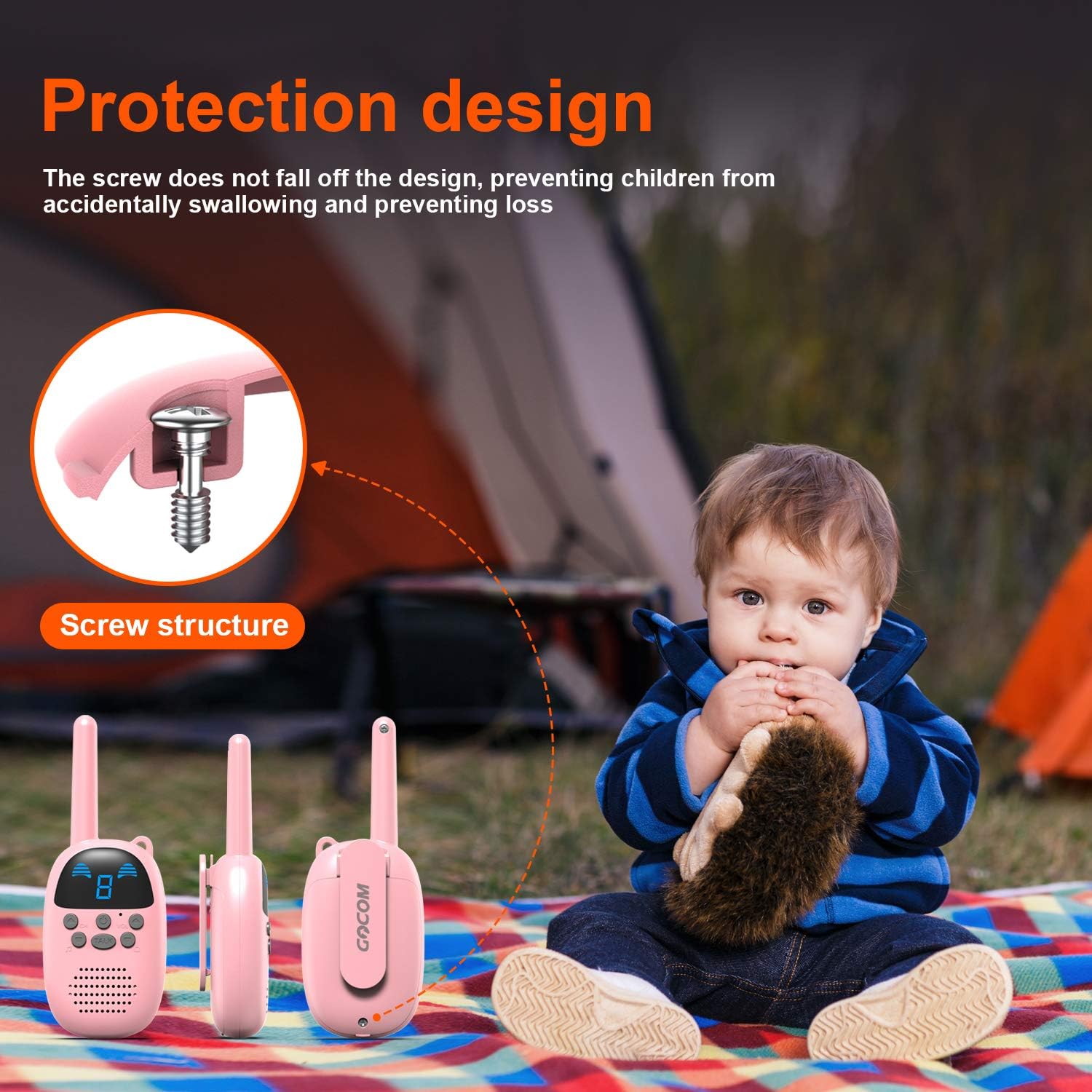
Figure 2.2: Long-range communication capabilities.
2.8 Energy Saving and Auto-Shutdown
To conserve battery life, the walkie talkies feature an automated shut-down function. If left inactive for 1.5 hours, the unit will automatically power off. This helps extend the battery's operational time, which can last up to 24 hours with continuous use.

Figure 2.3: Energy saving function with auto-shutdown.
2.9 Advarsel om lavt batteri
The walkie talkie is equipped with a low battery alert feature. When the battery level is low, the unit will provide an audible or visual indication, prompting you to replace the batteries.
Video 2.4: Demonstration of various features including low battery alert and auto-shutdown.
3. Vedligeholdelse
3.1 Udskiftning af batteri
As mentioned in the setup section, replace the three (3) AAA batteries when the low battery alert is activated. Always use fresh batteries for optimal performance. Use the provided screwdriver to access the battery compartment.
3.2 Rengøring
To clean the walkie talkies, use a soft, dry cloth. For stubborn dirt, a slightly damp cloth can be used, but ensure no moisture enters the unit's openings. Do not use harsh chemicals or abrasive cleaners.
3.3 Opbevaring
When not in use for extended periods, it is recommended to remove the batteries to prevent leakage and potential damage to the unit. Store the walkie talkies in a cool, dry place away from direct sunlight and extreme temperatures.
4. Fejlfinding
4.1 Static or Interference
If you experience static or interference during communication, ensure both walkie talkies are on the same channel. Moving too close to each other can also cause a
Relaterede dokumenter - GO100
 |
Brugermanual til GOCOM G600 tovejsradio Omfattende brugermanual til GOCOM G600 tovejsradioen, der dækker opsætning, betjening, funktioner, sikkerhedsretningslinjer og tekniske specifikationer for kommunikation. |
 |
GOCOM Walkie Talkie Programmeringsvejledning: Kommunikationsindstillinger og kanalredigering En omfattende guide til GOCOM walkie-talkie-brugere om opsætning af kommunikationsparametre, programmering af kanaler og ændring af frekvensindstillinger ved hjælp af GOCOM CPS-softwaren. Dækker trinene i forberedelse, softwareopsætning og kanalredigering. |
 |
GOCOM 2020G9 Walkie-Talkie: Brugermanual og betjeningsvejledning Omfattende betjeningsvejledning til GOCOM 2020G9 walkie-talkie, der dækker opsætning, funktioner, kommunikation, vejrfunktioner og sikkerhedsoplysninger. |
 |
Brugermanual til GOCOM G200 tovejsradio Omfattende brugermanual til GOCOM G200 tovejsradioen, der beskriver sikkerhedsinstruktioner, driftsprocedurer, funktionsforklaringer, kanalfrekvenser og overholdelse af regler for brugere i USA og Canada. Dækker opsætning, kommunikation, vejrfunktioner og fejlfinding. |