1. Produktet er slutview
The TREATLIFE Smart Light Switch is designed to provide convenient control over your home lighting. It integrates with 2.4GHz Wi-Fi networks, allowing for remote control via smartphone applications and voice commands through popular smart home assistants like Amazon Alexa and Google Home. This single-pole switch requires a neutral wire for installation and is FCC listed for safety.

Figure 1: TREATLIFE Smart Light Switch with its packaging.
2. Hvad er der i æsken
- 1 x Single Pole Smart Switch
- 1 x vægplade
- 4 x trådmøtrikker
- 2 x skruer
- 1 x brugermanual
3. Vigtige sikkerhedsoplysninger
Læs og forstå alle sikkerhedsinstruktioner før installation og brug. Forkert installation kan føre til elektrisk stød eller brand.
- Neutral ledning påkrævet: This smart switch requires a neutral wire for proper operation. If your home was built or remodeled before the mid-1980s, you may not have a neutral wire in your switch box. Consult a qualified electrician if unsure.
- Not for Dimmer Use: This switch is designed for ON/OFF control only and is not compatible with dimmable lights or as a dimmer switch.
- Not for 3-Way or Multi-Way Use: This is a single-pole switch and cannot be used in 3-way or multi-way switch configurations where two or more switches control the same light fixture.
- Kun 2.4 GHz Wi-Fi: Switchen understøtter kun 2.4 GHz Wi-Fi-netværk. Den er ikke kompatibel med 5 GHz Wi-Fi.
- Elektrisk sikkerhed: Always turn off power at the circuit breaker before installing or servicing the switch. The device features flame-retardant material and built-in overheat protection for added safety.

Figure 2: Key compatibility and safety considerations for the smart switch.
4. Opsætning og installation
Follow these steps for physical installation and initial setup.
4.1 Fysisk installation
- Sluk for strømmen: Find din afbryder og sluk for strømmen til den lyskontakt, du udskifter. Kontroller, at strømmen er slukket, ved hjælp af en lydstyrkemåler.tage tester.
- Fjern den gamle switch: Fjern forsigtigt den gamle afbryder fra vægdåsen.
- Identificér ledninger: Identify the Line (hot), Load, Neutral, and Ground wires. The neutral wire is typically white and often bundled with other white wires in the box.
- Tilslutning af Smart Switch: Connect the wires from the wall box to the corresponding wires on the TREATLIFE Smart Light Switch using the provided wire nuts.
- Green wire: Ground
- Black wire: Line (Hot)
- Red wire: Load
- White wire: Neutral
- Monter kontakten: Secure the smart switch into the wall box with the provided screws. Attach the screwless snap-on wall plate.
- Gendan strøm: Tænd for strømmen igen ved afbryderen.

Figure 3: Basic wiring diagram for the TREATLIFE Smart Light Switch.
4.2 App-opsætning og parring
To enable smart features, download the Smart Life App and pair your device.
- Download app: Download the "Smart Life" app from your smartphone's app store (available for iOS and Android).
- Registrer/Log ind: Opret en ny konto, eller log ind, hvis du allerede har en.
- Tilføj enhed: In the app, tap the "+" icon to add a new device. Select "Electrical" > "Switch (Wi-Fi)".
- Parringstilstand: Long press the ON/OFF button on the smart switch until the red indicator light blinks rapidly (confirm 2.4GHz Wi-Fi network).
- Opret forbindelse til Wi-Fi: Confirm the indicator light is blinking rapidly in the app, then enter your 2.4GHz Wi-Fi network password. The switch will connect to your network.

Figure 4: Remote control of the smart switch via the Smart Life App.
5. App Integration & Voice Control
Once paired with the Smart Life App, you can integrate your switch with voice assistants for hands-free control.
5.1 Voice Control with Amazon Alexa / Google Assistant
The TREATLIFE Smart Light Switch is compatible with Amazon Alexa and Google Assistant, allowing you to control your lights with voice commands.
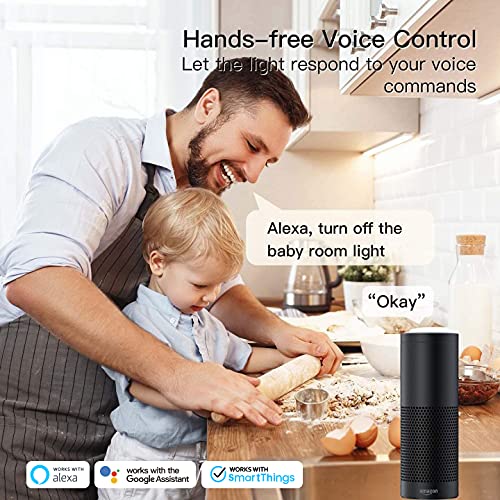
Figure 5: Hands-free voice control of lighting using a smart assistant.
To link your TreatLife account to Amazon Alexa, follow these steps or refer to the video below:
- Åbn Amazon Alexa-appen.
- Tap on "More" at the bottom right, then tap on "Skills & Games".
- Tap on the Magnifier Icon (Search).
- Type "TreatLife" and search.
- Tap on "TreatLife" in the search results.
- Tap on "ENABLE TO USE".
- Enter your TreatLife account and password and Tap on "Link Now".
- Tap on "Authorize".
- Tap on "DISCOVER DEVICES".
Video 1: Step-by-step guide on how to link your TreatLife App to Amazon Alexa for voice control.
5.2 App funktioner
- Fjernbetjening: Turn lights ON/OFF from anywhere using your smartphone.
- Tidsplaner og timere: Create custom schedules (timer or countdown) to automatically turn lights ON/OFF based on your daily routines or to simulate occupancy for security.
- Deling af enhed: Del kontrollen over din smarte switch med familiemedlemmer.
- Status i realtid: Monitor the real-time ON/OFF status of your lights.

Figure 6: Automated scheduling features for the smart switch.
6. Betjeningsvejledning
The TREATLIFE Smart Light Switch offers multiple ways to control your lighting.
- Manuel kontrol: Press the physical button on the switch to toggle lights ON/OFF.
- App kontrol: Use the Smart Life App on your smartphone to turn lights ON/OFF remotely, set schedules, or create scenes.
- Stemmestyring: Use voice commands with Amazon Alexa or Google Assistant (e.g., "Alexa, turn on the living room light").

Figure 7: Manual operation of the smart light switch.
7. Vedligeholdelse
To ensure the longevity and proper functioning of your smart light switch, follow these simple maintenance guidelines:
- Rensning: Gently wipe the switch and wallplate with a soft, dry cloth. Avoid using abrasive cleaners, solvents, or harsh chemicals, as these can damage the finish or internal components.
- Regelmæssig kontrol: Periodically check the switch for any signs of damage or loose connections. If any issues are observed, turn off the power at the circuit breaker and consult a qualified electrician.
- Softwareopdateringer: Keep the Smart Life App updated to the latest version to ensure optimal performance and access to new features.
8. Fejlfinding
If you encounter issues with your TREATLIFE Smart Light Switch, refer to the following common solutions:
- Kontakten reagerer ikke:
- Ensure the circuit breaker is ON and the switch has power.
- Verify the neutral wire is correctly connected.
- Kan ikke oprette forbindelse til Wi-Fi:
- Confirm your Wi-Fi network is 2.4GHz. The switch does not support 5GHz networks.
- Ensure your Wi-Fi signal is strong at the switch's location.
- Prøv at genstarte din Wi-Fi-router.
- When connecting, ensure the indicator light on the switch is blinking rapidly. If not, re-enter pairing mode.
- Some users find success using AP mode for connection if standard mode fails.
- Problemer med stemmestyring:
- Ensure your TreatLife account is correctly linked to your Alexa or Google Home app.
- Verify the device name in the Smart Life App matches the name used for voice commands.
- Tjek din internetforbindelse.
- Intermitterende forbindelse:
- Ensure your Wi-Fi router is not overloaded with too many devices.
- Consider repositioning your router or using a Wi-Fi extender to improve signal strength.
For more detailed troubleshooting steps, please refer to the complete user manual provided with your product or contact TREATLIFE customer support.
9. Specifikationer
| Feature | Specifikation |
|---|---|
| Produktdimensioner | 5.07 x 3.34 x 1.61 tommer; 6.4 ounce |
| Varemodelnummer | AUB07WRQB999 |
| Driftstilstand | ON-OFF-ON |
| Nuværende vurdering | 10 Amps |
| Operation Voltage | 120 volt (AC) |
| Kontakttype | Normalt lukket |
| Connector Type | Skrue |
| Mærke | BEHANDLING |
| Terminal | Spst |
| Kredsløbstype | Tryk knap |
| Monteringstype | Vægmontering |
10. Garanti og support
TREATLIFE is committed to providing reliable products and excellent customer service.
- Kundesupport: For any questions, technical assistance, or warranty inquiries, please contact TREATLIFE customer support. Refer to the product packaging or the official TREATLIFE webwebsted for kontaktoplysninger.
- FCC certificering: This device is certified by FCC, ensuring compliance with safety and regulatory standards.


